
The Snom PA1 is the only product listed that is identified as a public address system, so it is the closest match for offices seeking an announcement solution. The other listings are a wireless headset, room and name signs, and an employee time clock; they may support office operations but do not replace a PA system. The comparison below distinguishes the direct match from those adjacent products so buyers can avoid choosing an unrelated device.
| Product | Best suited for | Relevance to office PA |
|---|---|---|
| Snom PA1 Public Address System with 2 25AE | Buyers researching a dedicated PA product | Directly identified as a public address system |
| Yealink WH64 Workstation Headset System | Individual calls and hybrid work | Not a room-wide announcement system |
| Utility Room Raised-Text Braille Sign | Room identification and accessibility | Supports wayfinding, not audio announcements |
| Custom Engraved Office Name Plate | Office or desk identification | Visual identification only |
| ANVIZ FacePass 7 Pro Time Clock | Employee timekeeping and access functions | Not a PA system |
Snom PA1 Public Address System
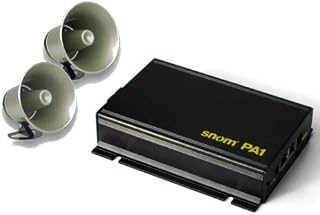
Best for: Buyers specifically seeking a product identified as a public address system for an office. Among the five listings, this is the only direct PA match. The listing name also mentions “2 25AE,” but the supplied product information does not explain what that refers to or provide technical details.
Why it was selected: Its product name explicitly describes it as a public address system, making it more relevant to office announcements than the other items. It is the logical starting point for a buyer comparing dedicated PA equipment.
Check before choosing: The provided details do not specify connection type, speaker configuration, coverage area, microphone options, power requirements, installation method, or compatibility with an existing office phone or audio network. Confirm those requirements with the full product listing or manufacturer before purchase. Avoid assuming the product will work with a particular office system based only on its name.
Yealink WH64 Wireless Headset System

Best for: Office staff who need a personal communications headset, not buyers who need building-wide announcements. The listed features include a touchscreen base, DECT and Bluetooth, three noise-cancelling microphones, a speakerphone, and a busy light.
Why it was selected: It is an office communications product and may be relevant to an employee’s individual calling setup. Its wireless connection options and busy light distinguish its role from a room PA: it is designed around a workstation and personal communication rather than announced audio throughout a space.
Limitation: The supplied description does not identify it as a public address system or provide details about room coverage or paging. Choose it for headset and workstation communication; avoid choosing it as a substitute for dedicated PA equipment.
Raised-Text Utility Room Sign

Best for: Offices that need a visual room-identification sign alongside an audio communication plan. The product description specifies raised text, Grade 2 Braille, a brushed aluminum or silver finish, and double-sided tape for installation. It is described as an ADA-compliant conference room office door sign.
Why it was selected: Clear room identification can complement an office communications setup by helping people locate spaces. It is an adjacent workplace product, not an audio component.
Limitation: This sign does not make or amplify announcements. The listing name refers to a utility room, while its description also mentions conference room signage; check the exact wording and intended room before ordering. Choose it for door identification, not paging or emergency audio.
Custom Engraved Office Name Plate

Best for: Buyers organizing office doors or desks with personalized identification. The supplied product title describes a custom engraved office door name plate and desk sign in brushed brass, sized 2 by 8 inches.
Why it was selected: It may be useful as a visual office accessory when adding or updating workplace communications infrastructure. Clearly marked offices can support navigation, but the name plate itself has no PA function.
Limitation: The listing does not describe speakers, microphones, amplifiers, or announcement controls. Confirm personalization details and mounting needs on the listing. Choose this for a name plate; avoid it if the purchase goal is sound distribution.
ANVIZ FacePass 7 Pro Time Clock

Best for: Small businesses looking for employee timekeeping features and a device that supports door access. The listing describes face, RFID, and PIN punching, as well as forever-free cloud software.
Why it was selected: It is an office operations device that could be considered during a broader workplace systems project. Its access and time-clock functions are separate from audio announcements, so it should not be treated as a PA alternative.
Limitation: The supplied information does not describe paging, sound output, or announcement functionality. Buyers should assess it only for its listed timekeeping and access-related functions and confirm any installation or system requirements separately.
Buying Guide: How to Choose an Office Public Address System
Start by separating a true PA system from other office communications products. A headset supports individual calls. A door sign provides visual wayfinding. A time clock supports workforce processes. A public address system is intended to distribute spoken announcements through an audio setup. Product titles and technical specifications should explicitly match the intended use before you buy.
What areas need to receive announcements?
List the rooms, corridors, reception areas, and other spaces that need audio coverage. A small office and a multi-room workplace can have very different requirements. The available listing for the Snom PA1 does not specify coverage or speaker layout, so do not assume it suits a particular floor plan. Ask the seller or manufacturer how the product is designed to connect to the speakers and spaces you plan to cover.
What type of announcements will you make?
Consider whether staff will make occasional live announcements, scheduled messages, or urgent broadcasts. The product information supplied here does not establish whether the listed PA product supports any particular announcement method. Verify the needed controls, microphone arrangements, and operating process before purchasing. If announcements must reach multiple zones, confirm whether the system supports that arrangement rather than inferring it from the product name.
Will it connect to your existing office equipment?
Compatibility is a key question for any workplace audio purchase. Check the exact connection requirements for the existing phone, network, amplifier, or speaker equipment, as applicable. The Snom listing provided here does not give connection specifications, and the Yealink headset’s DECT and Bluetooth features do not establish compatibility with a PA system. Verify model-specific technical information instead of relying on broad categories such as “wireless” or “office communications.”
How should you compare installation requirements?
Ask whether the product needs a separate amplifier, speakers, cabling, power, network access, or professional installation. These requirements are not stated in the supplied Snom product information. Also confirm whether the system can be expanded if the office changes. A device’s name alone is not enough to determine setup complexity or whether additional components are needed.
What matters for intelligibility and accessibility?
Announcements should be understandable in the intended spaces. Consider background noise, room layout, and how listeners will receive information. Audio announcements may not reach every person in every situation, so offices may also need visual communication or clear room signage. The raised-text Braille sign listed above provides a room-identification function; it does not provide audio or replace a complete accessibility plan.
Which of these products is the closest fit?
- For an actual PA product: Start with the Snom PA1 listing, then verify its specifications and system requirements.
- For an individual employee’s calls: The Yealink WH64 is the relevant headset listing, not a room-wide paging product.
- For room identification: Consider the raised-text sign if its wording matches the intended room.
- For a personalized office label: The engraved name plate is the relevant option.
- For employee timekeeping: The ANVIZ clock is the relevant product category, separate from public address.
Frequently Asked Questions
Which listed product is an office public address system?
The Snom PA1 is the only listing explicitly identified as a public address system. The supplied product information does not include enough technical detail to establish its coverage, connections, or installation needs.
Can the Yealink WH64 replace a PA system?
No. It is described as a wireless workstation headset system with a speakerphone and microphones. The supplied details do not describe room-wide paging or public address functionality.
Are the room signs part of an audio announcement system?
No. The raised-text sign and engraved name plate are visual identification products. They can support office navigation but do not play, transmit, or amplify announcements.
Does the ANVIZ FacePass 7 Pro make announcements?
The supplied product description identifies it as an employee time clock with face, RFID, and PIN punching and door-access support. It does not list public address or paging features.
What should I verify before buying the Snom PA1?
Confirm the connection method, supported speakers, coverage, power needs, installation requirements, and compatibility with the equipment already in the office. Those specifications are not included in the provided product details.
Can a PA system be the office’s only communication method?
That depends on the workplace and its communication needs. Consider whether people in every intended area can hear announcements and whether visual or other communication methods are also needed. Confirm the system’s actual capabilities before relying on it.