
If you specifically need a car diagnostic tool that works with a laptop, the MB Star C4 Plus package is the closest match in this list because it includes a CF53 laptop and diagnostic software for Mercedes-Benz vehicles. For general DIY checks without a computer, the ANCEL AD310, FOXWELL NT301, FOXWELL NT604 Elite, and MOTOPOWER MP69033 are handheld alternatives. The right choice depends on your vehicle, the systems you need to scan, and whether you want computer-based or standalone operation.
| Product | Best suited for | Format |
|---|---|---|
| MB Star C4 Plus with CF53 laptop | Mercedes-Benz-focused diagnostics and software | Laptop package |
| FOXWELL NT604 Elite | Scanning several common vehicle systems | Handheld |
| FOXWELL NT301 | Engine codes and inspection readiness checks | Handheld |
| ANCEL AD310 | Basic engine and emissions code reading | Handheld |
| MOTOPOWER MP69033 | Basic engine data and a built-in code lookup library | Handheld |
MB Star C4 Plus Laptop Diagnostic Package

Best for: Buyers seeking a laptop-based diagnostic setup for Mercedes-Benz vehicles. This is the only listed product supplied with a laptop: the package includes a used CF53 laptop, a multiplexer, cables, and Xentry, DAS, and EPC software.
The listed C4 DoIP functions include Ethernet communication, wireless diagnostics, and support for K-line, CAN BUS, and UDS protocols. The product description also lists diagnosis, programming, simulation learning, maintenance information, and technical service bulletins. Its included cables cover several connector types, including 16-pin OBDII, 38-pin, 14-pin, and 8-pin connections.
Why it was selected: It directly addresses the laptop portion of the search, unlike the standalone readers below. The listing describes support for Mercedes-Benz vehicles after 2000 and current and upcoming vehicles, but buyers should confirm exact vehicle and software coverage before purchase.
Limitation: It is a brand-specific package, not a general-purpose laptop scanner for every make. The laptop is listed as used, and the setup includes software and multiple components rather than a simple plug-in reader.
FOXWELL NT604 Elite Multi-System Scanner

Best for: Car owners who want a standalone scanner for more than engine codes. The NT604 Elite is listed for ABS, SRS, engine, and transmission diagnostics, as well as OBDII checks. Its feature list also includes live data, a built-in DTC library, data playback, printing, and an I/M readiness menu.
Why it was selected: It covers more listed vehicle systems than basic engine-code readers, making it a better fit when a warning light may involve the brakes, airbags, or transmission. The product is described as ready to use through its OBDII cable without first downloading software.
Use the scanner to identify fault codes and check diagnostic information; it does not physically repair a problem. The listing says the device does not support maintenance functions such as resets or relearns. It also notes that SRS crash or collision data cannot be cleared, and that the SRS code-clearing feature applies to common faults not caused by a crash.
Limitation: It is a handheld tool, not a laptop interface. Confirm that its functions cover the specific year, make, model, and system you need to diagnose.
FOXWELL NT301 Engine Code Reader

Best for: DIY drivers focused on the check-engine light and emissions inspection readiness. The NT301 reads and clears engine diagnostic trouble codes and has dedicated I/M readiness hotkeys. A red-yellow-green indicator and built-in speaker provide readiness feedback.
Why it was selected: Its described functions suit common engine-code checks and post-repair verification. The listing says a fault code may return if the underlying issue has not been fixed, so clearing a code should not be treated as a repair. This makes it a practical choice for checking a warning and gathering information before deciding on next steps.
To use it, connect the scanner to the vehicle’s 16-pin diagnostic link connector and turn on the ignition, as described in the product listing. The device is designed as a standalone reader, so it does not meet a requirement for viewing diagnostics through a laptop.
Limitation: The listed functions center on engine codes and readiness rather than broad coverage of systems such as ABS, SRS, and transmission. Verify vehicle coverage before buying.
ANCEL AD310 Basic OBDII Scanner

Best for: Drivers who want a simple, standalone reader for engine and emissions-related checks. The listed functions include reading and clearing codes, viewing live and hard memory data, freeze-frame information, I/M monitor readiness, and vehicle information.
Why it was selected: The AD310 offers a clear alternative for shoppers who searched for computer-based diagnostics but may only need to read codes at the vehicle. Its buttons are labeled, it has a large display, and it draws power from the vehicle’s OBDII data link connector rather than requiring batteries or a charger. The listing also describes a 2.5-foot cable and a compact design.
For a DIY owner, the key distinction is that this unit displays information on its own screen. It does not come with a laptop or list laptop software. Its feature set focuses on engine and emissions diagnostics, so it is not the best match if you need the broader system scanning described for the NT604 Elite.
Limitation: This is a basic code reader, not a laptop-based diagnostic package or a listed multi-system scanner.
MOTOPOWER MP69033 OBD2 Code Reader
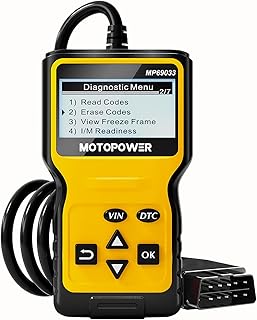
Best for: Drivers who want a standalone engine scanner with several live-data displays and a built-in DTC lookup library. The listed functions include reading and erasing codes, viewing freeze-frame data and data flow, checking I/M readiness, and displaying information such as engine speed, coolant temperature, vehicle speed, and calculated load value.
Why it was selected: Its 2.8-inch LCD and built-in code library may help users review engine information directly at the car without relying on a separate computer. The listing says it supports nine protocols and six languages: English, German, Dutch, Spanish, French, and Italian. It receives power through the OBDII connector, so the listed use does not require a separate battery or charger.
Limitation: The listed functions focus on OBDII engine diagnostics. It is not presented as a laptop-based interface or as a scanner for ABS, SRS, or transmission systems. Check the stated vehicle coverage against your car before purchase.
Buying Guide: How to Choose a Car Diagnostic Tool
Do you need the scanner to work with a laptop?
Start by deciding whether laptop use is essential. Of the five products here, only the MB Star C4 Plus package is listed with a laptop. It is aimed at Mercedes-Benz diagnostics and includes a used CF53 laptop and named software. The other four products are standalone handheld scanners with their own displays. They may suit a basic code-reading task, but they are not substitutes for laptop software if your workflow requires a computer.
Before choosing a laptop package, confirm the exact vehicle coverage, software functions, computer condition, included accessories, and setup requirements with the seller. The product details supplied here do not establish compatibility with every vehicle or explain every software limitation.
Which vehicle systems do you need to scan?
Match the scanner’s listed systems to the warning light or diagnostic job. The NT604 Elite is the broadest multi-system option in this group, with listed coverage for ABS, SRS, engine, and transmission. The AD310, NT301, and MP69033 are presented primarily for engine or emissions-related OBDII checks. If you need to investigate a non-engine warning, do not assume a basic engine code reader can access that system.
System coverage can vary by vehicle. Check the tool’s vehicle coverage information for your specific year, make, and model before relying on a feature such as ABS or SRS diagnostics.
Do you need code reading, live data, or readiness checks?
For reading and clearing engine codes, all four handheld products list code-reading functions. The AD310 lists live data, freeze frame, vehicle information, and I/M readiness. The NT301 emphasizes check-engine diagnostics and readiness status. The MP69033 adds a built-in DTC lookup library and several named live-data values. The NT604 Elite lists live data, playback, and readiness checks in addition to multiple systems.
These tools report diagnostic information; they do not repair a vehicle. Clearing a code does not resolve the cause, and a fault may return if the underlying problem remains. Treat code results as a starting point for diagnosis rather than proof that a vehicle is safe or repaired.
How important is ease of setup?
A handheld reader is generally the more direct choice if you want to connect to the OBDII port and view results on the device. The NT301, AD310, and MP69033 are described as drawing power from the vehicle connection. The NT604 Elite is described as usable out of the box without downloading software first. The MB Star package involves a laptop, software, a multiplexer, and several cables, so it is a different type of setup.
Consider where you will work and what you want to do with the results. A standalone screen can be convenient for quick checks at the car. A laptop-based package may suit a buyer specifically seeking the software-driven Mercedes-Benz functions listed for the C4, but it requires managing the computer and included components.
What should you verify before buying?
- Vehicle fit: Confirm the scanner supports your specific vehicle and the system you need to diagnose.
- Diagnostic scope: Distinguish engine-code reading from ABS, SRS, transmission, or brand-specific functions.
- Computer requirement: Choose a package with a laptop only if you need a computer-based workflow; do not assume a handheld reader connects to a laptop.
- Repair expectations: A scanner reads diagnostic information and may clear eligible codes; it does not perform physical repairs.
- Included items: Review the package contents, especially when the tool relies on software, a laptop, or multiple cables.
Frequently Asked Questions
What is the best car diagnostic tool for laptop use in this list?
The MB Star C4 Plus package is the only listed option that includes a laptop. It is described as a Mercedes-Benz-focused diagnostic package with a used CF53 laptop, software, a multiplexer, and several cables.
Can I use the ANCEL AD310 with a laptop?
The provided product details describe the AD310 as a standalone OBDII scanner with its own display. They do not list laptop software or laptop connectivity.
Which scanner listed here checks ABS and SRS?
The FOXWELL NT604 Elite is listed for ABS, SRS, engine, and transmission diagnostics. Its feature notes state that SRS crash or collision data cannot be cleared.
Will clearing a diagnostic code fix the vehicle?
No. Clearing a code does not repair the underlying issue. The FOXWELL NT301 listing notes that a fault code may reappear if the problem has not been fixed.
Do these scanners work with every car?
No universal compatibility is established for every product and vehicle. Check the scanner’s listed coverage against your vehicle’s year, make, model, and diagnostic system before buying.
Which option is best for a basic check-engine-light scan?
The ANCEL AD310, FOXWELL NT301, and MOTOPOWER MP69033 are all described as handheld engine-code readers. Compare their listed extras—such as readiness checks, live data, freeze-frame information, and a built-in code lookup library—to choose the functions you need.