
If you need an audio recorder with a mic input, confirm that the specific model has a labeled external-microphone jack; built-in microphones alone do not meet that requirement. The five options below are portable voice recorders or AI note-taking devices, but the supplied product details do not confirm an external mic input for any of them. Tonfarb’s 136GB model is best for long recording sessions, the EVIDA is suited to adjustable voice-activated recording, and the AI devices may suit buyers seeking note-taking features.
| Product | Best suited for | Mic input confirmed? |
|---|---|---|
| Tonfarb 136GB Recorder | Long sessions and large file capacity | No |
| Tonfarb 64GB Recorder | One-button portable recording | No |
| EVIDA 128GB Recorder | Voice-activated recording options | No |
| Pocket AI Voice Recorder | Buyers exploring AI transcription | Not specified |
| Comulytic Note Pro | AI meeting notes and recording | Not specified |
Tonfarb 136GB Digital Voice Recorder
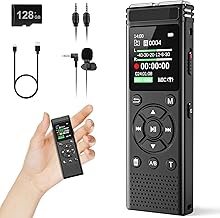
Best for: Buyers who prioritize long recording time, large stated storage capacity, and quick recording controls. Tonfarb lists 8GB of built-in storage plus an included 128GB TF card, a rechargeable 1100mAh battery, and up to 68 hours of continuous recording.
The recorder supports PCM recording at up to 1536 kbps, automatic noise reduction, and voice-activated recording. A side control starts recording with one action, including when the device is powered off, and pushing the control down saves the file. USB-C is listed for transferring recordings to a computer.
Why it was selected: Its advertised storage and battery figures make it a useful comparison for extended lectures, interviews, and meetings. Limitation: The supplied details do not mention an external microphone input, so do not choose it for a wired external mic unless the manufacturer confirms the connection.
Tonfarb 64GB Digital Voice Recorder

Best for: Students, journalists, and other users who want a straightforward portable recorder with one-button operation. The listed features include a built-in 64GB TF card, up to 48 hours of continuous use at MP3 32 kbps, and storage advertised for up to 4,600 hours of recordings.
For higher-detail files, the product description says it can record WAV audio at up to 1536 kbps. It also lists noise reduction and a one-click control that starts recording when powered off and saves the recording when moved back.
Why it was selected: It offers a simpler storage-and-battery comparison against the 136GB Tonfarb model while retaining quick controls and PCM recording. Limitation: The listed features do not confirm a mic input. Choose it for its stated built-in recording features only if an external microphone is not essential, or verify the port specifications first.
EVIDA 128GB Voice-Activated Recorder

Best for: Buyers who want voice-activated recording with adjustable sensitivity settings. EVIDA lists six voice-decibel levels, intended to help the recorder capture speech while reducing silent sections and quieter snippets.
The product description states 128GB of storage, up to 54 hours of continuous recording on a full battery, and selectable MP3 recording at 128 or 192 kbps, as well as WAV at 1536 kbps. It also describes PCM recording and a noise-canceling microphone.
Why it was selected: Adjustable voice activation and multiple recording formats make it a useful option to compare for lectures and meetings where long pauses may occur. Limitation: An external mic input is not listed. Voice activation is also not a replacement for checking whether the device accepts the particular microphone you plan to use.
Pocket AI Voice Recorder

Best for: Buyers considering a compact recorder marketed around automatic transcription and AI note-taking. The product name identifies it as a pocket voice recorder with auto transcription, but no further technical features were supplied for this product.
Why it was selected: It represents a different kind of recording workflow from the dedicated storage-focused voice recorders above: buyers may be looking for text output or note-taking in addition to audio capture. Review the product’s current specifications to understand how transcription works and what it requires before choosing it.
Limitation: The supplied information does not state recording formats, battery life, storage capacity, connectivity, or whether an external microphone can be connected. It should not be treated as a confirmed audio recorder with mic input without verifying that detail.
Comulytic Note Pro AI Voice Recorder

Best for: Buyers interested in a device described as an AI meeting recorder and note taker. Its product name also references transcription and summarization for interviews, but no detailed feature list was provided.
Why it was selected: Meeting-focused recording and note-taking are common alternatives to using a recorder solely to create audio files. This model is worth comparing if a written meeting workflow matters as much as capturing sound.
Limitation: The supplied information does not confirm mic-input type, storage, battery life, audio formats, or how transcription and summarization are delivered. Verify these details directly before purchase, especially if you need a specific external microphone.
Buying Guide: How to Choose an Audio Recorder With Mic Input
The most important distinction is whether a recorder has a true external microphone input. Product descriptions that say “microphone,” “noise-canceling microphone,” or “dual microphones” may refer only to built-in mics. Those phrases do not establish that a separate microphone can be connected.
Does the recorder have the right kind of mic input?
Look for an explicit statement naming an external microphone input or the type of jack. Check the manual or manufacturer’s technical specifications for the input’s connector and supported microphone requirements. A headphone jack or USB-C port should not be assumed to function as a mic input unless the manufacturer says so.
Also distinguish between an analog microphone jack and audio supplied through USB. If you plan to use a particular microphone, check whether the recorder supports its connector and power needs. The product information supplied for the five models above does not establish these details.
What will you record?
For lectures, meetings, and spoken interviews, voice activation and one-button recording can be useful. The EVIDA lists six sensitivity levels, while both Tonfarb models describe one-button start-and-save controls. For music or detailed environmental audio, prioritize a recorder that specifies its input and recording format rather than relying on general voice-recorder claims.
Room size and microphone placement also matter. A built-in microphone may be convenient for nearby speech, while a separate mic can be important when the speaker is farther away or the microphone needs to be positioned independently. Confirm the recorder’s input before planning an external-mic setup.
How much storage and battery life do you need?
Compare stated recording time and battery duration with your typical session length. The Tonfarb 136GB model advertises up to 68 hours of continuous recording, while the 64GB model lists up to 48 hours at a specified MP3 setting. EVIDA lists up to 54 hours. These figures depend on the described recording conditions and should not be treated as identical comparisons across different formats and settings.
Storage estimates vary with file format, bit rate, and recording settings. Higher-quality WAV files generally require more space than compressed MP3 recordings. If you record long sessions, confirm how much usable storage is available and whether removable-card capacity is included in the stated total.
Which recording format is appropriate?
MP3 files are commonly used when smaller files and convenient sharing are priorities. WAV or PCM formats are often selected when the user wants less-compressed audio, although larger files require more storage. The listed Tonfarb and EVIDA specifications include WAV/PCM options, but check the exact menu settings and transfer process for the model you are considering.
Do you need transcription or just audio files?
A conventional digital voice recorder focuses on recording, playback, storage, and file transfer. AI note-taking devices may emphasize transcription or meeting summaries, but the supplied details for the Pocket AI Voice Recorder and Comulytic Note Pro do not explain their specific workflows. Before buying, confirm supported languages, connection requirements, export options, and whether the features you want are available in your intended use.
Frequently Asked Questions
What does “audio recorder with mic input” mean?
It means a recorder with an input designed to accept audio from a separate microphone. The input type and supported microphone should be confirmed in the product specifications.
Do the Tonfarb recorders listed here have an external mic input?
The supplied feature descriptions do not say that either Tonfarb model has an external microphone input. Check the manufacturer’s specifications before buying if that feature is required.
Is a built-in microphone the same as a mic input?
No. A built-in microphone captures sound directly, while a mic input is a connection for an external microphone. A product may have one without the other.
Is PCM the same as an external mic connection?
No. PCM describes a digital audio recording format or method. It does not indicate that a recorder accepts an external microphone.
Should I choose MP3 or WAV recording?
MP3 is useful when smaller files are important. WAV or PCM may be preferable when less-compressed recording is a priority, but it typically uses more storage. Check the recorder’s listed settings before deciding.
Which listed recorder is best if an external mic is mandatory?
None of the supplied descriptions confirms an external mic input. Verify the port specifications with the manufacturer or select a model whose documentation explicitly identifies the required microphone input.