
External speakers can make a digital piano easier to hear across a room and can provide a different listening setup from built-in speakers or headphones. The PreSonus Eris 3.5 is best for stereo desktop listening, while the Coolmusic DM20 is best for keyboard practice with an instrument input and onboard tone controls. Mackie CR3.5 monitors suit compact desks, OHAYO offers several listed input types, and Logitech S150 is a simple USB speaker option for setups that support it.
| Product | Best suited to | Useful listed feature |
|---|---|---|
| PreSonus Eris 3.5 | Stereo desktop listening | Pair of powered monitors, 50 watts |
| Coolmusic DM20 | Keyboard practice and backing tracks | 1/4-inch instrument input, Bluetooth, USB playback |
| Mackie CR3.5 | Small desks and studios | Pair with an adjustable tone knob |
| OHAYO Computer Speakers | Desktop setups needing several input options | 3.5 mm, RCA, and USB inputs listed |
| Logitech S150 | Computer-based audio setups | USB connection and built-in controls |
PreSonus Eris 3.5 Powered Studio Monitors

The PreSonus Eris 3.5 is a powered stereo pair intended for near-field listening on a desk or in a small workspace. The listed features include 50 watts of built-in amplification, 3.5-inch woven-composite woofers, and one-inch silk-dome tweeters. The stated frequency range is 80 Hz to 20 kHz.
Best for: Digital piano owners who want a pair of desktop speakers for stereo playback, practice, and other audio. It was selected because the product is sold as a complete pair and is described for music production and everyday listening.
Consider: The supplied product details do not specify the piano connection or cable requirements. Check the piano’s audio outputs and the monitor’s available inputs before choosing a connection method. These are compact near-field monitors, so they are a different kind of setup from a single portable keyboard amp.
Coolmusic DM20 Keyboard Monitor

The Coolmusic DM20 is a 20-watt personal monitor amplifier listed for electronic drums, keyboards, and digital pianos. It has a standard 1/4-inch instrument input, a 6.5-inch woofer, and a 2.5-inch tweeter. Independent low- and high-tone controls and a master volume dial allow basic sound adjustment on the unit.
Best for: Players who want a single practice monitor with an instrument input and simple onboard controls. Bluetooth and USB playback are listed for playing music from a phone, tablet, or USB flash drive alongside practice. The product information says USB playback disconnects Bluetooth while reading files from a flash drive.
Consider: The product is rated at 20 watts, so compare that specification with the room and volume level you need. Confirm that the piano’s output and the required cable match the monitor’s 1/4-inch input; the supplied details do not identify an included piano connection cable.
Mackie CR3.5 Studio Monitors

The Mackie CR3.5 is a pair of compact studio monitors with 3.5-inch woofers. The listed features describe them as sized for desks and small studios, with a tone knob for adjusting the voicing without navigating menus. The product is also positioned for listening to mixes and streaming audio without intentionally flattering the sound.
Best for: Digital piano players setting up speakers on a desk who want a matched pair and a physical tone control. The pair format makes this an option for stereo listening, subject to the piano’s output and the connection supported by the speakers.
Consider: The supplied product details do not state the input types, power rating, or frequency range. Check the full product specifications and your piano’s manual before purchase, especially if you need a particular connector or want to estimate output for a larger room.
OHAYO 60W Computer Speakers
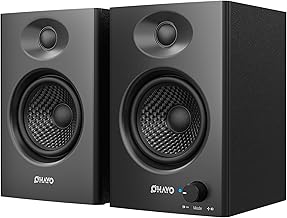
OHAYO’s active stereo 2.0 speakers are listed with Bluetooth 5.3 and 3.5 mm, RCA, and USB inputs. The product name describes them as a 60-watt pair for desktop computers or laptops, as well as music and gaming. These listed connections give buyers multiple ways to connect compatible equipment.
Best for: A desktop piano setup where the piano provides an output that matches one of the speakers’ listed inputs, or where a suitable audio path is available. It was selected for the range of named connection options and the stereo-pair format.
Consider: The supplied details do not specify the intended signal level for each input or which connection is appropriate for a particular piano. Confirm compatibility with the piano’s manual before connecting. The product information also does not provide driver sizes or a stated frequency range, so compare detailed specifications if those matter to your choice.
Logitech S150 USB Speakers

The Logitech S150 is a USB speaker set described as having digital sound, built-in volume and mute controls, and 1.2 watts RMS power. Its product name identifies it as an option for a PC. The integrated controls provide a direct way to adjust volume or mute the speakers without using a separate control device.
Best for: A computer-based setup where the audio source supports USB audio and the listed power level is appropriate for the listening task. It may be useful when a piano’s sound is routed through a compatible computer, but the product details do not establish direct compatibility with a digital piano.
Consider: Check whether the piano itself supports USB audio output; a USB port for data or MIDI does not necessarily mean it sends audio to USB speakers. At 1.2 watts RMS, this model is also a lower-power choice than the other speaker options listed here.
Buying Guide: How To Choose External Speakers For A Digital Piano
What output does your digital piano have?
Start by checking the piano’s manual or rear-panel labels. Common audio connections include a headphone output or dedicated line outputs, but the exact ports vary by model. The speaker must accept a compatible signal, either directly or through an appropriate audio interface. Do not assume that a USB port carries audio: some piano USB connections are intended for MIDI or data rather than speaker playback.
Compare the piano’s output connector with the speaker’s input connector before buying. A 1/4-inch keyboard output, a 3.5 mm headphone connection, and RCA connections require different cable arrangements. If the product information does not list its inputs, consult its full specifications rather than guessing. Also check whether the piano’s manual recommends a particular output level or connection procedure.
Should you choose a monitor pair or a keyboard amp?
Powered studio monitors are generally designed as a left-and-right pair for near-field listening. They can suit a desk or music workspace where stereo placement is practical. The PreSonus Eris 3.5 and Mackie CR3.5 are listed as pairs, making them candidates for that kind of setup. Confirm the connection requirements, since the supplied Mackie details do not specify its inputs.
A keyboard monitor or amplifier is a different format. The Coolmusic DM20 is a single personal monitor with a 1/4-inch instrument input, tone controls, Bluetooth, and USB playback. It may be more convenient for a focused practice setup, while a pair of monitors may better suit a player seeking stereo placement. Neither format is automatically best for every room or piano.
How much power do you need?
Think about listening distance, room size, and the volume you expect to use. The listed products range from Logitech’s 1.2 watts RMS to the DM20’s 20 watts and the PreSonus pair’s 50 watts of built-in amplification. OHAYO’s product name states 60 watts. These figures are not necessarily measured or specified in identical ways, so they should not be treated as a direct loudness ranking.
For close-range practice, compact speakers may be adequate, while a larger room or louder playing may call for a different system. Look for full manufacturer specifications when you need to compare output. Avoid turning volume up to compensate for a poor connection or unsuitable placement.
Do you need Bluetooth or USB playback?
Bluetooth and USB playback can be useful for playing accompaniment, lesson tracks, or other audio. The Coolmusic DM20 lists both features and includes controls for playback. OHAYO lists Bluetooth 5.3, while the Logitech S150 is a USB speaker set rather than a Bluetooth model in the supplied product description.
These playback features are separate from connecting the piano’s sound. Bluetooth playback from a phone does not establish that the speaker can receive the piano’s audio wirelessly. Check the exact supported input modes and the piano’s output options if wireless connection is important.
What else should you compare?
- Placement: A pair of desk monitors needs space for both speakers and a suitable listening position. A single monitor may take less space, but does not provide the same two-speaker layout.
- Tone adjustment: The DM20 lists separate low and high controls, while the Mackie CR3.5 lists a physical tone knob. Choose controls that suit how much adjustment you expect to make.
- Specifications: Compare the full input list, power information, frequency response, and physical dimensions where available. Do not infer missing details from a product name.
- Connection accessories: Verify which cables or adapters are needed and whether they are included. The supplied product details do not confirm cable contents for these options.
- Use beyond piano: Several products are also described for computer audio, music production, gaming, or backing tracks. Consider whether you want one set of speakers for multiple sources.
Frequently Asked Questions
Can I connect external speakers to any digital piano?
Many digital pianos provide an audio output, but ports and supported connections differ by model. Check the piano’s manual and match its output to an input on the speakers or an appropriate audio interface.
Are studio monitors good for digital piano practice?
Studio monitors can work well for near-field stereo listening when the piano and monitors have compatible connections. Their desk-oriented placement may be less suitable if you need a portable, single-speaker practice setup.
Can USB speakers connect directly to a digital piano?
Only if the piano supports USB audio output in a form the speakers can use. A USB port may support MIDI or data instead, so verify the piano’s documentation before relying on a direct USB connection.
Is Bluetooth a good way to connect a piano to speakers?
It depends on whether the piano can transmit audio over Bluetooth and whether the speaker supports the same audio function. Bluetooth playback from a phone does not by itself confirm wireless piano compatibility.
Do external speakers replace piano headphones?
No. Speakers and headphones serve different listening situations. External speakers let sound fill the room, while headphones support private practice; a piano’s available headphone and speaker behavior depends on its design and settings.