
The best car stereo for an iPod depends on how you want to connect: the five options below offer Bluetooth, USB, or other playback features, but the supplied product details do not confirm direct iPod compatibility for any of them. The JVC KD-SX27BT is best for audio adjustments and connecting multiple phones; the Pioneer MVH-S110BT is a strong fit for USB playback; and the Jensen JCR311 is the option to consider if you want a CD player as well. Check your iPod model and the receiver’s manual before buying.
| Product | Best For | Listed Connection Options |
|---|---|---|
| JVC KD-SX27BT | Sound controls and multiple connected phones | Bluetooth, USB, AUX-in |
| REAKOSOUND Single DIN | Bluetooth streaming and FM presets | Bluetooth |
| Pioneer MVH-S110BT | USB music playback | Bluetooth, front USB |
| Jensen MPR210 | Voice assistant access | Bluetooth |
| Jensen JCR311 | CD playback alongside modern features | Bluetooth, USB, CD, AM/FM |
JVC KD-SX27BT: Best for Audio Controls

The JVC KD-SX27BT is a single-DIN digital media receiver with Bluetooth, USB, and AUX-in playback options. Its listed features include a 13-band equalizer, K2 sound processing, Time Alignment, Sound Lift, and a built-in amplifier rated at 50 watts per channel. It can keep two phones connected for hands-free calling and supports up to five Bluetooth devices at the same time.
Best for: Drivers who want more sound adjustments and frequently switch between phones. It was selected because its connection choices and audio controls offer flexibility beyond basic Bluetooth streaming.
iPod note: Bluetooth or AUX may provide a way to play audio from a compatible iPod, depending on the iPod model and available accessories. USB is listed, but the product details do not confirm direct iPod control or compatibility. Verify this in the receiver documentation before relying on it.
Limitation: The listing does not specify which iPod models are supported. Avoid choosing it solely for direct iPod integration without confirming compatibility.
REAKOSOUND: Best for Bluetooth and FM

This REAKOSOUND single-DIN receiver is designed to add Bluetooth streaming and hands-free calling to a vehicle. Its listed features include a built-in microphone, answer and end buttons, push-to-talk access to a supported phone voice assistant, and FM radio with up to 18 presets. The radio supports automatic and manual station search across the stated FM range.
Best for: Drivers who mainly want wireless music, calls, and saved FM stations. It was selected as a straightforward Bluetooth-focused option for people who do not need a listed USB or AUX connection.
iPod note: If your iPod supports Bluetooth audio, wireless streaming may be an option. The supplied features do not list USB, AUX-in, or specific iPod support, so check the device and receiver documentation first.
Limitation: The listed connection information centers on Bluetooth. Choose another model if you need a confirmed wired input or direct USB playback.
Pioneer MVH-S110BT: Best for USB Playback
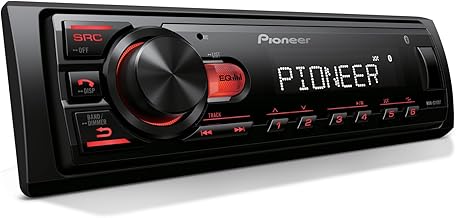
The Pioneer MVH-S110BT is a single-DIN digital media stereo with Bluetooth and a front USB input. The listed USB formats include FLAC, MP3, and WMA. It also has hands-free calling and a built-in MOSFET amplifier rated at up to 50 watts per channel for four speakers.
Best for: Drivers who want to play supported audio files from USB and stream music from a phone over Bluetooth. It was selected for its clearly stated USB playback and file-format details.
iPod note: The front USB port may be relevant to some iPod setups, but the supplied details do not state that it supports iPod playback or control. Confirm compatibility with your specific iPod generation and the receiver manual before purchase.
Limitation: The feature list names USB audio formats but does not identify an AUX input or specify iPod support. Do not assume that every iPod will work through USB.
Jensen MPR210: Best for Voice Assistant Access

The Jensen MPR210 is a single-DIN Bluetooth stereo with AM/FM radio and a high-contrast, seven-character LCD. Its listed features include hands-free calls, wireless music streaming, and a dedicated voice-assistant button for Siri or Google Assistant on a compatible paired phone.
Best for: Drivers who want to access a supported phone assistant without searching through stereo menus. It was selected for its stated voice-control feature and simple Bluetooth streaming approach.
iPod note: Bluetooth audio may work with an iPod model that supports it, but the listing does not identify a USB or AUX input or confirm iPod compatibility. Check your device’s Bluetooth capabilities before choosing this receiver for iPod use.
Limitation: The provided features do not list a wired connection for an older iPod. If your player lacks Bluetooth, this may not meet your connection needs.
Jensen JCR311: Best for CD and USB

The Jensen JCR311 is listed as a single-DIN receiver with a CD player, AM/FM radio, USB, and Bluetooth. Those options make it the most traditional media mix in this group: discs and radio are available alongside wireless streaming and USB playback.
Best for: Drivers who still use CDs but also want Bluetooth and USB features. It was selected because its listed CD player distinguishes it from the digital-media-only options above.
iPod note: USB and Bluetooth are listed, but the supplied product information does not specify iPod compatibility, supported file formats, or direct control. Confirm that your model of iPod is supported before treating either connection as a solution.
Limitation: The available details are less specific about the USB and Bluetooth functions than some other entries. Review the product documentation if you need a particular iPod connection method.
Buying Guide: How to Choose an iPod-Compatible Car Stereo
“iPod connection” can mean several different things: wireless Bluetooth audio, a wired AUX connection, USB playback, or direct iPod control. These are not interchangeable. A receiver may have a USB port without supporting every iPod, and Bluetooth streaming does not necessarily provide the same controls as a direct wired connection.
Which connection does your iPod support?
Start by identifying your iPod model and its available ports and wireless features. Older models may require an AUX cable, a compatible USB cable, or an adapter. Some newer models may support Bluetooth audio. Confirm the receiver’s manual explicitly names your model or connection method; do not infer compatibility just because a product has USB or Bluetooth.
Should you choose Bluetooth, USB, or AUX?
- Bluetooth: Choose this for wireless streaming and, on supported devices, hands-free calls. It may not charge the iPod, and the exact controls depend on the device and receiver.
- USB: Consider this when you want a wired connection or file playback. Check supported audio formats and whether the receiver supports iPod operation, not just USB storage.
- AUX-in: This can be a simple wired audio route when both devices have compatible audio connections. It may not support track information, charging, or playback controls through the stereo.
Does your vehicle need a single-DIN stereo?
All five products here are identified as single-DIN receivers. Check the dashboard opening and the vehicle’s installation requirements before ordering. A receiver’s DIN size alone does not confirm that it will fit every vehicle without additional parts. Verify the vehicle-specific fit and any required wiring or mounting accessories separately.
Which other features matter?
For frequent phone use, compare hands-free calling and voice-assistant functions. For audio customization, the JVC KD-SX27BT lists a 13-band equalizer and sound-positioning features. For radio listening, the REAKOSOUND model lists 18 FM presets. For physical media, the Jensen JCR311 includes a CD player. Match features to your routine rather than choosing by connection label alone.
What should you check before buying?
- Confirm the exact iPod model and the receiver’s documented compatibility.
- Check whether the connection is intended for audio, charging, control, or some combination.
- Verify the vehicle’s stereo size and installation requirements.
- Look for the audio formats and inputs you actually use.
- Choose Bluetooth if wireless playback is the priority; choose a confirmed wired input if your iPod does not support Bluetooth.
Frequently Asked Questions
Do these car stereos explicitly confirm iPod compatibility?
No. The supplied product details list Bluetooth, USB, AUX-in on one model, and other media features, but they do not explicitly confirm compatibility with a particular iPod model.
Can I play an iPod through a Bluetooth car stereo?
Possibly, if the iPod supports Bluetooth audio and the receiver supports Bluetooth streaming. Check both manuals to confirm pairing and playback support.
Does a USB port mean a stereo will control an iPod?
No. USB may support file playback or other functions without offering direct iPod control. Look for explicit iPod support in the product documentation.
Which option lists an AUX input?
The JVC KD-SX27BT feature description lists AUX-in as one of its playback options. The supplied details do not confirm iPod compatibility through that input.
Which receiver is best if I want to keep using CDs?
The Jensen JCR311 is the only product in this selection whose name and supplied details identify a CD player. It also lists AM/FM, USB, and Bluetooth.
What is the safest way to confirm a connection will work?
Check the receiver’s manual and compatibility information for your exact iPod model, then verify that your cable or adapter supports the intended function. Do not rely on the presence of a USB port alone.