
The best video conference wireless microphone depends on your room size and how many people need to speak. The Anker PowerConf is a portable choice for personal workspaces, while the EMEET M0 Plus is designed for small groups and expandable meetings. For multiple separate speakers, the CM300 offers 10 wireless microphones; the 4K camera system combines conferencing audio and video. The Anker PowerConf S330 is a USB-connected alternative for a desk setup where wireless operation is not the priority.
| Product | Best For | Connection Or Setup Highlight |
|---|---|---|
| Anker PowerConf | Personal workspaces | Bluetooth 5.3 or USB-C |
| EMEET M0 Plus | Small group meetings | Bluetooth, USB-C, and daisy chaining |
| 4K Conference Room Camera System | Rooms needing camera and audio | 4K PTZ camera and Bluetooth speakerphone |
| CM300 Conference Speaker | Meetings with multiple speakers | 10 wireless microphones |
| Anker PowerConf S330 | USB-connected home offices | Plug-and-play USB connection |
Anker PowerConf For Personal Workspaces
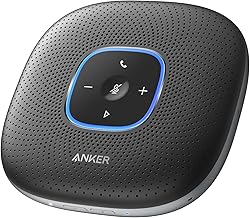
The Anker PowerConf is best for an individual or small home-office setup that needs a wireless speakerphone without separate microphones scattered around the desk. Its six microphones are described as providing 360-degree enhanced voice pickup, making it a practical format for people who speak from different positions around the unit.
Bluetooth 5.3 supports a wireless connection, and USB-C provides another listed connection option. The product name also specifies up to 24 hours of call time, a useful feature for users who want a battery-powered meeting device rather than a speakerphone that must remain connected by cable.
- Best for: Personal workspaces and compact meeting setups.
- Why it stands out: Six-microphone, 360-degree pickup plus Bluetooth and USB-C.
- Consider: It is a speakerphone with integrated microphones, not a set of separate wearable or table microphones.
Choose this model if one central device suits your call setup and you value wireless connection options. Avoid choosing it solely for a large room where speakers need individual microphones; the listed product details do not describe separate mic units or a room-size rating.
EMEET M0 Plus For Small Groups

The EMEET M0 Plus is best for small group meetings where several people share one speakerphone. Its four microphones provide 360-degree voice pickup, and the product description specifies noise reduction. It is listed for meetings of up to eight people, with daisy chaining available for setups of up to 16.
Connection options include Bluetooth and USB-C, and the listing also mentions a C-to-A adapter. That combination can suit users who want to connect wirelessly in one situation and use a cable or adapter in another. The product is described as working with leading meeting software, though the supplied details do not name specific platforms.
- Best for: Small conference tables and expandable group meetings.
- Why it stands out: Four microphones, Bluetooth, USB-C, and daisy-chain support.
- Consider: The listed group-size guidance is up to eight people for one unit; larger setups require daisy chaining as described.
Choose the M0 Plus if you need more than a personal desk speakerphone and want an option to link units for a larger meeting. It is a better fit for shared tabletop use than for participants who each need a separate personal microphone.
4K Camera System For Audio And Video

This system is best for buyers who want a conference-room camera and speakerphone in one package rather than shopping for audio alone. The product description lists a 4K PTZ camera with AI auto-tracking, 3X optical zoom, a 93-degree wide-angle view, USB 3.0, and HDMI output. It also includes a wireless Bluetooth speakerphone with microphones.
The combination may suit conference rooms, worship spaces, medical settings, and other group environments named in the product listing. The camera’s pan-tilt-zoom format and tracking feature make the video component a key distinction from standalone speakerphones. The available product details do not specify the number of speakerphone microphones or a wireless operating range.
- Best for: Rooms that need a camera system as well as conferencing audio.
- Why it stands out: 4K camera features and a Bluetooth speakerphone are included in the same product description.
- Consider: It is a larger, multi-function system; choose a standalone speakerphone if you only need audio.
Choose this option when camera capability matters alongside wireless meeting audio. Before buying, verify that the listed connection outputs and the speakerphone arrangement suit your room and conferencing equipment.
CM300 For Multiple Wireless Speakers

The CM300 is best for meetings where participants need multiple wireless microphones rather than relying on one central pickup device. The listing specifies 10 wireless AI microphones, 360-degree pickup, and a stated range of 65 feet. It also describes noise reduction and echo cancellation, along with full-duplex operation.
The product is described as a USB speakerphone for meetings of up to 10 people and names Zoom and Microsoft Teams. These details make it a more specialized choice than a compact Bluetooth speakerphone: its defining feature is the group of wireless microphones. The listing does not provide battery-life information for the microphones, so buyers should check current product documentation if runtime is a deciding factor.
- Best for: Group meetings where several people need wireless microphones.
- Why it stands out: Ten microphones, a stated 65-foot range, noise reduction, and echo cancellation.
- Consider: It is designed around a multi-microphone setup, which may be more equipment than a solo caller needs.
Choose the CM300 if separate microphones for meeting participants are more important than keeping the setup minimal. Its listed range is a product specification, not a guarantee that every room will deliver the same performance.
Anker PowerConf S330 For USB Desks

The Anker PowerConf S330 is best for a home office or desktop setup where a direct USB connection is acceptable. The listing describes it as a plug-and-play USB speakerphone with 360-degree voice coverage, smart voice enhancement, and powerful sound. It is also identified as a conference microphone and desktop PC speaker.
Unlike the other options here that explicitly list Bluetooth or wireless microphones, the S330 is described as USB-connected. That makes its connection style straightforward for a desk, but less suitable for buyers specifically seeking a cordless speakerphone. The product details do not state a battery or wireless operating time.
- Best for: Computer-based calls in a fixed workspace.
- Why it stands out: Plug-and-play USB setup and 360-degree voice coverage.
- Consider: The listing specifies USB connection, not wireless operation.
Choose the S330 if simple wired setup matters more than Bluetooth freedom. If you need to move the microphone around a room without a USB connection, compare it with the PowerConf or M0 Plus instead.
Buying Guide: How To Choose A Video Conference Microphone
Do you need a wireless microphone or a wireless speakerphone?
These terms can describe different setups. A wireless speakerphone usually combines microphones and a speaker in one tabletop device, while a multi-microphone system gives participants separate microphone units. The Anker PowerConf and EMEET M0 Plus are integrated speakerphones with Bluetooth listed. The CM300 specifically lists 10 wireless microphones. Decide whether your meeting needs one central device or several individual microphones before comparing other features.
How many people will speak in the room?
Match the listed group guidance to the meeting. The EMEET M0 Plus is described for eight people, with daisy chaining for up to 16. The CM300 is described for 10-person meetings and includes 10 wireless microphones. The Anker PowerConf is positioned for personal workspaces, while the S330 is described as a home-office USB speakerphone. These stated use cases help narrow the choices, but they do not replace checking your room layout.
Which connection type fits your computer and workflow?
Bluetooth can reduce cable clutter, while USB offers a direct connection for a computer-based setup. The PowerConf lists Bluetooth 5.3 and USB-C. The M0 Plus lists Bluetooth, USB-C, and a C-to-A adapter. The camera system lists USB 3.0 and HDMI for its camera, plus a Bluetooth speakerphone. The S330 is described as plug-and-play USB. Confirm the connection you plan to use is available on your device.
Does microphone coverage matter more than microphone count?
A 360-degree pickup description can be useful when participants sit around a central speakerphone. A higher microphone count does not automatically mean better performance in every room; placement, distance, and background sound also matter. For participants spread across a room, separate wireless units may be more practical than one central pickup point. Compare the stated coverage and microphone arrangement, not just the number of microphones.
Should you buy an audio-only device or a camera system?
If your camera already meets your needs, an audio-focused speakerphone may be the simpler category to evaluate. The 4K system is the only listed option that combines a conference camera with a Bluetooth speakerphone. Its camera specifications include 4K resolution, AI auto-tracking, 3X optical zoom, and a 93-degree wide angle. Consider the full system when video equipment is also part of the upgrade.
What details should you verify before ordering?
Check the current product listing for included cables, adapters, microphone placement instructions, supported connection modes, and any platform-specific requirements. Product descriptions can identify broad software compatibility without naming every supported application. If battery runtime, microphone range, or room capacity is essential, verify that the manufacturer provides a specification for the exact configuration you plan to use.
Frequently Asked Questions
What is the best wireless microphone setup for a video conference?
For one person, a Bluetooth speakerphone such as the Anker PowerConf is a compact option. For a group using separate microphones, the CM300 lists 10 wireless microphones. The right choice depends on participant count and room layout.
Is a speakerphone the same as a wireless microphone?
No. A speakerphone combines a speaker and microphones in one device. A system with wireless microphones may provide separate microphone units, as the CM300 listing describes.
Which product here supports the largest stated meeting size?
The EMEET M0 Plus is listed for up to 16 people when daisy chained. The CM300 is described for meetings of up to 10 people, and the M0 Plus is listed for up to eight people with one unit.
Which option is intended for a USB-only desk setup?
The Anker PowerConf S330 is described as a plug-and-play USB speakerphone for a home office or desktop computer. Its listing does not specify wireless operation.
Does the 4K camera system include a wireless speakerphone?
Yes. The product description specifies a wireless Bluetooth speakerphone with microphones alongside a 4K PTZ camera. It does not state the speakerphone’s microphone count in the supplied details.