
For a TV or other device with a digital audio output and an RCA-input stereo or amplifier, a DAC converter is usually needed; a simple RCA cable does not convert digital audio into analog. The PROZOR and AUTOUTLET converters below are best suited to optical or coaxial digital outputs, while the 75-foot coaxial cable is for compatible coaxial connections. The Elite Audio cable is an analog, two-channel RCA interconnect—not a digital converter.
| Product | Best For | Connection Type |
|---|---|---|
| PROZOR 192KHz Digital-to-Analog Converter | Optical or coaxial output to RCA input | Digital input, analog RCA output |
| PROZOR DAC with 7-foot Cable | A short optical-to-RCA connection | Optical digital to RCA |
| AUTOUTLET 192kHz Converter | Optical audio output to stereo RCA | Optical digital to RCA |
| Digital Coaxial 75FT Audio Cable | Long coaxial connection where equipment supports it | Single RCA-ended coaxial cable |
| Elite Audio 15-foot RCA Cable | Two-channel analog audio connections | Stereo RCA interconnect |
PROZOR 192KHz Digital-to-Analog Converter

Best for: Connecting a digital optical or coaxial audio output to RCA analog inputs. This is a converter, not merely a cable, so it addresses the digital-to-analog signal change that many TV-to-stereo setups require.
The listed product converts coaxial or Toslink optical digital PCM signals to left/right RCA and 3.5mm analog outputs simultaneously. It supports sample rates of 32, 44.1, 48, 96, and 192 kHz, with 24-bit S/PDIF input. The listing also describes an updated amplifier chipset and dual-channel operational amplifier.
Why it was selected: Its two types of digital input make it a flexible option when the source has optical or coaxial output. Choose this if you need analog RCA outputs for a stereo amplifier or another RCA-input device.
Limitation: The source must send PCM audio; the listing says to set the TV’s audio output to PCM. It is a digital-to-analog device, not an analog-to-digital converter. TV volume may need to be adjusted through the TV settings.
PROZOR DAC with 7-Foot Cable
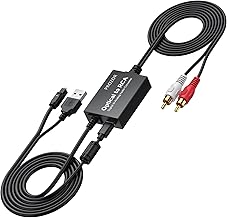
Best for: A setup that needs a short optical-to-RCA connection. The product name identifies a 7-foot, or 2.1-meter, cable and a built-in audio amplifier chip, making it a compact option for placing a source and amplifier relatively near each other.
This product is described as a 192kHz digital-to-analog converter with an optical Toslink input and RCA output. Its intended source devices include HDTVs, Blu-ray and DVD players, and game consoles. It is designed to convert digital audio to analog rather than carry an already-analog RCA signal between components.
Why it was selected: The included cable length may help reduce the number of separate connection pieces needed in a nearby TV-and-stereo arrangement. Choose it if the source offers optical digital audio and the receiving equipment has RCA analog inputs.
Limitation: The listed information does not specify support for coaxial digital input, so do not choose it for a source that only has a coaxial digital output. Check the source’s audio format and the receiver’s input type before ordering.
AUTOUTLET 192kHz Optical-to-RCA Converter

Best for: Converting a TV, DVD player, Blu-ray player, or game console’s optical digital audio output into stereo RCA analog audio. The listing describes a 7-foot/2.1-meter optical-to-RCA male converter cable, which can suit a source and amplifier that are not immediately beside one another.
The converter uses a built-in audio amplifier chip and dual-channel operational amplifier. Its stated processing supports sample rates up to 192kHz and 24-bit audio, including 32, 44.1, 48, 96, and 192kHz inputs. The product is described as plug and play, but the source still needs to output a supported signal format.
Why it was selected: The stated optical input, RCA output, and cable length directly match a common digital-audio-out-to-RCA use case. Choose this if the source has Toslink optical output and the receiving stereo equipment accepts left/right RCA.
Limitation: This listing describes optical input, not coaxial digital input. It will not solve a connection where the only source output is coaxial unless an appropriate conversion step is added.
Digital Coaxial 75-Foot Audio Cable

Best for: A long run between devices that use a compatible single-RCA coaxial connection. The product name identifies a 75-foot cable with one RCA male connector at each end and lists subwoofer, home theater, video, and rear-view camera uses.
This is a cable, not a digital-to-analog converter. A digital coaxial output can connect to a compatible digital coaxial input through the appropriate cable, but it cannot directly become left/right analog RCA audio simply because the connector is RCA-shaped. The receiving equipment’s input specification matters.
Why it was selected: It is relevant for buyers whose equipment already supports a single-RCA coaxial signal and who need a notably long cable run. Choose it for that connection type rather than for optical output or standard two-channel analog connections.
Limitation: Its 75-foot length and single-RCA format are not a substitute for a DAC. Avoid this choice if the source has only Toslink optical output or the destination expects two separate left/right analog RCA plugs.
Elite Audio 15-Foot Stereo RCA Cable

Best for: Carrying two-channel analog audio between equipment such as an amplifier, subwoofer, speaker system, or processor, as described in the product name. The cable is 15 feet long and features double shielding and oxygen-free copper, according to its listing.
This is a two-channel car-audio RCA cable, not a digital audio converter. It can be useful after a DAC has converted a digital signal to analog, or in another setup where both connected devices provide compatible analog RCA connections. Its listed noise-reducing design features are intended for audio interconnection.
Why it was selected: Buyers searching for “digital audio out RCA cable” may actually need an analog cable after conversion. This option covers that second step when the equipment needs separate left/right RCA connections.
Limitation: It cannot connect an optical digital output directly to an analog input or perform signal conversion. Avoid it as the only component when the source has digital audio output only.
Buying Guide: How to Choose a Digital Audio-to-RCA Connection
Do you need a cable or a converter?
First identify whether the source’s audio output is digital or analog. Optical Toslink and digital coaxial outputs carry digital signals. Red-and-white RCA outputs usually carry separate analog left and right audio channels. A passive cable changes connector shape or extends a connection; it does not decode digital audio. If a digital source must feed an analog RCA input, select a DAC with the correct digital input.
For example, an optical TV output needs an optical-to-analog converter with RCA outputs. A coaxial digital output needs a converter that explicitly accepts coaxial input, or a compatible digital coaxial cable if the receiver also has a digital coaxial input. A converter’s RCA output is analog, so it can then feed an analog RCA input.
Which output does your source have?
- Optical/Toslink: Look for a converter with an optical input. Confirm that the cable or optical connection is included if that matters to your setup.
- Digital coaxial: Look for a converter that specifically lists coaxial digital input. A single RCA connector does not by itself prove that a cable or device supports the required signal.
- Analog RCA: Use a two-channel RCA cable to connect to compatible analog inputs. A DAC is not needed when both devices already provide analog audio.
What input does the stereo or amplifier accept?
Check the destination before choosing a product. An analog stereo input commonly uses two RCA jacks, one for each channel. A digital coaxial input may also use a single RCA-style jack, but it serves a different purpose. A receiver with only optical or coaxial digital inputs may not accept the analog output of a basic DAC without another suitable input arrangement.
Match the signal type at both ends, not just the connector’s appearance. If the source is optical digital and the destination is analog RCA, the connection path is source optical output, DAC optical input, DAC RCA output, and receiver analog RCA input.
Will the converter support the audio format?
Some converters require the source to output PCM rather than a compressed or surround-sound format. The PROZOR listing specifically instructs users to set the TV output to PCM. Check the converter’s supported formats and set the television, streaming device, or game console accordingly. A supported sample rate alone does not guarantee that every audio format or channel configuration is accepted.
If audio is missing, verify the source’s selected output, the converter’s input type, and the receiver’s selected input. Confirm that cables are seated and that the source is sending a format the converter supports. These checks help distinguish a settings problem from a mismatched cable or signal direction.
How much cable length do you need?
Measure the actual route, including the path around furniture or equipment, rather than estimating only the straight-line distance. A 7-foot converter cable may suit nearby components, while a 15-foot stereo RCA cable or 75-foot coaxial cable serves different connection needs. Longer is not automatically better: excess cable can complicate routing, and the cable must still match the signal and connector type.
For a long digital coaxial run, confirm that both devices have compatible coaxial connections. For an optical link, verify the optical cable’s reach and connector fit. For analog stereo, use a two-channel cable with the appropriate RCA plugs at both ends.
What should you check before ordering?
- Read the labels beside the source’s audio outputs and the receiver’s inputs.
- Determine whether the source signal is optical digital, coaxial digital, or analog RCA.
- Choose a converter only when the source and destination use different signal types.
- Check whether the converter needs a particular output setting, such as PCM.
- Confirm the number of channels and connectors required at the destination.
- Choose a cable length that suits the component layout without confusing digital and analog RCA connections.
Frequently Asked Questions
Can I connect a digital audio output directly to an RCA input?
Not in most cases. A digital optical or coaxial output usually needs a DAC to convert the signal to analog before it can feed a standard analog RCA input.
Does an RCA plug mean the connection is analog?
No. RCA connectors can be used for analog audio or digital coaxial signals. Check the device labels and specifications to identify the signal type.
Can a regular RCA cable convert optical audio to RCA?
No. An RCA cable does not convert optical digital audio. Use an optical-to-analog converter with RCA outputs, then connect those outputs to the analog RCA input.
What does PCM mean on a TV audio setting?
PCM is an audio output format supported by many basic DACs. If a converter’s instructions require PCM, select that format in the TV’s sound settings and consult the converter’s listed support.
Can a digital coaxial cable replace a DAC?
No. A coaxial cable can carry a compatible digital signal between digital coaxial connections, but it does not convert that signal to analog RCA audio. A DAC is needed when the destination requires analog audio.
Are left and right RCA cables interchangeable with a single digital coaxial connection?
They are not automatically interchangeable. Stereo analog audio uses separate left and right connections, while digital coaxial audio uses a single connection. Match the cable and signal to the specific inputs and outputs.