
The best cheap computer microphone headset depends on the connection you need: choose the Logitech H111 for a simple 3.5 mm connection, the Logitech H390 for USB-A controls, or the Amazon Basics headset for a foldable design and adjustable microphone. The Necode model suits buyers who want visible mute status and multiple pickup modes, while the 321Wasay headset emphasizes comfort features. Compare connection type, microphone controls, fit, and intended use before choosing.
| Headset | Best for | Connection or standout feature |
|---|---|---|
| Logitech H111 | Basic calls and everyday listening | 3.5 mm audio jack; reversible boom |
| Logitech H390 | USB-A calls and meetings | In-line volume and mute controls |
| Amazon Basics On Ear | Compact storage and smaller or medium head sizes | Foldable design; 3.5 mm or USB-A option |
| 321Wasay USB Headset | Long work sessions | Adjustable headband and memory foam earpads |
| Necode USB Headset | Frequent calls requiring easy mute access | In-line controls and call-status lights |
Logitech H111 Stereo Headset

The Logitech H111 is a straightforward wired headset for buyers who want a 3.5 mm audio connection without relying on a USB-A plug. Its listed features include full stereo sound for music, movies, and games, plus a noise-cancelling microphone intended to reduce room noise during internet calls.
Best for: People who need a simple headset for calls and everyday audio, especially if they prefer a 3.5 mm jack. The microphone boom rotates so it can be worn on the left or right side, making microphone positioning more flexible.
Why it was selected: It offers a useful combination of stereo listening, a noise-reducing microphone, and a common analog connection in a basic design.
Limitation: The listed connection is a 3.5 mm audio jack, not USB. Check that your computer has a compatible headset jack or the appropriate connection arrangement before buying.
Logitech H390 USB Headset

The Logitech H390 is a wired stereo headset with a USB-A connection. Its fine-tuned drivers are described as providing enhanced digital sound for music, calls, and meetings. A rotating noise-cancelling microphone is designed to minimize unwanted background noise, and the boom can be moved out of the way when it is not in use.
Best for: Buyers who want a USB-A headset with microphone and speaker controls on the cable. Its in-line controls let users adjust volume or mute calls without reaching for separate computer controls.
Why it was selected: The combination of USB-A audio, a rotating microphone, and accessible mute and volume controls makes it a practical option for regular computer calls.
Limitation: This model uses USB-A. It may not be the right choice if the computer lacks a compatible port and the buyer does not have a suitable adapter.
Amazon Basics Foldable On-Ear Headset
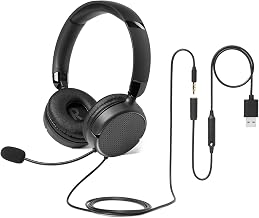
This Amazon Basics wired headset has a foldable design and an adjustable boom microphone that can be positioned at different angles. The product listing describes the microphone as unidirectional and intended to reduce background noise when it is directed correctly. The headset is designed for calls, meetings, and online learning.
Best for: Buyers looking for a compact headset for smaller or medium head sizes, or anyone who values foldability for storage. The listing gives dimensions of 6.1 inches wide by 7.2 inches high and specifies 2.8-inch ear cups.
Why it was selected: It stands out for its adjustable microphone, foldable construction, and listed 3.5 mm or USB-A connection options with in-line control. Check the product details to confirm which connection arrangement is included for the version being considered.
Limitation: The on-ear fit may feel snug initially. The listing advises adjusting it gradually, taking breaks during extended use, and notes that comfort may improve as the ear cups conform.
321Wasay USB Computer Headset

The 321Wasay headset is a wired USB model described as suitable for PC and laptop use. Its listed microphone is unidirectional, rotatable, and designed to focus on the speaker’s voice while reducing background noise. The headset also includes a 40 mm audio driver and an adjustable headband.
Best for: Buyers who prioritize cushioning and adjustability for extended computer use. The product listing identifies soft protein memory foam earpads and breathable materials as comfort features, alongside an adjustable headband.
Why it was selected: It combines a rotatable microphone with stated comfort features and stereo audio for calls, music, movies, or gaming.
Limitation: The supplied product information identifies it as a USB headset but does not specify the USB connector type or detailed operating-system compatibility. Confirm the connection suits your computer before ordering.
Necode USB Headset With Call Controls

The Necode is a wired USB headset with in-line buttons for microphone mute, speaker mute, and volume adjustment. Its controller includes visible status lights: the listing says a red light turns on when the microphone is muted and a working light flashes during active calls.
Best for: People who take frequent meetings, online courses, or customer-service calls and want physical call controls with a visual mute indicator. The microphone offers optional omnidirectional and unidirectional pickup modes, according to the product details.
Why it was selected: Its combination of USB plug-and-play operation, call controls, and selectable microphone pickup modes provides more call-management features than a basic headset.
Limitation: The listed compatibility includes USB 2.0 and USB 3.0 interfaces and specified operating systems, but buyers should still verify that their particular device and setup are supported.
Buying Guide: How to Choose a Cheap Computer Headset
A low-cost headset can be suitable for everyday calls, classes, or meetings, but the right choice depends on the computer’s ports and how you plan to use the microphone. Start with connection type, then consider controls, fit, and how often you will wear the headset. Product listings can describe features differently, so compare the specific model details rather than assuming that all headsets in a category work the same way.
Which connection does your computer need?
A 3.5 mm headset, such as the H111, uses an analog audio connection. Confirm that the computer has a suitable headset jack and that it supports both audio output and microphone input as required. Some computers have separate microphone and headphone ports, so check the port arrangement before selecting an analog model.
USB headsets connect through a USB port and may provide audio and microphone functions through that connection. The H390 and Necode specify USB-A, while the 321Wasay listing says USB without identifying the connector type in the supplied details. If your computer has only a different USB port, verify adapter needs before purchase.
Do you need in-line mute and volume controls?
In-line controls can make it faster to mute a microphone or change volume during calls. The H390 lists volume and mute controls, and the Necode lists microphone mute, speaker mute, and volume buttons with status lights. The H111’s supplied features do not mention in-line controls, so buyers who want on-cable call management may prefer a model that explicitly lists them.
A visible mute indicator can help users check microphone status at a glance, but it does not replace checking the meeting application’s mute state. If you often switch between calls and other tasks, consider whether the controls are easy to reach and whether the product listing describes the functions you need.
What microphone design is appropriate for your room?
A boom microphone lets you position the mic near your mouth. The H111 has a rotating boom that can be worn on either side, while the Amazon Basics and 321Wasay models list adjustable or rotatable microphones. The Amazon Basics listing specifically says its unidirectional microphone should be positioned correctly to reduce background noise.
Noise reduction descriptions are not a guarantee that every sound will be removed. Room noise, microphone placement, and the calling application can affect how clearly other people hear you. For a shared or noisy space, compare whether the model lists a directional microphone or noise-cancelling feature, and place the boom as directed.
How important is fit for long sessions?
Headband adjustment, ear-cup style, and cushioning affect comfort. The 321Wasay listing calls out an adjustable headband, memory foam earpads, and breathable materials. The Amazon Basics model is described as an on-ear design for small to medium head sizes, and its listing cautions that it may feel snug at first.
If you plan to wear a headset through a full workday or several classes, consider taking breaks and checking fit early. A feature description cannot predict how a headset will feel on every person. Buyers who are sensitive to pressure around the ears should pay particular attention to on-ear versus other listed designs and the product’s fit guidance.
Will you use it for calls only or other audio too?
For calls alone, a clear, positionable microphone and convenient mute controls may matter most. For mixed use, compare the stereo audio descriptions. The H111 lists stereo sound for music, movies, and games; the H390 lists digital stereo sound for music and calls; and the 321Wasay lists a 40 mm audio driver for calls and entertainment.
These descriptions identify intended features, not a guarantee of a particular sound preference. If listening quality is a priority, consider how often you will use the headset for entertainment and whether the product’s connection and comfort suit that broader use.
What should you check before ordering?
- Confirm your computer has the listed 3.5 mm or USB connection.
- Check whether a USB headset specifies USB-A or leaves the connector type unclear.
- Look for microphone position, mute, and volume features that match your call habits.
- Review fit information, especially if you have a smaller head or prefer less ear pressure.
- Verify the included connection version and compatibility details on the product page before purchase.
Frequently Asked Questions
Which headset is best for a basic 3.5 mm connection?
The Logitech H111 is the clearest choice among these options for a 3.5 mm audio jack. Confirm that your computer’s jack supports the headset’s audio and microphone needs.
Which headset includes easy-to-reach mute controls?
The Logitech H390 lists in-line volume and mute controls. The Necode adds microphone and speaker mute buttons, volume buttons, and status lights.
Which option is designed to fold for storage?
The Amazon Basics On Ear headset is listed as foldable. Its compact design may suit buyers who want to store or carry a headset, though its on-ear fit may feel snug.
Which headset has a visible microphone mute indicator?
The Necode listing describes a red light that turns on when the microphone is muted. It also describes a working light that flashes during active calls.
Are these headsets suitable for online meetings and classes?
The listed features identify these headsets for calls, meetings, online learning, or computer use. Choose one with a connection compatible with your device and the microphone controls you prefer.
Does “noise-cancelling microphone” mean all background sound disappears?
No. The product descriptions refer to reducing or suppressing background noise, not eliminating every sound. Microphone direction and placement can affect voice pickup and the amount of surrounding noise captured.