
An optical-to-3.5mm adapter converts digital audio from a TV or other optical-output source into analog audio for compatible headphones, speakers, or other 3.5mm equipment. The PROZOR is a strong fit for buyers seeking a converter with a built-in amplifier chip, while Tackston, ESWN DNXB, and QIMIAOUS list support for inputs up to 192 kHz. The LiNKFOR product converts in the opposite direction, from 3.5mm to optical, so it is included as a direction-specific alternative rather than a substitute for an optical-to-3.5mm converter.
| Product | Best suited for | Signal direction |
|---|---|---|
| Tackston 192KHz DAC | Buyers prioritizing listed high-resolution input support | Optical to 3.5mm |
| PROZOR 192kHz DAC | Buyers wanting a built-in amplifier chip | Optical to 3.5mm |
| ESWN DNXB 192KHz DAC | Buyers who can set the source to PCM or stereo | Optical to 3.5mm |
| QIMIAOUS 192KHz DAC | Buyers who need clear PCM setup guidance | Optical to 3.5mm |
| LiNKFOR 3.5mm to SPDIF | Buyers needing the reverse connection direction | 3.5mm to optical |
Tackston 192KHz Optical To 3.5mm DAC

The Tackston converter changes an optical or TOSLINK digital audio signal into analog audio through a female 3.5mm AUX output. Its listed input support includes 32, 44.1, 48, 96, and 192 kHz sample rates, with 24-bit data streams. This makes it a match for buyers checking source-format specifications before choosing a converter.
Best for: People connecting an optical-output TV or other source to a 3.5mm audio device who want a converter with clearly listed sample-rate support. It was selected because its stated signal direction matches the requested optical-to-3.5mm use.
Important limitation: It is not reversible. The listing also notes that the TV remote cannot control playback volume through the converter; adjust volume on the connected speaker or headphones instead. Confirm that the receiving device has a compatible 3.5mm input.
PROZOR 192kHz Digital-To-Analog Converter

The PROZOR converts digital SPDIF or optical audio to analog 3.5mm audio. Its listed features include a built-in amplifier chip and compatibility with devices such as HD TVs and game consoles. The product description emphasizes signal clarity and amplified output, although it does not provide a specific output-power figure in the supplied details.
Best for: Buyers who want an optical-to-3.5mm converter with an amplifier chip called out in the product features. It is a practical option to compare when connecting a digital source to an analog 3.5mm audio input.
Why it was selected: It supports the requested conversion direction and names several types of potential source devices, including TVs and game consoles.
Important limitation: The supplied features do not specify supported sample rates, output levels, or whether a particular headphone or speaker will work. Check the source’s optical output and the receiving device’s input requirements before purchasing.
ESWN DNXB 192KHz Optical To AUX Converter
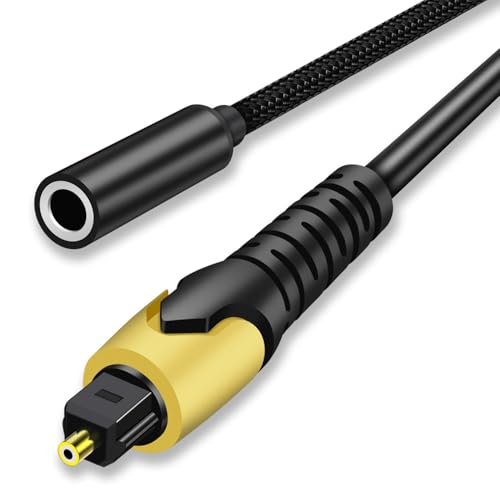
This ESWN DNXB adapter converts an optical SPDIF or TOSLINK digital signal to stereo analog audio at a 3.5mm AUX port. It lists support for 32, 44.1, 48, 96, and 192 kHz optical inputs and 24-bit data streams. The product instructions say to set the source’s digital audio output to PCM or stereo before use.
Best for: Buyers whose TV or source device offers a PCM or stereo output setting and who want listed support up to 192 kHz. Its stated input formats and setup guidance make it a relevant choice for common TV-audio troubleshooting.
Why it was selected: It matches the required conversion direction and explicitly explains an important source setting that may be needed for operation.
Important limitation: It cannot convert 3.5mm audio to optical. If the source is set to a surround or other unsupported format, the product instructions indicate that the output should instead be set to PCM or stereo.
QIMIAOUS 192KHz Optical To 3.5mm Converter

The QIMIAOUS converter takes digital audio from an optical SPDIF or TOSLINK connection and provides stereo analog output through a 3.5mm AUX port. It lists 24-bit support and input sample rates of 32, 44.1, 48, 96, and 192 kHz. Its setup notes include PCM instructions for several TV brands.
Best for: Buyers who want an optical-to-3.5mm converter and may need guidance setting a TV’s digital audio format to PCM. It was selected for its matching signal direction, stated format support, and practical setup notes.
Why it may be a better fit: The listed instructions identify PCM menu paths for Samsung, LG, and Sony TVs, which can help buyers locate the relevant audio setting. Menu names can vary by model.
Important limitation: The converter is not reversible. Its listed features do not specify amplifier details or volume control, so do not assume the TV remote will adjust the connected device’s volume.
LiNKFOR 3.5mm To SPDIF Converter

The LiNKFOR adapter converts an analog 3.5mm audio signal to optical SPDIF output. It supports uncompressed two-channel PCM and lists a 48 kHz output sampling rate. That makes it a direction-specific alternative for a setup that starts with an analog 3.5mm source and needs optical digital output.
Best for: Buyers who need to send audio from a 3.5mm output to an optical-input amplifier or soundbar. It was selected because it is the closest matching adapter type in the supplied product list, but its direction is the reverse of the main search intent.
Do not choose this if: Your TV has an optical audio output and your headphones or speakers have a 3.5mm input. For that arrangement, choose one of the optical-to-3.5mm converters above. The LiNKFOR listing also specifies two-channel PCM and 48 kHz output, rather than the higher input-rate support listed by some other products here.
Buying Guide: How To Choose An Optical-To-3.5mm Adapter
Which signal direction do you need?
Check the audio output on the source and the input on the receiving device. For a TV with an optical output and headphones or speakers with a 3.5mm input, choose an optical-to-3.5mm digital-to-analog converter. A 3.5mm-to-optical converter performs the opposite job. The connector shapes alone do not tell you the direction of conversion, so read the product description before buying.
Will the adapter work with your TV or source?
The source must provide an optical digital audio output, and the receiving equipment must accept analog audio through a 3.5mm input. A converter cannot replace a missing optical output or turn a 3.5mm output into an optical input unless it is specifically designed for that reverse direction. Check the labels on the device and review its audio-output settings.
Why might PCM or stereo settings matter?
Some converters in this list specify PCM or stereo input requirements. If a TV sends an audio format the converter does not support, audio may not play as expected. Set the TV’s digital sound output to PCM or stereo when the converter’s instructions call for it. The exact menu path differs across models, so use the device’s settings menu or manual to find the digital audio format option.
Do sample-rate specifications determine compatibility?
Sample-rate support is one specification to compare, not a guarantee of compatibility with every source or receiving device. Tackston, ESWN DNXB, and QIMIAOUS list optical inputs up to 192 kHz and include additional supported rates. PROZOR’s supplied product details describe a 192 kHz converter but do not list its supported input rates. Match the converter’s supported formats to the source output where those details are available.
How will you control volume?
Volume control can depend on the TV, converter, and connected headphones or speakers. Tackston specifically notes that the TV remote cannot control playback volume when using its adapter, so volume should be adjusted on the playback device. For other models, the supplied details do not confirm remote-volume behavior. If remote control is essential, verify that capability before choosing a converter.
Do you need an amplifier?
The PROZOR listing specifically identifies a built-in amplifier chip. The other supplied descriptions do not make the same claim, so compare the products based only on their stated features. Consider the input requirements of your headphones or speakers and do not assume that a converter’s sample-rate specification describes its output power or volume capability.
Frequently Asked Questions
What does an optical-to-3.5mm adapter do?
It converts digital audio from an optical SPDIF or TOSLINK source into analog audio for a 3.5mm input. It is commonly considered when connecting an optical-output source to compatible analog headphones or speakers.
Can I use a 3.5mm-to-optical converter in reverse?
No. A converter designed for 3.5mm-to-optical transmission does not automatically work from optical to 3.5mm. Choose a product that explicitly states the direction you need.
Why is there no sound after connecting the adapter?
Check that the source is connected to the converter’s optical input and that the playback device is connected to its 3.5mm output. If the product calls for PCM or stereo, change the source’s digital audio setting to that format and confirm that the connected device is set to the correct input.
Can my TV remote control the volume?
It depends on the converter and the connected equipment. Tackston states that its adapter does not allow TV-remote volume control, so adjust volume on the playback device. The other supplied product details do not confirm remote-volume support.
Is a 192 kHz specification enough to choose an adapter?
No. Also verify signal direction, the source’s optical output, the receiving device’s 3.5mm input, and any PCM or stereo requirements. A high sample-rate specification does not by itself establish compatibility with every device or audio format.