
For a TV or other source with digital audio output and an analog receiver, speakers, or mixer, choose a digital-to-analog converter (DAC) that matches the source’s optical or coaxial output and the destination’s RCA or 3.5 mm input. The AUTOUTLET optical-to-RCA converter suits stereo amplifiers; the coaxial RCA DAC is an option for coaxial sources; and the optical-to-3.5 mm DAC fits AUX inputs. Two listed products convert in the opposite direction, so they are included as examples to help prevent a common buying mistake—not as solutions for digital-out-to-analog connections.
| Product | Direction | Analog output | Best fit |
|---|---|---|---|
| AUTOUTLET Optical to RCA | Digital to analog | RCA | Stereo amplifier |
| Coaxial RCA DAC Cable | Digital to analog | RCA | Coaxial digital source |
| 192 kHz Optical to 3.5 mm DAC | Digital to analog | 3.5 mm AUX | Analog AUX input |
| Adoreen RCA to Optical | Analog to digital | Optical | Reverse-direction connections |
| TAIKURA 3.5 mm to Optical | Analog to digital | Optical | Reverse-direction connections |
AUTOUTLET Optical To RCA Converter

Best for: Connecting an optical digital audio output, such as one on a television or disc player, to an amplifier or other device with stereo RCA inputs. This is the closest match in the list for the common “digital out to analog” setup.
The converter changes Toslink optical digital audio into analog RCA output. Its listed features include a built-in audio amplifier chip, a dual-channel operational amplifier, and support for optical inputs at 32, 44.1, 48, 96, and 192 kHz, with 24-bit streams. The product description identifies a 192 kHz, 24-bit sampling rate and plug-and-play use.
Why it was selected: It has the required signal direction and RCA output, making it a straightforward candidate for a stereo system with optical input on the source side and RCA input on the receiving side.
Check before buying: The source must provide Toslink optical audio, and the receiving device must accept RCA analog audio. Set a TV or other source to PCM/stereo if its output format is not supported by the converter.
Coaxial RCA Digital-To-Analog DAC Cable

Best for: A source with a coaxial S/PDIF digital output and a receiving device with stereo RCA analog inputs. This unidirectional cable is described as converting digital coaxial audio to analog stereo output.
The listed specifications include 192 kHz support, USB power, a 4-foot cable, and two RCA male analog connectors. It is intended for use with equipment such as a TV or Blu-ray player on the source side and a speaker system, amplifier, or home theater component on the analog-input side.
Why it was selected: It covers a different digital connection from an optical DAC. Choose it if the source has a coaxial digital audio jack; it will not replace an optical-to-RCA converter when the source only has Toslink.
Check before buying: The product is unidirectional and requires USB power. Confirm that the source’s jack is a coaxial digital output, not an analog RCA output, and plan for a USB power connection.
Optical To 3.5 Mm Analog DAC

Best for: Connecting a digital optical output to an analog device with a 3.5 mm AUX input, such as an audio mixer or speaker with that input. Select this instead of an RCA DAC when the analog destination has a 3.5 mm jack.
The product converts optical SPDIF/Toslink digital audio to stereo 3.5 mm analog output. It lists support for 32, 44.1, 48, 96, and 192 kHz optical inputs and 24-bit streams. The instructions call for setting the source output to PCM or stereo before use.
Why it was selected: Its direction and analog output format suit a digital-out-to-AUX connection, a common alternative to connecting to RCA inputs.
Check before buying: This converter is not reversible. It cannot convert a 3.5 mm analog source to optical, and the source may need to be switched to PCM/stereo for audio to work correctly.
Adoreen RCA To Optical Converter Cable
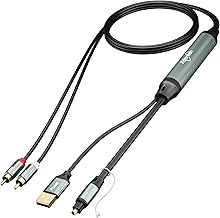
Best for: Buyers who need the reverse of the requested connection: sending analog RCA audio from a turntable, CD player, or similar source to a digital optical input.
The product name describes a unidirectional 2-RCA-input-to-SPDIF/Toslink-output adapter cable. It is listed as a 10-foot analog-to-digital converter with 48 kHz and 96 kHz support. Those details make its conversion direction the key point: RCA is the input, and optical is the output.
Why it is included: The listing contains “audio converter” and RCA/optical terminology that can look relevant in a search for an audio cable. Its reverse direction makes it a useful comparison, but it is not the right choice for a TV’s digital output feeding an analog amplifier.
Limitation: Avoid this product if you need digital optical audio converted to analog RCA. It performs the opposite conversion.
TAIKURA 3.5 Mm To Optical Converter

Best for: Sending analog audio from a computer, laptop, or projector with a 3.5 mm output to a soundbar or other system with an optical input. It is not a digital-to-analog converter.
The listed features describe a 3.5 mm analog input converted to Toslink/SPDIF digital output. It uses USB power, requires no drivers or setup, and outputs uncompressed two-channel PCM digital audio. The product listing explicitly says it does not convert digital audio to analog.
Why it is included: Its 3.5 mm and optical connections may resemble the right combination when shopping quickly. Checking which jack is the input and which is the output prevents selecting a cable that sends audio the wrong way.
Limitation: Choose a DAC with optical input and analog output for the requested connection. This unit works in the opposite direction.
Buying Guide: How To Choose A Digital-To-Analog Audio Converter
Which digital output does the source have?
Check the TV, streamer, disc player, or other source for its audio output connection. Toslink is a small square optical port, often labeled “Optical” or “Digital Audio Out.” Coaxial S/PDIF commonly uses a single RCA-style jack. These digital formats are not interchangeable without a converter that accepts the specific input.
Do not assume that any RCA jack carries digital audio. A pair of red and white RCA jacks usually indicates analog stereo output or input. A single coaxial S/PDIF jack is a digital connection, even though it resembles an RCA connector. Read the labels on the equipment and the converter before ordering.
What analog input does the receiving device need?
Match the DAC’s output to the amplifier, receiver, powered speakers, or mixer. Stereo RCA is appropriate when the destination has red and white analog inputs. A 3.5 mm output is the match for an AUX input. A converter with the wrong analog connector may require an additional adapter, so choosing the correct output directly is usually simpler.
Confirm that the destination has an input, not only an output. For example, an amplifier’s RCA input can accept the converter’s analog signal, while an RCA output on another device does not serve the same purpose.
Does signal direction matter?
Yes. Digital-to-analog and analog-to-digital conversion are opposite operations. For a television’s optical digital output connected to analog RCA equipment, the required path is optical input to RCA output. For a computer’s analog headphone jack connected to an optical-only soundbar, the path is 3.5 mm input to optical output.
Words such as “converter,” “adapter,” and “audio cable” do not establish direction by themselves. Look for explicit input and output descriptions in the listing. A unidirectional converter cannot usually be reversed by swapping the cable ends.
Will the source’s audio format work?
Many optical DACs in this selection specify PCM or stereo output. If there is no sound, check the source’s audio settings and select PCM, stereo, or a compatible two-channel output. A source set to an unsupported surround format may not produce usable audio through a basic stereo converter.
Also compare the source’s sample rate and bit depth with the converter’s listed support. A higher maximum sampling-rate figure does not guarantee that every device will output that format. Use the source’s available audio settings and the product’s stated input support as the practical guide.
Does the converter need separate power?
Some active converters need USB power to process the signal. The coaxial RCA DAC and TAIKURA product descriptions specify USB power. Check whether a USB port or suitable power source is available near the equipment. A converter that needs power is not the same as a passive cable, even if it is sold in a cable-style form.
How should buyers compare these choices?
- Choose optical-to-RCA for a digital Toslink source and an analog stereo RCA destination.
- Choose coaxial-to-RCA for a coaxial S/PDIF digital source and an analog RCA destination.
- Choose optical-to-3.5 mm when the digital source is optical and the analog destination uses AUX.
- Avoid analog-to-optical converters when the source is already digital and the destination is analog.
- Check power and format support before installing the DAC, especially when connecting a television.
Frequently Asked Questions
Can a digital audio cable connect directly to an analog amplifier?
Not if the source provides only digital audio and the amplifier accepts only analog audio. Use a DAC with the correct digital input and an analog output that matches the amplifier’s input.
Is an optical-to-RCA converter the same as an RCA-to-optical converter?
No. Optical-to-RCA converts digital audio to analog audio. RCA-to-optical converts analog audio to digital optical audio. These are different signal directions, and a unidirectional converter cannot be assumed to work backward.
Do I need an optical or coaxial DAC?
Choose based on the source’s digital audio output. Use an optical DAC for a Toslink output and a coaxial DAC for a coaxial S/PDIF output. Confirm the connector and label on the source before selecting a converter.
Why is there no sound after connecting an optical DAC?
Check that the optical cable is connected to the source’s output and the converter’s input, that the DAC has power if required, and that the analog output goes to an input on the receiving device. Also set the source to PCM or stereo if the converter requires it.
Can I use the TAIKURA converter to connect a TV’s optical output to AUX speakers?
No. The listed TAIKURA unit converts 3.5 mm analog audio to optical digital audio. For a TV’s optical output to analog AUX speakers, choose an optical-to-3.5 mm digital-to-analog converter instead.