
The best USB sound audio controller depends on whether you need a headphone adapter, gaming-focused sound features, or a desktop volume knob. The VENTION adapter is best for simple 3.5mm headset connections, while the 1Mii model adds virtual 7.1 sound and separate mic controls. For adjusting computer volume without replacing an audio adapter, consider the XMSJSIY or DROK knob. The fifth option lists 7.1-channel virtual audio and volume controls, but provides fewer product details.
| Product | Best suited for | Key listed feature |
|---|---|---|
| VENTION USB Sound Card | Everyday headset use | 3.5mm audio, volume knob, and sound controls |
| 1Mii USB Sound Card | PC gaming and mic adjustment | Virtual 7.1 sound and mic mute |
| XMSJSIY USB Volume Knob | Desktop media control | Volume, mute, and playback controls |
| DROK USB Volume Knob | A stable desktop control | Weighted base and detachable cable |
| USB 2.0 7.1-Channel Adapter | Users seeking multiple audio controls | 3.5mm ports and volume controls |
VENTION USB Sound Card With Volume Control

The VENTION USB sound card is best for buyers who want to connect a 3.5mm headphone, headset, earphone, or microphone through USB and adjust sound from a small external controller. Its listed features include a volume-control knob, microphone button, and sound-switch button.
The adapter is described as plug and play, with no extra drivers required. It supports stereo audio and is listed for Windows, Mac, PCs, laptops, desktops, and other devices. The product description also identifies headset use, including gaming headsets, and says it can support microphone and headphone use together on iMac and Mac Mini devices.
- Best for: Everyday listening, calls, and headset use when a computer needs a USB-to-3.5mm connection.
- Why it was selected: It combines the audio adapter and easy-to-reach physical controls in one compact product.
- Limitation: The listed features describe normal stereo, not virtual surround sound.
Choose this model if you need a straightforward headset adapter with basic controls. Avoid choosing it specifically for virtual 7.1 audio, which is not among its listed features.
1Mii USB Sound Card With Virtual 7.1

The 1Mii USB sound card is best for PC or laptop users who want a 3.5mm audio adapter with virtual 7.1 sound and separate microphone and headphone volume adjustment. The listing says the surround feature can help users perceive game sounds such as footsteps and other environmental audio.
Its multifunction controller lets users adjust microphone and headphone levels independently. It also includes a microphone mute button and LED indicators for the 7.1 and mic-mute functions. The listed compatibility includes Windows 10, 7, and XP, desktops, laptops, game equipment, and most 3.5mm headphones. The description identifies support for TRS and TRRS microphones.
- Best for: Buyers who want gaming-oriented audio controls, virtual surround processing, and quick mic muting.
- Why it was selected: It offers more listed audio and microphone adjustments than a basic USB-to-headphone adapter.
- Limitation: The specified operating-system compatibility is Windows 10, 7, and XP; the listing does not establish Mac support.
Choose this model if its listed Windows compatibility matches your computer and you want virtual 7.1 as an option. Buyers seeking a simple Mac-compatible adapter should compare the VENTION listing instead.
XMSJSIY USB Multimedia Volume Knob
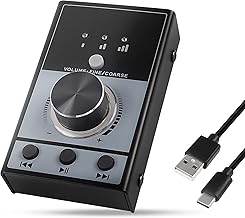
The XMSJSIY controller is best for users who want a physical desktop control for volume and media playback rather than a USB audio adapter with 3.5mm jacks. Its listed controls include rotating the knob to adjust volume, pressing it for one-click mute, and using play, pause, back, and forward functions.
The product description specifies a metal case, a solid rotary shaft, and a removable USB and Type-C cable. It is described as plug and play, with no driver required. Listed system compatibility includes Windows 10, 8, 7, Vista, XP, Mac, and Android. The listing also mentions use with a PC, phone, speaker, or multimedia setup.
- Best for: People who want quick access to computer volume and common playback commands at their desk.
- Why it was selected: Its combination of a rotary control, mute, and media buttons makes it more than a volume-only knob.
- Limitation: The listed features do not describe 3.5mm headphone or microphone ports, so it should not be treated as a headset adapter.
Choose this if your computer already has an audio connection and you mainly want tactile media control. If you need to add a headset jack, select a USB sound card instead.
DROK USB Volume Knob With Weighted Base

The DROK USB volume knob is best for buyers who want a simple system-volume control that is designed to stay in place on a desk. The listing describes a weighted base with internal metal blocks and four non-slip pads. These features distinguish it from a small controller that may move when turned.
It connects with a detachable 1.5-meter dual-port USB Type-C cable. The metal housing and solid rotary mechanism are listed construction details. The product is described as plug and play on Windows 10, 8, and 7, and Mac, with no driver installation needed for the stated volume-control function.
- Best for: Desktop users who value a stable, easy-to-reach knob for adjusting system volume.
- Why it was selected: The weighted, non-slip base and detachable cable are practical differences for a stationary setup.
- Limitation: The supplied features specify volume adjustment but do not list playback buttons, mic mute, or 3.5mm audio ports.
Choose this model if a stable volume knob is the priority. The listed operating-system support is narrower than the XMSJSIY model’s stated compatibility, so check the system list before buying.
USB 2.0 7.1-Channel Virtual Audio Adapter

This USB 2.0 adapter is best suited to shoppers comparing external sound cards that list virtual 7.1-channel audio, 3.5mm audio and microphone ports, and volume controls. Its product name also specifies a 3D stereo audio adapter and an internal amplifier.
Those listed features suggest a different role from a standalone multimedia knob: this product is described as an external audio device with connection ports and audio controls. It may be worth comparing with the 1Mii model if virtual surround is a priority, but the available product information does not provide enough detail to establish differences in supported systems, button layout, or microphone functions.
- Best for: Buyers seeking a USB external sound card with 3.5mm ports and listed virtual 7.1-channel audio.
- Why it was selected: The product name directly identifies audio connections, virtual surround, and volume controls.
- Limitation: No feature details beyond the product name were supplied, so compatibility and specific control functions cannot be confirmed here.
Choose it only after checking the current listing for device compatibility and included controls. If clear operating-system and microphone details matter, compare the more fully described VENTION or 1Mii options.
Buying Guide: How to Choose a USB Sound Audio Controller
Do you need an audio adapter or only a volume knob?
A USB sound card or audio adapter connects audio equipment through the ports it provides. The VENTION and 1Mii products are described as USB-to-3.5mm adapters. The fifth product also lists 3.5mm audio and microphone ports. In contrast, the XMSJSIY and DROK products are described as USB volume controllers; their supplied features do not list headphone or microphone jacks.
Check the role of the device before comparing controls. If your computer lacks a suitable 3.5mm connection, a volume-only knob may not solve that problem. If your existing audio setup works but its volume control is inconvenient, a desktop knob may be the more relevant category.
Which controls matter for calls, gaming, or media?
For calls and gaming, look for a dedicated microphone mute button and separate microphone and headphone level controls. The 1Mii listing identifies both separate volume adjustment and a mic-mute button. VENTION lists microphone and sound buttons, while the XMSJSIY listing emphasizes volume, mute, and playback commands.
For listening and general media use, decide whether you want only a rotary volume control or also play, pause, and track navigation. XMSJSIY lists those playback functions. DROK focuses on system volume and a physical knob with a weighted, non-slip base.
Is virtual surround sound important?
Virtual 7.1 audio is specifically listed for the 1Mii and the USB 2.0 7.1-channel adapter. It is not listed for the VENTION adapter or the two standalone volume knobs. If you want a virtual surround feature, compare the adapter’s documented system support and controls rather than assuming all USB sound controllers provide it.
Also distinguish a listed audio feature from a guaranteed improvement in every game or listening setup. The supplied descriptions identify virtual surround as a product function, but do not establish how it will perform with a particular headset, application, or computer.
How should you check compatibility?
Match the product’s stated operating systems to your computer. The 1Mii description specifies Windows 10, 7, and XP. DROK lists Windows 10, 8, and 7, plus Mac. XMSJSIY lists several Windows versions, Mac, and Android. VENTION names Windows and Mac among its supported device types. The fifth adapter’s supplied information does not specify an operating-system list.
For a headset, check whether the adapter supports the type of plug and microphone arrangement you use. The 1Mii listing mentions TRS and TRRS microphones. The VENTION description says it supports 3.5mm headphones, headsets, and microphones, but buyers should verify any device-specific requirements in the full listing.
What physical design details should you compare?
Consider where the controller will sit and how you will connect it. A compact adapter may be convenient to carry, while a desktop knob is intended for accessible adjustment at a workstation. DROK specifically lists a weighted base, non-slip pads, and a detachable 1.5-meter cable. XMSJSIY lists a metal case and removable USB and Type-C cable.
Do not assume that a product includes a particular cable arrangement or port just because it connects over USB. Review the complete listing for the connector details that match your computer and desk setup.
Frequently Asked Questions
What is the difference between a USB sound card and a USB volume knob?
A USB sound card can provide audio connections and sound-processing features, such as 3.5mm ports or virtual surround, when those are listed. A USB volume knob is primarily a physical control for adjusting system volume and may include media buttons. The two product types are not interchangeable unless the listing confirms the needed ports and functions.
Which option lists virtual 7.1 sound?
The 1Mii USB sound card and the USB 2.0 7.1-channel adapter list virtual 7.1 audio. The 1Mii listing also specifies mic mute, separate microphone and headphone volume adjustment, and LED indicators.
Which controller lists a microphone mute button?
The 1Mii product lists a dedicated microphone mute button. The XMSJSIY controller lists one-click mute, but its feature description does not identify that as microphone-only mute; it describes the function as a mute control.
Which products list Mac support?
VENTION lists Mac support, and the XMSJSIY and DROK volume controllers also name Mac compatibility. The supplied 1Mii compatibility list specifies Windows versions. The fifth product’s supplied information does not state operating-system compatibility.
Can a USB volume knob connect a 3.5mm headset?
Not based on the supplied features for the XMSJSIY or DROK models. Their descriptions list volume-control functions but do not specify 3.5mm audio ports. Choose a product that explicitly lists the required headphone and microphone connections.