
The best video screen for a car depends on how passengers will watch: choose a headrest player for an individual seat, a dual DVD system for two children, or an overhead display for group viewing. The NHOPEEW is best for buyers seeking a headrest screen with phone integration, while the XTRONS suits larger vehicles and shared viewing. Portable DVD options from GOnavidio and FANGOR offer different combinations of screen size, HDMI input, and battery power.
| Product | Best For | Key Difference |
|---|---|---|
| NHOPEEW 9-inch headrest player | Phone-connected headrest entertainment | Wireless and wired CarPlay and Android Auto |
| XTRONS 21.5-inch overhead player | Group viewing in larger vehicles | Large display with built-in speakers |
| GOnavidio 12-inch dual DVD players | Large portable screens and HDMI sources | Up to five hours of playback |
| WONNIE 10.5-inch dual DVD players | Two children watching together or separately | Two players with mounting hardware |
| FANGOR 7.5-inch dual-screen DVD player | Portable viewing with battery operation | About five hours of playback on one screen |
NHOPEEW 9-Inch Headrest Video Player

The NHOPEEW is a headrest-mounted video screen with a 9-inch IPS display. Its listed resolution is 1024 × 600 pixels. The product description also uses the phrase “1080P HD,” so buyers should distinguish that marketing wording from the stated screen resolution.
Best for: Buyers who want a headrest screen with phone and vehicle-interface features. The player supports wireless and wired Apple CarPlay and Android Auto, plus mirror link and voice control. The listing also mentions video websites and includes a 64GB memory card.
The included mounting bracket is described as fitting most automotive headrests, but the product is not suitable for seats without retractable posts or for wide retractable posts. Check the installation diagram and your headrest before choosing it. This is a better fit for a buyer prioritizing phone integration than for someone specifically seeking a disc-based DVD player.
XTRONS 21.5-Inch Overhead Player

The XTRONS is a 21.5-inch overhead display designed for larger vehicle spaces, including buses, coaches, and motorhomes. It has a Full HD IPS display, HDMI input, and built-in amplified speakers. Its wide viewing angles are intended to make the screen easier to see from different passenger seats.
Best for: Buyers who need a large screen for several passengers to watch together. The large display and integrated speakers make it more suited to shared viewing than a small headrest monitor. The product listing describes dedicated video playback for movies, series, and travel videos.
Choose this if screen size and group visibility matter more than individual viewing. Its 21.5-inch format is described for large vehicle interiors, so it may be less appropriate for buyers seeking a compact, portable screen for a typical backseat. The listed features do not specify a built-in battery or a DVD drive.
GOnavidio 12-Inch Dual Car DVD Players
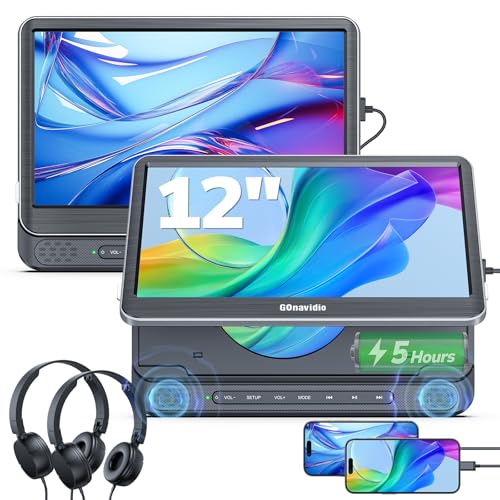
This GOnavidio set combines two 12-inch TFT screens with DVD playback and HDMI input. The listed display resolution is 1366 × 768 pixels. HDMI lets buyers connect supported devices such as phones, streaming devices, game consoles, and computers; the connected device must provide a suitable HDMI connection.
Best for: Families who want larger portable screens and more than DVD playback. The product supports HDMI input for video and gaming, and its built-in battery is listed for up to five hours of playback. That combination makes it a better choice for buyers who want to use external HDMI sources as well as discs.
The stated five-hour runtime is a product specification, not a guarantee for every use; actual playback time can depend on operating conditions. Buyers should also check the connection requirements of their intended source device before relying on HDMI. Choose this over a DVD-only screen if input flexibility and screen size are priorities.
WONNIE 10.5-Inch Dual DVD Players

The WONNIE system includes two 10.5-inch DVD players with 1280 × 800 pixel screens. Passengers can watch different movies on the two players, or connect them to play the same movie. Two headrest brackets and two mounting straps are included.
Best for: Families with two backseat passengers who may want separate programs or a shared movie. The dual-player setup, headrest mounting accessories, and support for DVD formats and USB or SD/MMC media make it a practical option for disc and file playback.
The listing specifies support for USB and SD/MMC cards up to 32GB, and says the maximum resolution for card playback cannot exceed 720 × 576 pixels. Blu-ray discs are not supported. If you plan to play downloaded video, check the listed file formats before buying rather than assuming every video file will work.
FANGOR 7.5-Inch Portable Dual-Screen DVD Player

This FANGOR set pairs a 7.5-inch DVD player with a separate LCD screen. The product description says the main player has a rechargeable battery rated for about five hours on a full charge. When connected to the second monitor, the listed playback time is about 2.5 hours. A car charger and AC adapter are included.
Best for: Buyers who want a portable DVD setup with battery operation and a second screen. It can send the same movie to both displays using AV and DC connections. Its AV output can also connect playback to a larger TV or projector, according to the listing.
The two-screen runtime is shorter than the stated single-player runtime, so consider that distinction for longer drives. This system is better for shared viewing of one movie than for two passengers who want different programs. Its 7.5-inch screens are also smaller than the 10.5- and 12-inch options in this comparison.
Buying Guide: How To Choose A Video Screen For A Car
Should you choose a headrest, overhead, or portable screen?
A headrest screen puts viewing in front of one passenger and is often a sensible choice when the backseat needs individual entertainment. Check how it attaches to the seat, especially if the mount requires retractable headrest posts. An overhead screen is designed for passengers to share a larger display, but its size and installation style may suit larger vehicle interiors better than compact cars.
Portable DVD players are another option when you want screens that can be mounted or repositioned. Some sets include two displays, while others pair a player with a separate monitor. Compare what is included: the number of screens, mounting pieces, and required cables can affect how the system works for your passengers.
Do you need DVD playback, HDMI, or phone integration?
DVD players suit buyers who already use movie discs or want a self-contained playback source. Check the supported disc and file formats before purchasing. A device that reads DVDs may not play Blu-ray discs or every video file stored on a USB drive or memory card.
HDMI input is useful when you plan to connect another video source, such as a compatible phone, computer, streaming device, or game console. Confirm that the source can output video over HDMI and that you have the connections needed. Phone integration features such as CarPlay and Android Auto are different from a conventional DVD drive; review the product’s listed functions to make sure they match your intended use.
How many screens do passengers need?
One large screen can work well when everyone wants to watch the same program. Two screens are more flexible for families: some dual-player products can show different movies, while others can synchronize playback for shared viewing. Verify that a specific model supports the viewing arrangement you need. A second screen may also require a cable connection and can affect battery life.
How important is battery life?
Some portable screens require a car charger, while others include a rechargeable battery. A battery can be useful when the vehicle is stopped or when you want fewer power cables during use. Compare the listed runtime for one screen with the runtime when a second display is connected. These figures are product specifications and may vary with use.
What should you check before installation?
- Measure the available space and confirm the display size suits the intended seat or vehicle interior.
- Check headrest post and seat compatibility against the seller’s mounting information.
- Confirm which cables, brackets, chargers, and screens are included.
- Match the player’s supported discs, memory-card capacity, and file formats to your media.
- For HDMI or phone features, verify that the source device supports the required connection.
- Consider audio preferences, including built-in speakers and headphone jacks where listed.
Frequently Asked Questions
Can a car video screen play different movies on two screens?
Some dual-player systems support different movies on each screen, while others are designed to mirror one movie. Check the specific product description because dual screens do not automatically mean independent playback.
Do car DVD players usually have built-in batteries?
Battery support varies by model. The FANGOR listing specifies a rechargeable battery, while some other car DVD systems require a car charger. Check the power details before buying.
Can I connect a phone to a car video screen?
Some screens list HDMI input, phone mirroring, or CarPlay and Android Auto. These features have different requirements, so confirm the screen’s supported connection and whether your phone can provide it.
Will every video file play from a USB drive or memory card?
No. Supported file types and storage limits vary by player. Review the listed formats and capacity limits, and do not assume a model supports a format that is not specified.
Is a larger screen always better for a car?
Not necessarily. A larger screen can help with shared viewing, but it needs more space and may be less suitable for individual seat mounting. Choose a size that fits the vehicle and the number of viewers.