
The best stereo amp for a computer depends on your speakers and how you want to connect: the Fosi Audio BT20A Pro suits users seeking a two-channel Bluetooth amp, while the Pyle PDA29BU.5 offers Bluetooth, RCA, USB, and other inputs. For a compact desktop setup, consider the Fosi BT10A or WOOPKER AK35. The WOOPKER AK45Pro adds microphone and multiple input options. These amplifiers are intended for passive-speaker setups; check your speaker connections and the amp’s input options before buying.
| Product | Best For | Computer Connection Options Listed |
|---|---|---|
| Fosi Audio BT20A Pro | Two-channel Bluetooth streaming | Bluetooth |
| Pyle PDA29BU.5 | More source inputs and microphone use | Bluetooth, RCA, USB, and more |
| Fosi Audio BT10A | Compact Bluetooth desktop setup | Bluetooth |
| WOOPKER AK35 | Desktop tuning and USB or SD playback | Bluetooth and USB or SD media inputs |
| WOOPKER AK45Pro | Multiple inputs and microphone controls | Bluetooth and RCA |
Fosi Audio BT20A Pro
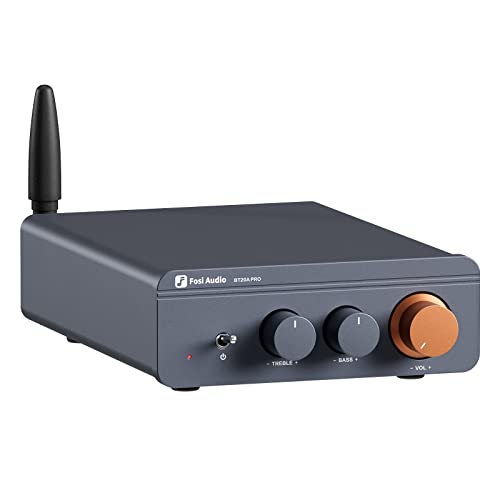
The Fosi Audio BT20A Pro is best for computer users who want a compact two-channel amplifier with Bluetooth streaming and passive-speaker support. Its listed features include a TPA3255 amplifier chip, Bluetooth 5.0, a pairing memory function, and replaceable plug-in op-amps. The brand lists an output rating of 300 watts per channel, along with signal-to-noise and distortion specifications.
Choose this model if wireless playback from a computer or other Bluetooth device is the priority. Its op-amp design may also appeal to buyers interested in changing components, although that feature is not necessary for ordinary computer listening. The product information provided does not list a USB or RCA computer input, so check the available connections if you plan to use a wired audio cable.
Best for: A two-channel Bluetooth setup with passive speakers. Limitation: The supplied feature information does not specify a wired computer input.
Pyle PDA29BU.5 Bluetooth Amplifier

The Pyle PDA29BU.5 is best for buyers who want more than one way to feed audio into a stereo amp. Listed connections and sources include Bluetooth, an RCA audio input, USB, an SD card slot, and FM radio. It also has two microphone inputs, an LED display, and support for two stereo speakers. The feature listing gives 200 watts peak power and 100 watts RMS continuous power.
For computer use, Bluetooth provides a wireless option, while the RCA input can serve a wired source when the computer and cable provide a compatible output. USB and SD playback offer additional ways to play stored audio, but they are not the same as a USB audio connection from a computer. Choose this model if input variety, microphone capability, or radio matters as much as desktop listening.
Best for: A computer and home-audio setup with several source options. Limitation: Its larger collection of features may be unnecessary for a simple desktop system.
Fosi Audio BT10A Compact Amplifier

The Fosi Audio BT10A is best for a small desk where Bluetooth streaming and a compact amplifier are the main requirements. It is a two-channel Class D amplifier rated in the product name at 50 watts per channel and uses a TPA3116 chip. Listed features include bass and treble controls, Bluetooth 5.0, and a wireless range of up to 50 feet. The supplied feature description also notes that a power adapter and power cord are included.
Choose the BT10A if you want to pair a computer wirelessly and adjust bass or treble from the amplifier. Its listed protection features include short-circuit, thermal, overvoltage, undervoltage, and DC protection. These details can help buyers compare its stated design with simpler models, but they do not replace checking speaker requirements.
Best for: A compact Bluetooth desktop system with passive speakers. Limitation: The listed computer connection is Bluetooth; no wired computer input is specified in the supplied features.
WOOPKER AK35 Stereo Amplifier
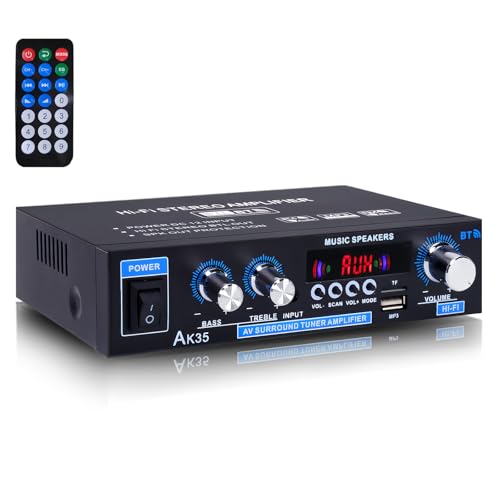
The WOOPKER AK35 is best for buyers who want a small two-channel amp with hands-on tone controls. Its listed output is 100 watts plus 100 watts peak and 30 watts per channel RMS. The feature description specifies Bluetooth 5.0, USB 2.0 and SD card inputs, separate bass and treble knobs, a volume control, and a remote control.
For a computer desk, Bluetooth offers a wireless playback route. The USB and SD slots are described for playing audio files from storage media; the product information does not establish that the USB port works as a direct USB audio connection to a computer. The amp’s compact form is presented as suitable for desks, shelves, bedrooms, offices, basements, and garages.
Best for: A desktop or small-room setup where bass and treble adjustment and media-card playback are useful. Limitation: Its listed RMS output is lower than its peak-power figure, so compare RMS ratings rather than relying only on peak numbers.
WOOPKER AK45Pro Stereo Amplifier

The WOOPKER AK45Pro is best for a buyer who wants several input types and separate controls for music and microphone sound. The listed connections include Bluetooth, RCA, microphone, USB, and SD card. Its controls include microphone volume, bass, treble, and master volume, and the package description mentions a remote control. The feature listing gives 400 watts plus 400 watts peak and 50 watts per channel RMS.
Choose this amp if the computer is one of several audio sources or if microphone input is important for the room. Bluetooth provides wireless computer playback, while RCA may support a wired connection when the computer has a suitable audio output. The feature list says the remote uses AAA batteries, which must be purchased separately.
Best for: A small office or room needing multiple sources, tone adjustment, and microphone controls. Limitation: The remote’s AAA batteries are not included, according to the supplied product information.
Buying Guide: How To Choose A Computer Stereo Amp
Do you need Bluetooth or a wired computer connection?
Start by deciding how the computer will send audio. Bluetooth is convenient for wireless playback and is listed for all five amplifiers here. A wired connection can be useful if you prefer a cable or need to connect another source. Among these picks, the Pyle lists an RCA audio input, and the WOOPKER AK45Pro lists RCA inputs. Confirm the computer’s available output and the cable requirements before choosing a wired setup.
Do not assume that a USB port on an amplifier is a USB audio input for a computer. The Pyle and WOOPKER models list USB playback features, but their descriptions refer to media inputs rather than confirming computer USB audio. If USB audio is essential, verify that the specific product supports that function.
Are your speakers passive or powered?
A stereo power amplifier is generally selected to drive passive speakers. Check the speaker’s own specifications and connection type before purchasing an amp. If the speakers are powered and already include amplification, they may not need a separate speaker amp. The supplied product information describes these models as amplifiers for stereo or passive-speaker systems, but it does not give all speaker-matching details.
Confirm that the amplifier’s speaker connections and operating requirements match your speakers. Do not select a product based only on a large wattage number. The source material gives different types of figures, including peak and RMS output; RMS ratings are more useful for comparing continuous output when they are provided.
How much power should you compare?
Compare like with like. The Pyle listing states 200 watts peak and 100 watts RMS continuous power. The WOOPKER AK35 lists 100 watts per channel peak and 30 watts per channel RMS. The WOOPKER AK45Pro lists 400 watts per channel peak and 50 watts per channel RMS. The Fosi BT10A is named as a 50-watt-per-channel model, while the BT20A Pro is listed at 300 watts per channel.
These figures do not, by themselves, tell you how loud a system will sound in a particular room. Speaker sensitivity, listening distance, room size, and how the product’s output is specified all matter. Use the amp’s detailed specifications and your speaker documentation to check suitability.
Which controls and extra inputs are useful?
Simple computer listening may only require volume and a dependable connection. Bass and treble controls are useful if you want to adjust tonal balance at the amplifier. The Fosi BT10A offers bass and treble controls, while the WOOPKER AK35 and AK45Pro add dedicated physical adjustment. The AK45Pro also has microphone-volume control, and the Pyle includes two microphone inputs.
For multiple sources, compare the specific inputs instead of choosing by the number of features alone. RCA, Bluetooth, USB, SD, and microphone connections serve different purposes. Select the inputs that match your computer, other audio sources, and intended use.
Will the amplifier fit your desk?
Check the product dimensions and allow room for cables and ventilation before placing an amplifier beside a computer monitor. The Fosi BT10A and BT20A Pro are described as compact or mini models. The WOOPKER AK35 and AK45Pro are also presented as compact designs. The provided information does not include exact measurements, so consult the product listing if desk space is limited.
Frequently Asked Questions
Can I connect a computer to a stereo amplifier?
Yes, if the computer and amplifier share a compatible connection. These listed models include Bluetooth options, and some also list RCA inputs. Check the computer’s outputs and the amplifier’s input specifications before connecting.
Is Bluetooth enough for computer audio?
Bluetooth can provide a convenient wireless connection for everyday playback. Choose it if avoiding a cable matters. If you require a wired connection, verify the amplifier’s inputs and the computer’s audio output instead.
Do these amplifiers work with passive speakers?
The product descriptions present these models as stereo amplifiers for speakers, with the Fosi BT20A Pro explicitly described for passive speakers. Check your speaker documentation and the amplifier’s connection and output specifications to confirm a suitable match.
Does an amplifier’s USB port connect directly to a computer?
Not necessarily. A USB port may be intended for playing files from a flash drive rather than receiving computer audio. Confirm that the manufacturer specifically identifies the port as a computer audio input before relying on it for that purpose.
What is the difference between peak and RMS power?
Peak power describes a maximum output figure, while RMS is commonly used to describe continuous power. Compare figures with the same measurement basis, and check the amp’s full specifications alongside the speaker’s requirements.
Which option is best for multiple audio sources?
The Pyle PDA29BU.5 lists Bluetooth, RCA, USB, SD, and FM radio, while the WOOPKER AK45Pro lists Bluetooth, RCA, microphone, USB, and SD inputs. Choose according to the sources you actually plan to connect.