
The best choice depends on whether you need to decode a digital 5.1 signal or create virtual surround from stereo audio. For analog 5.1 outputs from optical or coaxial sources, the SOUTHSKY and Zopsc decoders are the closest matches. The HDMI extractor listed here handles audio extraction, while the PROZOR converter and VPFET extractor have narrower roles and should not be mistaken for full 5.1 analog decoders.
| Product | Best suited for | Key distinction |
|---|---|---|
| SOUTHSKY 5.1/2.1 Decoder | Older receivers needing six RCA outputs | Switchable 5.1- and 2.1-channel modes |
| 5.1CH Digital Sound Decoder | HDMI and digital-source setups | Claims virtual 5.1 processing for stereo sources |
| PROZOR Digital-to-Analog Converter | Stereo analog output from optical audio | Listed title describes L/R RCA and 3.5 mm output |
| VPFET HDMI Audio Extractor | Separating audio from an HDMI connection | Extractor, not a listed six-channel analog decoder |
| Zopsc 5.1 Channel Audio Decoder | Discrete analog surround output | Optical or coaxial input to six analog channels |
SOUTHSKY 5.1/2.1 Audio Decoder

Best for: Owners of older AV receivers or powered speaker systems that accept six analog RCA inputs. This converter is a strong fit when the source sends supported digital audio over optical or coaxial and the receiving equipment needs analog connections.
The SOUTHSKY has two optical inputs, one coaxial input, and a 3.5 mm auxiliary input. Its six RCA outputs are labeled for front left, front right, surround left, surround right, center, and subwoofer. A one-key switch selects 5.1- or 2.1-channel mode. The listed features include LPCM and Dolby, DTS, and AC-3 decoding, plus input-signal memory after restart.
Why it was selected: It clearly specifies both six-channel analog outputs and a switchable stereo mode, directly addressing common old-receiver connection needs. Limitation: A six-output decoder does not automatically make every stereo source discrete 5.1. Check the source’s audio format and output settings; the supplied details do not promise that every two-channel signal is upmixed into separate surround channels.
5.1CH Digital Sound Decoder

Best for: Buyers who need a multi-input device for HDMI and other digital sources and specifically want virtual surround processing for 2.0 or 2.1 audio. The product information says it accepts HDMI, optical, coaxial, and USB inputs and applies virtual 5.1 processing to stereo sources.
Its listed video features include HDMI 2.0b support at 4K and 60 Hz, backward compatibility with HDMI 1.4, HDR, 3D passthrough, and HDCP 2.3/2.2 compliance. The audio-format list includes DTS, DTS-ES, Dolby Digital (AC3), FLAC, APE, AAC, MP3, and more. These format claims make it relevant to varied digital-source setups, but they do not by themselves establish which analog outputs are provided.
Why it was selected: Among the listed products, it expressly describes virtual 5.1 processing for two-channel sources. Limitation: The supplied details do not specify the physical output connectors or explain whether its 5.1 output is discrete analog, digital, or virtual. Confirm the output type and channel routing before choosing it for a receiver with six RCA inputs.
PROZOR 192 kHz Digital-to-Analog Converter

Best for: A buyer who needs a basic optical digital-to-stereo analog connection, rather than a confirmed 2-channel-to-5.1-channel conversion. The product name describes a Toslink/SPDIF-to-analog L/R RCA and 3.5 mm adapter and mentions HDTV, Blu-ray, DVD, and game-console sources.
Why it was selected: It is relevant to people comparing digital audio converters and highlights an important distinction: converting digital audio to analog stereo is not the same as producing six-channel surround. The product title also identifies 192 kHz support and a magnetic-ring power cord.
Limitation: The supplied product information does not list six discrete analog outputs, surround decoding, or stereo upmixing. Do not choose it when your receiver requires separate front, center, surround, and subwoofer analog inputs unless the product’s current specifications confirm that capability.
VPFET HDMI Audio Extractor
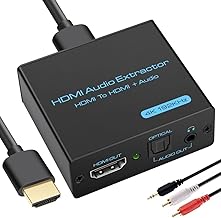
Best for: Setups that need to separate audio from an HDMI connection. The product name lists HDMI input and optical and 3.5 mm audio connections, with support for 4K HDMI and HDCP, as well as DTS 5.1 and PCM audio.
An audio extractor can be useful when a display or source arrangement needs a separate audio path. However, “DTS 5.1” in the product name does not necessarily mean that the device decodes a 5.1 signal into six analog RCA channels. The listed title identifies optical and 3.5 mm connections, not a six-channel analog output bank.
Why it was selected: It may suit buyers whose main requirement is HDMI audio extraction and whose receiving equipment can accept the output format. Limitation: Choose a different type of device if you specifically need six discrete analog outputs or stereo-to-surround upmixing; those functions are not established by the supplied information.
Zopsc 5.1 Channel Audio Decoder

Best for: Home theater users who need optical or coaxial digital input converted to six analog surround channels. The listed outputs are front left/right, center, surround left/right, and subwoofer, making the product a close match for powered systems or receivers with corresponding analog inputs.
The product description lists DTS and AC-3 decoding and says it is intended for sources such as Blu-ray players, gaming consoles, and streaming devices. It also describes compatibility with TVs, DVD players, and set-top boxes that provide optical or coaxial digital output. Its six discrete outputs make it more directly suited to analog 5.1 wiring than a basic stereo DAC.
Why it was selected: Its stated digital inputs, surround decoding, and six named analog channels align with a standard 5.1 connection requirement. Limitation: The supplied details do not say that it converts arbitrary stereo input into discrete 5.1. Confirm that the source can provide a supported surround format when discrete surround channels are required.
Buying Guide: How to Choose a 2-Channel to 5.1-Channel Converter
Do you need a decoder, an upmixer, or an extractor?
These devices solve different problems. A decoder reads a supported encoded surround format, such as Dolby Digital or DTS, and routes it to appropriate channels. An upmixer processes stereo audio to create a surround-style output. An extractor separates audio from an HDMI connection; extraction alone does not mean the device creates 5.1 analog sound.
Before buying, identify the result you expect. If a TV sends only two-channel PCM, a decoder that handles Dolby Digital may still receive only stereo. If you want virtual surround from that stereo signal, look for an explicit upmixing or virtual 5.1 feature and verify the output connections.
Does the converter have the right inputs and outputs?
Match the converter’s inputs to the source device and its outputs to the receiver or speakers. Optical Toslink and coaxial SPDIF are digital connections; RCA is an analog connection. A six-RCA-output converter typically labels the channels FL, FR, center, SL, SR, and subwoofer. A device with only L/R RCA outputs is a stereo converter, not a confirmed six-channel decoder.
- Choose optical input if the source provides Toslink audio output.
- Choose coaxial input if the source and converter both have coaxial SPDIF connections.
- Choose HDMI extraction when audio must be separated from HDMI, but verify the extractor’s audio outputs.
- Confirm the receiving equipment has matching inputs for every channel you intend to use.
Will two-channel audio become true 5.1 surround?
Not automatically. A stereo signal contains two channels. A device may pass those channels as stereo, distribute them through a virtual processing mode, or apply an upmixing process. Those behaviors are not interchangeable with decoding a source that already carries discrete 5.1 audio. Look for explicit language about stereo upmixing or virtual surround and confirm whether the result is provided on six separate outputs.
Which audio formats should you check?
Compare the converter’s supported formats with the source device’s audio output setting. The listed products mention formats including LPCM, Dolby Digital/AC-3, DTS, and PCM, but the terms are not interchangeable. A source set to a format the converter cannot decode may produce no audio or an unintended channel layout. Check both the source settings and converter specifications, especially when connecting a TV or streaming device.
Is an HDMI model necessary?
An HDMI model can be useful when the source uses HDMI and you need to route video onward while extracting audio. For older receivers with analog 5.1 inputs, however, an HDMI extractor is only suitable if it also provides the audio outputs and decoding behavior your system requires. HDMI video support, including 4K or HDR passthrough, does not prove that the device has six-channel analog output.
What should you verify before connecting?
- Check the number and type of input ports on the converter.
- Confirm whether the output is stereo analog, digital audio, or six-channel analog.
- Match the converter’s supported audio formats to the source’s output settings.
- Look for explicit stereo-to-5.1 processing if your content is only two-channel.
- Review the channel labels and connect each output to the matching receiver input.
Frequently Asked Questions
Can a 2-channel signal be converted into true 5.1 sound?
A device can process stereo into virtual or upmixed surround, but it cannot recover separate original surround content that was not present in the two-channel signal. Check whether the product specifically supports upmixing and whether its outputs are discrete six-channel analog.
Is a 5.1 decoder the same as a stereo-to-5.1 converter?
No. A decoder converts supported encoded surround audio into channel outputs. A stereo-to-5.1 upmixer processes two-channel audio to create a surround-style presentation. A product may perform one function without performing the other.
Will an optical-to-RCA converter work with a 5.1 receiver?
It depends on the outputs. A converter with only left and right RCA outputs provides stereo analog audio. A receiver that requires six analog inputs needs a converter that explicitly provides six discrete channel outputs.
Why might a converter produce only stereo?
The source may be sending PCM stereo, the converter may support only two-channel analog output, or the selected mode may be 2.1 rather than 5.1. Check the source audio setting, supported formats, converter mode, and output connectors.
Does support for DTS 5.1 guarantee six RCA outputs?
No. Format support describes the audio signal a device can handle; it does not establish which physical outputs it has. Verify that the specifications explicitly list six analog channels if that is what your receiver requires.