
For charging a laptop in a car, choose a USB-C car charger that matches the laptop’s power requirements, or use a car power inverter if the laptop charges through a wall-style AC adapter. The 100W USB-C charger is best for compatible USB-C laptops; the PWR+ charger is a lower-output option for listed devices; and the FOVAL, PiSFAU, and YSOLX inverters provide AC outlets for compatible laptop adapters. These are laptop power accessories, not chargers for a vehicle’s 12-volt starter battery.
| Product | Best suited for | Power approach |
|---|---|---|
| 100W USB-C Laptop Car Charger | Compatible USB-C laptops needing up to 100W | Direct USB-C charging |
| PWR+ USB-C Laptop Car Charger | Listed laptops needing up to 90W | Direct USB-C charging |
| FOVAL 200W Car Power Inverter | Travelers needing AC outlets and USB ports | 12V DC to AC |
| PiSFAU 200W Car Power Inverter | Users needing dual AC outlets and USB charging | 12V DC to AC |
| YSOLX 300W Portable Car Power Inverter | Road trips and camping with multiple devices | 12V DC to AC, USB-A/C |
100W USB-C Laptop Car Charger

This is the most direct choice for a compatible laptop that accepts USB-C charging. The listed input is 12V–24V, and the charger supports several output profiles, including 20V at up to 5A, with a stated maximum power of 100W. The product description says it supports lower power levels including 90W, 85W, 65W, 61W, 45W, and 30W.
Best for: Owners of compatible Dell, MacBook, HP, Lenovo, Acer, Google, or Samsung laptops who want to charge without plugging in a separate AC power brick. Its broad listed model compatibility and 100W maximum make it the higher-output direct USB-C option in this group.
Limitation: Check the exact laptop model and its USB-C charging requirements before buying. The product listing names many supported models, but that does not establish compatibility with every device from those brands.
PWR+ USB-C Laptop Car Charger

The PWR+ adapter connects to a vehicle’s 12V–24V input and supplies USB-C power at listed profiles up to 20V and 4.5A. Its maximum output is stated as 90W, with support for 30W, 45W, 61W, 65W, 85W, and 90W. The listing also specifies a 10-foot power cord and names a range of Dell, Lenovo, Apple, Razer, Microsoft, Huawei, Google, Samsung, Asus, and Acer devices.
Best for: Buyers whose laptop appears in the compatibility list and needs no more than the listed 90W maximum. The long cord can be useful when the vehicle’s power outlet is not close to the passenger’s seat or laptop.
Limitation: This is a USB-C adapter, so confirm that the laptop accepts charging through USB-C and that its required wattage is within the output range. Do not assume a listed brand means every model is supported.
FOVAL 200W Car Power Inverter
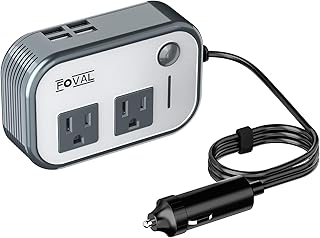
The FOVAL inverter converts a vehicle’s 12V DC input to 110V AC and provides two standard AC sockets plus four USB charging ports. The listing describes a maximum power rating of 200W and says the converter provides power up to 180W. It also lists protection features for short circuits, low voltage, overcharging, overvoltage, overload, and overheating, along with a built-in fuse and cooling fan.
Best for: Laptop owners who charge through a conventional AC adapter and want extra ports for phones or tablets. It is also a practical format for travel because the listed dimensions are 3.2 × 2.5 × 1.5 inches and the weight is 8 ounces.
Limitation: Match the laptop adapter’s power draw to the inverter’s stated output limits. An inverter creates AC power, so it is not as direct as a USB-C car charger for a laptop that supports USB-C charging.
PiSFAU 200W Car Power Inverter
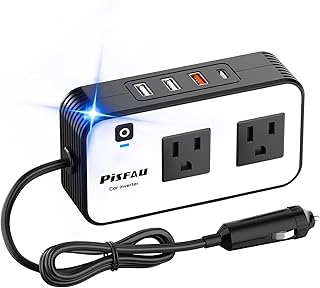
The PiSFAU model is described as a 12V DC-to-110V AC car inverter with two AC outlets and USB-A/USB-C charging. Its name lists 4.8A and 24W for the USB charging output, along with use for laptops, camping, and road trips. This arrangement lets a compatible laptop use its AC adapter while other devices use the USB ports.
Best for: Travelers who want two AC outlets in a portable vehicle adapter and also need USB charging. It was selected as an alternative to the FOVAL inverter for shoppers comparing products with dual AC outlets.
Limitation: The supplied product information does not specify detailed USB-C voltage profiles or protections. Check the laptop adapter’s power requirements and the full product specifications before relying on it for a particular device.
YSOLX 300W Portable Car Power Inverter

The YSOLX inverter is listed with two 110V AC outlets and four USB-A/C charging ports, for six output ports in total. Its name identifies it as a 300W vehicle inverter, and the description highlights charging laptops, cameras, phones, and other devices during travel or camping. It also describes an intelligent cooling fan designed to operate more quietly and steadily during extended use.
Best for: Buyers who want several connection options for a laptop and other electronics on a road trip or at a campsite. Its combination of AC outlets and USB-A/C ports is useful when a group carries devices with different charging methods.
Limitation: The listing information provided does not state USB-C output wattage or detailed laptop-adapter limits. Confirm the specifications for the port you plan to use and avoid exceeding the inverter’s supported load.
Buying Guide: How To Choose A Laptop Car Charger
“Laptop car battery charger” can refer to different equipment. The products here take power from a vehicle’s 12V outlet and deliver power to a laptop. They do not recharge the car’s starter battery. If the goal is to charge a vehicle battery, look for a dedicated automotive battery charger that matches the battery type and voltage.
Should You Choose USB-C Or An Inverter?
A direct USB-C car charger is usually the simpler option when the laptop supports USB-C charging. It connects the vehicle outlet to the laptop with a compatible USB-C power connection, without requiring the laptop’s AC adapter. Choose a direct charger only after checking the laptop’s charging port, required wattage, and supported power profiles.
An inverter is the better match when the laptop charges through a conventional AC adapter, or when you also want standard AC outlets for other equipment. The laptop’s adapter plugs into the inverter, which converts vehicle DC power into AC power. This adds an extra device and connection, so check the inverter’s output rating against the adapter’s requirements.
How Much Wattage Does A Laptop Need?
Check the power rating printed on the laptop’s original charger or in the laptop’s documentation. The charger should supply the wattage and voltage the laptop requires. A charger with a maximum rating above the laptop’s requirement may be suitable only if it also supports the required charging standard and voltage profile.
For the products in this list, the 100W USB-C model has the highest stated USB-C output among the direct car chargers, while the PWR+ model lists up to 90W. Inverters are rated differently: compare the laptop AC adapter’s input power needs with the inverter’s stated output limit. Do not treat an inverter’s headline wattage as a guarantee that every accessory can run at that level in every vehicle.
Will It Work With Your Laptop Model?
Start with the exact model number, not just the manufacturer. Product compatibility lists can cover selected models and generations while excluding others from the same brand. For a USB-C charger, verify that the laptop accepts power through USB-C and that the charger supports an appropriate output profile. For an inverter, verify that the laptop’s original AC adapter can be powered within the inverter’s limits.
Check the connector and cable arrangement as well. The 100W product describes a Type-C connector and a 1.8-meter cord. PWR+ lists a 10-foot power cord. Those details may affect where the laptop can sit in the vehicle, but cable length alone does not confirm device compatibility.
How Many Ports Do You Need?
A single direct USB-C connection can keep a laptop setup straightforward. If passengers need to charge phones and other electronics at the same time, compare the number and type of ports. The FOVAL has two AC sockets and four USB ports. PiSFAU is described with two AC outlets and USB-A/C charging. YSOLX lists two AC outlets and four USB-A/C ports.
Multiple ports do not necessarily mean every connected device can draw maximum power simultaneously. Review the product’s full output specifications and consider the total load of all connected devices. This is especially important when a laptop and several accessories are plugged in at once.
What Should You Check For Vehicle Use?
Confirm that the product’s input matches the vehicle’s power outlet. The direct chargers and inverters listed here are designed for vehicle power, but the 100W USB-C and PWR+ listings specifically state 12V–24V input. Do not substitute a household wall charger or connect a product to an unsupported power source.
For an inverter, check its output rating, ventilation needs, and any protection information in the full listing. The FOVAL description specifies several protections and a cooling fan. The YSOLX description mentions an intelligent cooling fan. The provided PiSFAU information does not give the same level of protection detail, so consult its complete specifications before choosing it for extended use.
When Is A Direct Charger Better Than An Inverter?
Choose a direct USB-C charger when the laptop supports that charging method and the adapter’s output meets the laptop’s requirements. It avoids using a separate AC power brick and keeps the setup focused on laptop charging. Choose an inverter when AC power is necessary or when outlets for multiple types of equipment matter more than a single direct connection.
For a listed compatible laptop requiring up to 90W, PWR+ is the lower-maximum direct option. For a compatible laptop needing more output, the 100W USB-C model may be a better fit, subject to exact model and profile compatibility. For AC power and several ports, compare the FOVAL, PiSFAU, and YSOLX by their stated outputs and connection types.
Frequently Asked Questions
Can I use a laptop car charger while the vehicle is off?
The product information provided does not specify whether the vehicle outlet remains powered when the engine is off. Outlet behavior varies by vehicle. Check the vehicle manual and avoid drawing power longer than appropriate, since accessories use energy from the vehicle’s electrical system.
Can a car inverter charge any laptop?
No. The laptop’s AC adapter and the inverter’s output must be compatible, and the laptop adapter’s power requirements must fit within the inverter’s supported limits. Confirm the specific laptop and adapter specifications before use.
Is a 100W USB-C car charger suitable for every USB-C laptop?
No. A USB-C port does not by itself confirm that a laptop accepts charging through that port. Check the laptop’s documentation, required wattage, and supported charging profiles, then compare them with the charger’s specifications.
What is the difference between a laptop car charger and a car battery charger?
A laptop car charger draws power from a vehicle outlet to charge a laptop. A car battery charger is equipment designed to recharge the vehicle’s battery. The products in this article are laptop power accessories, not vehicle battery chargers.
Can an inverter power a laptop and other devices at the same time?
It may, if the inverter has the required ports and the combined load stays within its supported output. Check the full output specifications for simultaneous use rather than assuming each port can provide its maximum independently.