
The best wireless speaker transmitter for a TV depends on the audio connection you need and whether you want to use your own speaker or buy a complete listening system. The 1Mii B06TX is a strong fit for sending TV audio to two Bluetooth speakers or headphones. The 1Mii 2.4GHz set is better for connecting a TV to a powered speaker, while the Evinof is a portable TV speaker designed to bring dialogue closer to the listener.
| Product | Best For | Connection Type |
|---|---|---|
| 1Mii B06TX | Two Bluetooth listening devices | Bluetooth transmitter; optical, coaxial, AUX, and RCA inputs listed |
| Evinof Wireless TV Speaker | Portable, dialogue-focused listening | 2.4GHz TV mode and Bluetooth mode |
| 1Mii 2.4GHz Audio Set | TV-to-powered-speaker connection | Dedicated transmitter and receiver; AUX/RCA |
| SOOMFON Bluetooth Adapter | Two Bluetooth devices and status display | Bluetooth TX/RX; optical, AUX, and RCA |
| Monster TVlink 300 | A ready-to-use headphone setup | Transmitter base with headphones |
1Mii B06TX Bluetooth TV Transmitter

The 1Mii B06TX sends audio from a TV to Bluetooth headphones or speakers. Its listed connections include optical, coaxial, AUX, and RCA audio inputs, giving buyers several ways to connect a television. The product is a transmitter, not a Bluetooth receiver, so its intended role is to send TV sound outward to wireless devices.
This model is best for households that already own Bluetooth speakers or headphones and want the option to connect two devices at once. The manufacturer describes a two-device connection and automatic reconnection after startup, which can make shared viewing more convenient. It also emphasizes simple operation: connect the audio cable, power on, and pair the listening devices.
- Best for: Sending TV audio to as many as two Bluetooth headphones or speakers.
- Why it stands out: Multiple listed TV audio inputs and a two-device connection option.
- Limitation: It does not receive Bluetooth audio from a phone or tablet. Confirm that the TV has a compatible audio output before choosing it.
Evinof Portable Wireless TV Speaker

The Evinof is a wireless TV speaker rather than a standalone transmitter for connecting an existing speaker. Its dedicated TV mode is described as using voice enhancement to make dialogue stand out, while Bluetooth mode is intended for music and other general listening. The unit uses a 2.4GHz wireless connection for TV audio and is listed with an open-area range of up to 98 feet.
Choose this model if the main goal is to place a speaker closer to the listener, such as near a chair or in another listening area. Its mode selection gives it a different use from a small adapter: it is a complete portable speaker with its own TV-focused sound profile. The product information also lists a 24-hour battery and optical, AUX, RCA, and USB-C connections.
- Best for: Listeners who want a portable speaker and clearer emphasis on TV dialogue.
- Why it stands out: Separate TV and Bluetooth modes, plus a stated 2.4GHz connection range.
- Limitation: This is not simply a transmitter to pair with a speaker you already own; check the listed connections and intended setup.
1Mii 2.4GHz TV Audio Transmitter Set
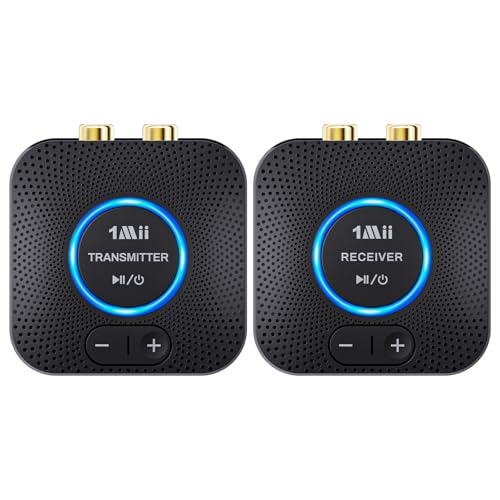
This 1Mii set includes one transmitter and one receiver for sending audio wirelessly from a TV or other source to a powered speaker, amplifier, or home theater component. It uses a dedicated 2.4GHz link rather than Bluetooth pairing. The listed connections include AUX and RCA, and the receiver can provide simultaneous AUX and RCA output to two powered speakers.
It is best for buyers who want to keep a wired powered speaker but remove the long audio cable between that speaker and the television. The product listing states a 25-millisecond latency and a range of up to 262 feet. The transmitter and receiver are described as automatically powering on and entering pairing mode after connection to power.
- Best for: Connecting a TV to a powered speaker or amplifier over a 2.4GHz link.
- Why it stands out: A paired transmitter-and-receiver kit with AUX/RCA connections and volume control.
- Limitation: The listing says it is not suitable for subwoofers. It is designed for powered audio equipment, not passive speakers on their own.
SOOMFON Bluetooth Transmitter With LCD

The SOOMFON adapter supports Bluetooth transmitter and receiver functions. In transmitter mode, it can send TV audio to two Bluetooth headphones or speakers at the same time. Its listed inputs include optical, 3.5mm AUX, and RCA, and its LCD display shows connection status. The manufacturer also describes automatic reconnection for devices that have already been paired.
This adapter is best for a buyer who wants Bluetooth flexibility and an on-device display rather than a dedicated 2.4GHz speaker link. It can also serve as a receiver for sending audio from a phone to a wired speaker system. The stated Bluetooth range is 10 to 30 meters, with the shorter range applying when obstacles are present.
- Best for: Connecting two Bluetooth listening devices or switching between transmit and receive uses.
- Why it stands out: Optical, AUX, and RCA connections, two-device transmission, and an LCD status display.
- Limitation: For optical input, the product information says to set the TV audio output format to PCM. Check the TV’s audio settings before setup.
Monster TVlink 300 Wireless Headphones

The Monster TVlink 300 is a complete wireless headphone system with a transmitter base, rather than a general-purpose adapter for a separate Bluetooth speaker. The base connects to a television using the included optical, AUX, or RCA cables. The product description says no pairing is needed and lists Bluetooth 5.3 with latency under 40 milliseconds.
This set is best for someone who wants personal TV listening without separately selecting and pairing headphones. Its over-ear headphones have soft protein ear cushions, an adjustable headband, and a foldable design, according to the product details. The description positions the setup for simple use, including for seniors and first-time users.
- Best for: A ready-made TV headphone setup with a matching transmitter base.
- Why it stands out: Multiple listed TV connections and a no-pairing setup claim.
- Limitation: This is a headphone system, not a transmitter for your existing wireless speaker. Choose another option if speaker output is the priority.
Buying Guide: How to Choose a Wireless TV Audio Transmitter
Do you need a transmitter, a wireless speaker, or a complete set?
A transmitter sends sound from a TV to another device. A Bluetooth transmitter is intended to connect with Bluetooth headphones or speakers, while a dedicated transmitter-and-receiver kit typically sends audio to a matching receiver connected to powered speakers. A portable TV speaker, such as the Evinof, is a speaker system intended to play TV sound nearby. A headphone package, such as the Monster set, includes both the listening device and its transmitter base.
Start by deciding whether you want to use equipment you already own. If you have a Bluetooth speaker, look for a Bluetooth transmitter with a TV-compatible input. If you have a powered speaker with AUX or RCA input, a paired 2.4GHz kit may be a better fit. If you want a simple personal listening solution, a complete headphone system avoids the need to find a separate pair of wireless headphones.
Which TV audio output should you check?
Look at the television’s available audio outputs before buying. The products in this comparison list optical, coaxial, AUX, or RCA connections in different combinations. Match the TV’s output to the transmitter’s input, or confirm that you have an appropriate cable or adapter. Connector names can look similar to other ports, so check the TV manual or the labels near its ports.
Optical connections may also require an audio-format setting. The SOOMFON product information specifically says to set the TV’s optical output to PCM. If your TV offers several digital sound formats, check the transmitter instructions and television settings rather than assuming every format will work.
Bluetooth or 2.4GHz: which wireless link is better for your setup?
Bluetooth transmitters are a practical choice when you want to connect to Bluetooth headphones or speakers. Some models in this list can connect to two Bluetooth devices, which can help two people listen at once. A dedicated 2.4GHz transmitter-and-receiver set is intended to connect the TV to its matching receiver, which then connects to powered audio equipment.
Do not compare range figures without considering how they are measured. Product descriptions may state an open-area maximum, while walls and other obstacles can reduce usable distance. For a real room, consider the route between the TV and the listening device, including walls, furniture, and nearby wireless equipment.
How important is audio-video synchronization?
When watching TV, a delay between speech and the picture can be distracting. Some product listings provide latency figures, including claims of 25 milliseconds for the 1Mii 2.4GHz set and under 40 milliseconds for the Monster TVlink 300. These are manufacturer-provided specifications, not a guarantee of identical results with every TV and listening device.
Bluetooth performance can depend on the connected device as well as the transmitter. If synchronization is a priority, check whether the transmitter and receiving device support compatible low-latency features. A dedicated wireless kit or a bundled headphone system may be easier to assess because the transmitter and receiver are supplied as a matched setup.
Will you connect one device or two?
If two people need to listen privately, verify that the transmitter supports simultaneous connections rather than merely storing two paired devices. The 1Mii B06TX and SOOMFON listings describe connecting two headphones or speakers at the same time. Check whether your chosen listening devices can be used together and whether the product instructions identify any limitations in dual-device mode.
If only one person needs clearer TV sound, a portable speaker placed nearby may be more convenient than headphones. A dialogue-focused mode can help make speech stand out, but it does not replace checking the speaker’s placement, connection method, and volume controls for your room.
What setup details can prevent problems?
- Confirm that the transmitter’s input matches an available TV audio output.
- Check whether the receiving speaker is powered or needs a separate amplifier.
- For Bluetooth, verify that the speaker or headphones support Bluetooth audio reception.
- For an optical connection, check the TV’s digital audio output setting and the adapter’s instructions.
- Consider where the receiver or speaker will sit and whether the wireless path crosses walls.
- Choose a complete speaker or headphone system if you prefer not to combine separate components.
Frequently Asked Questions
Can I use a wireless TV transmitter with any speaker?
No. The speaker must support the transmitter’s connection method. A Bluetooth transmitter needs a Bluetooth audio receiver, while a 2.4GHz transmitter-and-receiver kit generally needs its matching receiver connected to a powered speaker or amplifier.
Can a Bluetooth TV transmitter connect to two speakers?
Some models support two simultaneous Bluetooth connections, but not all do. Check the specific product description for a dual-connection feature and confirm that it applies to simultaneous playback.
Is a Bluetooth transmitter the same as a Bluetooth receiver?
No. A transmitter sends audio from a source such as a TV to wireless headphones or speakers. A receiver accepts audio from a Bluetooth source, such as a phone, and sends it to wired speakers or a stereo system. Some adapters support both modes.
Can I connect a wireless transmitter to passive speakers?
A transmitter does not normally power a passive speaker. Use a powered speaker or connect the wireless receiver to an amplifier that can drive the speakers. Check the product’s output connections and requirements before buying.
What should I choose for clearer TV dialogue?
A portable TV speaker with a dedicated voice or TV mode may suit listeners who want dialogue emphasized and the speaker placed closer to them. A transmitter alone does not enhance speech; it only sends audio to a compatible listening device.
Why is there no sound through an optical connection?
Check that the optical cable is firmly connected, the TV audio output is set correctly, and the transmitter supports the selected format. Some products, including the listed SOOMFON adapter, specify PCM as the TV’s optical output format.