
The best HDMI audio breakout device depends on the video resolution you need and the audio connection your speakers or receiver accept. The VPFET is suited to buyers choosing between optical and 3.5mm output; the J-Tech Digital is better for higher-refresh video; and the Avedio Links offers both optical and analog connections with 4K at 30Hz pass-through. These devices extract sound from an HDMI source, but they are adapters rather than simple cables, and most do not extract audio from a TV’s ARC or eARC output.
| Product | Best For | Video Support Stated | Audio Outputs |
|---|---|---|---|
| VPFET HDMI Audio Extractor | Selectable stereo or optical audio | Up to 4K at 30Hz | Optical, 3.5mm |
| HDMI to 3.5mm Audio Adapter | Compact, basic analog output | Up to 4K at 30Hz | 3.5mm |
| HDSUNWSTD HDMI Extractor | 1080p systems needing HDMI pass-through | Up to 1080p | Optical, 3.5mm |
| J-Tech Digital JTD18G-H5CH | Higher-resolution and high-refresh video | 4K at 60Hz | SPDIF, 3.5mm |
| Avedio Links HDMI Extractor | 4K at 30Hz with analog or optical audio | Up to 4K at 30Hz | Optical, RCA, 3.5mm via cable |
VPFET HDMI Audio Extractor
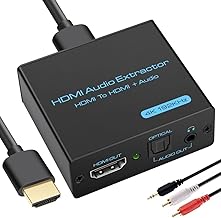
Best for: Buyers who need a choice between optical digital audio and 3.5mm stereo. This extractor takes audio from an HDMI signal and routes it to an audio system while passing video through. It lists three modes: 2.0-channel, 5.1-channel, and pass-through.
The 3.5mm output is for PCM 2.0, while optical output supports DTS 5.1. Its stated video capability is up to 4K at 30Hz with HDMI 1.4 and HDCP 1.4. The mode options make it a flexible pick when the connected audio equipment’s input type determines the setup.
Limitation: It does not support ARC or eARC, and a TV cannot be used as the input source. The listing also says certain sources, including Fire TV, Apple TV, and PS4/PS5, are limited to 1080p through this extractor. It does not support 7.1-channel audio.
HDMI Extractor With 3.5mm Output

Best for: Buyers who need a compact HDMI-to-analog audio adapter for speakers or other equipment with a 3.5mm input. The listing describes support for a range of HDMI sources, including streaming devices, Blu-ray and DVD players, game consoles, cable boxes, and HD cameras.
This model is a straightforward option if a 3.5mm audio connection is the priority. It supports 4K at 30Hz and 3D when the source and display both support 3D. The product is described as lightweight and plug-and-play, and it normally does not require an external power adapter.
Limitation: Some low-power HDMI ports, including those on certain Sony consoles, may require USB power; a USB cable is included. The listing says ARC and eARC are unsupported, and the TV is not a supported input source. Choose another model if you need a stated optical output or multichannel optical audio.
HDSUNWSTD 1080p HDMI Audio Extractor

Best for: A 1080p setup that needs HDMI video pass-through along with separate audio outputs. The listed configuration is one HDMI input, one HDMI output, SPDIF, and 3.5mm audio. It can send sound to a receiver or headphones without requiring the TV or monitor to be switched off.
The supported video formats include 1080p, 1080i, 720p, and several lower resolutions. The product lists HDMI 1.4 and HDCP 1.4 support. Its combination of HDMI pass-through and two audio output types is useful when an older display or audio system is part of the setup.
Limitation: The listed maximum is 1080p, so this is not the best choice for a 4K pass-through system. The source’s audio output should be set to PCM. It does not support ARC and cannot send a TV’s returned audio to headphones or an amplifier.
J-Tech Digital 4K 60Hz Extractor

Best for: Buyers who need the higher video bandwidth indicated by 4K at 60Hz support. The product name also lists HDMI 2.0, HDCP 2.2, HDR10, 1080p at 120Hz and 144Hz, and SPDIF and 3.5mm outputs. Those specifications make it a candidate for systems where a 4K-at-30Hz extractor would be too limiting.
Audio format handling is an important part of choosing this model. The supplied product information says it passes Dolby Digital and DTS but does not decode those formats for analog output. For the 3.5mm connection, set the HDMI source to PCM audio. This distinction helps avoid choosing a device that cannot provide the required analog signal format.
Limitation: The product is listed as incompatible with Apple TV 3rd Generation model A2843, certain Comcast Xfinity boxes, HDMI 1.2 sources, and monitors made before 2005. Check the source, display, and audio format requirements before selecting it.
Avedio Links 4K Audio Extractor

Best for: Buyers who want both digital and analog audio connections while retaining 4K at 30Hz video pass-through. The extractor has HDMI input and output, optical SPDIF, and RCA left/right outputs. The included RCA-to-3.5mm cable provides a female 3.5mm connection for compatible headphones or speakers.
Its stated video support includes 4K at 30Hz, 1080p at 60Hz, 3D, HDMI 1.4b, and HDCP 1.4. The optical output supports two-channel PCM, Dolby Digital 5.1, and DTS; the RCA outputs provide two-channel PCM. It also lists CEC bypass, although the remote function is limited to powering the unit on or off.
Limitation: This model does not support ARC, and its 4K pass-through is limited to 30Hz. Choose a different extractor if your display setup requires 4K at 60Hz or audio return from a TV.
Buying Guide: How To Choose An HDMI Audio Breakout
An HDMI audio breakout cable is often called an HDMI audio extractor or adapter. It is typically a small box with an HDMI input, an HDMI output for video, and one or more separate audio outputs. The source sends audio and video to the extractor; the extractor routes video to the display and audio to separate equipment. Check the actual ports and supported formats rather than relying on the word “cable” in a search.
Which audio output do your speakers or receiver need?
Match the extractor’s output to an available input on the receiving equipment. A 3.5mm output is a common choice for stereo speakers or headphones. RCA outputs connect to compatible analog equipment. Optical SPDIF can carry supported digital formats to a receiver or sound system. These outputs are not interchangeable without the appropriate input or adapter.
- Choose 3.5mm when the destination has an analog stereo input.
- Choose optical when the destination has an optical digital input and you need a supported digital format.
- Choose RCA when the audio equipment has left and right analog inputs.
- Confirm channel support if you need surround sound; some analog outputs are limited to two-channel PCM.
Do you need 4K at 30Hz or 4K at 60Hz?
Confirm the maximum resolution and refresh rate for the complete chain: source, extractor, cable, and display. A 4K-at-30Hz model is not equivalent to a 4K-at-60Hz model. If your video source or display requires 4K at 60Hz, look for that specific capability in the extractor’s stated specifications. Also check whether the listed performance changes with a particular source or audio mode.
Is ARC or eARC required?
Most products in this selection state that ARC or eARC is unsupported. This matters if you expect sound from apps running on your TV to travel back through an HDMI connection to an audio system. An extractor designed for a source device usually receives HDMI from a streaming player, console, or disc player; it is not automatically a TV audio-return device. Verify the product’s ARC and eARC support before buying.
What audio format should the source send?
Audio format settings can determine whether sound reaches the separate output. Some extractors need PCM for analog stereo output, while others pass supported Dolby Digital or DTS formats over optical. Check the source device’s audio menu and the extractor’s format notes. If a product says it passes a format but does not decode it, the receiving equipment must be able to handle that format.
Will the extractor work with the source and display?
Check resolution, HDCP version, HDMI version, and any named device limitations. Some models do not support a TV as the HDMI input; others identify particular devices or older equipment as incompatible. Confirm that the source connects to the extractor’s HDMI input and the display connects to its HDMI output. Do not assume that a device supports 4K simply because the listing describes the extractor as 4K-capable.
Does the extractor need power?
Power requirements vary. One listed model normally operates without an external adapter but may need USB power with a low-power HDMI source. Another includes a power adapter. Review the product’s power instructions and make sure an appropriate USB port or outlet is available where the extractor will sit.
Frequently Asked Questions
What does an HDMI audio extractor do?
An HDMI audio extractor separates audio from an HDMI signal. It sends video to a display through HDMI pass-through and routes sound through a separate output such as optical, RCA, or 3.5mm.
Is an HDMI audio extractor the same as an HDMI cable?
No. An extractor is an adapter or device with audio output ports, and it usually connects between the HDMI source and display. A standard HDMI cable alone does not provide separate optical or analog audio outputs.
Can an HDMI audio extractor take sound from a TV?
Only if the specific device supports the required TV audio-return function. Several products in this selection state that ARC and eARC are unsupported, so they should not be assumed to extract sound from a TV.
Can an extractor send 5.1 audio through a 3.5mm connection?
Not necessarily. The listed VPFET model specifies PCM 2.0 for its 3.5mm output and DTS 5.1 for optical. Check the exact model’s output and format specifications before expecting multichannel audio.
Why is there no sound after connecting an extractor?
Check that the source is connected to the HDMI input, the display is connected to the HDMI output, and the audio equipment uses the matching output. Then review the source’s audio format setting; some models require PCM for analog output. Also confirm power requirements and supported audio modes.
Will every HDMI extractor pass 4K video?
No. Supported video varies by model. Some listed devices support up to 4K at 30Hz, the J-Tech Digital model lists 4K at 60Hz, and the HDSUNWSTD model lists up to 1080p. Verify resolution and refresh-rate requirements before purchase.