
The best headphone USB-to-jack converter depends on the USB port you have and whether you need microphone support. For a USB-A computer or console, the MOSWAG adapter is a strong fit for listed TRRS headset support and specified 16-bit/48 kHz output; the Fidioto and grey USB-A adapter also support listening and speaking. For a USB-C phone or tablet, consider the JXMOX. The Eanetf product serves a different purpose: it is for playing MP3 files from a USB flash drive through a compatible car AUX system, not for connecting headphones to a USB audio port.
| Product | Best suited for | Connection type | Microphone support |
|---|---|---|---|
| MOSWAG USB audio adapter | TRRS headset users seeking stated audio specifications | USB-A to 3.5 mm | Yes, with connector caveat |
| Grey USB-A audio adapter | Plug-and-play computer headset use | USB-A to 3.5 mm | Yes, TRRS |
| Fidioto USB audio adapter | TRRS headset users prioritizing interference shielding | USB-A to 3.5 mm | Yes, with connector caveat |
| JXMOX USB-C adapter | USB-C phones, tablets, and computers | USB-C to 3.5 mm | Phone-call support stated |
| Eanetf USB-to-AUX decoder | USB flash-drive music in a compatible car AUX system | USB-A to 3.5 mm AUX use | No headphone microphone use stated |
MOSWAG USB-A To 3.5 Mm Headset Adapter

The MOSWAG is an external USB sound card that adds a 3.5 mm TRRS audio connection to a device with USB-A. Its stated purpose includes both listening and speaking, so it is intended for headsets with a compatible integrated microphone. The listed specifications include a built-in DAC, 16-bit/48 kHz audio output, and noise reduction.
Best for: Buyers who want a USB-A adapter with microphone support and clearly stated audio output specifications. The listing says it supports CTIA and OMTP headset standards and names Windows, Linux, Mac OS X, Chromebook, Raspberry Pi, PS4, and PS5 among compatible systems.
Limitation: The listing warns that its 3.5 mm microphone connection does not support TS or TRS connectors. Check the headset plug type before buying; a four-pole TRRS headset is the intended match.
Grey USB-A Plug-And-Play Audio Adapter

This USB-A adapter adds a 3.5 mm four-pole TRRS port for audio output and microphone input. The product information describes it as plug and play, with no driver download, app, or external power required. It also lists a DAC smart chip and noise reduction for audio conversion.
Best for: Users who need a straightforward USB-A-to-headset connection for a compatible PC, laptop, desktop, Mac, Linux device, or PS4. Its compact form is described as suitable for carrying between home, an office, or a conference room.
Limitation: The supplied details do not specify an audio sample rate or name particular headset wiring standards. Confirm that the device has USB-A and that the headset uses a compatible 3.5 mm TRRS plug.
Fidioto USB-A Adapter With Microphone Support
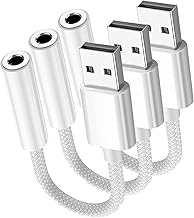
The Fidioto converts USB audio to a 3.5 mm TRRS headset connection and supports listening and speaking. Its listed features include a sound chip for audio decoding and an enameled copper core intended to shield against electromagnetic interference. The product is presented as an external sound card for computers and other listed devices.
Best for: Buyers seeking a USB-A adapter with a microphone input and a stated focus on reducing interference. The listing names Mac, PS4, PC, laptops, and desktops as compatible device categories.
Limitation: The listing specifically says TS and TRS connectors are not supported. Select this adapter for a compatible four-pole TRRS headset rather than a separate or two-pole microphone connection.
JXMOX USB-C To 3.5 Mm Headphone Adapter

Unlike the USB-A models above, the JXMOX connects to a USB-C port and provides a female 3.5 mm headphone jack. Its listed functions include listening to music, answering phone calls, and using headphone wire controls. The product information also mentions a DAC chip, noise reduction, and a strain-relief design.
Best for: People whose phone, tablet, or computer has USB-C rather than USB-A and who want to use wired 3.5 mm headphones. The listing names selected iPhone, Samsung Galaxy, Pixel, iPad Pro, and MacBook models, but buyers should confirm their exact device is supported.
Limitation: This is a USB-C adapter, not a USB-A sound card. Its listed features do not give a sample-rate specification, and the device’s USB-C audio support should be checked before purchase.
Eanetf USB-To-AUX Decoder For Car Audio

The Eanetf is not a conventional USB-to-headphone adapter. Its stated use is playing MP3 files stored on a USB flash drive through a car audio system or 3.5 mm speaker, provided the AUX port can decode music from a USB drive. The listing describes a two-piece product and plug-and-play operation for supported setups.
Best for: A buyer who needs USB flash-drive music playback through a car’s 3.5 mm AUX connection and has confirmed that the system supports this decoding function.
Limitation: The listing explicitly requires an AUX port with MP3 decoding capability and a USB drive containing MP3 files. It is not described as a USB sound card for connecting a headset to a computer or phone.
Buying Guide: How To Choose A USB-To-Headphone Adapter
Which USB connector does your device use?
Start by checking the port on the source device. USB-A adapters such as the MOSWAG, grey model, and Fidioto fit a USB-A connection. The JXMOX uses USB-C. A connector that looks similar is not enough: choose the adapter that matches the port available on your computer, console, phone, or tablet.
Do not assume that a USB-C-to-3.5 mm adapter works with every USB-C device. The JXMOX listing names specific device families, but compatibility can vary by model. Verify the exact device and operating requirements before ordering.
Do you need microphone input as well as headphone audio?
If you use a headset for calls, meetings, or gaming chat, look for explicit support for both listening and speaking. The MOSWAG, grey USB-A adapter, and Fidioto are described as supporting headphone audio and microphone input through a TRRS connection. The JXMOX listing mentions answering phone calls and wire controls.
A headphone-only adapter may send sound to the headset without carrying microphone audio back to the device. Read the product details and check your headset plug before choosing. The supplied listings do not establish microphone support for the Eanetf product.
What does TRRS mean, and why does it matter?
TRRS is a four-contact 3.5 mm plug commonly used to combine headphone audio and a microphone connection. By contrast, TS and TRS plugs have fewer conductors and may be used for other audio configurations. The MOSWAG and Fidioto listings specifically exclude TS and TRS connectors, so a headset with a different plug type may not provide the intended functions.
Some headset plugs follow different wiring standards. MOSWAG lists support for CTIA and OMTP, while the other USB-A listings do not give the same level of wiring detail. When the headset’s standard is uncertain, check its documentation before purchase.
Should you prioritize sound specifications or simple setup?
For a stated output specification, MOSWAG lists 16-bit/48 kHz audio and a built-in DAC. The grey adapter emphasizes automatic recognition and operation without driver downloads or external power. Fidioto highlights shielding against electromagnetic interference, while JXMOX lists a DAC chip and noise reduction. These descriptions are product claims, not a guarantee that every setup will sound identical.
For basic headset use, port match and microphone wiring are often the most important checks. If you need a particular sample rate, operating-system behavior, or gaming-console function, confirm that detail for your specific device rather than relying on broad compatibility wording.
Is a USB-to-AUX decoder the same as a headphone converter?
No. A headset converter typically sends USB audio to a 3.5 mm headphone jack, and some models also accept microphone input. The Eanetf product has a different purpose: it is intended to let a compatible car audio system read MP3 music from a USB flash drive through an AUX setup. Its AUX decoding requirement makes it unsuitable as a general USB headset adapter.
What should you check before ordering?
- Match USB-A or USB-C to the port on your source device.
- Confirm whether you need headphone output only or both output and microphone input.
- Check whether your headset has a compatible TRRS plug and wiring standard.
- Verify compatibility with the exact device and operating system.
- For the Eanetf, confirm the car AUX system can decode MP3 files from a USB drive.
Frequently Asked Questions
Can a USB-to-3.5 mm adapter support headset microphones?
Some can. The MOSWAG, grey USB-A adapter, and Fidioto list microphone support through a TRRS headset connection. Check plug requirements, since MOSWAG and Fidioto exclude TS and TRS connectors.
Will a USB-A adapter work in a USB-C port?
Not directly unless the device has a compatible USB-A port or a separate USB-C-to-USB-A adapter. For a direct USB-C-to-3.5 mm connection, the JXMOX is the product in this list with a USB-C plug.
Is a USB DAC required to use wired headphones?
Not always. A device may already have a 3.5 mm headphone jack. A USB audio adapter is useful when the device has a compatible USB port but lacks the jack or when an external audio connection is needed.
Does the Eanetf adapter connect headphones to a computer?
That is not its stated purpose. It is listed for USB flash-drive MP3 playback through a compatible car AUX system or 3.5 mm speaker, not as a computer headset sound card.
What is the safest way to check compatibility?
Match the adapter’s USB connector to the device, verify the exact device is listed or supported, and check the headset’s 3.5 mm plug type. For microphone use, confirm that the adapter explicitly supports a compatible headset microphone.