
The best Bluetooth USB streaming audio option depends on what you want to connect: the TP-Link UB500 is best for adding Bluetooth to a Windows PC, while the UGREEN receiver is designed for AUX-equipped cars and audio systems. For home stereo setups, consider the Esinkin or KAIY receiver. The Ortizan speaker is a portable listening option, rather than a USB Bluetooth adapter. Check each product’s connection type before buying; a USB Bluetooth dongle for a computer does a different job from a Bluetooth receiver for speakers.
| Product | Best For | Connection Focus |
|---|---|---|
| TP-Link UB500 | Windows desktop or laptop | USB Bluetooth dongle |
| UGREEN Bluetooth Receiver | Car or home audio with AUX | 3.5 mm audio and USB 2.0 |
| KAIY Bluetooth Receiver | Home stereo connections | Optical, RCA, and AUX options named |
| Esinkin Bluetooth Audio Adapter | Home stereo Bluetooth streaming | Bluetooth receiver for stereo |
| Ortizan X10 Speaker | Portable Bluetooth listening | Standalone speaker, not a PC dongle |
TP-Link UB500 USB Bluetooth Adapter
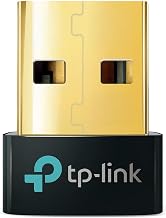
Best for: Windows desktop and laptop users who need to add Bluetooth connectivity through a USB port. This nano-style dongle is the clearest match in this list for someone searching for a Bluetooth USB adapter to use with a computer.
TP-Link lists Bluetooth 5.4, Enhanced Data Rate (EDR), and Bluetooth Low Energy (BLE). The adapter is backward compatible with several earlier Bluetooth versions, from 5.3 through 1.1. The product information also describes faster data transfer and broader coverage compared with Bluetooth 4.0, with performance dependent on the connected devices and environment.
- Supports Windows 11, 10, 8.1, and 7, according to the product name.
- Designed for use with desktop PCs, laptops, keyboards, mice, and other Bluetooth devices.
- Its USB connection is intended to add Bluetooth to a computer, not to act as an audio output for a stereo by itself.
Why it was selected: It directly addresses the PC-side meaning of Bluetooth USB streaming. Choose it if your computer needs Bluetooth capability. Limitation: The listed operating systems are Windows versions; the provided information does not establish support for other operating systems.
UGREEN Bluetooth AUX Receiver

Best for: Drivers or home audio users whose sound system has a 3.5 mm AUX input and who want to stream audio from a Bluetooth device. The product is described as a Bluetooth receiver with a 3.5 mm connection and USB 2.0 in the product name, so it is a more relevant choice for AUX systems than a PC USB dongle.
UGREEN lists a Bluetooth 6.0 chipset, a stated stable connection range of 10 meters, and SBC codec support. The receiver also includes a microphone for hands-free calls through car speakers. Its listed use includes both music streaming and phone conversations.
- Designed to add Bluetooth streaming to a car, home audio system, or speaker with an AUX input.
- Supports hands-free calling through the connected speakers using its built-in microphone.
- Uses a 3.5 mm audio connection and is described as a USB 2.0-to-3.5 mm kit.
Why it was selected: It addresses the common need to stream phone audio through an existing AUX-equipped system. Choose this if you want music and call audio, rather than Bluetooth for a computer’s peripherals. Limitation: It requires an appropriate AUX connection; the product details do not indicate that it replaces a USB Bluetooth adapter for a PC.
KAIY Optical Bluetooth Home Receiver

Best for: Home stereo owners who want to receive Bluetooth audio and connect it to wired speakers or a stereo system. The product name identifies optical, RCA, and AUX audio connections, giving buyers several named connection types to compare against their existing equipment.
KAIY describes this as a Bluetooth 5.4 receiver for home stereo and wired speakers. Its product name also promotes optical low-latency audio and HD music audio. Those labels may help shoppers narrow options, but the provided product details do not specify additional performance measurements or supported audio formats.
- Bluetooth receiver for a home stereo or wired speakers.
- Optical, RCA, and AUX connections are named in the product listing.
- Positioned for wireless audio reception, not for adding Bluetooth to a Windows computer.
Why it was selected: It is a better fit than a basic PC dongle when the goal is to send Bluetooth audio to a wired home sound system. Choose it if one of its named audio outputs matches the input on your equipment. Limitation: Confirm the receiver’s specific output and your stereo’s available input before ordering; the supplied information does not include a full connection diagram.
Esinkin Bluetooth Stereo Audio Adapter

Best for: Buyers looking for a Bluetooth receiver to use with a home stereo and stream music from a smartphone or tablet. The product name specifically describes it as a wireless audio adapter and Bluetooth receiver for a home stereo system.
The available listing information identifies smartphone and tablet music streaming as its intended use. This makes the Esinkin a straightforward category match for people who want to send audio wirelessly to an existing stereo. The provided product details do not list specific Bluetooth version, codec, audio outputs, range, or latency information, so compare those details on the product page with your needs before deciding.
- Designed as a Bluetooth receiver for a home stereo.
- Named use includes music streaming from smartphones and tablets.
- It is a receiver for audio equipment, not a USB dongle for adding Bluetooth to a computer.
Why it was selected: It is relevant to home stereo streaming and offers a simple product category match. Choose it if your priority is receiving Bluetooth music on a stereo. Limitation: The available specifications are less detailed than those provided for some other options here, so verify the required cable connections and features before purchase.
Ortizan X10 Portable Bluetooth Speaker

Best for: People who want a portable Bluetooth speaker for home, parties, or outdoor listening rather than an adapter to connect existing audio equipment. It is included as an alternative for buyers whose real goal is to play streamed audio without setting up a separate stereo receiver.
The listed features include an IPX7 waterproof rating, TWS pairing, and up to 30 hours of playtime. The product name also describes it as a portable speaker for home, parties, and outdoor use. These details make it a different type of purchase from the USB dongle and stereo receivers above.
- Portable Bluetooth speaker with TWS pairing.
- Listed as IPX7 waterproof and rated for up to 30 hours of playtime.
- It plays audio as a speaker; it is not described as a USB Bluetooth adapter for a PC or a receiver for a wired stereo.
Why it was selected: It can suit buyers who want a complete portable listening device rather than a Bluetooth bridge. Choose this if you need a speaker for varied locations. Limitation: Avoid it if your requirement is specifically to add Bluetooth to a computer or stream to existing wired speakers.
Buying Guide: How To Choose Bluetooth USB Streaming Audio
Do you need Bluetooth for a computer or a stereo?
Start by identifying which device should send or receive audio. A USB Bluetooth adapter such as the TP-Link UB500 adds Bluetooth capability to a compatible computer. A stereo receiver such as the KAIY or Esinkin is intended to receive audio from a phone or tablet and pass it to audio equipment. These product types are not interchangeable just because both use Bluetooth.
For a PC, confirm the operating system and available USB port. For a home stereo, check its input connections before choosing a receiver. For a car, look for an AUX input if considering an AUX receiver such as the UGREEN. A portable speaker is a separate solution that does not require an existing stereo.
Which connections should you check?
Match the adapter’s audio output to the receiving equipment’s input. The KAIY product name lists optical, RCA, and AUX options, while the UGREEN listing names a 3.5 mm audio connection. The Esinkin listing identifies a home stereo receiver but does not provide connection details in the supplied information. If the connection type is not explicit, verify it before buying.
Do not assume that a USB plug means a device will send audio to any USB port. A computer Bluetooth dongle and an audio receiver have different roles. Check whether USB is used for computer connectivity, power, or another function in the product’s documentation.
Does Bluetooth version matter?
Bluetooth version can help describe a device’s wireless generation, but it does not by itself establish that two products will deliver the same audio quality or range. The TP-Link adapter lists Bluetooth 5.4 and backward compatibility, while the UGREEN receiver lists Bluetooth 6.0 and SBC support. For audio, also check the product’s stated codec, connection method, and intended use where that information is available.
For streaming from a phone, both the phone and the receiving device need compatible Bluetooth behavior. For a computer, the operating system and drivers can matter as well. Read the specific compatibility information rather than relying on a version number alone.
When should you prioritize low latency or call support?
Low latency can matter when audio needs to stay closely synchronized with video or gameplay. The KAIY product name advertises optical low-latency audio, but the provided information does not give a latency measurement. If timing is critical, look for detailed latency specifications and confirm that your source device and receiving equipment support the needed setup.
For car use, the UGREEN receiver lists a built-in microphone and hands-free calling. That feature makes it more suitable for buyers who want phone conversations through car speakers, as well as music streaming. A receiver without listed call support should not be assumed to provide the same function.
What should you consider for portable listening?
If you need audio away from a fixed stereo, a standalone speaker may be simpler than an adapter. The Ortizan X10 listing describes a portable Bluetooth speaker and specifies IPX7 waterproofing, TWS pairing, and up to 30 hours of playtime. Those are speaker features, not proof that it can function as a USB audio adapter or connect to wired speakers.
For a permanent home setup, prioritize the receiver’s audio outputs and the stereo’s inputs. For travel or outdoor use, consider whether a standalone speaker better matches your needs. The right category depends on where the audio will play and what equipment you already own.
Frequently Asked Questions
Can a USB Bluetooth adapter stream audio from a computer?
Yes, a PC-oriented USB Bluetooth adapter can add Bluetooth connectivity to a compatible computer. The TP-Link UB500 is listed for Windows 11, 10, 8.1, and 7 and supports use with Bluetooth devices. Check the computer’s operating system and the audio device’s compatibility.
Can I use a Bluetooth stereo receiver with my computer?
A stereo receiver is designed to receive audio and connect it to speakers or a stereo, while a USB dongle adds Bluetooth to a computer. These serve different roles. Choose based on whether the computer needs Bluetooth or the stereo needs a Bluetooth audio input.
Which listed product is intended for car AUX audio?
The UGREEN Bluetooth AUX receiver is described for car and home audio systems with a 3.5 mm connection. Its listed features include Bluetooth streaming and a built-in microphone for hands-free calls.
Does the Ortizan speaker replace a Bluetooth receiver?
It can replace the need for a separate receiver if you want to play sound through a portable speaker. It is not described as an adapter for a PC or a receiver that sends audio to existing wired speakers.
What should I verify before buying a home stereo receiver?
Check that the receiver’s output connection matches an available input on your stereo or speakers. Also confirm the listed Bluetooth and audio features meet your needs. If the product information does not name a connection or compatibility detail, verify it rather than assuming.