
For converting analog RCA or 3.5mm stereo audio to optical digital audio, choose a converter that explicitly lists analog input and Toslink output. The Musou is a straightforward RCA-to-optical option; the kiisdaa adds 3.5mm input and volume adjustment; and the VPFET accepts RCA or 3.5mm input and also provides coaxial output. Two other listed products convert in the opposite direction, from optical digital to analog, so they are included only to help prevent a common buying mistake.
| Product | Direction and connection | Best suited for |
|---|---|---|
| Musou RCA Analog to Digital Converter | RCA analog to optical and coaxial | RCA sources needing optical output |
| kiisdaa Analog to TOSLINK Converter | RCA or 3.5mm analog to optical and HDMI audio | Sources needing volume adjustment |
| VPFET RCA-to-Optical Converter | RCA or 3.5mm analog to optical and coaxial | Flexible analog inputs and digital outputs |
| PROZOR Optical-to-Analog Converter | Optical digital to RCA or 3.5mm analog | Buyers who need the reverse direction |
| AUTOUTLET Optical-to-RCA Converter | Optical digital to RCA analog | Optical sources feeding an RCA amplifier |
Musou RCA Analog To Digital Converter

Best for: A stereo RCA source that needs Toslink optical output, with coaxial digital output as an additional connection option.
The Musou converts an analog stereo signal from RCA inputs into both Toslink optical and coaxial digital audio outputs at the same time. Its listed output is uncompressed two-channel LPCM, with a 48 kHz sampling rate. The product listing also includes an optical cable, which may be useful when connecting to a device with a Toslink input.
Choose this model if the source has left/right RCA audio outputs and the receiving equipment accepts optical or coaxial digital audio. It was selected because its conversion direction is clearly analog-to-digital and it provides two digital output types.
Limitation: The listed output is two-channel LPCM at 48 kHz. The product notes that the analog input source does not support Dolby, so do not choose it for converting an analog signal into Dolby digital audio.
kiisdaa Analog To TOSLINK Converter

Best for: Buyers with an RCA or 3.5mm analog source who want optical output and an onboard volume adjustment feature.
This converter accepts analog stereo audio through RCA or a 3.5mm AUX jack. It sends audio to Toslink optical and HDMI audio outputs simultaneously, according to the supplied product features. It supports uncompressed two-channel PCM output at 44.1, 48, or 96 kHz. A volume adjustment function is also listed, which distinguishes it from the other analog-to-digital options in this selection.
Choose this model if your source uses a headphone-style 3.5mm output or RCA connections and you want the stated volume adjustment. It was selected for its input choices, multiple output formats, and broader listed sampling-rate options.
Limitation: This is an analog-to-digital converter, not a digital-to-analog converter. Its listed digital audio output is two-channel PCM, so it should not be treated as a multichannel Dolby encoder.
VPFET RCA-To-Optical Audio Converter

Best for: Analog sources with either RCA or 3.5mm output when the receiving device needs optical or coaxial digital audio.
The VPFET converts RCA or 3.5mm analog stereo audio into Toslink optical and coaxial digital audio simultaneously. The listed output format is uncompressed two-channel PCM, with supported sampling rates of 32, 44.1, and 48 kHz. The listing describes automatic encoding and says no software installation is needed.
Choose this model if you need both common analog input options and want a choice of optical or coaxial digital output. It was selected as a flexible option for connecting analog audio equipment to a digital-audio input.
Limitation: This model does not have volume control, according to the product details. The listing also advises unplugging the power source before connecting the audio cable to avoid humming noise. Adjust volume at the source or amplifier instead.
PROZOR Optical-To-Analog Converter
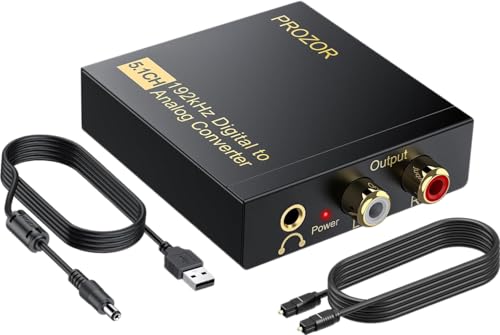
Best for: Buyers who need to convert an optical or coaxial digital source into RCA or 3.5mm analog audio.
Important direction check: The PROZOR is a digital-to-analog converter, not an analog-to-digital optical converter. Its listed inputs are optical and coaxial digital audio; its outputs are left/right RCA and 3.5mm analog audio. It supports listed Dolby AC-3, DTS, and LPCM/PCM input formats, with two-channel analog output and a stated sampling rate up to 192 kHz.
This product is included because shoppers sometimes confuse “optical to RCA” with “RCA to optical.” Choose it if a digital optical or coaxial source needs to connect to analog speakers, headphones, or an amplifier with analog inputs. It was selected as a useful opposite-direction comparison, not as a match for analog-to-optical conversion.
Limitation: Avoid this model if your goal is to send analog RCA or 3.5mm audio into an optical input. The conversion direction is the reverse of that requirement.
AUTOUTLET Optical-To-RCA Converter

Best for: Connecting an optical digital audio source to an amplifier or other equipment with RCA analog input.
The AUTOUTLET product converts Toslink optical digital audio into RCA analog audio. The listing describes a 7-foot/2.1-meter optical-to-RCA male cable and a built-in audio amplifier chip with a dual-channel operational amplifier. It lists optical input sampling rates up to 192 kHz and 24-bit input streams.
This model is included as another direction-check option for buyers whose actual need is optical digital to analog RCA. Choose it when the source sends optical audio and the receiving equipment takes RCA analog audio. It was selected because the stated cable format and direction are clearly described.
Limitation: It does not perform analog-to-digital conversion. Do not choose it to connect a TV’s analog output to a soundbar’s optical input.
Buying Guide: How To Choose An Analog-To-Optical Converter
Which way does the audio need to travel?
Check the input and output labels before comparing other features. For analog-to-optical conversion, the converter must accept an analog input such as RCA or 3.5mm AUX and provide a Toslink optical output. A product described as “optical to RCA” works in the opposite direction: it accepts digital optical audio and creates analog RCA output.
This direction distinction is essential. The terms “analog-to-digital” and “digital-to-analog” describe different tasks, and most converters do not work both ways. Match the source device’s output to the converter’s input, then match the converter’s output to the destination device’s input.
Does your source use RCA or 3.5mm AUX?
RCA stereo connections usually use separate left and right plugs. A 3.5mm AUX connection uses a single headphone-style plug for stereo audio. The Musou is listed for RCA analog input. The kiisdaa and VPFET list both RCA and 3.5mm analog inputs, making them better candidates when the source uses a headphone jack or when input flexibility matters.
Confirm the exact ports on both devices before ordering. A converter cannot make an incompatible connector fit without the appropriate cable or adapter, and the listed product information should not be assumed to include every cable needed for a particular setup.
What digital output does the receiving equipment accept?
For an optical connection, both the converter and the receiving device need compatible Toslink ports. The Musou and VPFET also list coaxial digital output, while the kiisdaa lists HDMI audio output in addition to optical. Choose based on the actual input available on the soundbar, receiver, or other destination device.
Do not assume that an HDMI output means the converter supports every HDMI feature or video function. The listed feature is HDMI audio output. Check the product details and your equipment’s connection requirements if HDMI is essential.
Will two-channel PCM meet your audio needs?
The analog-to-digital products listed here specify uncompressed two-channel PCM or LPCM output. That is appropriate when the intended signal is stereo PCM and the destination accepts it. It does not mean the converter will encode an analog signal into Dolby Digital or another multichannel bitstream.
Check the audio format settings on the source and the supported formats of the receiving equipment. The Musou listing specifically says the analog source does not support Dolby. The VPFET and kiisdaa also describe two-channel PCM output, so buyers seeking multichannel encoding should verify requirements rather than assume it is included.
How should you compare sampling rates?
The listed analog-to-digital sampling rates differ: Musou specifies 48 kHz, VPFET lists 32, 44.1, and 48 kHz, and kiisdaa lists 44.1, 48, and 96 kHz. A higher listed maximum is not automatically necessary for every setup. The source, converter, and destination must support compatible audio formats and rates.
For a basic stereo connection, prioritize matching the source and destination requirements over choosing a converter solely by its maximum sampling-rate number. If a device’s manual specifies a required rate or format, use that information to guide the selection.
Do you need volume control?
The kiisdaa lists volume adjustment. The VPFET explicitly states that it does not feature volume control and advises adjusting volume at the signal source or amplifier. The supplied information for the Musou does not identify a volume adjustment feature. If the converter itself must change output level, look for that feature specifically rather than assuming every model includes it.
Frequently Asked Questions
Can an analog-to-optical converter connect a record player to a soundbar?
It may work if the record player provides a compatible analog RCA or 3.5mm output and the soundbar accepts optical input. Check whether the turntable’s output is suitable for the converter and confirm the soundbar supports the converter’s two-channel PCM output.
Does RCA-to-optical conversion create Dolby Digital?
Not according to the listed features for these analog-to-digital models. They specify two-channel PCM or LPCM output. The Musou listing specifically notes that the analog source does not support Dolby.
Can I use an optical-to-RCA converter in reverse?
No. An optical-to-RCA converter accepts digital optical audio and outputs analog RCA audio. It does not convert analog RCA audio into optical digital audio unless the product explicitly supports both directions, which the two reverse-direction products here do not.
What is the difference between Toslink and optical audio?
Toslink is a common connector format for optical digital audio. In product listings, “Toslink” and “optical” often refer to the same type of audio connection, but you should still check the device ports and supported signal formats.
Do these converters support surround sound?
The listed analog-to-digital options specify uncompressed two-channel PCM or LPCM output, not multichannel surround encoding. The PROZOR listing mentions support for certain digital input formats, but that product converts digital audio to analog and is not an analog-to-optical choice.