
The best mic and earphone splitter depends on which way you need the signal to travel: connect a headset with one 3.5mm plug to separate computer microphone and headphone jacks, or combine separate headset plugs for a device with one combo jack. The UGREEN computer adapter is best for a braided, durable cable; the DUKABEL adapter suits users who need a combo-port connection. For sharing audio between two listening devices, the SYNCWIRE splitter has a different purpose.
| Product | Best For | Connection Direction |
|---|---|---|
| UGREEN Headphone Splitter for Computer | Single-plug headset to PC | One headset plug to separate mic and headphone plugs |
| D & K Exclusives Store Y Splitter | Portable PC headset setup | One headset plug to separate mic and headphone plugs |
| DUKABEL Headsets Adapter | Connecting separate plugs to a combo port | Separate mic and headphone plugs to one combo port |
| UGREEN 2 Female to 1 Male Splitter | Separate headset plugs and a single-jack device | Two plugs to one audio jack |
| SYNCWIRE Headphone Splitter | Sending audio to two listening devices | One audio plug to two headphone or speaker outputs |
UGREEN Headphone Splitter For Computer

This UGREEN adapter connects a headset with a four-pole 3.5mm TRRS plug to a computer or laptop with separate headphone and microphone jacks. Its female headset socket branches into two male plugs, one for audio output and one for microphone input. It is designed for voice chat, online classes, meetings, and gaming setups that use separate computer ports.
Best for: People who want a clearly specified headset-to-PC splitter with a reinforced cable. UGREEN lists polished gold-plated connectors, an aluminum-alloy casing, and a nylon-braided jacket that it says has passed more than 10,000 bending tests.
Check before buying: The listed microphone requirement is a CTIA-compliant TRRS headset cable. The product information warns that OMTP or other wiring standards may prevent microphone operation. This is not the right choice for combining two separate headset plugs into one device jack.
D&K Exclusives Store Headset Y Splitter

This adapter takes a newer headset’s combined audio-and-microphone plug and separates it into two 3.5mm male connectors for a computer’s headphone and microphone jacks. The product description names VOIP and chat programs as use cases, including Skype and Google Voice. It also describes a compact design intended to fit in a laptop bag.
Best for: Buyers looking for a straightforward, portable headset-to-computer adapter. Its stated features include gold-plated connectors and oxygen-free copper conductors, and the two male ends are designated for separate PC audio and mic ports.
Check before buying: This cable is for a headset with one combined plug and a computer with two separate jacks. It will not provide the reverse connection for a headset that already has separate headphone and microphone plugs going into a single combo socket.
DUKABEL Headsets Adapter

The DUKABEL adapter is described as turning a 3.5mm combo audio port into separate headphone and microphone ports. It is also described for connecting a headset with separate headphone and microphone plugs to a device with a combined audio port. These descriptions point to a connection arrangement that differs from the common one-female-to-two-male PC splitter, so verify the connector layout and intended direction for your setup before ordering.
Best for: Buyers who need to connect separate audio and mic connections with a combo-port device and want a short 11-inch cable. The listed use cases include laptops, tablets, smartphones, and game controllers with a 3.5mm interface. The product also notes that a separate microphone and powered speakers can be used for online chat.
Check before buying: The description uses more than one connection-direction explanation. Confirm that the adapter’s ports match your device and headset plugs; the listing does not establish that every named device supports microphone input through its 3.5mm port.
UGREEN 2 Female To 1 Male Splitter
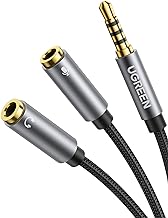
This UGREEN splitter has two female connections for separate headphone and microphone plugs and one male 3.5mm connector for a device with a single audio jack. It is useful for the reverse arrangement from a headset-to-PC adapter: instead of dividing one headset plug into two computer plugs, it brings separate plugs together for one combo-style port.
Best for: Users with separate headphone and mic plugs who need to connect them to a compatible single-jack device. The cable is described as flexible TPE with a nylon-braided covering, copper core, and gold-plated connectors.
Check before buying: The listing specifies CTIA-standard headphone compatibility and says it does not support iPhone headsets or OMTP headphones. It also advises plugging the headset and microphone into the adapter before connecting the adapter to the computer. Check your device’s jack and headset wiring standard first.
SYNCWIRE Two-Output Headphone Splitter

The SYNCWIRE cable splits audio from one 3.5mm source into two output connections for headphones, speakers, or other listed audio devices. It is not a microphone-and-earphone separator: its stated function is to send audio to two listening devices. The description lists phones, tablets, laptops, MP3 players, and game systems among possible sources.
Best for: People who want two output connections for shared listening or connecting headphones and speakers to one source. Listed construction features include gold-plated connectors, double shielding, and a compact, lightweight design for travel.
Check before buying: This is the wrong cable if your goal is to split a headset microphone from its headphone signal for separate PC jacks. The product description also notes that the slim connector fits almost all cases, with LifeProof cases excluded.
Buying Guide: How To Choose A Mic And Earphone Splitter
Which connection direction do you need?
Start by counting the plugs on your headset and the jacks on your device. A headset with one combined 3.5mm plug may need a one-female-to-two-male adapter to connect to a computer with separate headphone and microphone ports. The UGREEN computer splitter and the D&K adapter are intended for this arrangement.
If your headset has separate headphone and microphone plugs but your device has one combo jack, look for a two-female-to-one-male adapter. The UGREEN 2 Female to 1 Male model is listed for that direction. A two-output headphone splitter, such as the SYNCWIRE, sends audio to two listening devices and does not perform either mic-separation function.
Does your headset use a compatible wiring standard?
Connector shape alone does not guarantee that a microphone will work. The UGREEN computer splitter specifies a CTIA-compliant TRRS headset cable and warns that OMTP or other standards may cause mic failure. The UGREEN two-female model also lists CTIA compatibility and excludes OMTP headphones and iPhone headsets. Check the headset’s documentation and the adapter’s requirements before choosing.
What ports does your computer or mobile device have?
Some computers have separate headphone and microphone jacks, while other devices use a single combo jack. Match the adapter to the ports physically available on your device. A splitter with two male plugs cannot connect directly as intended to a single combo port unless the setup includes a compatible arrangement; likewise, a two-female-to-one-male adapter is not designed to separate audio for two computer jacks.
Also confirm that the device’s 3.5mm jack supports the audio or microphone function you need. Product descriptions list intended uses, but they do not establish compatibility with every model or port configuration.
Is the cable for a microphone or for shared listening?
Terms such as “headphone splitter” can describe different products. A headset adapter separates or combines microphone and headphone connections. An audio-sharing splitter duplicates the sound output to two listening devices. Read the number and type of connectors, not just the product name, to distinguish these jobs.
- One female socket and two male plugs usually indicates a combined headset plug splitting to separate computer audio and mic jacks.
- Two female sockets and one male plug can combine separate headphone and microphone plugs for a single device jack, if standards match.
- One male plug and two female outputs is commonly used to share audio between listening devices.
Which construction details matter?
For frequent packing or movement, consider listed cable materials and build details. The UGREEN computer adapter names an aluminum-alloy casing and braided jacket; the D&K adapter emphasizes compact portability; and the other UGREEN model lists flexible TPE and nylon braiding. These features may help buyers compare physical construction, but they do not replace checking plug direction and wiring compatibility.
Gold-plated connectors and copper conductors are listed on several products. Treat these as construction details rather than a guarantee that a splitter will work with an incompatible headset, device, or wiring standard.
How can you troubleshoot a microphone that does not work?
First, confirm that the adapter is intended for the direction of your connection. Make sure every plug is fully seated and connected to the correct port. For the UGREEN two-female adapter, follow the listing’s instruction to connect the headset and microphone to the adapter before plugging it into the computer. Then check the headset wiring standard and the device’s input settings. If the cable type or jack layout does not match, a different adapter may be needed.
Frequently Asked Questions
What does a mic and earphone splitter do?
It can separate a combined headset connection into microphone and headphone plugs, or combine separate plugs for a single combo jack. The correct type depends on the headset and device connections.
Can I use a headphone splitter to connect a headset microphone?
Not necessarily. A one-to-two audio-output splitter is generally meant to send sound to two listening devices. Choose an adapter specifically designed to handle microphone and headphone connections if you need mic input.
How do I connect a one-plug headset to a PC with two jacks?
Use a compatible one-female-to-two-male headset adapter. Connect the headset’s combined plug to the female socket, then plug the adapter’s headphone and microphone ends into their matching PC jacks.
Can a two-female-to-one-male splitter work with any headset?
No. Compatibility can depend on plug wiring, device jack design, and whether the headset uses separate microphone and headphone connections. Check the adapter’s listed standards; the UGREEN model, for example, specifies CTIA compatibility and excludes OMTP headphones.
Will these adapters work with a device that has no 3.5mm jack?
The listed products use 3.5mm connectors. A device without a compatible 3.5mm port would require another suitable connection solution, which is not specified by these product details.