
The right 4-pole 3.5mm splitter depends on whether you need to separate a headset’s microphone and headphone plugs or connect two listening devices to one source. The UGREEN PC adapter is best for a headset with separate mic and audio plugs; the DUKABEL and D & K adapters are designed for sharing a combo jack. The MillSO option suits buyers seeking a TRRS male-to-two-female adapter, while the second UGREEN model is intended for separating mic and headphone connections.
| Product | Best For | Connection Direction |
|---|---|---|
| UGREEN Computer Headset Splitter | Connecting a separate-plug headset to a computer | One 4-pole female to two 3.5mm male plugs |
| MillSO TRRS Headset Splitter | Connecting two TRRS devices to one jack | One male to two female jacks |
| UGREEN Mic and Audio Y Splitter | Separating headset mic and headphone connections | Two female jacks to one male plug |
| DUKABEL TRRS Audio Y Cable | Sharing audio or connecting a TRRS mic setup | One male to two female jacks |
| D & K TRRS Splitter | Connecting two combo-plug headsets | One male to two female jacks |
UGREEN Computer Headset Splitter

This adapter is the reverse of a typical headphone-sharing splitter. It takes a headset’s single 4-pole 3.5mm connection and provides separate plugs for a computer’s headphone and microphone ports. Choose it if your headset has one combined plug but your computer has separate audio-out and mic-in sockets.
- Best for: Connecting a combo-plug gaming headset to a computer with separate audio and microphone ports.
- Why it stands out: The cable is braided and designed to divide headset audio and microphone signals into separate plugs.
- Check before buying: Match the adapter’s two plugs to the computer’s separate ports and confirm the headset uses the supported wiring standard.
This is not a two-listener splitter: its two male connectors plug into the computer, while the headset connects to the single female jack. It is the best fit among these options for solving that specific port mismatch.
MillSO TRRS Headset Splitter

The MillSO is a male-to-two-female TRRS adapter, a connection pattern suited to connecting two compatible 4-pole devices to one 3.5mm jack. Its product name specifies support for two TRRS headphones or microphones. Choose it when you need two female TRRS sockets rather than separate headphone and microphone plugs for a computer.
- Best for: Buyers who need one TRRS plug to branch into two TRRS female connections.
- Why it stands out: The listed design includes a metal shell and sapphire-blue finish.
- Check before buying: A splitter does not necessarily duplicate every microphone signal or provide independent controls. Confirm the intended use and device wiring before purchase.
The available product information does not specify detailed device compatibility or how microphone signals behave when both female jacks are occupied. Avoid assuming it will work as a PC headset-to-separate-mic adapter; that job calls for a cable with one headset socket and two distinctly assigned plugs.
UGREEN Mic and Audio Y Splitter
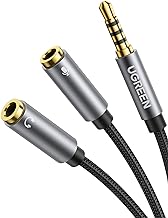
This UGREEN cable is described as a two-female-to-one-male adapter for separating headphone and microphone connections. It is intended for a headset with separate headphone and mic plugs that must connect to a device with one combo 3.5mm jack. That makes it a different solution from the UGREEN computer splitter above, which joins separate computer ports to one headset plug.
- Best for: Connecting a separate-plug headset to a single combo jack on a compatible device.
- Why it stands out: The listing identifies separate headphone and microphone sockets, a braided cable, flexible TPE material, copper core, and gold-plated connectors.
- Important limitation: The listing says the headphone port supports CTIA-standard headphones and does not support iPhone headsets or OMTP headphones.
Follow the manufacturer’s connection order: plug the headset and microphone into the adapter before inserting the adapter into the device, or the microphone may not be detected. Do not mistake this for a cable intended to let two people listen through two headphones.
DUKABEL TRRS Audio Y Cable

The DUKABEL cable has one 3.5mm male plug and two female jacks. The listing describes sharing audio with two headphones and also connecting a built-in-mic headset and an external 4-pole TRRS microphone to a compatible device. Choose it if those uses match your setup and you need a compact Y cable.
- Best for: Sharing audio between two headphones or connecting the specific TRRS mic arrangement described by the seller.
- Why it stands out: Its listed construction includes 24K gold-plated contacts, triple shielding, a nylon-braided exterior, metal housing, and oxygen-free copper wiring.
- Important limitation: The listing says it does not support iOS headphones for microphone function and does not support 3-pole TRS microphones for the stated mic setup.
Although the product name mentions compatibility with several device categories, check that the source has a 3.5mm jack and that the connected plugs match the intended use. The listed cable length is 30 centimeters, so it is designed for a nearby connection rather than long-distance routing.
D & K TRRS Headset Splitter

This adapter turns one 4-pole TRRS 3.5mm source connection into two female 3.5mm ports. The listing describes using it to connect two combo-plug gaming headsets to one audio source and to share music, movies, or games. Choose it when both connected headsets have 4-pole plugs and you want a straightforward two-way branch.
- Best for: Connecting two compatible TRRS headsets to a single combo jack.
- Why it stands out: It has a listed metal housing and 24K gold-plated connector.
- Important limitation: For microphone use, the listing says both the headphone and microphone plugs must be 4-pole TRRS. It also says the adapter does not fit iPhone headsets.
The two female ports are described as supporting audio and microphone function, but actual operation depends on the connected headset and source. Do not select this model for a headset with separate headphone and mic plugs; its direction and connector layout are intended for two combo-plug connections.
Buying Guide: How to Choose a 4-Pole 3.5mm Splitter
Do you need to split a headset plug or share one audio source?
Start by identifying the direction of the connection. A headset-to-PC adapter takes one headset plug and divides it into separate headphone and microphone plugs. A sharing splitter takes one source jack and branches it to two headphone or headset sockets. These products may all be called “splitters,” but they are not interchangeable.
- One headset plug to two computer plugs: Choose a headset-to-PC adapter such as the first UGREEN model.
- Two separate headset plugs to one combo port: Choose an adapter with a headphone socket and a microphone socket, such as the second UGREEN model, while checking its CTIA limitation.
- One source to two listening devices: Consider a male-to-two-female sharing cable such as DUKABEL or D & K, based on the type of plugs and microphone use required.
What does 4-pole or TRRS mean?
A 4-pole 3.5mm plug, often called TRRS, has four contact sections and can carry audio plus a microphone signal. A 3-pole TRS plug has three contact sections and commonly carries stereo audio without the same microphone connection. Count the insulating bands on the plug and check the product description: a splitter designed for TRRS microphone use may not support a 3-pole microphone.
Does the headset use CTIA or OMTP wiring?
Wiring standards affect whether a headset’s microphone and audio contacts line up with an adapter. The second UGREEN product specifically lists CTIA support and says it does not support OMTP headphones or iPhone headsets. Check the headset and adapter requirements instead of assuming that every 3.5mm TRRS plug is wired the same way.
Will two connected headsets both have working microphones?
Not necessarily. Some splitters are designed mainly to duplicate listening audio; others describe microphone support for particular combinations. Read the exact microphone notes for the selected cable. For example, D & K specifies 4-pole plugs for microphone use, while DUKABEL excludes 3-pole TRS microphones from its stated mic configuration. A splitter should not be assumed to provide separate microphone controls or independent audio levels.
What should you check before ordering?
- Count the source device’s 3.5mm ports and identify whether they are separate or combined.
- Check whether the headset has one combo plug or separate headphone and microphone plugs.
- Confirm the number and type of male and female connectors shown in the product description.
- Review CTIA, OMTP, iPhone, and microphone restrictions where listed.
- Consider cable length and construction if the adapter will be moved or frequently handled.
- Confirm that the intended source has a 3.5mm jack; these are not Lightning or other digital-port adapters.
Frequently Asked Questions
Is a 4-pole 3.5mm splitter the same as a headphone sharing splitter?
No. Some 4-pole adapters separate microphone and headphone connections, while others branch one source to two devices. Check the connector direction and socket layout before choosing.
Can I use a headset-to-PC splitter to connect two headphones?
No. A headset-to-PC adapter is designed to connect one headset to separate computer audio and microphone ports. It does not provide two headphone sockets for two listeners.
Can a TRRS splitter work with a TRS microphone?
Compatibility depends on the splitter’s design. The DUKABEL listing specifically says its described microphone setup does not support a 3-pole TRS microphone, so check the product’s stated requirements.
Why might a headset microphone fail through an adapter?
Possible causes include using the wrong splitter direction, mismatched CTIA or OMTP wiring, an unsupported headset, or plugging devices in an order that the adapter’s instructions do not recommend. Check the product-specific notes and connection sequence.
Can I connect two headsets and expect both microphones to work?
Not automatically. Some products support audio sharing but do not establish that both microphones will work. Choose a model whose listing explicitly supports your intended microphone arrangement, and verify plug type and wiring standard.