
The best 24-channel analog mixer depends on whether you need multitrack recording, flexible monitor mixes, or straightforward live-sound routing. The Mackie Onyx is best for multitrack recording, while the Allen & Heath ZED-24 is suited to performers who need multiple auxiliary mixes. The Mackie 2404VLZ4 and Behringer XENYX X2442USB offer 24-input configurations, and the Mackie ProFX22v3 is a smaller 22-channel alternative rather than a true 24-channel console.
| Product | Best for | Standout feature |
|---|---|---|
| Mackie Onyx Series | Multitrack recording | USB and SD-card recording options |
| Mackie 2404VLZ4 | Live mixing with subgroup routing | 24 channels and four buses |
| Allen & Heath ZED-24 | Monitor and auxiliary mixes | Four auxiliary outputs |
| Behringer XENYX X2442USB | Buyers seeking a 24-input USB mixer | Built-in effects and USB audio interface |
| Mackie ProFX22v3 | Versatile 22-channel setups | USB I/O for computer mixes |
Mackie Onyx Series

The Mackie Onyx Series is a strong match for users who want an analog mixing workflow alongside multitrack digital recording. Its listed features include 96 kHz, 24-bit multitrack recording to a Mac or PC over USB, plus stereo recording and playback directly to an SD card. This gives recording-focused buyers two ways to capture or play audio.
Onyx microphone preamps provide up to 60 dB of gain, and the mixer includes Perkins British-style EQ with a sweepable midrange. A digital effects engine offers user-customizable reverbs, delays, and other effects. These features make it a useful option for live performers who also want to record individual tracks for later editing.
- Best for: Bands, venues, and studios that need multitrack capture as well as live mixing.
- Why it stands out: USB multitrack recording and SD-card stereo recording are both listed.
- Limitation: Buyers who only need a basic live mixer may not need its recording and effects features.
Mackie 2404VLZ4
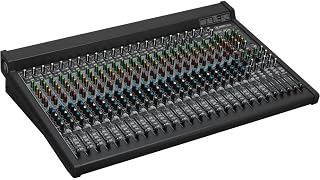
The Mackie 2404VLZ4 is a straightforward choice for buyers prioritizing a 24-channel, four-bus analog mixer. Its listed design emphasizes high headroom and low noise, and it has 20 Onyx microphone preamps. Four buses provide additional routing options compared with a mixer that only offers a main stereo output.
The product information also notes improved RF rejection for broadcast applications. That makes this model worth considering for installations or production environments where radio-frequency interference is a concern. Its feature set is centered on analog mixing and routing rather than detailed computer-recording specifications.
- Best for: Live sound and broadcast users who need 24 channels and four-bus routing.
- Why it stands out: It combines 24 channels, 20 Onyx preamps, and four buses.
- Limitation: The supplied features do not specify multitrack USB recording capabilities.
Allen & Heath ZED-24

The Allen & Heath ZED-24 is best for users who need separate auxiliary mixes for stage monitoring, effects, or other feeds. It provides two pre-fade auxiliary outputs and two post-fade auxiliary outputs. Pre-fade sends can support mixes independent of the main mix, while post-fade sends follow the send level to the main mix, according to the listed features.
Its DuoPre microphone preamps include 48V phantom power and offer up to 69 dB of gain. Each mono input also has a 100 Hz high-pass filter and a three-band MusiQ EQ with a swept mid frequency. These controls help users shape vocals and instruments at the mixer without relying solely on external processing.
- Best for: Bands and venues that need multiple monitor or effects feeds.
- Why it stands out: Four auxiliary outputs, phantom power, high-pass filtering, and swept-mid EQ are specified.
- Limitation: Its listed USB feature is USB I/O; the supplied information does not describe multitrack recording details.
Behringer XENYX X2442USB

The Behringer XENYX X2442USB is a 24-input mixer with a built-in USB/audio interface, according to its product name. The listed features include British-style EQ and an ultra-low-noise, high-headroom analog design. The product description also identifies onboard compressors and a 24-bit multi-effects processor, giving buyers several processing options within the mixer.
This model is a practical candidate for users who want analog controls and built-in digital effects without treating the console solely as a recording interface. The available feature details are brief, so buyers should check the current product specifications for the exact channel layout, bus configuration, and USB functions before choosing it for a specific setup.
- Best for: Buyers looking for a 24-input analog mixer with USB and built-in effects.
- Why it stands out: Its listed features combine British-style EQ, compressors, and a 24-bit effects processor.
- Limitation: The supplied information does not detail recording channel counts or the precise routing capabilities.
Mackie ProFX22v3

The Mackie ProFX22v3 is not a 24-channel console: it is identified as a 22-channel mixer. It is included as a smaller alternative for buyers whose channel needs fit its configuration. Mackie describes it for live sound, home recording, content creation, and live streaming, so it suits users who want one mixer for several kinds of work.
The listed features include 17 Onyx microphone preamps with up to 60 dB of gain, 24-bit/192 kHz recording, and 2×4 USB I/O. The USB connection can create two custom mixes on a computer and send them back to the mixer, which is useful when playback monitoring needs to differ from the full mix.
- Best for: Content creators and performers who want flexible USB mixing and do not require 24 channels.
- Why it stands out: It combines high-gain preamps with computer-based custom mixes.
- Limitation: Choose another model if 24 channels are a firm requirement.
Buying Guide: How to Choose a 24-Channel Analog Mixer
A “24-channel” label does not describe every part of a mixer’s layout. Some models are described by their input count, while others also specify microphone preamp count, buses, auxiliary sends, or USB functions. Before comparing features, confirm how many sources you need to connect at the same time and whether the manufacturer’s channel count matches your intended use.
How many inputs do you need?
Count all sources that may need their own channel during a typical session. These can include vocal microphones, instruments, playback devices, and other sound sources. Add a reasonable allowance for occasional guests or additional equipment. A mixer with fewer channels can be a sensible fit if your source count is consistently lower, but it will offer less room to expand.
Pay attention to the difference between total channels and microphone preamps. The Mackie 2404VLZ4, for example, is listed as a 24-channel mixer with 20 Onyx preamps. That distinction matters when a setup uses many microphones at once. Check the complete channel layout before assuming every input can accept a microphone directly.
Do you need multitrack recording or a stereo mix?
Recording needs can sharply narrow the choices. Multitrack recording captures separate channels or sources for later editing and mixing, while stereo recording captures a combined mix. The Mackie Onyx is the clearest fit in this group for multitrack workflows because its listed features specify 96 kHz/24-bit multitrack recording over USB to a computer.
Do not assume that a mixer with USB offers the same recording workflow. The Behringer XENYX X2442USB is identified as having a USB/audio interface, and the Allen & Heath ZED-24 lists USB I/O, but the supplied details do not explain multitrack channel counts. Confirm the current specifications if separate track recording is essential.
How many buses and auxiliary mixes are useful?
Buses and auxiliary outputs help route signals to destinations beyond the main mix. A four-bus mixer such as the Mackie 2404VLZ4 can suit users who need subgroup routing. Auxiliary outputs serve other purposes, including monitor feeds and external effects. The ZED-24 lists two pre-fade and two post-fade auxiliary outputs, giving it a clear advantage for buyers who need multiple independent sends.
Plan the routing before you buy. List the separate mixes you need for performers, recording, streaming, effects, or other destinations. Then compare the number and type of outputs on each console. A mixer’s total channel count cannot substitute for the routing options required by a complex setup.
Which microphone preamp and EQ features matter?
Compare the number of preamps with the number of microphones you expect to use. Gain specifications can be useful when checking whether a mixer’s preamps match your needs, but gain alone does not describe the full sound or performance of a preamp. The listed models offer different figures and features: Mackie Onyx preamps provide up to 60 dB of gain, while the ZED-24 DuoPre preamps are listed at up to 69 dB.
EQ and filtering can also shape day-to-day use. The ZED-24 lists a 100 Hz high-pass filter on every mono input and a three-band EQ with swept mids. The Mackie Onyx includes Perkins-style EQ with a sweepable midrange. Consider whether you need channel-level tone shaping at the console or whether your workflow uses external processing.
Is an onboard effects processor important?
Built-in effects can reduce the need for separate processing equipment in some setups. The Mackie Onyx lists customizable reverbs, delays, and other effects, while the Behringer XENYX X2442USB lists a 24-bit multi-effects processor. If effects are a priority, compare the available types and controls in the current product information rather than relying only on the presence of an effects engine.
Users who already process sound with external hardware or software may place greater value on inputs, buses, and auxiliary sends. In that case, onboard effects are a secondary convenience rather than a deciding feature.
Which mixer fits a live-streaming or hybrid setup?
For a setup that combines live sound and computer audio, examine the USB input and output workflow. The Mackie ProFX22v3 lists 2×4 USB I/O and the ability to send two custom computer mixes back to the mixer. That may suit users who need separate playback monitoring, but its 22-channel configuration makes it unsuitable when 24 channels are mandatory.
For any hybrid workflow, verify how many channels can be recorded or returned at once and whether the mixer’s routing supports the intended software and monitoring arrangement. Product descriptions can use terms such as USB interface without specifying every detail needed for a particular production setup.
Frequently Asked Questions
What should I look for in a 24-channel analog mixer?
Start with the number and type of inputs, then compare microphone preamp count, bus routing, auxiliary outputs, USB functions, and onboard processing. Choose features based on the sources and separate mixes your setup actually requires.
Can a 22-channel mixer replace a 24-channel mixer?
It can work if your setup needs no more than its available channels, but it is not a direct substitute when 24 channels are required. The Mackie ProFX22v3 is a 22-channel option, not a 24-channel console.
Which listed mixer is best for multitrack recording?
The Mackie Onyx Series is the clearest choice based on the supplied details because it lists 96 kHz/24-bit multitrack USB recording to a Mac or PC. It also lists stereo recording and playback to an SD card.
Which mixer has the most clearly specified auxiliary outputs?
The Allen & Heath ZED-24 lists four auxiliary outputs: two pre-fade and two post-fade. Those outputs can support separate monitor, effects, or other mixes, depending on the setup.
Does USB mean a mixer records every channel separately?
No. USB features differ by mixer. Check whether the product specifically supports multitrack recording and how many channels it can record or return. The supplied descriptions do not provide complete multitrack specifications for every model in this comparison.
Should I prioritize channel count or routing?
Prioritize both according to your setup. Channel count determines how many sources you can connect, while buses and auxiliary outputs determine how signals can be grouped and sent elsewhere. A mixer can have enough inputs but still lack the routing needed for separate monitor or effects mixes.