
The best at-home podcast equipment depends on how many people you record and whether you need a simple microphone kit or a full production setup. The Zoom ZDM-1 is best for a solo host who wants a microphone and basic recording accessories in one pack. The Brvomussy bundle is aimed at two-person recording, while the RODECaster Pro II bundle includes equipment for a larger podcast team. The MAONO bundle emphasizes mixer controls and soundpads, and the Dmsky shield is an add-on for shaping a microphone recording area.
| Product | Best suited for | What the listed package includes |
|---|---|---|
| Zoom ZDM-1 Podcast Mic Pack | Solo hosts | Dynamic microphone, headphones, tripod, windscreen, and XLR cable |
| Brvomussy Podcast Equipment Bundle | Two-person recording | Audio interface, condenser microphones, and voice changer features |
| RODE RODECaster Pro II Bundle | Multi-person podcasts | Four microphones, four headphones, mixer, memory card, and accessories |
| MAONO AU-AM200-S1 Bundle | Creators who want soundpads | Audio mixer, 3.5mm microphone, and four custom soundpads |
| Dmsky Microphone Isolation Shield | Recording-area add-on | Foldable shield, pop filter, and tripod stand |
Zoom ZDM-1 Podcast Mic Pack

Best for: A solo host starting a home podcast who wants the core microphone accessories grouped together. The listed pack includes a dynamic microphone, headphones, a tripod, a windscreen, and an XLR cable. That gives a buyer more to work with than a microphone-only purchase, while keeping the package focused on one recording position.
The dynamic microphone is the central component. The included headphones are useful for monitoring audio, and the tripod provides a compact stand option. The windscreen and XLR cable are also identified as included items, so buyers can check whether they suit their intended recording workflow before ordering.
Why it was selected: It is the clearest match for a straightforward, one-person podcast setup. It bundles several practical pieces without presenting itself as a large multi-host production system.
Limitation: The listed contents do not include an audio interface or mixer. Check what connection and recording equipment your computer or recording device requires before choosing this pack.
Brvomussy Podcast Bundle For Two

Best for: Two-person recording, live streaming, gaming, singing, or YouTube creators looking for a bundled audio setup. Its product name identifies an audio interface, condenser microphones, and voice changer functions. Those features make it more oriented toward a creator who wants an interface and effects as part of the package than a buyer seeking only a basic microphone.
The two-person positioning is useful for co-hosts or interviews recorded at home. Before purchasing, confirm the exact number of microphones and included cables or stands on the current product listing; the supplied product information does not specify those details beyond the bundle name.
Why it was selected: It explicitly targets a two-person podcast setup and includes an audio interface, giving it a different role from the solo microphone pack. Its stated use cases also cover streaming and other creator formats.
Limitation: The listing name does not provide detailed connection requirements or a full inventory of accessories. Avoid assuming it includes every stand, cable, or monitoring accessory your room setup needs.
RODECaster Pro II Podcast Bundle
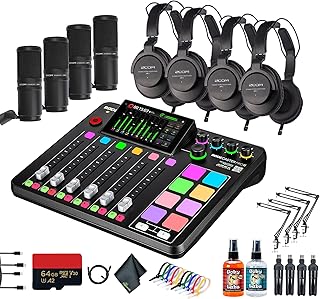
Best for: A larger home podcast team that needs equipment for up to four listed microphone and headphone positions. The bundle name includes a RODECaster Pro II, four podcast microphones, four headphones, a 64GB Micro SD memory card, a microphone arm stand, two USB-C items, and additional accessories.
This package is the most extensive option in this selection by its stated item count. It is designed around a central production unit and multiple microphones and headphones, so it may suit a panel, recurring guest show, or a household recording space more than a solo beginner. Review the seller’s exact bundle contents to identify the models of the microphones and headphones and clarify what “more” includes.
Why it was selected: Its listed four-microphone and four-headphone configuration makes it the clearest choice here for a multi-person show. The included memory card and arm stand are also specifically named in the bundle.
Limitation: A package with several components may be more equipment than a solo host needs. Confirm the exact accessories and setup requirements before committing to a larger system.
MAONO AU-AM200-S1 Mixer Bundle

Best for: A creator who wants an audio mixer and built-in soundpad functions in a home setup. The product name lists a 3.5mm microphone, four custom soundpads, and PC and smartphone compatibility. It also describes the package as an all-in-one audio production bundle for streaming and podcast creators.
The soundpads may appeal to users who want to incorporate custom sounds into their content. The stated PC and smartphone compatibility offers more than one device category to consider, but buyers should check the current listing for the exact connection method and device requirements. The listed microphone uses a 3.5mm connection, which is an important detail to compare with the inputs on the intended recording device.
Why it was selected: It combines a mixer, microphone, and soundpad features in one named bundle, making it distinct from microphone-only packages and multi-mic systems.
Limitation: The product information does not specify the number of people it can record at once. Choose another option if you need a clearly stated multi-microphone configuration.
Dmsky Microphone Isolation Shield

Best for: A podcaster who already has a microphone and wants an additional recording-area accessory. The listed package includes a foldable microphone shield, pop filter, and tripod stand. Its product description also identifies triple sound insulation and high-density sound-shielding material.
This is not a complete podcast recording system: the product name does not list a microphone, headphones, mixer, or audio interface. It is better understood as an accessory to consider alongside equipment you already own. The foldable design may be relevant to buyers who need to store or reposition a shield, but check the listing for dimensions and microphone-stand arrangement before purchase.
Why it was selected: A recording environment is part of an at-home setup, and this product offers a shield and pop filter rather than duplicating the microphone bundles above.
Limitation: A shield does not replace a microphone or recording interface. Confirm that its stand and layout suit your specific microphone setup.
Buying Guide: How To Choose At-Home Podcast Equipment
What equipment do you need to start a podcast at home?
A basic setup needs a microphone and a way to record its signal. Depending on the microphone and recording device, that may also require an audio interface or mixer and compatible cables. Headphones help a host monitor audio, while a stand and windscreen can support microphone placement and use. A recording shield is an optional accessory, not a substitute for the recording equipment itself.
Start by checking what you already own. Then identify the missing pieces rather than buying a bundle based only on its “all-in-one” wording. The Zoom pack names a dynamic microphone and several accessories, while the Brvomussy and MAONO packages identify an interface or mixer. The Dmsky shield is an add-on for a separate microphone.
Are you recording alone or with other people?
For a solo show, a one-microphone pack such as the Zoom ZDM-1 may be easier to evaluate because the listed components focus on a single host. For two participants, the Brvomussy bundle is explicitly positioned for two people, but check the exact microphone count and accessory list before buying. For a show with several participants, the RODECaster Pro II bundle names four microphones and four headphones.
Count the people who need microphones and headphones, including regular guests. A package’s stated participant capacity matters more than a broad label such as “podcast equipment.” Also consider whether everyone records in one room or whether some participants join remotely; the provided product details do not establish remote-call features for these packages.
Should you choose a microphone bundle, mixer, or shield?
- Choose a microphone pack if you need the microphone and basic accessories for a host. The Zoom kit lists a dynamic mic, headphones, tripod, windscreen, and XLR cable.
- Choose a mixer-oriented bundle if you want named production controls or sound effects. The MAONO bundle lists an audio mixer and four custom soundpads; the Brvomussy bundle lists an audio interface and voice changer features.
- Choose a multi-person package if you need several microphone and headphone positions. The RODECaster Pro II bundle lists four of each.
- Choose a shield as an add-on if you already have core recording equipment and want a microphone shield and pop filter. The Dmsky product is not a full recording kit.
What connections and included accessories should you verify?
Check the microphone connection, the inputs on your recording device, and whether the package includes the cables needed to connect them. The Zoom pack lists an XLR cable, while the MAONO product identifies a 3.5mm microphone and PC and smartphone compatibility. Those descriptions are useful starting points, but they do not provide every device-specific connection detail.
Read the current listing for the complete contents before ordering. In particular, verify the microphone count, stands, cables, headphone count, and any memory or software components. Bundle titles can summarize packages without naming every included item. Do not assume an accessory is included unless the seller’s detailed contents confirm it.
How should you plan a home recording space?
Choose a place where the host can speak comfortably and keep the microphone in a consistent position. Reduce avoidable background noise where possible, and use headphones to monitor the recording if your setup supports them. An isolation shield may be worth considering as an accessory, but its presence does not guarantee a particular recording result. Room layout, microphone placement, and the equipment’s actual connections all affect how practical a setup is.
Think about storage and setup time, too. A solo microphone kit may be simpler to organize than a multi-person bundle with several components. A larger package can suit a team, but only if the room has space for the equipment and the host is prepared to manage its connections.
Frequently Asked Questions
What is the best at-home podcast equipment for one person?
The Zoom ZDM-1 Podcast Mic Pack is the most directly suited option in this list for a solo host. Its stated contents include a dynamic microphone, headphones, tripod, windscreen, and XLR cable.
Which listed bundle is designed for multiple hosts?
The RODECaster Pro II bundle lists four podcast microphones and four headphones. The Brvomussy bundle is described as a package for two, but buyers should verify its exact microphone count in the current listing.
Does the Dmsky shield include a microphone?
The supplied product name lists a foldable shield, pop filter, and tripod stand, but does not list a microphone. Treat it as an accessory and check the seller’s complete contents before purchase.
Which option includes soundpads?
The MAONO AU-AM200-S1 bundle lists four custom soundpads along with an audio mixer and 3.5mm microphone.
Can these bundles connect to every computer or phone?
The provided product details do not establish universal compatibility. The MAONO title specifically mentions PC and smartphone compatibility, but buyers should confirm device requirements and connection methods for their own equipment.