
The best Bluetooth movie player for a car depends on the vehicle’s screen and whether you want streaming, offline playback, or a separate display. These products are mainly CarPlay or Android Auto adapters and screens, not standalone Bluetooth DVD players. The Rocketek Magic Video Box is best for TF card playback, the Yurnlv box adds HDMI input, and the LAMTTO 11-inch screen is an option for cars without a compatible factory touchscreen setup. Use video features only when parked or for passengers, not while driving.
| Product | Best for | Playback options | Key requirement |
|---|---|---|---|
| LAMTTO Wireless Carplay Adapter | Built-in streaming apps in a compatible car | Netflix and YouTube | Factory wired CarPlay or Android Auto |
| Rocketek 6-in-1 Magic Video Box | Offline video and music playback | Streaming and TF card | Factory wired CarPlay |
| Yurnlv Magic AI Box | HDMI and USB media connections | Streaming, USB drive, and HDMI input | Factory wired CarPlay or Android Auto |
| OTTOCAST Play2Video Ultra | CarPlay conversion and USB playback | Streaming and USB drive | Wired CarPlay; no existing wireless system |
| LAMTTO 11-inch Wireless Carplay Screen | A separate, larger display | Streaming through a phone hotspot | Separate screen installation and setup |
LAMTTO Wireless Carplay Adapter

This adapter is designed to convert a compatible wired CarPlay setup to wireless connectivity and provide access to built-in video apps. Its listed features include Netflix and YouTube streaming, plus phone-based navigation and music through the car’s touchscreen. It is best for drivers whose cars already have factory wired CarPlay or Android Auto and who want to reduce cable use while adding entertainment for passengers or while parked.
Choose this if your vehicle meets the wired-system requirement and you want a compact adapter rather than a separate screen. The product instructions say to check that Apple CarPlay is enabled before connecting it. Android Auto-only users may need to use the included pin to switch the LED to blue.
Limitation: It is not compatible with BMW or Tesla vehicles, and it requires a compatible factory system. The feature description does not specify offline video playback, so buyers who need movies without Wi-Fi should consider a product that explicitly lists local media support.
Rocketek 6-in-1 Magic Video Box

The Rocketek box combines wireless CarPlay and Android Auto conversion with built-in Netflix and YouTube. It also supports video and music playback from a TF card, with support listed for cards up to 256GB. That offline playback option makes it a strong fit for passengers who want stored media on trips where a hotspot or Wi-Fi connection may be unavailable.
Choose this if you want both streaming and local media in one adapter. The product includes USB-C-to-USB-A and USB-C cables, and the listing says it is intended for vehicles with factory wired CarPlay. It also describes compatibility with more than 800 car models after 2016, but advises checking its compatibility information before purchase.
Limitation: Streaming requires a hotspot or Wi-Fi, and the product does not support downloading additional apps. It is not compatible with BMW or Tesla vehicles, according to the listed features. Confirm that the vehicle has the required wired CarPlay system rather than assuming the model-year range alone is sufficient.
Yurnlv Wireless CarPlay Android Auto Adapter

This Magic AI Box offers built-in YouTube, Netflix, and TikTok, plus USB drive playback and a full-size HDMI input. Its listed features say that the original touchscreen, steering-wheel controls, and knobs remain usable, with no coding or system alterations required. It is best for buyers who want more connection options than a basic streaming adapter provides.
Choose this if you want to play files from a USB drive or connect an external media device through HDMI. The product description specifies vehicles with factory-wired Apple CarPlay or wired Android Auto and says it supports iOS 8+ and Android 10+ smartphones. Streaming requires connecting to a phone’s mobile hotspot.
Limitation: The listed streaming apps require a hotspot, while USB playback is the option for stored media without mobile data. Check the vehicle’s system and the phone requirements before buying. The feature list does not give a maximum USB storage capacity, so do not assume a particular drive size will work.
OTTOCAST Play2Video Ultra
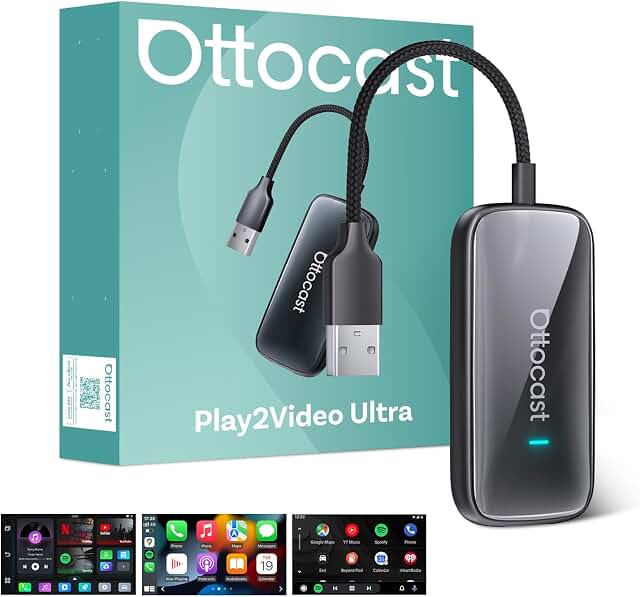
The OTTOCAST Play2Video Ultra combines wireless CarPlay and Android Auto conversion with built-in Netflix and YouTube. It supports offline playback from a USB drive up to 128GB, according to the listed features. Its interface is described as a simplified Android system, with an app hub and a one-click switch between video streaming and CarPlay or Android Auto.
This is best for buyers who want a mix of wireless phone connectivity, built-in streaming, and USB playback. The listing specifies iOS 10.0+ and Android 11.0+ and says controls can include the steering wheel, knobs, or voice commands. It also lists Wi-Fi 6 and Bluetooth 5.4.
Limitation: It is not intended for cars that already have wireless CarPlay or wireless Android Auto, and it requires wired CarPlay for its conversion function. Streaming needs a Wi-Fi or hotspot connection. The listing recommends a 5G Wi-Fi or hotspot connection for reduced lag, so check your connection options if smooth streaming is a priority.
LAMTTO 11-Inch Wireless Carplay Screen

This product is a separate 11-inch display with wireless CarPlay and Android Auto features, streaming through a phone hotspot, and a backup camera. Its dual Bluetooth design is described as connecting the screen with the phone and the car’s original audio system, so calls and music can play through the car speakers while the screen handles display and touch control. It is best for buyers seeking a larger, separate screen rather than a small adapter that uses the vehicle’s existing display.
Choose this if you want an 11-inch screen and features such as voice-controlled navigation, hands-free calls, and split-screen viewing. The listing describes dual-band 2.4G and 5G Wi-Fi and streaming apps including Netflix, YouTube, and TikTok through a hotspot.
Limitation: The product description explicitly says the screen does not have built-in CarPlay or Android Auto software. It also requires a hotspot for streaming. Buyers seeking a simple plug-in adapter for an existing factory touchscreen should compare the other products instead.
Buying Guide: How to Choose a Car Movie Player
“Bluetooth movie player for car” can refer to different kinds of equipment. These five options are adapters or a separate display, not traditional portable DVD players. Bluetooth may carry phone or audio connections, but the video is displayed through the car’s compatible screen or the separate LAMTTO screen. Start by identifying your vehicle’s existing equipment before choosing a product.
Does your car have factory-wired CarPlay or Android Auto?
Most of the adapters in this list require a factory wired CarPlay system, and some also describe wired Android Auto support. A wireless CarPlay system alone does not meet the wired-system requirement stated by several listings. Check the vehicle’s manual or infotainment settings, and review the product’s compatibility information for your specific car before ordering.
The LAMTTO 11-inch display is a different format from the adapters, but its product description says the screen itself does not have built-in CarPlay or Android Auto software. Do not assume it is a standalone replacement for every factory system. Verify the setup and connections described by the seller for your intended vehicle.
Do you need streaming or offline playback?
Built-in streaming apps can be convenient, but the listings for streaming products require an internet connection such as a phone hotspot or Wi-Fi. That can involve mobile data use and may not work where the signal is weak. If you want entertainment when there is no connection, prioritize a product that explicitly lists local playback.
The Rocketek supports TF card playback, with support listed up to 256GB. The Yurnlv supports playback from a USB drive, while the OTTOCAST lists USB drive playback up to 128GB. The LAMTTO adapter’s listed features do not specify offline file playback. Compare the storage format and stated capacity with the files and devices you plan to use.
Would HDMI or a separate screen be more useful?
The Yurnlv stands out for buyers who want an HDMI input as well as a USB port. Its HDMI connection is described for an external streaming stick or media player. The LAMTTO 11-inch product is the only listed choice with its own separate display, making it relevant if a larger screen is more important than using the car’s factory display.
Adapters generally make most sense when the vehicle already has a compatible screen and wired smartphone integration. A separate display may involve a different installation and audio setup. Consider where the screen will sit, how it will connect to the car’s audio system, and whether its controls suit the driver and passengers.
Which phone and vehicle requirements should you check?
Requirements vary by product. The Yurnlv listing specifies iOS 8+ and Android 10+ phones. The OTTOCAST listing specifies iOS 10.0+ and Android 11.0+. The LAMTTO adapter and Rocketek listing emphasize compatible factory wired systems, while the LAMTTO adapter specifically excludes BMW and Tesla. Check each product’s current compatibility information rather than relying only on a general claim about supported vehicles.
Also verify the car’s USB connection type and any setup instructions. The Rocketek includes USB-C-to-USB-A and USB-C cables. The LAMTTO adapter instructions mention enabling Apple CarPlay and switching the LED for Android Auto-only systems. These details can affect setup, even when a vehicle appears to meet the broad requirements.
How should you think about safe use?
Video content is for passengers or for use when the vehicle is parked. Do not watch or operate video apps while driving. A screen that also provides navigation or voice controls does not make video viewing safe for the driver in motion. Set up media before departure, and use the product’s navigation and hands-free features only in ways that keep attention on driving.
For family trips, a separate display or stored media can help passengers access entertainment without relying entirely on streaming. For a driver who mainly wants navigation and music, wireless phone integration may be more relevant than video features. Choose based on the actual use case rather than the largest app list.
Frequently Asked Questions
Can I stream movies on a car screen while driving?
These products list video streaming and playback features, but video should be used only by passengers or while the vehicle is parked. Do not watch video or operate video apps while driving.
Do these products work in any car with Bluetooth?
No. Bluetooth alone is not enough for the adapters listed here. Most require factory wired CarPlay or Android Auto, and the separate LAMTTO screen has its own stated setup requirements. Check the individual compatibility information before buying.
Which option supports movies without Wi-Fi?
The Rocketek lists TF card playback, the Yurnlv lists USB drive playback, and the OTTOCAST lists USB drive playback up to 128GB. Those local playback features are the relevant choices when an internet connection is unavailable.
Which product has an HDMI input?
The Yurnlv Magic AI Box lists a full-size HDMI input for connecting an external streaming stick or media player. Confirm the connection requirements for the external device you plan to use.
Do these devices include cellular internet?
The product features provided do not say that these devices include cellular service. Streaming descriptions require Wi-Fi or a phone hotspot, so plan for an internet connection separately.
Is a car movie player the same as a portable DVD player?
No. The products in this guide are CarPlay or Android Auto adapters and a separate display. Their listed playback options use built-in apps, TF cards, USB drives, or HDMI rather than a DVD disc drive.