
The easiest way to play phone audio through a cassette player is to use a cassette adapter: choose a wired model for a direct connection, or a Bluetooth model if your phone supports wireless audio. The Arsvita Bluetooth adapter is best for a vintage car without Bluetooth, while the Mersoco wired adapter is suited to people who want a cable and call controls. The USB-C cassette adapter is a direct option for compatible phones without a 3.5 mm headphone jack.
| Adapter | Connection | Best for |
|---|---|---|
| Arsvita Bluetooth | Bluetooth | Wireless phone audio in a car with a cassette deck |
| Mersoco | 3.5 mm cable | Wired playback and one-touch call controls |
| Kedok Bluetooth 5.0 | Bluetooth | Wireless listening with stated battery details |
| Generic Type-C adapter | USB-C to 3.5 mm | Direct wired connection from a compatible USB-C phone |
| Arsvita cassette-to-AUX | 3.5 mm cable | Wired stereo playback from a device with a headphone jack |
Arsvita Bluetooth Cassette Adapter

Best for: Drivers who want to stream phone audio through a vintage car cassette deck without running a 3.5 mm cable from the phone.
This Arsvita cassette receiver sends audio from a Bluetooth-enabled phone, tablet, or other compatible device to a cassette player. The product description says it is intended for cars or home audio systems that have a tape deck but lack Bluetooth. It can let drivers retain the original stereo rather than replacing or modifying it.
Choose this model if wireless connection is more important than taking calls through the adapter. It supports stereo audio, and the listing suggests adjusting the player’s equalizer to tailor playback. It is also suitable for other cassette-based audio systems, not just cars.
Limitation: The listed features explicitly say this adapter does not support phone calls. It also requires a Bluetooth source device, so choose a wired model if you prefer a cable connection or your phone cannot connect over Bluetooth.
Mersoco Wired Cassette Adapter

Best for: People who want a wired connection and built-in call controls for a compatible device with a 3.5 mm audio jack.
The Mersoco adapter connects a cassette player to a phone or MP3 player through a 3.5 mm cable. Its listed cable length is 3.2 feet. The adapter also has a built-in microphone and one-touch button for answering or ending calls. Listed controls include track switching, volume adjustment, and voice-assistant activation.
Choose this model if you want to avoid Bluetooth pairing and value controls on the adapter. Its described precision tape head is intended to provide stable stereo output. The call-control functions may make it a better fit than a basic wired cassette adapter for drivers who need to manage calls without handling the phone.
Limitation: The direct connection is described for devices with a 3.5 mm jack. Check your phone’s available audio connection before buying; the provided product details do not specify a USB-C or Lightning connector.
Kedok Bluetooth 5.0 Cassette Receiver
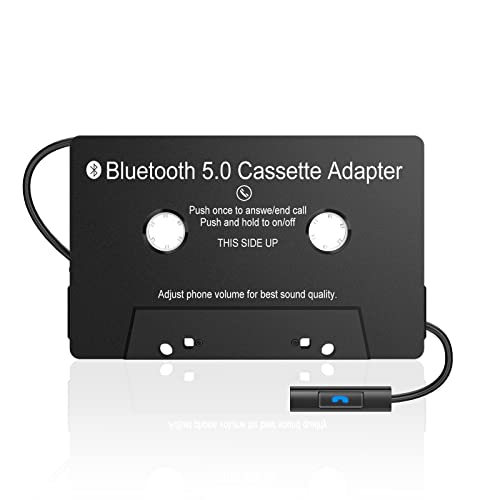
Best for: Buyers who want a wireless cassette adapter and prefer a product listing that states battery and charging information.
The Kedok receiver connects to a Bluetooth-enabled phone and plays audio through a cassette deck. Its listed features include Bluetooth 5.0, two-channel stereo transmission, and a built-in lithium-ion battery. The product description states up to eight hours of playback and talk time and a full charge time of 1.5 hours.
Choose this model if you want wireless listening without replacing a classic car radio, and if the stated battery details are useful when planning regular use. It can also be used with home or car audio systems that have a cassette player. As with other Bluetooth adapters, connect the phone to the receiver and adjust audio settings on the player if needed.
Limitation: Unlike a wired adapter, this model needs charging. The listing’s talk-time claim does not establish that every call feature or microphone behavior will suit every phone, so confirm the controls you need before choosing it.
Type-C Cassette To AUX Adapter

Best for: People with a compatible USB-C phone who prefer a direct wired audio path instead of Bluetooth.
This product combines a cassette adapter with a USB-C-to-3.5 mm audio connection. Its listing says it works with Type-C devices and describes a setup that needs no Bluetooth, batteries, or car modifications. It also lists a gold-plated connector, metal casing, dual shielding, and a silver wire core as design features intended to support a stable audio connection.
Choose this option if your phone has USB-C audio output and you want to connect it to a cassette player by wire. It is a more appropriate match than a standard 3.5 mm-only cassette adapter when your phone lacks that headphone jack, provided the phone supports the connection described by the product.
Limitation: The listing specifies Type-C devices; it does not describe support for phones with other connector types. Check that your device supports audio through its USB-C port before purchase.
Arsvita 3.5 Mm Cassette Adapter

Best for: Listeners with a 3.5 mm audio output who want a simple wired connection to a cassette deck.
This Arsvita model connects a cassette player to devices with a standard 3.5 mm audio jack or AUX-in port. The listed design features include a step-down design, dual shielding, a metal shell, and gold-plated connectors. It supports stereo audio and is described for use with phones, tablets, MP3 players, headphones, portable speakers, and other compatible equipment.
Choose this adapter if you want to avoid Bluetooth pairing and your phone or audio source has the required 3.5 mm connection. It is also a straightforward choice for other compatible audio devices, such as an MP3 player, when the goal is to play audio through an existing cassette deck.
Limitation: This is a wired adapter with a 3.5 mm connection. A phone without a headphone jack may need an appropriate audio adapter, which is not included in the listed features.
Buying Guide: How To Choose A Cassette Adapter For Your Phone
Should you choose Bluetooth or a wired cassette adapter?
A Bluetooth cassette adapter is better for a wireless setup. Pair your phone with the adapter, then insert the cassette-shaped receiver into the tape deck. This can reduce cable clutter, but the adapter needs a charge if it has a battery, and call support varies by model. The Arsvita Bluetooth listing specifically says calls are not supported.
A wired cassette adapter connects directly to an audio output. It does not require Bluetooth pairing, and basic wired models do not require a rechargeable adapter battery. However, the phone must have a compatible port, and the cable may need to reach the cassette deck. Choose wired if you value a direct connection and can accommodate the cable.
What phone connector does your device use?
Check the phone’s available audio connection before selecting a wired adapter. A conventional 3.5 mm cassette adapter is suited to a device with a 3.5 mm audio jack. If your phone uses USB-C, a USB-C-to-3.5 mm setup may be a better fit, but confirm that the phone supports audio output through that port. Connector shape alone does not establish every device’s audio compatibility.
Bluetooth models avoid the need for a headphone jack, provided the phone can connect to the adapter over Bluetooth. If more than one person may use the car stereo, consider whether each person’s phone can connect in the way the adapter requires.
Do you need hands-free calling?
Do not assume that every cassette adapter supports calls just because it works with a phone. Some products focus on music playback. The Arsvita Bluetooth model listed here states that it has no phone-call function. Mersoco lists a built-in microphone and a one-touch call button, while Kedok lists playback and talk time. Compare the stated call controls with your needs before buying.
For safety, set up audio and controls before driving. Follow local laws and avoid handling a phone while the vehicle is moving. A control on an adapter does not replace safe driving practices.
Will a cassette adapter work with your stereo?
Your car or home stereo needs a working cassette player. These products use the cassette deck as the audio input, so they are not a solution for a stereo without a tape player. If the deck does not accept or play ordinary cassettes reliably, the adapter may not solve the underlying problem.
For a car with an original tape deck, a cassette adapter can provide phone audio without replacing or modifying the radio. That is useful when retaining the existing stereo matters. For home use, apply the same basic check: the audio system needs a compatible cassette player.
How important are battery life and charging?
Battery information matters for Bluetooth models. The Kedok listing states up to eight hours of playback and talk time and a 1.5-hour charging time. The provided details for other wireless options do not give the same figures, so do not assume they have identical battery performance. Wired models avoid charging the cassette adapter itself, although the connected phone still uses its own battery.
What should you compare for sound and ease of use?
Look for the connection type, stereo support, controls, and any setup requirements in the product details. The listed adapters describe stereo audio, while some also mention shielding or connector materials. These specifications do not guarantee the same sound in every car: the cassette deck, phone output, volume levels, and equalizer settings can all affect playback.
For the simplest decision, match the adapter to your priorities: choose Bluetooth for fewer phone cables, a standard wired adapter for a 3.5 mm source, or a USB-C model for a compatible Type-C phone. Choose a model with call controls only if those controls are explicitly listed.
Frequently Asked Questions
How do I play phone music through a cassette player?
Insert a cassette adapter into the tape deck, then connect your phone by Bluetooth or by a compatible wired audio connection. Select the cassette source on the stereo and play audio from the phone.
Can I use a cassette adapter if my phone has no headphone jack?
Yes, if you choose a Bluetooth adapter or a wired option compatible with your phone’s port. A standard 3.5 mm adapter may require a separate, compatible audio connection for a phone without a headphone jack.
Do cassette adapters work for phone calls?
Call support depends on the model. Mersoco lists a microphone and one-touch call controls. The Arsvita Bluetooth adapter listed here says it does not support phone calls.
Does a Bluetooth cassette adapter need to be charged?
Battery-powered Bluetooth models need charging. The Kedok listing states up to eight hours of playback and talk time and a full charge time of 1.5 hours. Check the specific product details because battery information differs by model.
Can I use a cassette adapter in a home stereo?
Yes, if the home stereo has a working cassette player and the adapter supports the audio source you plan to use. Some product listings describe use with both car and home cassette systems.