
The most direct option in this selection is the HumanCentric VESA monitor shelf, which is designed to hold microphones and attaches to a 100x100mm VESA pattern. A Gator camera-thread adapter may suit a compatible microphone or accessory, while the other listed products are alternatives for mounting near a monitor rather than directly to its arm. Compare the mounting method and your microphone’s connection before choosing.
| Product | Best suited for | Mounting approach |
|---|---|---|
| HumanCentric DSLR Monitor Mount Small | VESA-based monitor setups | VESA shelf with 1/4-20 screws |
| Gator Frameworks Camera Mount Adapter | Gear with a standard 1/4-20 camera thread | Ball-and-socket adapter |
| Mic Boom Arm with Extension Riser | Buyers seeking an overhead boom arm | Separate microphone stand |
| M05 Pro Boom Arm | Desk-mounted microphone positioning | Clamped, foldable boom arm |
| RAUBAY Monitor Top Camera Mount | Lightweight webcam placement | Clamp on a flat-screen monitor |
HumanCentric DSLR Monitor Mount Small

Best for: A desk setup with a compatible 100x100mm VESA pattern that needs a microphone or other accessory positioned above the monitor.
This aluminum shelf attaches to the back of a monitor using 100x100mm VESA patterns, with or without a VESA arm. The listed features say it can hold microphones, webcams, DSLR cameras, and lighting accessories using standard 1/4-20 screws. That makes it the clearest match here for someone who specifically wants equipment supported from a VESA monitor arrangement.
Why it was selected: Unlike a general desk boom arm or webcam clamp, this product is explicitly described as a shelf for a monitor VESA setup and names microphones among the supported equipment.
Check before choosing: Confirm that your monitor or arm has the stated 100x100mm VESA pattern and that your microphone or its attachment can use a standard 1/4-20 screw. The listed information does not specify a weight limit, so do not assume it can support every microphone.
Gator Frameworks Camera Mount Adapter

Best for: Buyers who need an adapter for equipment with a standard 1/4-20 camera thread and have a compatible mounting point available.
The product name identifies a camera-mount microphone stand adapter with a ball-and-socket head, and says it fits standard 1/4-20 camera threads. That connection detail may make it useful when adapting compatible equipment in a monitor-area setup. Its ball-and-socket head is relevant when an adjustable angle is needed.
Why it was selected: It provides a specific thread standard and an adjustable-head design, which are important details when evaluating a small accessory mount. It is an adapter rather than a complete monitor arm or VESA shelf.
Check before choosing: The supplied product information does not state that it attaches directly to a monitor arm, nor does it provide a load limit or list microphone models. Verify that the arm-side connection and the microphone-side thread both match before ordering.
Adjustable Height Microphone Boom Arm
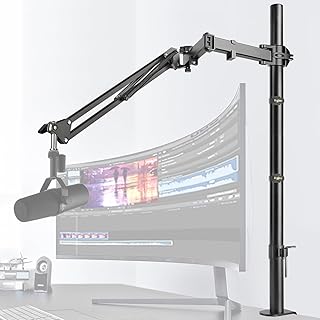
Best for: Buyers looking for an overhead microphone boom with added height, rather than a product confirmed to attach to a monitor arm.
The name describes an adjustable-height overhead microphone stand with a heightened extension riser. It also names Shure SM7B, Blue Yeti, and HyperX QuadCast S among the microphones for which it is intended. Those details may help shoppers seeking a raised boom position for a compatible microphone.
Why it was selected: It is a microphone-specific positioning product and may be relevant to someone comparing ways to clear desk space around a monitor. The listed information, however, does not identify a VESA plate or a monitor-arm attachment.
Check before choosing: Do not treat “overhead” as confirmation that the arm mounts to a monitor. The provided product data does not state its attachment method, thread details, or weight capacity. Confirm those specifications and compatibility with your setup before relying on it for a monitor-arm installation.
M05 Pro 360-Degree Boom Arm

Best for: A shopper who wants a separate desk-mounted boom arm for streaming, gaming, podcasting, or radio.
The product name specifies 360-degree rotation, a foldable arm, a desk mount, and a 3/8-inch-to-5/8-inch screw adapter. These details describe a conventional desk-mounted microphone arm. They may be useful if the goal is to place a microphone beside a monitor without attaching it to the monitor arm itself.
Why it was selected: It is a microphone-positioning alternative with named mounting and adapter details, making it a practical comparison for people considering a monitor-arm mount.
Check before choosing: The listed information describes a desk mount, not a VESA or monitor-arm connection. Avoid choosing it if direct attachment to the monitor arm is essential. The supplied features do not state its supported microphone weight or desk-clamp range.
RAUBAY Monitor Top Camera Mount

Best for: Buyers seeking a lightweight mount for a webcam on a flat-screen monitor, not a confirmed microphone support.
The product description calls this a lightweight plastic webcam mount for flat-screen monitors and lists streaming, video calls, and content creation as use cases. Its name also identifies a 1/4-inch connection. That makes it relevant as a monitor-mounted accessory comparison, particularly for shoppers whose priority is a webcam rather than a microphone.
Why it was selected: It is explicitly designed to clamp onto a monitor, so it helps distinguish a monitor-top accessory from a VESA mount or a separate desk boom.
Check before choosing: The supplied information describes it as a webcam mount and does not say it supports microphones or attaches to a monitor arm. Do not assume the 1/4-inch connection establishes microphone load capacity or compatibility.
Buying Guide: How to Mount a Microphone to a Monitor Arm
Does the product attach to the monitor arm itself?
Start by identifying the exact structure you want to mount to. A monitor-arm setup can mean the VESA plate behind the display, an accessory shelf attached to that plate, or the monitor’s top edge. Those are different mounting points. In this product list, the HumanCentric shelf is the item expressly described for a 100x100mm VESA pattern. The RAUBAY product is described as a flat-screen monitor clamp, while the M05 Pro has a desk mount.
Read the mounting description carefully rather than relying on words such as “monitor,” “overhead,” or “camera.” Those terms do not by themselves prove that a product attaches to a monitor arm.
What connection does your microphone require?
Check the microphone’s mounting point and any adapter already attached to it. A standard 1/4-20 thread is specifically mentioned for the HumanCentric shelf’s supported accessories and for the Gator camera-thread adapter. The M05 Pro listing names a 3/8-inch-to-5/8-inch screw adapter. These thread descriptions are not interchangeable by assumption; match the product connection to the equipment you actually have.
If the microphone uses a different connection, you may need a separate adapter. The supplied product information does not establish which additional adapters are included or whether they fit a particular microphone, so verify those details with the product listing and your equipment documentation.
Will the mount support the microphone’s weight?
Do not estimate load capacity from a product’s appearance or from a list of compatible microphone names. None of the supplied product details gives a specific weight limit. Check the manufacturer’s current specifications for the mount and the monitor arm, and consider the combined load of the microphone, shock mount, cable, and any added accessories.
A VESA shelf or monitor clamp can affect the balance of a monitor setup. Keep the microphone close to the supported mounting point where possible, and avoid adding equipment beyond stated limits. If no load rating is available, contact the manufacturer before mounting valuable or heavy gear.
Do you need direct arm mounting or just a clear desk?
If you specifically want the microphone carried by the monitor’s VESA structure, the HumanCentric shelf is the clearest listed match, subject to pattern and connection checks. If the priority is moving a microphone out of the way, a separate desk boom such as the M05 Pro may be an alternative, but it is not described as attaching to the monitor arm. The overhead boom arm is another possible positioning option, though its attachment method is not provided here.
Choosing the mounting point first helps avoid buying an accessory that solves a different problem. A monitor-top webcam clamp is not a substitute for a microphone mount unless its manufacturer explicitly confirms microphone support.
How should you manage positioning and cable movement?
Decide where the microphone should sit relative to your screen, speaking position, and camera view. A ball-and-socket head, as named for the Gator adapter, is intended to allow angle adjustment; the M05 Pro name specifies 360-degree rotation and a foldable arm. These features can help with positioning, but the appropriate range depends on the actual setup.
Leave enough slack in the microphone cable for the monitor arm to move through its normal range. Route cables so they do not pull on the microphone, interfere with screen movement, or become pinched. The supplied product details do not describe cable-management features for these mounts.
Which mounting approach should you choose?
- Choose a VESA shelf if your setup has the specified 100x100mm pattern and the microphone connection matches the shelf’s stated 1/4-20 support.
- Consider an adapter if you have a compatible standard 1/4-20 camera thread and have confirmed a suitable arm-side attachment.
- Choose a desk boom instead if a separate desk mount meets your needs and direct monitor-arm attachment is not required.
- Choose a monitor-top clamp for a webcam only when webcam placement is the intended use; the supplied description does not establish microphone support.
Frequently Asked Questions
Can I mount a microphone directly to a monitor arm?
Yes, if the mount is designed for the arm’s attachment pattern and can safely support the microphone. In this selection, the HumanCentric shelf is described for a 100x100mm VESA pattern and microphone accessories using standard 1/4-20 screws. Check the load limit and thread match before installation.
Is a VESA monitor shelf the same as a microphone boom arm?
No. A VESA shelf attaches to a monitor’s VESA mounting pattern and supports compatible equipment. A boom arm positions a microphone through an extending arm, often from a desk clamp. The M05 Pro listing describes a desk-mounted arm, not a VESA mount.
Does a 1/4-20 camera mount fit every microphone?
No. A 1/4-20 connection only confirms a particular thread standard. The microphone or its adapter must have a matching connection, and the mount must support the equipment’s weight. Check both ends of the connection before buying.
Can I use the RAUBAY monitor-top clamp for a microphone?
The supplied description identifies the RAUBAY product as a lightweight plastic webcam mount for flat-screen monitors. It does not state that the clamp supports microphones, so do not assume it is suitable for one.
What should I check before attaching anything to my monitor arm?
Confirm the VESA pattern or attachment method, thread size, supported load, and clearance for screen movement. Also check that cables can move without pulling or snagging. If the mount’s capacity or attachment compatibility is not specified, seek confirmation from the manufacturer.