
The best iPod docking station depends on whether you want a traditional 30-pin speaker dock, a portable speaker, an alarm clock, or a way to stream wirelessly to an existing dock. These options focus on older Apple devices and 30-pin connections, so check your iPod or iPhone connector before buying. The Bose SoundDock Series II suits buyers seeking a speaker dock, the iClassic adds radio and alarm functions, and the portable Bose model is designed for listening away from an outlet. The INVERY adapter is an accessory, not a standalone docking station.
| Product | Best For | Key Detail |
|---|---|---|
| Bose SoundDock Series II (Renewed) | Buyers open to a renewed unit | 30-pin speaker dock; Lightning adapter needed for Lightning devices |
| Bose SoundDock Series II | Buyers seeking a traditional Bose dock | Speaker dock for many iPod and iPhone models |
| iClassic Docking Speakers | Bedside or radio use | Alarm, snooze, AM/FM, and 20 presets |
| Bose SoundDock Portable (Renewed) | Portable playback | Rechargeable Li-ion battery |
| INVERY 30-Pin Bluetooth Adapter | Wireless streaming to a compatible dock | Adapter for existing 30-pin music docks |
Bose SoundDock Series II Renewed

This renewed Bose SoundDock Series II is a 30-pin speaker dock for buyers who want a direct-docking setup for a compatible iPod or iPhone. The listed features describe proprietary Bose sound technology and styling intended for use in rooms such as a kitchen, bedroom, or living room. It is a stationary speaker option rather than a portable, battery-powered model.
Best for: Buyers who want a Bose-branded speaker dock and are considering a renewed listing. It was selected because it combines the Series II dock format with the listed speaker features in a familiar home-audio design.
Connector caution: This dock uses a 30-pin connection. The listing says an Apple Lightning-to-30-pin adapter is required for iPhone 5 and other iPod or iPhone models with a Lightning connector. Confirm the exact device connection and adapter needs before choosing it. The listing identifies the item as renewed, so buyers seeking a specifically new unit should check the condition details.
Bose SoundDock Series II

The Bose SoundDock Series II is a 30-pin speaker dock for buyers looking for a straightforward home listening setup. Its listed features include proprietary Bose audio technology and a sleeker design update. The product is described as working with many iPod and iPhone models, making the connector check especially important for anyone using a newer Apple device.
Best for: Buyers who want a traditional speaker dock for a compatible 30-pin iPod or iPhone. It is a better fit than the portable SoundDock when the intended use is a fixed room setup and portability is not a priority.
Connector caution: For iPhone 5 and other devices with a Lightning connector, the listing specifies use of an Apple Lightning-to-30-pin adapter. It does not provide a list of every compatible model, so verify your device’s connector and model before purchasing. Do not assume that a Lightning device will connect directly to the dock.
iClassic Docking Speakers With Alarm

The iClassic docking speaker combines a 30-pin iPod or iPhone dock with an alarm clock and digital AM/FM radio. Its listed radio includes 20 preset stations: 10 FM and 10 AM. The alarm has a snooze function, and the user can select the iPod, buzzer, or AM/FM radio as the alarm source.
Best for: Buyers who want a bedside or desk device that combines docking, radio listening, and alarm functions. It was selected because its added clock and tuner features offer a different use case from the Bose speaker docks.
Connector caution: The product description specifies a 30-pin dock. Check that your Apple device has a matching connector or determine whether a suitable adapter is needed. The feature information does not specify the speaker’s dimensions, sound output, or exact model compatibility, so confirm those details if they affect your setup.
Bose SoundDock Portable
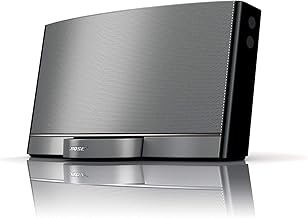
The Bose SoundDock Portable is the portable option among these speaker docks. The listed features describe a rechargeable lithium-ion battery and audio reproduction intended for use as a battery-powered iPod speaker. It is a fit for buyers who want to move a compatible dock and speaker between listening locations rather than keep it in one room.
Best for: Buyers who prioritize portability and want a dock with a rechargeable battery. Choose this over the Series II if battery-powered playback is a key requirement.
Connector caution: The listing notes that many iPod and iPhone models are supported, but a Lightning-to-30-pin adapter is required for iPhone 5 and other Lightning-connector devices. The supplied feature details do not state the battery runtime, so do not assume a particular number of hours per charge. This listing is identified as renewed.
INVERY 30-Pin Bluetooth Adapter

The INVERY 30-pin Bluetooth adapter is an accessory for a compatible existing dock, not a speaker or a complete docking station. The listed features say it adds Bluetooth streaming to specified Bose SoundDock models and other 30-pin music docking stations. It supports iOS and Android devices, pairs with up to two devices, and lists a 70-foot range in open air.
Best for: Owners of a compatible 30-pin music dock who want to stream from a phone or tablet without placing that device in the dock. It can be a better choice than replacing a working speaker dock when wireless playback is the main goal.
Compatibility caution: This product depends on an existing compatible 30-pin dock and does not provide speakers, an alarm clock, or a standalone iPod docking system. Check the dock model and connection before ordering. The stated 70-foot range is for open air and should not be treated as a guaranteed indoor range.
Buying Guide: How To Choose An iPod Docking Station
Which connector does your iPod or iPhone use?
Start by identifying the connector on the Apple device. The speaker docks in this selection use a 30-pin connection. Some older iPods and iPhones use that connector directly, while devices with a Lightning connector need an Apple Lightning-to-30-pin adapter according to the Bose listings. A connector mismatch can prevent direct docking, so compare your device model with the listing before buying.
Also distinguish a dock’s physical connector from a wireless adapter. The INVERY product plugs into a compatible 30-pin music dock and receives Bluetooth audio from another device. It does not convert a speaker dock into a universal charging station or replace the dock’s speakers.
Do you need a speaker dock, an alarm clock, or an adapter?
Choose a speaker dock if you want an integrated speaker and a physical docking setup. The Bose SoundDock Series II models are the simplest choices in this group for home listening. Choose the iClassic if AM/FM radio, alarm-source selection, and snooze are important. Choose the portable Bose SoundDock if a rechargeable battery is a priority. Choose the INVERY adapter only if you already own a compatible dock and want Bluetooth streaming.
- For a room speaker: Compare the Bose Series II models and check whether renewed condition is acceptable.
- For a bedside device: Consider the iClassic’s alarm, snooze, and radio presets.
- For moving between locations: Consider the portable Bose model, while checking battery-runtime information separately.
- For wireless phone playback: Check whether your existing dock is compatible with the INVERY adapter.
Should you choose renewed or non-renewed?
Two listings here are identified as renewed: the Bose SoundDock Series II renewed listing and the Bose SoundDock Portable listing. The other Series II listing is not labeled renewed in the supplied product information. If condition is important, read the current listing’s condition and included-items details before placing an order. Do not assume that two listings with the same product name have identical condition, accessories, or packaging.
What should you check before ordering?
Verify the exact dock model, connection type, and required accessories. For a Lightning device, account for the adapter specified by the Bose listings. For the INVERY receiver, verify that your existing dock has a compatible 30-pin connection and is among the supported types. If you want an alarm or radio, confirm that those functions are listed for the chosen product rather than assuming every iPod dock includes them.
Consider where the dock will be used. A stationary speaker dock can suit a bedroom or living room, while a battery-powered model may offer more flexibility. For a bedside setup, the alarm source can matter as much as speaker playback. For a wireless setup, consider whether the receiver’s open-air range statement is suitable for your expected placement, while recognizing that indoor conditions can affect the connection.
Frequently Asked Questions
Can a new iPhone connect directly to a 30-pin iPod dock?
Not necessarily. The Bose listings state that an Apple Lightning-to-30-pin adapter is required for iPhone 5 and other iPod or iPhone models with a Lightning connector. Confirm the device connector and adapter requirement before buying.
Which option includes an alarm and radio?
The iClassic Docking Speakers listing includes a snooze alarm, digital AM/FM radio, 20 station presets, and a choice of iPod, buzzer, or radio as the alarm source.
Is the INVERY Bluetooth adapter a docking station?
No. It is a Bluetooth receiver accessory that plugs into a compatible 30-pin music dock. It does not include speakers or function as a standalone dock.
Which product is designed for portable playback?
The Bose SoundDock Portable is the portable speaker-dock option in this selection. Its listed features include a rechargeable lithium-ion battery, but the supplied details do not give a specific playback time per charge.
Do all iPod docking stations charge every iPod?
No universal charging compatibility is established by these product details. Check the exact iPod model, connector, and listing information before assuming a dock will charge it.