
The best computer headphones and mic depend on whether you need gaming features, a simple USB connection, or clear voice pickup for meetings. The HyperX Cloud III is best suited to gaming and multi-device setups, while the NUBWO HG03 is a PC-focused gaming option. For everyday calls, the Logitech H390 provides USB-A connectivity, and the H391 offers USB-C. The rose H390 keeps the same listed core features as the black version in a different color.
| Product | Best suited for | Connection or standout detail |
|---|---|---|
| HyperX Cloud III | Gaming and flexible connections | USB-C, USB-A, and 3.5mm |
| NUBWO HG03 | PC gaming | FPS-tuned headset with noise-canceling mic |
| Logitech H390, Black | Calls and everyday computer use | USB-A and inline controls |
| Logitech H391, Graphite | USB-C computers and meetings | USB-C and inline controls |
| Logitech H390, Rose | USB-A users who prefer rose | Noise-canceling mic and inline controls |
HyperX Cloud III: Best For Gaming Flexibility
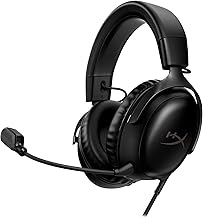
The HyperX Cloud III is a wired gaming headset with a 10mm microphone, angled 53mm drivers, memory foam, and a durable frame, according to its product name. Its listed connections are USB-C, USB-A, and 3.5mm, giving buyers several connection formats to consider. The product title also identifies spatial audio as a feature.
Best for: Buyers who want a gaming-focused headset and value having more than one connection type. It is the most connection-flexible choice in this selection based on its listed USB-C, USB-A, and 3.5mm options.
Why it was selected: It combines a clearly identified microphone with gaming-oriented audio and construction features. The multiple connection options may suit buyers choosing between compatible devices, but check the intended device’s available port before buying.
Limitation: This is a wired headset, so it is not the pick for someone specifically seeking wireless listening.
NUBWO HG03: Best For PC Gaming

The NUBWO HG03 is described as a wired gaming headset for PC with FPS-tuned audio and a noise-canceling microphone. Those stated features make it a more gaming-specific option than the Logitech H390 and H391 office-oriented descriptions in this list.
Best for: PC players looking for a gaming headset with a mic and an FPS focus. Choose this if those gaming descriptors match your main use rather than prioritizing a particular USB connector or meeting controls.
Why it was selected: It directly addresses both parts of the search—computer headphones and a microphone—and is explicitly identified for PC gaming. The noise-canceling mic is a relevant listed feature for voice communication, though the product details provided do not specify how much background sound it reduces.
Limitation: The supplied product information does not state its connector type or describe features such as inline mute controls. Confirm the connection details before purchase if your computer requires a specific port.
Logitech H390 Black: Best For USB-A Calls

The Logitech H390 is a wired stereo headset for PC and laptop with a USB-A connection. Its fine-tuned drivers are described as providing digital stereo sound for music, calls, and meetings. The rotating noise-canceling mic is designed to minimize unwanted background noise, and its boom arm can be moved out of the way when not in use.
Best for: People who need a USB-A computer headset for calls, meetings, and general listening. Inline cable controls let users adjust volume or mute calls without reaching for separate controls.
Why it was selected: Its listed mic, mute function, and clear USB-A identification make it a straightforward work-and-call option. Compared with the gaming models, its listed strengths focus more on communication and convenient call handling.
Limitation: This model uses USB-A. If your computer’s available connection is USB-C only, compare it with the H391 instead or verify your setup supports the connection you need.
Logitech H391: Best For USB-C Computers

The Logitech H391 is a wired PC and laptop stereo headset with a USB-C connector and graphite finish. Its listed digital stereo sound is intended for calls, meetings, music, and more. It also includes a rotating noise-canceling microphone and inline controls for volume adjustment and call muting.
Best for: Buyers whose computer setup calls for a USB-C headset and who want a boom mic with inline call controls. Its listed functions closely match the H390, with USB-C as the key stated difference.
Why it was selected: It provides a clear alternative for buyers comparing USB-C and USB-A computer headsets. The rotating mic can be tucked away when unused, according to the product details, while the inline controls support quick adjustments during calls.
Limitation: This is a wired USB-C model, not a wireless headset. Check that your computer’s USB-C port supports the connection you intend to use.
Logitech H390 Rose: Best For Color Choice

This rose version of the Logitech H390 is a wired USB-A stereo headset for PC and laptop. Its listed features include fine-tuned drivers for digital stereo sound, a rotating noise-canceling microphone, and inline controls for volume and muting. The microphone boom can be tucked out of the way when it is not needed.
Best for: USB-A users who want the H390’s listed call and meeting functions in a rose finish. Its stated core features make it comparable to the black H390; the clear distinction in the supplied product names is color.
Why it was selected: It offers the same kind of mic and inline control setup described for the black H390 while giving buyers another finish to consider. It is suitable to compare when appearance matters alongside USB-A connectivity.
Limitation: Like the other H390, it uses USB-A. It may not suit a computer without an appropriate USB-A connection.
Buying Guide: How To Choose A Computer Headset
Which connection should you choose?
Start by checking the ports available on your computer. The HyperX Cloud III lists USB-C, USB-A, and 3.5mm connections. The Logitech H390 models listed here use USB-A, while the Logitech H391 uses USB-C. The NUBWO HG03 product details provided do not identify a connector, so verify that information before ordering.
A connector label alone does not confirm that every function will work with every device. Check your computer’s available ports and the headset’s product listing. If you plan to use the headset with another device, verify that device’s connection requirements too.
Is the headset mainly for gaming or work calls?
For PC gaming, compare the HyperX Cloud III and NUBWO HG03. The Cloud III lists angled 53mm drivers, spatial audio, and a 10mm mic. The HG03 is described as FPS-tuned and includes a noise-canceling mic. The supplied information does not provide enough detail to rank their sound quality against each other.
For work calls and meetings, the Logitech H390 and H391 have more specific call-oriented details: a rotating noise-canceling mic, inline volume adjustment, and call mute controls. Choose between them chiefly by checking whether USB-A or USB-C fits your computer.
What microphone features matter for calls?
A boom microphone places the mic near the speaker’s mouth, and a rotating design can be moved aside when it is not in use. The Logitech models explicitly list this feature. Noise-canceling descriptions indicate an effort to minimize unwanted background noise, but the provided details do not quantify the effect or guarantee a particular result in a noisy room.
Inline mute controls can be useful when you need to silence a call quickly. The H390 and H391 list inline mute and volume controls. The HyperX product name identifies an ultra-clear 10mm mic, while the NUBWO name identifies a noise-canceling mic.
Should you choose a wired headset?
All five selected products are described as wired. A wired headset avoids the need to choose based on wireless features, but the cable and connection type become important. Check that the cable can reach your workspace and that your computer has a suitable port. If you require wireless use, these products do not match that requirement based on the supplied descriptions.
How should comfort and daily use affect your decision?
Consider how long you expect to wear the headset and whether you need to move the mic out of the way between calls. The HyperX listing names memory foam and a durable frame, but the provided details do not specify fit measurements or weight. The Logitech mic arms rotate for storage or when not in use. Compare the product descriptions and images, and check detailed fit information before choosing for extended wear.
Frequently Asked Questions
What is the best computer headset with a microphone for gaming?
The HyperX Cloud III is a strong gaming-focused option in this selection, with spatial audio, angled 53mm drivers, a 10mm mic, and USB-C, USB-A, and 3.5mm connections listed. The NUBWO HG03 is another PC gaming choice, described as FPS-tuned with a noise-canceling mic.
Which headset here has USB-C?
The Logitech H391 is listed as a USB-C wired headset. The HyperX Cloud III also lists USB-C among its connection options.
Which Logitech headset uses USB-A?
Both Logitech H390 versions shown here use USB-A: the black model and the rose model. Their listed core functions include digital stereo sound, a rotating noise-canceling mic, and inline controls.
Do these computer headsets have mute controls?
The Logitech H390 and H391 explicitly list inline mute controls. The supplied details for the HyperX Cloud III and NUBWO HG03 do not specify an inline mute function.
Are these headsets wireless?
No. The selected products are described as wired headsets. Buyers who need wireless operation should look for a product that explicitly lists wireless connectivity.