
A Toslink-to-stereo converter changes digital optical audio into analog left-and-right RCA or 3.5 mm audio for equipment with analog inputs. The PROZOR aluminum-alloy DAC is a good fit for buyers who want both RCA and 3.5 mm outputs; the AUTOUTLET is suited to buyers seeking a listed 7-foot cable; and the volume-adjustable PROZOR is worth considering when output-level control is a priority. Compare the output connections and included accessories before choosing.
| Converter | Best for | Listed connection or feature |
|---|---|---|
| PROZOR Aluminum Alloy DAC | Flexible stereo output choices | RCA and 3.5 mm outputs |
| AUTOUTLET 192 kHz DAC | Buyers who need a longer cable | 7-foot cable; RCA output |
| PROZOR Optical-to-Analog DAC | RCA and headphone-style output | RCA and 3.5 mm outputs |
| PROZOR Volume-Adjustable DAC | Output-level adjustment | Volume control; optical cable included |
| 192 kHz DAC With Optical Cable | Basic RCA stereo conversion | Optical cable included; RCA output |
PROZOR Aluminum Alloy Optical DAC

This PROZOR converter is best for buyers who want more than one analog output option from a Toslink source. Its listed connections include stereo RCA and a 3.5 mm jack, so it can serve setups built around either type of analog input. The aluminum-alloy housing is also identified in the product name.
The listing describes 192 kHz digital-to-analog conversion and references use with devices such as PS3, PS4, HD DVD players, Apple TV, amplifiers, and home cinema equipment. Those examples indicate the intended source-device category, but buyers should verify that their particular source provides a compatible optical signal.
- Best for: Connecting an optical audio source to RCA stereo or 3.5 mm analog equipment.
- Why it stands out: The two listed analog output types make it more flexible than an RCA-only converter.
- Check before buying: Confirm which output your receiving equipment accepts and whether you need any cables or power accessories not specified in the product information.
AUTOUTLET 192 kHz DAC With 7-Foot Cable

The AUTOUTLET converter is best for buyers who want an optical-to-RCA connection and value a longer cable included in the listed product description. It specifies a 7-foot, or 2.1-meter, cable and a Toslink-to-RCA male output. The listing also identifies 192 kHz and 24-bit digital-to-analog conversion.
Its stated applications include HDTVs, DVD and Blu-ray players, and game consoles. That makes it a practical option to compare when the source is a television or other home entertainment device and the receiving equipment has stereo RCA inputs. The product name describes it as plug and play, but that does not remove the need to check source audio settings.
- Best for: A setup needing an RCA connection and a cable with the stated 7-foot length.
- Why it was selected: The cable length and RCA output are clearly specified, which helps buyers assess placement and connection needs.
- Limitation: The described output is RCA; choose another model if your equipment specifically needs a 3.5 mm output.
PROZOR Optical-to-Analog RCA and 3.5 mm DAC

This PROZOR model is best for buyers comparing a compact conversion option with both stereo RCA and 3.5 mm analog connections. Its product description specifies a 192 kHz DAC and names digital SPDIF Toslink optical as the input type. It also lists examples such as PS3, PS4, HD DVD players, Apple TV, amplifiers, and home cinema systems.
Choose this if the receiving device may use either RCA stereo inputs or a 3.5 mm jack. Having both output types listed can simplify matching the converter to different analog equipment. The product description does not state a cable length or include details about adjustable output volume, so do not assume those features are present.
- Best for: Buyers who need a choice between RCA stereo and 3.5 mm output.
- Why it was selected: It directly addresses the common need to convert Toslink optical audio to analog stereo.
- Check before buying: Verify the exact contents and power requirements on the current listing if included accessories matter to your setup.
PROZOR Volume-Adjustable Optical DAC
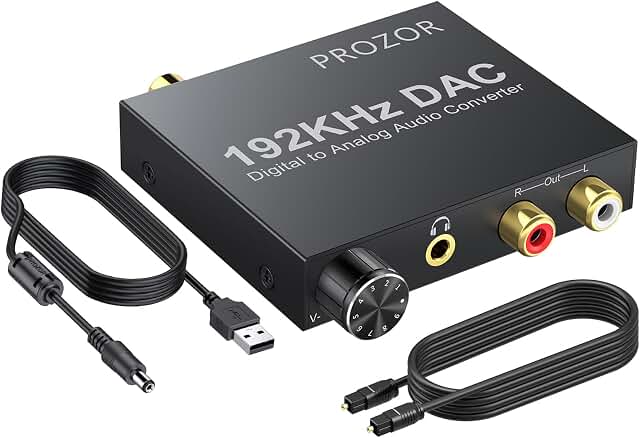
This PROZOR converter is best for buyers who want volume adjustment as a listed feature. Its product name specifies optical-to-RCA conversion, stereo left-and-right output, a 3.5 mm jack, and an included optical cable. It is also described as a 192 kHz DAC.
Compared with the RCA-only AUTOUTLET option, this model lists both RCA and 3.5 mm outputs. Its volume-adjustable feature may be useful when the user wants to change the converter’s output level, although the product information provided does not explain the control method or its range. Check the listing and equipment manuals to understand how it operates in a particular system.
- Best for: Buyers who specifically want a converter described as volume adjustable.
- Why it stands out: The product name identifies both analog output options and an optical cable.
- Limitation: The available description does not provide details about the volume-control interface or cable length.
192 kHz RCA DAC With Optical Cable

This converter is best for buyers looking for a straightforward optical-to-RCA connection and a product description that specifies an optical cable. It is described as a 192 kHz digital-to-analog converter for Toslink optical audio and lists HDTVs, DVD and Blu-ray players, and game consoles as intended source categories.
Choose this model when the receiving equipment has stereo RCA inputs and the included optical cable matches the distance between devices. Its product name does not identify a 3.5 mm output or a volume-adjustment feature. Buyers who require either should compare the PROZOR models that explicitly list those features instead.
- Best for: A basic Toslink-to-RCA stereo setup with an optical cable listed as included.
- Why it was selected: Its intended conversion direction and RCA output are clear in the product description.
- Limitation: The listed information does not specify a cable length or alternate analog output.
Buying Guide: How To Choose A Toslink-To-Stereo Converter
Which analog output does your stereo equipment accept?
Start by checking the input panel or manual for the receiving device, such as powered speakers, an amplifier, or a stereo system. RCA stereo connections typically use separate left and right plugs. A 3.5 mm input uses a single small jack. Choose a converter that explicitly lists the output your equipment accepts. If you use different equipment in different rooms, a model listing both outputs offers more connection choices.
Does the converter match your source’s optical output?
Confirm that the source device has a Toslink optical audio output, rather than a different digital connection. The converter’s input must match the source, and its analog output must match the stereo equipment. Also check whether the source’s optical port is enabled in its settings. A physical connection alone may not produce audio if the source is configured to send sound through another output.
What audio format should the source use?
Check the converter’s current product details and the source device’s audio menu for supported signal formats. For troubleshooting, many converter setups require the source to output two-channel PCM rather than a surround-sound bitstream. The information supplied for these products does not establish compatibility with every audio format. If sound is missing or distorted, consult the source manual and select an output format the converter supports.
Do you need an included cable or a particular cable length?
Included accessories and cable lengths vary across the five listings. AUTOUTLET specifies a 7-foot cable, while two other product names explicitly mention an optical cable without stating its length. Consider where the source and converter will sit, and whether the optical cable reaches between them. Also check the connection required from the converter to the stereo equipment; an included optical cable does not necessarily mean every cable in the full setup is included.
Is volume control important?
If you want to adjust output at the converter, compare models that specifically identify volume adjustment. The PROZOR volume-adjustable model lists this feature. The other product descriptions provided do not state that they have converter-level volume control. You can also check whether your amplifier, speaker system, or source device controls listening volume, but do not assume the converter will change volume unless its listing confirms it.
How should you compare 192 kHz and 24-bit claims?
Some product names state a 192 kHz conversion rate, and the AUTOUTLET name also specifies 24-bit. Treat these as listed technical specifications, not as a guarantee that every source will send audio at that rate or that every setup will sound different. The source format, converter, connections, and receiving equipment all affect the result. Prioritize correct input and output connections and supported formats before choosing based on a number alone.
Frequently Asked Questions
What does a Toslink-to-stereo converter do?
It converts digital audio received through a Toslink optical connection into analog stereo output, commonly left-and-right RCA or 3.5 mm audio. The analog output can connect to equipment that lacks a matching optical input.
Can I connect an optical TV output to RCA speakers?
Yes, if the TV provides a Toslink optical output, the converter accepts that signal, and the speakers or amplifier have stereo RCA inputs. Check the TV’s audio-output settings and the converter’s supported audio formats.
Will a Toslink converter work with any optical audio signal?
Not necessarily. Compatibility depends on the signal format supported by the converter. Check its product information and set the source to a supported format, such as two-channel PCM when required by the device instructions.
Should I choose RCA or 3.5 mm output?
Choose the output that matches the analog input on your receiving equipment. RCA is used for separate left and right connections; 3.5 mm is used for a compatible single jack. Some listed PROZOR converters specify both options.
Do these converters include the optical cable?
Included-cable details differ by model. The AUTOUTLET description specifies a 7-foot cable, and two product names mention an optical cable. Check the current listing for the exact contents and length before ordering.