
The right 3.5mm mic and headphone combiner depends on which device has one combo jack and which has separate headphone and microphone jacks. The KINGTOP and UGREEN adapters are listed as two-female-to-one-male designs; the PC adapters from Headphone Splitter and the second DUKABEL listing are female-to-dual-male designs. Check the plug and jack direction before buying. UGREEN is best for a combo-jack connection with separate plugs, while the dual-male options are best for connecting a single headset plug to a computer with two ports.
| Product | Best For | Listed Connection Direction |
|---|---|---|
| KINGTOP 3.5mm Headphone Mic Splitter | Headsets and devices matching its listed gaming compatibility | One male to two female |
| UGREEN Headphone Splitter | Separate audio and mic plugs connecting to a combo connection | Two female to one male |
| Headphone Splitter for Computer | A headset with one plug connecting to two computer jacks | One female to two male |
| DUKABEL Headsets Adapter | Users seeking a short, 30 cm cable | Separate headphone and microphone connections |
| Headphone Mic Splitter for PC | TRRS headsets used with PCs that have separate ports | One TRRS female to two male |
KINGTOP 3.5mm Headphone Mic Splitter

The KINGTOP adapter is listed as a one-male-to-two-female 3.5mm headset splitter. Its product name identifies TRRS audio and microphone use and lists compatibility with PC gaming headsets, laptops, PS4, Xbox One, and Android devices. Those details make it a candidate for buyers whose headset and source device match the adapter’s stated connector arrangement.
Best for: Buyers looking for a headset adapter with explicit gaming-device references in the product name. It was selected because it identifies both audio and microphone functions, rather than describing a headphone-only splitter.
Check before choosing: The listed one-male/two-female direction may not match a common PC setup where one headset plug needs to connect to separate headphone and microphone ports. Confirm the physical ends and the intended signal direction before ordering. The available product details do not specify cable length or construction material.
UGREEN Headphone Splitter
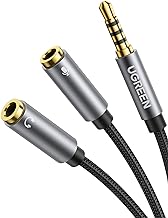
UGREEN describes this as a two-female-to-one-male TRRS adapter that separates audio and microphone jacks. The listing names the Switch 2, PS4, PS5, Steam Deck, Xbox, PC, laptop, and phone. It also specifies a braided cable. These features help shoppers compare it with basic adapters when they need the listed connector direction and want a cable described as braided.
Best for: Buyers who need two separate 3.5mm plugs to connect through one male TRRS plug, provided the plugs and device ports match the product’s design. It was selected for its clearly stated separate audio and mic jacks and broad list of intended devices.
Limitation: “Compatible with” does not establish that every port configuration or headset works in every use case. The two-female-to-one-male direction is not the same as a TRRS female-to-two-male PC adapter. Check the device’s port arrangement first.
Headphone Splitter for Computer

This adapter is described as a 3.5mm female-to-two-male Y cable for connecting a smartphone headset to a computer. The separate male connections are identified for headphone audio and microphone use. That layout is useful when a headset has one combined plug and the computer has distinct headphone and microphone connections.
Best for: Desktop or laptop users with two separate 3.5mm ports who need an adapter for a headset with a single plug. It was selected because the product name directly describes this PC-oriented connection pattern.
Check before choosing: This is the opposite direction from an adapter that combines two separate plugs into one combo jack. The available product details do not name a cable length, shielding, or connector plating, so shoppers prioritizing those specifications should compare the other listings.
DUKABEL Headsets Adapter

DUKABEL lists an 11-inch, approximately 30 cm headset adapter for separating headphone and microphone connections. The product name specifies 24K gold-plated connectors and names PS5, Xbox One controllers, smartphones, and PCs. The stated cable length offers a concrete comparison point for buyers who want a short lead between a headset and a device.
Best for: Buyers who want a compact, 30 cm adapter and value the listed connector-plating detail. It was selected because it identifies separate headphone and microphone use and names several device categories.
Limitation: The product details provided do not clearly specify the number and gender of every connector. Confirm its connector layout against the headset and device before purchasing, especially if you need a particular one-female/two-male or two-female/one-male arrangement.
Headphone Mic Splitter for PC

This adapter is specifically described as a 3.5mm TRRS female-to-dual-male cable, 30 cm long. Its stated purpose is connecting a TRRS headset or microphone to a computer with separate microphone and headphone jacks. The listing also identifies 24K gold-plated connectors and double shielding.
Best for: PC users who have one TRRS headset plug and two separate computer ports. It was selected because the connector direction and intended connection are stated explicitly, making it easy to compare with a two-female-to-one-male adapter.
Limitation: It is not the appropriate direction for combining two separate male plugs into one combo jack. Check that the headset plug is TRRS and that the computer actually has separate audio and microphone ports.
Buying Guide: How To Choose The Right Adapter
Does your device have one combo jack or two separate ports?
Start by counting the audio connections on the device. A combo jack accepts a single plug for headphone audio and microphone input. A computer with separate ports typically has one connection for headphones and another for a microphone. The required adapter changes depending on which side has the single connection.
For a single headset plug going to two separate computer ports, look for a TRRS female socket and two male plugs, often described as a headset-to-PC splitter. For two separate plugs going to one combo port, look for two female sockets and one male TRRS plug. Do not choose by the word “splitter” or “combiner” alone; product titles use these terms inconsistently.
What do TRRS and TRS mean for a headset?
TRRS refers to a plug with four contact sections, commonly used for combined headphone audio and microphone signals. TRS plugs have three contact sections and are commonly used for separate stereo audio or microphone connections. These labels describe the connector contacts, not a guarantee that an adapter will work with every device.
Check the headset plug and the device ports. A headset with one combined TRRS plug generally needs the correct adapter to connect to a computer with separate audio and mic ports. A headset with two separate plugs may need the reverse arrangement to connect to one combo jack. If the product listing does not make the connector layout clear, verify it before buying.
Which product is better for a PC with separate jacks?
The Headphone Splitter for Computer and the Headphone Mic Splitter for PC are the clearest matches among these options for one headset plug connecting to separate computer ports. The latter explicitly states TRRS female-to-dual-male, 30 cm, and double shielding. The former describes a female-to-two-male computer adapter and a smartphone headset connection.
The UGREEN and KINGTOP listings describe two-female-to-one-male arrangements. Consider those when the source and headset plugs match that direction, rather than assuming they are interchangeable with dual-male PC adapters. The DUKABEL listing describes separating headphone and microphone connections but provides less connector-gender detail in the supplied product information.
How much do cable length and construction matter?
A short cable can keep an adapter from adding much slack to a headset connection. Two products here specify approximately 30 cm: the DUKABEL adapter and the PC-focused Headphone Mic Splitter. UGREEN describes its cable as braided. The PC splitter listing specifies double shielding, and both DUKABEL listings identify 24K gold-plated connectors.
These are product-description details, not proof of a particular sound quality or durability in every setup. Choose based on the features you need and the physical layout of your desk, computer, or controller. If a specification is not listed, do not assume the adapter includes it.
What should you verify before ordering?
- Connector direction: Identify whether you need one plug to become two connections or two plugs to become one.
- Plug gender: Match male plugs to device sockets and female sockets to the plugs you intend to connect.
- Audio and mic labels: For separate computer ports, identify which adapter plug is intended for headphone audio and which is for the microphone.
- Headset plug type: Check whether the headset uses one TRRS plug or separate headphone and microphone plugs.
- Device port layout: Verify the actual ports on a PC, laptop, controller, or mobile device rather than relying only on a general compatibility list.
- Cable details: Compare stated length, braiding, shielding, and connector plating only when those features matter to your setup.
Frequently Asked Questions
Can a 3.5mm mic and headphone adapter combine audio and microphone signals?
Some adapters route separate headphone and microphone connections through one TRRS plug, while others split a combined headset connection into separate audio and mic plugs. Choose the direction that matches your equipment; the word “combiner” alone does not identify it.
Which adapter do I need for one headset plug and two PC ports?
Look for a TRRS female socket and two male plugs, one for headphone audio and one for the microphone. The Headphone Mic Splitter for PC listing explicitly describes this arrangement.
Can I use a two-female-to-one-male adapter with a PC that has separate jacks?
Not necessarily. That layout is the opposite of the common adapter used to connect one headset plug to separate PC ports. Check the connector genders and signal direction before selecting an adapter.
Will these adapters work with every gaming headset?
No universal compatibility is established by the supplied product details. Headset plug type, device port layout, and adapter direction must match. Some listings name particular gaming devices, but shoppers should still check their exact connection arrangement.
Does a 3.5mm adapter improve microphone or headphone quality?
The listed features describe connector layouts and construction details, not a guaranteed improvement in sound or microphone quality. An adapter’s primary role is to connect compatible ports and signals.
What does a 30 cm cable measure?
Thirty centimeters is approximately 11.8 inches. Two product listings describe a cable of about 30 cm, which can help buyers estimate how much lead the adapter adds to a headset connection.