
The best car mobile WiFi hotspot depends on how you travel, how many devices need a connection, and whether you prefer a battery-powered unit or a USB-powered device. The BNBDE hotspot is best for vehicle-focused use without an internal battery, while the Schok model suits drivers who want a removable battery and dual-band WiFi. RoamWiFi is designed for international travel, and the S2 and EIOTCLUB options offer compact alternatives for road trips and USB-powered setups.
| Product | Best For | Listed Connection Details |
|---|---|---|
| BNBDE Portable WiFi Hotspot | Vehicle use without a lithium battery | Up to 16 devices; 10GB USA data listed |
| RoamWiFi Mobile Hotspot | International travel and small groups | Up to 10 devices; 1GB US data for 30 days listed |
| Schok 4G LTE Mobile Hotspot | Car, home, and family use | Up to 16 devices; dual-band WiFi |
| S2 Portable WiFi Hotspot | North American trips and longer battery use | Up to 8 devices; up to 15 hours listed |
| EIOTCLUB USB WiFi 6 Dongle | USB-powered connectivity in a car | Up to 10 devices; 1GB, one-day US trial listed |
BNBDE Portable WiFi Hotspot

Best for: Drivers, truck owners, and RV travelers looking for a hotspot designed for vehicle use without an internal battery. It is selected for its battery-free design and listed support for up to 16 connected devices.
The product listing describes a 4G LTE Cat 4 connection, WiFi 6, and vSIM technology that selects a network without a physical SIM card. It also states that the device provides 10GB of USA data and can connect in more than 150 countries. Those details make it a potential fit for road trips that include multiple passengers or international travel.
Choose this if avoiding a built-in lithium battery in a vehicle is a priority, or if several devices need to share a connection. Limitation: The listed 10GB USA data is finite, so frequent streaming or extended use may require checking available data options. Confirm current coverage and plan details for your route before relying on it.
RoamWiFi Mobile Hotspot
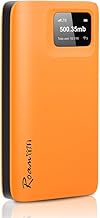
Best for: Travelers who cross borders and want a pocket-sized hotspot that can serve a small group. The listing states that it works in more than 170 countries, supports up to 10 devices, and uses automatic network selection.
RoamWiFi is a battery-powered mobile hotspot rather than a USB-only dongle. Its listed US package includes 1GB of data for 30 days. The product description also refers to additional data plans for different trip lengths. This makes the device worth considering for drivers who want a portable option they can carry between the car, hotel, and other destinations.
Better for international itineraries and travelers who want to share connectivity with companions. Limitation: The included US data allowance is limited to 1GB, so check plan choices and data requirements before using it as a primary connection for navigation, video, or work. The listing does not specify an exact battery runtime.
Schok 4G LTE Mobile Hotspot

Best for: Families and drivers who want a battery-powered hotspot for both car and home use. The product listing specifies up to 16 connected devices, dual-band 2.4GHz and 5GHz WiFi, and a removable 3000mAh battery.
The hotspot uses 4G LTE and has a listed theoretical download speed of up to 600Mbps. The description names T-Mobile, AT&T, and Verizon as compatible major carriers; verify current service availability and device requirements with the seller or carrier before purchase. USB Type-C charging is listed, which can be useful when charging in a vehicle with a suitable power source.
Choose this if you need to connect more devices than the RoamWiFi or S2 listings allow, or want dual-band WiFi. It is selected for its combination of a removable battery, Type-C charging, and stated 16-device capacity. Limitation: The 600Mbps figure is described as theoretical, not a guaranteed real-world speed. Actual performance depends on network coverage and conditions.
S2 North America Portable Hotspot

Best for: Road-trippers and remote workers traveling in North America who value portability and a longer stated battery runtime. The listing describes a 100-gram device with up to 15 hours of continuous use and support for up to eight connected devices.
The S2 offers 4G connectivity without a physical SIM card and includes 10GB of USA data according to its product name. It also lists WiFi 6, which the product description presents as an efficiency and performance feature in crowded network environments. Its North America focus makes it a more region-specific option than the products advertised for broader international coverage.
Better for a compact setup shared by a few travelers rather than a large passenger group. Limitation: The stated coverage is focused on North America, and the listing does not establish that it will work in every location or provide worldwide service. Check coverage and the terms for included data before travel.
EIOTCLUB USB WiFi 6 Dongle
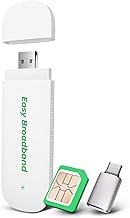
Best for: Drivers who want a compact hotspot that runs from a USB power source instead of relying on an internal battery. The listing says it can plug into a car charger, laptop, or power bank and support up to 10 devices.
This 4G LTE dongle includes a pre-installed SIM card and a listed 1GB, one-day US trial plan. Its stated maximum speed is up to 150Mbps. The product is advertised for use in the US, Canada, Mexico, and Latin America, but availability and service conditions should be checked for the specific destination.
Choose this if you want a small device that can stay powered from a compatible USB source during a drive. It is selected for its compact dimensions, listed regional coverage, and included trial data. Limitation: It depends on USB power, and the trial allowance is small. The listing says a pay-as-you-go plan can be selected after the trial data is used.
Buying Guide: How To Choose A Car Mobile WiFi Hotspot
Will the hotspot work on your route?
Start with the places where you expect to use the device. A hotspot needs cellular service in the area, and a product’s stated country coverage does not guarantee a strong signal at every address, highway, or rural stop. Check the product’s current coverage information and any carrier or plan restrictions before traveling.
For trips within the United States, compare the included data and the available options after it runs out. For international travel, check whether the device supports your destinations, how data is purchased, and whether the plan applies across borders. A hotspot that covers many countries can still have different service or plan terms by location.
How many devices need to connect?
Count the phones, tablets, laptops, and other devices that may be online at the same time. The products in this list state limits ranging from eight to 16 connections. A larger limit can help when multiple passengers share the connection, but it does not guarantee that every device will receive high speeds at once. Cellular service, data limits, and simultaneous activity affect the experience.
For a small group, an eight-device maximum may be sufficient. For a family or work vehicle with more connected devices, compare the 16-device options. Keep in mind that connected devices can consume data through background updates, video, and cloud syncing.
Should you choose a battery-powered hotspot or a USB dongle?
A battery-powered hotspot can be carried away from the car and may work when no USB port is available. Its runtime and charging needs matter, especially on longer trips. The Schok listing specifies a removable 3000mAh battery, while the S2 listing claims up to 15 hours of use. Treat stated runtime as a product specification rather than a guarantee for every usage pattern.
A USB-powered device, such as the EIOTCLUB dongle, avoids depending on its own battery but needs a compatible USB power source. This can suit a vehicle setup where power is available. The BNBDE product is also described as battery-free, which may appeal to buyers prioritizing that design. Consider where the device will sit and how you will power it before choosing.
What data allowance do you need?
Included data can make initial setup easier, but it may not cover a full trip or regular use. The listings describe different allowances: 10GB USA data for the BNBDE and S2 products, 1GB of US data for 30 days for RoamWiFi, and a 1GB one-day US trial for EIOTCLUB. The Schok feature list does not specify an included data allowance.
Estimate your expected use. Navigation and messaging typically require less data than repeated video streaming, large downloads, or remote work calls. Review whether plans renew, expire, or require a separate purchase. The supplied product details do not provide complete terms for every plan, so confirm them before purchase.
How should you compare speed and WiFi features?
Cellular network speed and the hotspot’s local WiFi connection are different parts of the system. A WiFi 6 label describes the device’s WiFi capability; it does not ensure a fast cellular signal. Likewise, Schok’s listed 600Mbps is a theoretical download speed, while EIOTCLUB lists up to 150Mbps. Real-world results vary with coverage, network conditions, and data-plan limits.
Dual-band WiFi can be useful when devices support different WiFi bands or when managing local wireless connections matters. Compare that feature alongside cellular compatibility, data terms, and the number of devices you expect to use, rather than relying on a maximum speed figure alone.
What should drivers check before setup?
Set up and test the hotspot before leaving, ideally in a location where you can confirm it connects and understand its network name, password, and data status. Secure the device so it does not interfere with driving or become a loose object. Do not handle setup controls while driving; have a passenger assist or configure the device while parked.
Also confirm the power method, charging cable or USB source, and any account or plan activation steps. If the device is intended for international use, verify the service for each destination. These checks help avoid relying on a hotspot that has no active data, insufficient power, or unavailable coverage.
Frequently Asked Questions
Can a mobile WiFi hotspot provide internet in a car?
Yes. A car hotspot uses a cellular connection and shares internet through WiFi with nearby devices. It needs cellular coverage and an active data plan or included data allowance. Vehicle power requirements depend on whether the hotspot has a battery or uses USB power.
Does a car WiFi hotspot need a SIM card?
It depends on the model. BNBDE, RoamWiFi, and S2 are described as not requiring a physical SIM card. EIOTCLUB includes a pre-installed SIM card, while the Schok listing says it includes a SIM card. Check the product’s current setup and plan instructions before buying.
Which listed hotspot connects the most devices?
BNBDE and Schok each list support for up to 16 devices. RoamWiFi and EIOTCLUB list up to 10, while S2 lists up to eight. These are stated connection limits, not guarantees of equal speed across all connected devices.
Is a USB hotspot better for a car than a battery-powered model?
Neither type is best for every driver. A USB-powered hotspot can be convenient when a suitable car USB power source is available. A battery-powered device can be used away from the vehicle, but it needs charging. Choose based on where you will use it and how you plan to power it.
Can I use these hotspots for international travel?
RoamWiFi is listed for more than 170 countries, and BNBDE is listed for more than 150. S2 is described as designed for North America, while EIOTCLUB lists the US, Canada, Mexico, and Latin America. Confirm current coverage and data-plan terms for every destination before traveling.