
The best bass guitar computer interface depends on how you record: the Focusrite Scarlett Solo 4th Gen suits straightforward computer recording, while the JOYO MOMIX CAB is designed for portable phone use. The MAONO P2 and Pyle PMUX9 offer additional connections or routing features for broader setups. Compare the options below by instrument input, connection style, and intended use before choosing.
| Product | Best For | Standout Detail |
|---|---|---|
| Focusrite Scarlett Solo 4th Gen | Direct computer recording | Hi-Z instrument input |
| Focusrite Scarlett Solo 3rd Gen | Simple bass and microphone setup | Hi-Z input and Air mode |
| JOYO MOMIX CAB | Portable phone recording | 6.35 mm input and direct monitoring |
| MAONO P2 Hybrid | Multi-source recording and streaming | Dual XLR and routing features |
| Pyle PMUX9 | Flexible input and output connections | Guitar, AUX, and RCA inputs |
Focusrite Scarlett Solo 4th Gen

Best for: Bass players who want a compact interface for recording directly to a PC, Mac, or iPad. The listed features include one Hi-Z instrument input, which is the relevant input type for connecting an instrument such as a bass, and one XLR microphone preamp for a microphone.
The Scarlett Solo 4th Gen supports USB-C and is listed as compatible with PC, Mac, and iPad. Its stated 24-bit/192 kHz recording specification and 120 dB dynamic range provide useful technical comparison points for buyers choosing a computer interface. Air modes are also included, though the listing does not explain their effect on a bass signal.
Choose this model if you primarily need one instrument input and may also record one microphone. It is a straightforward fit for a solo player tracking bass on a computer or tablet.
Limitation: It has one Hi-Z instrument input, so it is not the listed choice for recording multiple instrument inputs at once.
Focusrite Scarlett Solo 3rd Gen

Best for: Bassists seeking a simple instrument-and-microphone interface with broad listed device compatibility. This model has one Hi-Z instrument input and one XLR mic preamp. That combination suits a basic setup where the player records bass directly and uses a microphone as a separate source.
The listing specifies USB-C, 24-bit/192 kHz, a 56 dB gain range, and Air mode. It names macOS, Windows, and iPadOS as compatible platforms. These details help buyers compare its connection and recording specifications with other compact interfaces in this list.
Choose the Scarlett Solo 3rd Gen if you want a dedicated instrument input and do not need more than one instrument channel. It can be a practical option for home recording, practice capture, or a simple bass-and-vocal workflow, based on its listed inputs.
Limitation: The listed configuration has one Hi-Z instrument input. Players who need to record several instruments simultaneously should compare interfaces with more appropriate input capacity.
JOYO MOMIX CAB Phone Interface

Best for: Bass players who want a compact option for connecting an instrument to a phone. The product is described as a guitar audio interface with a 6.35 mm input and a 3.5 mm headphone output. Its listing names USB-C and Lightning connections and says it supports plug-and-play use.
Direct monitoring is a notable feature for players who want to hear their instrument through the connected setup. Its pocket-size design makes portability a central distinction compared with the desktop-oriented Focusrite models. The listed inputs and outputs are simple, so this is best considered for a mobile workflow rather than a setup that needs several sources or extensive routing.
Choose this if phone-based recording or practice is more important than adding multiple inputs. The product is marketed for guitar, and its listed 6.35 mm input makes it relevant to bass players comparing instrument connections.
Limitation: The listing focuses on phone connections and a single instrument input; it does not describe multiple input channels or detailed computer recording specifications.
MAONO P2 Hybrid Interface

Best for: Players building a recording, streaming, or content-creation setup that needs more than a basic one-instrument interface. The product name identifies dual XLR connections and guitar use, and its listing describes use with a PC, phone, and iPad. It also specifies 56 dB gain, loopback, mute, ASIO, and routing software features.
Those routing and loopback features may make this model more relevant to users who combine recording with streaming or other content workflows. The dual XLR description is useful if microphones are part of the setup, while the guitar reference signals that instrument use is part of its intended application.
Choose the MAONO P2 if your bass setup may include microphones, streaming, or routing needs beyond simple direct recording. Its listed platform range also gives mobile-device users more to compare than a computer-only product description.
Limitation: The provided listing does not specify the number or type of dedicated instrument inputs, so confirm the connection details against your bass and recording needs before buying.
Pyle PMUX9 USB Audio Interface
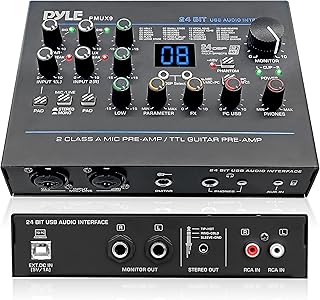
Best for: Buyers who want a range of connection types and output options in a computer-playing and recording setup. The listing names MIC/LINE, guitar, AUX stereo, and RCA inputs. It also describes phone, stereo, monitor, and headphone outputs, along with preset 24 digital effects and phantom power.
This product stands out from the compact one-instrument interfaces because its described connections cover several source types. That may suit a player comparing options for a setup involving bass, auxiliary audio, or other listed input sources. The output selection is another point to consider when planning how to monitor a recording.
Choose the PMUX9 if varied inputs and outputs matter more than a minimal desktop footprint. Its listed preset effects may also interest buyers looking for onboard effects as part of their workflow.
Limitation: The feature list does not provide a dedicated Hi-Z specification or detailed computer compatibility information. Check those details if they are essential to your bass setup.
Buying Guide: How To Choose A Bass Guitar Computer Interface
A bass guitar computer interface connects an instrument to a computer or mobile device for recording, monitoring, or related audio tasks. The right model depends on where you record, how many sources you need to connect, and whether you prefer a minimal setup or additional routing and outputs.
Does the interface have an instrument input?
Start by checking the product’s listed input type. A Hi-Z input, such as the one specified on both Scarlett Solo models, is a clear feature to compare when connecting a bass directly. Other listings describe a guitar input or a 6.35 mm instrument connection. Do not assume that every input labeled MIC/LINE or guitar has identical specifications; check the manufacturer’s details for the exact connection type and intended use.
If you plan to connect a bass directly rather than use a microphone, prioritize an explicitly identified instrument input. This makes the comparison more concrete than choosing by USB connection or recording resolution alone.
How many inputs do you need?
Count the sources you expect to record at the same time. A solo bassist recording one instrument may need only a single instrument input. If you also need to record a microphone, look at the listed XLR preamp or XLR connections. The Scarlett Solo models combine one instrument input with one XLR mic preamp, while the MAONO P2 listing specifies dual XLR connections.
More connections do not automatically mean a better fit. Choose according to the number and type of sources you actually intend to use. If the product description does not clearly state the instrument-input count or type, verify it before purchasing.
Will you record on a computer or a phone?
Check the connection and platform details together. The Scarlett models list USB-C and compatibility with named computer or tablet systems. The JOYO MOMIX CAB is presented as a portable phone interface with USB-C and Lightning plugs. MAONO describes PC, phone, and iPad use. These descriptions are not interchangeable, so confirm that the interface supports the device and connection you plan to use.
For a stationary home-recording setup, a desktop interface may offer a more relevant set of inputs and outputs. For mobile use, size and phone connection options may matter more. The JOYO is specifically described as pocket-sized, making portability a key reason to compare it.
Do you need direct monitoring or routing features?
Monitoring determines how you listen while playing or recording. The JOYO listing explicitly includes direct monitoring and a headphone output. The Pyle listing describes monitor and headphone outputs. The MAONO P2 lists loopback, mute, ASIO, and routing software features, which may matter for streaming or content creation.
Separate the feature you need from features that are merely available. A player recording bass by itself may value a straightforward instrument connection and headphone monitoring. A streamer may give more weight to loopback and routing. Check the complete product details to understand how these functions operate.
Which recording specifications matter?
Recording resolution and dynamic range are useful comparison specifications, but they should be considered alongside input type, device compatibility, and workflow. Both Scarlett listings specify 24-bit/192 kHz. The 4th Gen listing specifies 120 dB dynamic range, while the 3rd Gen listing provides a 56 dB gain range. Do not compare gain range and dynamic range as if they were the same measurement.
If you are choosing between the two Scarlett Solo generations, compare the exact specifications and features in their listings. If you are comparing a phone interface or mixer-style product, first confirm that its connection and compatibility details match your intended recording setup.
Should you choose a compact interface or a feature-rich option?
A compact interface can keep a solo bass workflow simple. The Scarlett Solo models have one Hi-Z input, while the JOYO is a portable, phone-oriented option with one listed instrument input. The MAONO P2 and Pyle PMUX9 may be more relevant when extra routing, varied inputs, or more output choices are priorities.
Consider your current setup and likely recording tasks rather than buying solely for a long feature list. If you only need to record bass, avoid paying attention to unrelated features until the instrument connection and device compatibility are clear. If you combine bass with microphones, streaming, or auxiliary sources, compare the listed connections and routing functions carefully.
Frequently Asked Questions
Can I plug a bass directly into a computer interface?
Yes, if the interface has an appropriate instrument input. The Scarlett Solo 3rd and 4th Gen listings specify one Hi-Z instrument input. Other products in this list describe guitar or 6.35 mm instrument connections; verify the exact input specifications before choosing.
Which interface is best for recording bass on a phone?
The JOYO MOMIX CAB is the clearest phone-focused option in this list. Its listing describes USB-C and Lightning connections, a 6.35 mm input, a 3.5 mm headphone output, and direct monitoring.
Can I record bass and vocals with one interface?
The Scarlett Solo models list one Hi-Z instrument input and one XLR mic preamp, a combination that aligns with a bass-and-microphone setup. Confirm your intended recording method and software requirements before purchasing.
Is a 24-bit/192 kHz specification essential for bass recording?
It is a useful specification for comparing products, but it should not be the only deciding factor. Input type, the number of sources you need, device compatibility, and monitoring options are also important.
What should I check before buying a bass interface?
Confirm the instrument-input type, the number of simultaneous inputs, compatibility with your computer or phone, and the monitoring or routing features you need. If a listing does not specify a key detail, check the complete product information rather than assuming compatibility.