
The best iPhone converter for a car depends on what you want to connect: a wireless CarPlay adapter converts factory-wired CarPlay to wireless, a USB adapter connects USB-C accessories to a USB-A port, and a Lightning-to-aux adapter connects compatible iPhones to a 3.5 mm audio input. Enhanlife is a straightforward pick for wireless CarPlay, Jemluse adds multi-user connection features, and Pastall is suited to USB-A-to-USB-C charging and data connections.
| Product | Best For | What It Converts |
|---|---|---|
| Enhanlife Wireless CarPlay Adapter | Simple wireless CarPlay | Wired CarPlay to wireless |
| Jemluse Wireless CarPlay Adapter | Multi-user CarPlay setup | Wired CarPlay to wireless |
| Luckyish Wireless CarPlay Adapter | Cars with factory CarPlay | Wired CarPlay to wireless |
| Pastall USB to USB-C Adapter | USB-A charging and data | USB-A to USB-C connection |
| Seulliya Lightning to 3.5 mm Adapter | Wired auxiliary audio | Lightning to 3.5 mm audio |
Enhanlife Wireless CarPlay Adapter
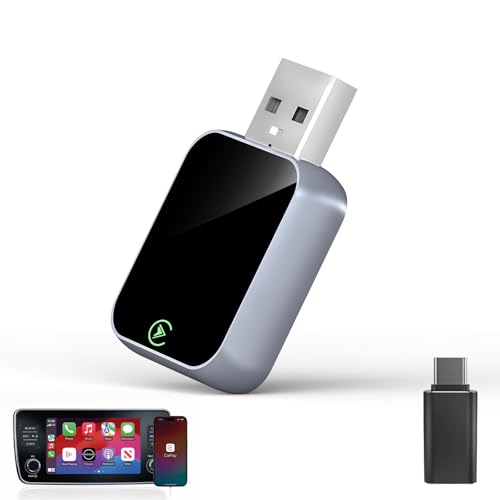
The Enhanlife adapter is designed to convert a vehicle’s factory-wired Apple CarPlay connection into a wireless one. It connects through the car’s USB port, and the listing says the package includes USB-A and USB-C connections. After initial pairing, the adapter is described as reconnecting automatically when the car starts.
Best for: iPhone owners who already use wired CarPlay and want to reduce cable clutter. Bluetooth 5.3 and 5 GHz Wi-Fi are listed for the wireless connection, with navigation, music, and Siri among the intended CarPlay functions.
Why it was selected: It directly addresses a common car-converter need: using existing wired CarPlay without plugging the phone in for every drive.
Limitation: It requires a vehicle with factory-wired Apple CarPlay. It does not add CarPlay to a car that lacks the feature.
Jemluse Wireless CarPlay Adapter

Jemluse is another converter for changing factory-wired Apple CarPlay to a wireless connection. Its listed features include a 5.8 GHz Wi-Fi connection, Bluetooth 5.3, an eight-core processor, and a compact aluminum-alloy dongle. The product description also mentions multi-user connection and operation through the car’s touchscreen, controls, or voice assistant.
Best for: Drivers who want a wireless CarPlay adapter with an emphasis on shared use and familiar vehicle controls. It is a better fit than a basic USB converter when the goal is wireless access to navigation, music, calls, and messaging apps through CarPlay.
Why it was selected: Its listed features make it a distinct option for households or vehicles where more than one driver may use the system.
Limitation: The listing specifies compatibility with wired Apple CarPlay systems only. Check that requirement before choosing it; a USB port alone is not enough.
Luckyish Wireless CarPlay Adapter

The Luckyish adapter is intended for converting wired CarPlay to wireless CarPlay. The product information lists Bluetooth 5.4, dual-band 2.4 and 5.8 GHz Wi-Fi, automatic reconnection, and a USB-C dongle. It is described as retaining use of vehicle controls such as steering-wheel buttons, knobs, and touchscreens.
Best for: Drivers with a compatible factory CarPlay system who want a small plug-in converter and automatic connection after setup. The listed support for iOS 10 and later and iPhone 6 and later may be useful to buyers checking phone requirements.
Why it was selected: It offers another wired-to-wireless option with stated support for both touchscreen and physical vehicle controls.
Limitation: The listing’s broad vehicle-compatibility claims should not replace checking the car’s own manual or confirming that wired CarPlay works in the specific vehicle.
Pastall USB-A to USB-C Adapter

Pastall’s two-pack adapter converts a standard USB-A port into a USB-C female connection. It is intended for connecting USB-C cables and accessories to USB-A ports, including car ports. The listing states support for up to 3 A of power output and USB 3.0 data transfer up to 5 Gbps, as well as bidirectional data transfer.
Best for: Drivers who need to use a USB-C cable or accessory with a car that has a USB-A port. It may also be useful for charging and transferring data, depending on the connected device and port.
Why it was selected: It covers the basic physical-connector conversion that some iPhone owners need when their car’s USB port and cable use different connector types.
Limitation: The adapter does not transmit video signals. It is not a wireless CarPlay converter, and its charging performance depends on the car’s USB port and connected equipment.
Seulliya Lightning to 3.5 mm Adapter

This two-pack converter connects a Lightning-equipped iPhone to a 3.5 mm headphone or auxiliary audio connection. The product listing describes it as Apple MFi certified and says it supports audio output up to 48 kHz and 26-bit. It lists compatibility with several iPhone generations, including iPhone 7 through iPhone 14 models.
Best for: Owners of a listed Lightning iPhone who want to connect to a car’s 3.5 mm aux input for music. It is an audio adapter, not a charging converter or CarPlay device.
Why it was selected: It serves drivers whose car stereo offers an auxiliary jack rather than a direct iPhone connection.
Limitation: The listing says the adapter supports music only and does not support calls. Confirm that the iPhone has a Lightning port and that the car has a 3.5 mm aux input.
Buying Guide: How to Choose an iPhone Converter for Your Car
Do you want wireless CarPlay or a simple cable connection?
Choose a wireless CarPlay adapter if the car already has factory-wired Apple CarPlay and you want to connect without plugging in the iPhone each time. These adapters do not generally create CarPlay capability in a car that lacks it. Check the vehicle’s infotainment settings or owner’s manual to confirm that wired CarPlay is available before buying.
Choose a USB adapter when the issue is a mismatch between a car’s USB-A port and a USB-C cable or accessory. Choose a Lightning-to-aux adapter when the car has a 3.5 mm auxiliary input and the iPhone has a Lightning port. These are different functions, so connector shape alone does not indicate that an adapter will provide CarPlay.
What port does the car have?
Inspect the vehicle’s available connections. A USB-A port is rectangular, while USB-C is smaller and oval-shaped. An aux input is a round 3.5 mm jack. For wireless CarPlay, identify the USB port used for the existing wired CarPlay connection; a charging-only port may not provide the required data connection.
Which iPhone connector do you need?
Check the connector on the iPhone and on the cable or accessory. A USB-A-to-USB-C adapter can connect a USB-C cable or accessory to a USB-A port, but it does not convert Lightning into USB-C. A Lightning-to-3.5 mm adapter is intended for Lightning iPhones and audio, not USB-C iPhone models.
Do charging and data specifications matter?
They matter when using a small USB converter. Compare the adapter’s stated charging output and data standard with the needs of the connected device. The car’s USB port also affects charging and data performance. A converter cannot make a lower-capability port deliver higher output, and not every adapter supports every feature of a USB-C accessory.
Is audio the only goal?
If the car has an aux input, a Lightning-to-3.5 mm adapter can provide a direct wired audio path from a compatible iPhone. If the car has CarPlay, a wireless CarPlay adapter is more suitable for accessing supported CarPlay features on the vehicle display. An aux adapter does not turn an aux stereo into a CarPlay screen.
Frequently Asked Questions
Can a wireless CarPlay adapter add CarPlay to any car?
No. The products in this guide are intended to convert an existing factory-wired Apple CarPlay system to wireless use. Confirm that the car supports wired CarPlay before purchasing one.
Will a USB-A-to-USB-C adapter make my car support wireless CarPlay?
No. A USB connector adapter changes the physical connection for compatible charging or data use. It is not a wireless CarPlay converter and cannot add CarPlay functionality by itself.
Can I use a Lightning-to-aux adapter for phone calls?
The Seulliya listing says it supports music only and does not support calls. For calls, check the car’s Bluetooth or hands-free system rather than assuming an aux audio adapter will carry call audio.
Does every USB port in a car work with CarPlay?
No. Some ports may be intended for charging only. Use the port that supports the car’s wired CarPlay connection, as specified by the vehicle manufacturer.
What should I check before buying an iPhone car converter?
Confirm the iPhone connector, the car’s available ports, and the desired function: wireless CarPlay, USB-C charging or data, or aux audio. For CarPlay adapters, verify factory-wired CarPlay support; for audio adapters, verify that the stereo has a compatible input.