
The Logitech Z906 is the only listed system with 5.1-channel surround sound, making it the closest match for buyers seeking multichannel audio. The other options are 2.0 stereo speakers or a soundbar, which may suit desk setups that prioritize simpler connections, compact size, or basic computer audio instead. Compare the channel format and listed features before choosing.
| Product | Channel format | Best suited for |
|---|---|---|
| Logitech Z906 | 5.1 surround | Buyers seeking surround sound and a subwoofer |
| XKX USB Computer Soundbar | Stereo soundbar | Buyers wanting a monitor-mounted USB speaker |
| Redragon GS520 | 2.0 stereo | Buyers who want desktop speakers with RGB lighting |
| Creative Pebble 2.0 | 2.0 stereo | Buyers seeking USB-powered speakers with angled drivers |
| Amazon Basics Stereo 2.0 | 2.0 stereo | Buyers who want a basic pair with inline volume control |
Logitech Z906 5.1 Surround Sound Speakers

Best for: Buyers whose priority is a true 5.1-channel speaker system for computer or home entertainment audio. This is the only product in this selection explicitly described as 5.1 digital surround sound, with support for Dolby Digital and DTS soundtracks.
The listed system includes a subwoofer and four wall-mountable satellite speakers. Logitech states continuous power of 500 watts and peak power of up to 1,000 watts under certain circumstances. Its THX certification is also a listed feature. These specifications distinguish it from the compact 2.0 desktop speakers below, which provide stereo rather than discrete 5.1-channel sound.
Why it was selected: It directly matches the 5.1-channel search intent and provides the most explicit surround-sound features in the product list.
Consideration: The listing does not provide computer connection details here. Confirm the system’s input options and the computer’s available outputs before purchasing; 5.1 playback depends on a compatible source and connection.
XKX USB Computer Soundbar

Best for: Buyers who want a compact, wired soundbar that can clip onto a monitor. The product is described as a USB speaker for computers and laptops, with an included USB-C adapter for devices that use USB-C.
Its listed audio components include dual ultra-magnetic drivers and dual passive radiators, which the product description associates with stereo sound and bass reproduction. It also advertises adaptive-channel-switching. These features do not make it a 5.1 system: choose it as a simpler stereo alternative when a compact bar is more important than separate surround speakers.
The listed operating-system compatibility includes Windows, macOS, ChromeOS, and Linux. The product information specifically says it is incompatible with monitors, TVs, and projectors, despite the monitor-clipping design; treat it as a speaker connected to a supported computer or device, rather than as a speaker powered by a monitor.
Why it was selected: It offers a small desktop form factor and USB connectivity for buyers who do not need discrete 5.1 audio.
Consideration: It is not a substitute for a 5.1-channel speaker arrangement.
Redragon GS520 Wired 2.0 Speakers

Best for: Desktop users who want a pair of wired stereo speakers with selectable lighting effects. The GS520 is explicitly a 2.0-channel system, so it is a stereo alternative rather than a surround-sound choice.
Redragon lists an enhanced full-range stereo sound drive unit and touch-controlled RGB lighting with six modes. The lighting can also be switched off. Its brushed-style, minimalist design may suit a desk where speaker appearance is part of the setup.
Why it was selected: It gives buyers a clearly identified 2.0 option with both sound and lighting features, making it easier to compare against a larger 5.1 system and more basic desktop pairs.
Consideration: The product details supplied do not specify its connection requirements or supported devices. Check the listing for those details before ordering, and do not choose it if you require discrete 5.1 playback.
Creative Pebble 2.0 USB Speakers
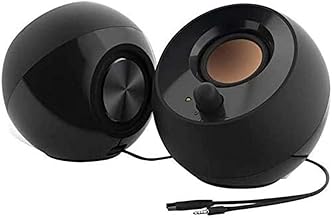
Best for: Buyers seeking a compact stereo pair powered by a single USB cable. Creative describes the Pebble as desktop speakers for PC or laptop use and says the USB cable avoids the need for a separate power adapter.
The design uses far-field drivers and rear-facing passive radiators, which the manufacturer says support audio output and bass reproduction. Its 45-degree elevated drivers are intended to project sound toward the listener for personal desktop listening. The product is still 2.0 stereo, not 5.1 surround.
Why it was selected: The single-cable power arrangement and angled drivers make it a straightforward option for a desk where simple placement and fewer power accessories matter.
Consideration: The listing details provided do not state a separate subwoofer or surround channels. Choose another system if those are essential to your setup.
Amazon Basics Stereo 2.0 Speakers

Best for: Buyers who want a basic pair of computer speakers with a straightforward volume control. This product is listed as a set of two USB-powered 2.0 speakers for a PC or laptop.
The listed features include USB power and an inline volume control. That control provides convenient access to volume without relying only on the computer’s controls. The product information also identifies a 3.5 mm auxiliary input, so review the current listing and your device’s available ports when checking how to connect it.
Why it was selected: It is a simple stereo comparison point for shoppers who do not need a 5.1 arrangement, lighting effects, or a monitor-mounted soundbar.
Consideration: It is not a surround-sound system and the listed features do not include a separate subwoofer. Avoid it if your main requirement is cinematic 5.1 audio.
Buying Guide: How to Choose Computer Speakers
Do you need actual 5.1-channel sound?
Start by deciding whether you need discrete surround channels or simply want louder, fuller computer audio. A 5.1 system is designed around multiple speaker channels and a subwoofer; a 2.0 system uses two stereo speakers, while a soundbar places its speaker drivers in one enclosure. In this product selection, only the Logitech Z906 is identified as 5.1.
For movies and games, check whether the content, playback software, and computer output support the surround format you want. A speaker system cannot create a true 5.1 signal from every source automatically. The Logitech listing names Dolby Digital and DTS support, but the supplied details do not explain computer connection methods, so verify the inputs before purchase.
Will a simpler stereo setup meet your needs?
Stereo speakers can be a sensible choice for everyday computer audio, including music, calls, videos, and general desktop use. They require less speaker placement than a multi-speaker surround arrangement. The Creative Pebble, Redragon GS520, and Amazon Basics models are all listed as 2.0 systems. The XKX is a soundbar-style stereo option rather than a 5.1 package.
Choose stereo when convenience and desk space matter more than sound coming from multiple directions. Choose the Z906 when surround playback is the central requirement and you can accommodate its multiple speakers.
Which connection and power details should you check?
Confirm how each speaker connects to your computer and whether the connection carries audio, power, or both. The Creative Pebble is described as using one USB cable without a power adapter. Amazon Basics lists USB power and a 3.5 mm auxiliary input. XKX lists USB compatibility and a USB-C adapter, while the Z906 details supplied here do not describe its inputs.
Do not assume that a USB port on a monitor or other device will work as an audio source. XKX specifically lists monitors, TVs, and projectors as incompatible. For any product, compare the listing’s requirements with the ports available on the computer or device you plan to use.
How much desk space and placement flexibility do you have?
A pair of stereo speakers needs space on both sides of a monitor, while the XKX soundbar is designed to clip onto a monitor. The Creative Pebble’s drivers are angled upward, which may suit a desktop listening position. The Z906 includes multiple satellite speakers and a subwoofer, so plan where each component can go before choosing it.
Wall mounting is listed for the Z906’s satellite speakers. That can matter when considering placement, but it does not remove the need to plan speaker positions and cable routing. For a small or crowded desk, a compact stereo option may be more practical than a full surround setup.
What features matter beyond channel count?
Consider controls, lighting, and speaker design after confirming the sound format. The Redragon GS520 offers touch-controlled RGB lighting with six modes and an option to switch the lights off. Amazon Basics lists an inline volume control. Creative highlights its angled drivers, while XKX highlights a monitor clip and USB-C adapter.
These convenience features do not indicate that a speaker has more channels. Compare them separately from surround format, device compatibility, and audio connections so that appearance or controls do not distract from the main requirement.
What should you verify before ordering?
- Channel format: Confirm whether the product is 5.1, 2.0 stereo, or a stereo soundbar.
- Computer outputs: Check that the computer has the connection types required by the speaker system.
- Content support: For 5.1 playback, verify that the source and software can provide a compatible multichannel signal.
- Power needs: Distinguish USB-powered speakers from systems that may require separate power connections.
- Placement: Account for the number of speakers, desk space, and cable routing.
- Device limits: Read stated compatibility notes, especially if connecting through a monitor, tablet, or USB-C-only device.
Frequently Asked Questions
Which product in this list is a true 5.1-channel system?
The Logitech Z906 is the only listed product described as a 5.1 digital surround sound system. The other products are 2.0 stereo speakers or a stereo soundbar.
Can 2.0 speakers provide the same channel layout as 5.1 speakers?
No. A 2.0 system has two stereo channels, while a 5.1 system has a multichannel surround arrangement. Stereo speakers may still suit everyday listening, but they are not the same channel configuration.
Are USB-powered computer speakers automatically surround sound?
No. USB describes a connection or power method, not the number of audio channels. Check the product’s stated channel format; the Creative Pebble and Amazon Basics models are listed as 2.0 stereo.
Which option has a monitor-mounted design?
The XKX product is described as a soundbar that can clip onto a monitor. Its listing also says it is incompatible with monitors as devices, so connect it to a supported computer or other compatible device rather than assuming the monitor itself will provide audio.
What should I check before using a 5.1 system with a computer?
Check the computer’s audio outputs, the speaker system’s input requirements, and whether the playback source can deliver compatible 5.1 content. The supplied Z906 details identify Dolby Digital and DTS support but do not specify the computer connection method.
Which listed speaker has an inline volume control?
The Amazon Basics Stereo 2.0 Speakers list an inline volume control. The Redragon GS520 lists touch-controlled lighting, but the supplied product details do not specify an inline volume control.