Best Small Speakers for Computer: Compact Sound Good for Any Desk
Choosing a compact, USB-powered speaker system for a PC or laptop helps you reclaim desk space without sacrificing audio quality. The following five picks are well-suited for everyday computing, streaming, or casual gaming, with easy setup, wire management, and multiple connection options. Below, you’ll find quick product highlights and a buying guide to compare key features like power, drivers, and clip-on monitor compatibility.
| Product | ||||
|---|---|---|---|---|
| Amazon Basics Stereo 2.0 Speakers | Amazon Basics | 2.0 desktop speakers | USB-powered, 3.5mm aux | Inline volume control |
| [Upgraded] USB Computer / Laptop Speaker | LIELONGREN | Desktop USB speaker bar | USB power & audio | Dual 3W drivers, enhanced bass |
| LXTNFU Computer Speakers | LXTNFU | Desktop monitor clip speakers | USB-powered (clip to monitor) | Easy monitor clipping |
| Cyber Acoustics CA-2890 | Cyber Acoustics | USB-powered bar speaker | USB only | Clamps to monitor, simple controls |
| Creative Pebble 2.0 | Creative | 2.0 desktop speakers | USB-powered | Far-field drivers, 45° tilt |
Amazon Basics Stereo 2.0 Speakers for PC or Laptop

These compact, black 2.0 speakers are a straightforward setup for desktop or laptop use. They run off USB power from the computer, eliminating separate power adapters. An inline volume control provides quick access to level adjustments, making them ideal for work or study sessions where simplicity matters. The set includes two speakers that deliver reliably balanced sound suitable for general listening, video calls, and casual media playback.
[Upgraded] USB Computer /Laptop Speaker with Stereo Sound
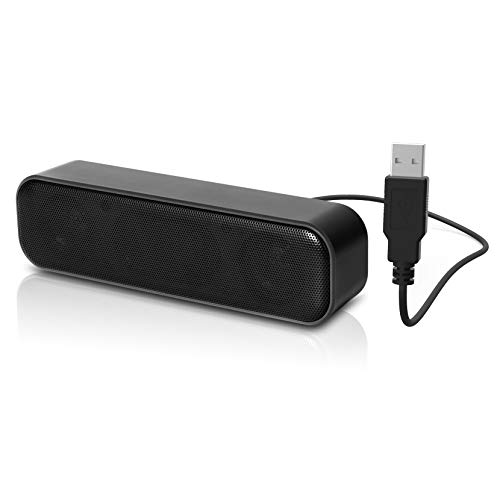
The upgraded LIELONGREN USB speaker bar provides stereo sound with higher capacity drivers and a passive radiator design to enhance bass. It uses a single USB cable for both power and audio, reducing cable clutter on busy desks. While there is no physical volume control on the unit itself, volume is easily managed via the computer settings. It’s compatible with Windows PCs and supports a compact, one-cable setup ideal for small workspaces or dorm desks.
LXTNFU Computer Speakers Clip-On Monitor

Designed to clip to the top or side of a monitor, these LXTNFU speakers save desk space while delivering clear sound with two 1.4-inch drivers. They use a USB connection for power and audio, and the clip mechanism allows flexible placement, making them suitable for compact setups where a traditional speaker pair would crowd the area. Note that they may not match the deepest bass of larger systems, but they provide strong midrange presence for daily tasks and media playback.
Cyber Acoustics USB Speaker Bar CA-2890

The CA-2890 USB speaker bar clamps directly to most monitors, providing convenient space-saving audio. A single USB cable powers the speaker and carries audio, simplifying setup compared with separate USB and auxiliary connections. The compact design, combined with accessible volume and mute controls, makes it a practical choice for office desks and home workspaces that prioritize minimalism without sacrificing sound clarity.
Creative Pebble 2.0 USB-Powered Desktop Speakers

Creative Pebble 2.0 emphasizes simplicity and stylish design with a single USB cable powering both audio and power. Its far-field drivers and rear passive radiators are tuned to deliver improved bass and a more immersive listening experience. The 45-degree tilted drivers help project sound toward the user, making it well-suited for desk setups where space is at a premium and ambient noise is a concern.
Amazon Basics USB-Powered Computer Speakers

This compact pair from Amazon Basics provides straightforward USB-powered operation with a front-facing volume control. It’s designed for plug-and-play use with a simple setup and also includes a 3.5mm jack for headphone connection. The emphasis is on ease of use, portability, and reliable performance for everyday computing tasks, making it a good match for dorm rooms and home offices.
Buying Guide: Key Considerations for Small Computer Speakers
When choosing compact computer speakers, consider these factors to match your needs and desk space.
- Power and drivers: Smaller speakers rely on efficient drivers and sometimes passive radiators to deliver noticeable bass. If you want deeper bass, look for multiple drivers or subwoofer-express claims, though ultra-compact units may still have strong midrange and highs.
- Connectivity: USB-powered speakers are easy to set up and eliminate extra adapters, but some models still offer 3.5mm auxiliary or Bluetooth for multi-device compatibility. Decide whether you need wired, wireless, or both.
- Placement and clipping: Clip-on monitor speakers save desk space but require a compatible monitor edge; table-top designs provide straightforward placement. Consider clip strength, clip size, and the available space on your monitor or desk.
- Controls: Inline or front-panel volume, mute, and power controls affect usability. Some models omit physical volume controls, relying on computer volume settings instead.
- Build quality and aesthetics: For a modern setup, choose a design and color that complement your computer, monitor, and workspace. Cable management is another practical aspect for clean desks.
- Compatibility with devices: If you plan to use the speakers with laptops, desktops, gaming consoles, or media players, check the supported connections. Some clips and bars are optimized for PC use but may not pair with TVs or consoles.
- Durability and warranty: Look for solid build materials and a warranty that covers typical desk-use wear and tear. This is especially helpful for frequent travelers or students.
Overall, the best small speaker for your computer balances ease of setup, space efficiency, and clear sound that suits your typical tasks. The selections above cover a range of layouts—from USB bars to clip-on monitors—so you can pick the option that best fits your desk and listening preferences.