
Decent gaming headphones should make game audio easy to follow, keep team chat clear, and suit the way you play. The Razer BlackShark V2 X is best for players who want a wired headset with closed earcups; the Logitech G432 is a strong choice for positional audio and a flip-up mute mic. For broad wired device support, consider the BENGOO G9000, while the Krysenix offers wireless connection options. The fifth pick is a wired BENGOO headset focused on memory foam comfort and adjustable microphone controls.
| Headset | Best For | Connection Or Standout Feature |
|---|---|---|
| Razer BlackShark V2 X | Wired play and sound isolation | 3.5 mm jack; software-enabled surround sound on Windows 10 64-bit |
| Logitech G432 | Positional audio and team chat | DTS Headphone:X 2.0 with G HUB software |
| BENGOO G9000 | Players seeking broad device support | Wired, with an old Xbox One adapter caveat |
| Krysenix Wireless Headset | Wireless play across supported devices | 2.4 GHz dongle and Bluetooth |
| BENGOO Wired Gaming Headset | Long sessions and quick mic control | Memory foam cushions and flip-to-mute mic |
Razer BlackShark V2 X

The Razer BlackShark V2 X is best for players who want a wired headset with closed earcups and a focus on separating game sounds. Its 3.5 mm audio jack and listed device support include PC, PS4, PS5, and Switch. It is a practical pick for buyers who prefer a direct wired connection over wireless features.
The headset uses custom-tuned 50 mm TriForce Titanium drivers. Razer describes the divided driver design as separately tuning highs, mids, and lows, with the aim of producing clearer highs and stronger lows. The closed earcups fully cover the ears, and the cushions create a closer seal to help limit sound leakage and provide passive noise isolation.
- Best for: Wired gaming and players who value closed-ear isolation.
- Why it was selected: It combines 50 mm drivers, memory foam cushioning, and broad listed console and PC use.
- Consideration: The listed 7.1 surround sound is software-enabled and available only on Windows 10 64-bit. Do not assume that feature applies on consoles.
Choose this headset if a wired connection and a close-fitting, closed-ear design matter more than wireless convenience. Avoid it if you specifically need Bluetooth or a wireless dongle; neither is listed among its features.
Logitech G432 Wired Gaming Headset

The Logitech G432 is best for gamers who want a wired headset that emphasizes positional audio and straightforward microphone muting. Its 50 mm audio drivers are described as delivering expansive, cinematic sound. The stated DTS Headphone:X 2.0 feature is intended to help players hear directional cues, including sounds approaching from behind.
For multiplayer use, the G432 has a 6 mm boom microphone that Logitech says helps make the player’s voice heard. The mic mutes when flipped up, allowing a quick physical mute action. These features make it a useful option for players who regularly switch between talking with teammates and listening quietly.
- Best for: Players who prioritize positional audio and a flip-up-to-mute microphone.
- Why it was selected: The combination of 50 mm drivers, DTS Headphone:X 2.0, and a boom mic addresses both game audio and team chat.
- Consideration: DTS Headphone:X 2.0 requires Logitech G HUB software. Buyers should check that the software-based feature suits their device and setup.
Choose the G432 if the software-enabled surround feature and physical mic control fit your gaming routine. It may be less suitable if you want a wireless headset or do not want to rely on companion software for DTS audio.
BENGOO G9000 Stereo Gaming Headset
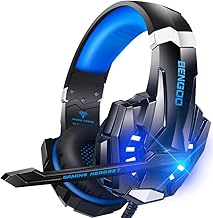
The BENGOO G9000 is best for players comparing a wired headset for several types of devices. Its listed compatibility includes PS4, PS5, Xbox consoles, PC, Nintendo 3DS, laptops, tablets, and mobile phones. The product description specifies that connecting to an old-version Xbox One controller requires a Microsoft adapter, which is not included.
For game audio, the G9000 lists 40 mm neodymium drivers and 7.1 surround sound. Its microphone is described as omnidirectional, noise-cancelling, and adjustable with a flexible boom. The headset also has soft memory earmuffs. Those details make it a reasonable choice for buyers seeking a general-purpose wired gaming headset with an adjustable mic.
- Best for: Players who want listed support across multiple console and personal-device categories.
- Why it was selected: Its stated platform range, surround audio, and flexible microphone cover common gaming and chat needs.
- Consideration: The old Xbox One controller connection needs an extra adapter, and the product description says it is not included. Confirm the connection method for your exact device.
Choose the G9000 if multi-device use is a priority and you have checked the required connection for your setup. Avoid assuming that every device connects in the same way, particularly older Xbox One controllers.
Krysenix 2.4 GHz Wireless Gaming Headset

The Krysenix headset is best for players who want wireless options and plan to use devices listed as compatible. It connects through a 2.4 GHz dongle for PC, PS4, PS5, Mac, phones, laptops, Switch, and more controllers. It also offers Bluetooth mode for many mobile devices, including smartphones, tablets, and Switch, according to the product features.
The headset uses 50 mm titanium-coated drivers and lists latency of 20 milliseconds or less for its 2.4 GHz wireless technology. It also includes RGB lighting, a foldable design, and a 1200 mAh battery. The microphone is described as noise-cancelling. These features make it a more flexible option than the wired picks for buyers who want to move between supported devices.
- Best for: Players who value wireless connectivity and switching between supported devices.
- Why it was selected: It offers both 2.4 GHz and Bluetooth modes, plus 50 mm drivers and a foldable design.
- Consideration: The product details state that both modes are incompatible with Xbox. They also instruct users to combine the 2-in-1 transmitter before connecting to PS5, PS4, PC, or a laptop.
Choose this headset if wireless operation is important and your device is covered by the stated compatibility. Avoid it if you need Xbox support, and follow the transmitter setup instructions for the listed dongle-connected devices.
BENGOO Wired Gaming Headset

This BENGOO wired headset is best for players who put comfort and quick microphone control high on their list. Its feature description highlights memory foam ear cushions, a self-adjusting headband, and breathable materials for extended gameplay. The over-ear design is intended to reduce pressure, while the 120-degree flexible boom can be positioned for multiplayer chat or streaming.
Its 50 mm drivers are described as providing balanced highs, rich bass, and audio positioning. The headset also lists virtual 7.1 audio to help identify sounds such as footsteps, movement, and environmental effects across compatible devices. For voice chat, the microphone has a flip-to-mute design and an inline mute button.
- Best for: Longer gaming sessions and players who want more than one quick way to mute the mic.
- Why it was selected: Its comfort-focused materials and adjustable microphone controls address practical everyday use.
- Consideration: The description says virtual 7.1 audio works across compatible devices, but does not specify that every listed device supports that feature. Check feature support for your setup.
Choose this model if wired use, memory foam cushions, and accessible mute controls are priorities. If you specifically need wireless play, this wired headset is not the right fit.
Buying Guide: How To Choose Gaming Headphones
Should you choose wired or wireless headphones?
A wired headset is a straightforward choice when you want to connect directly and do not need to move away from your gaming device. The Razer BlackShark V2 X, Logitech G432, BENGOO G9000, and second BENGOO model are wired options in this group. Check the connection type required by your console or controller before buying; the supplied product details do not give the same connection specifics for every model.
A wireless headset can reduce cable clutter and offer more freedom to move. The Krysenix provides a 2.4 GHz dongle connection and Bluetooth mode, but its listed details exclude Xbox. Wireless connection types are not interchangeable, so verify that the headset’s mode matches your device and intended use.
How important is surround or positional audio?
Positional audio can help make directional game sounds easier to identify, but the listed features differ. The Logitech G432 uses DTS Headphone:X 2.0, which requires Logitech G HUB software. The Razer’s 7.1 surround sound is software-enabled and limited to Windows 10 64-bit according to the supplied details. The BENGOO models and Krysenix also list surround or virtual 7.1 features, but buyers should confirm which devices support those modes.
Do not choose a headset based on a surround-sound label alone. Consider whether the feature works on your platform, whether it requires software, and whether you prefer a simpler stereo connection. For competitive play, microphone clarity and a secure fit may matter as much to your routine as virtual positioning.
What should you check for comfort?
Look at the earcup design, cushioning, headband, and how long you typically play. The Razer lists memory foam cushions and closed earcups that cover the ears. The second BENGOO headset specifically describes memory foam cushions, a self-adjusting headband, and breathable materials. The G9000 also lists soft memory earmuffs. These descriptions can help narrow choices, but comfort is personal, and product features cannot guarantee an ideal fit for every wearer.
Which microphone features matter for team chat?
For frequent voice chat, compare microphone position and mute controls. The Logitech G432 has a boom mic that mutes when flipped up. The second BENGOO headset offers a flexible boom, flip-to-mute design, and inline mute button. The G9000 describes an adjustable omnidirectional microphone. Choose controls that are easy to reach during play, and check whether the microphone’s stated connection and features suit your device.
How can you check compatibility before buying?
Start with your exact platform, controller, and connection method rather than relying only on a broad compatibility list. The G9000 notes that an adapter is required for an old-version Xbox One controller and that it is not included. The Krysenix listing says it is not compatible with Xbox and gives a transmitter setup instruction for several other devices. Software-based audio features may also have narrower requirements than basic headset audio.
| Buying Priority | Features To Compare | Relevant Picks |
|---|---|---|
| Closed-ear isolation | Closed earcups and cushioning | Razer BlackShark V2 X |
| Directional audio | Surround feature requirements and software | Logitech G432, Razer BlackShark V2 X |
| Wireless flexibility | 2.4 GHz, Bluetooth, platform limits | Krysenix Wireless Headset |
| Mic control | Flip-up, inline, or adjustable boom | Logitech G432, BENGOO Wired Gaming Headset |
| Extended-session comfort | Memory foam, headband design, breathable materials | BENGOO Wired Gaming Headset |
Frequently Asked Questions
What makes a decent gaming headset?
A decent gaming headset should suit your platform, provide clear game audio, and have a microphone and fit that work for your play style. Connection type, comfort features, and support for any advertised surround mode are also important.
Are wired gaming headphones better than wireless ones?
Neither connection type is best for every player. Wired headsets avoid the need for wireless modes, while wireless models can reduce cable clutter. Check the connection supported by your device and whether the headset’s wireless features match your platform.
Do gaming headphones need surround sound?
No. Surround or positional audio is an optional feature. It may help some players interpret directional cues, but support can depend on software and platform. Check requirements such as the Logitech G HUB requirement for DTS Headphone:X 2.0 on the G432.
Can I use the Krysenix wireless headset with Xbox?
The supplied product details say that both the 2.4 GHz and Bluetooth modes are incompatible with Xbox. Choose another listed model if Xbox use is essential.
Which headset has the clearest microphone controls?
The Logitech G432 has a boom microphone that mutes when flipped up. The second BENGOO wired headset lists both a flip-to-mute design and an inline mute button. These are useful options for players who want quick access to mute controls.
Do I need an adapter for the BENGOO G9000?
The product details say an extra Microsoft adapter, not included, is needed when connecting to an old-version Xbox One controller. Check your controller version and connection needs before choosing the headset.