
The best mini DVR recorder with SD card support depends on the video source: choose the POMIACAM for a basic one-channel analog setup, the Segrehy for compact FPV recording, or the Portta for converting older video sources with a preview screen. The options below compare recording formats, input types, storage details, and intended uses so you can match a recorder to your equipment.
| Recorder | Best For | Key Storage Detail |
|---|---|---|
| POMIACAM Mini DVR | One-channel CVBS recording | Records to an SD card; overwrite feature listed |
| DIYSecuritycameraworld Mini DVR | Camera and monitor connections | SDHC support, up to 512GB |
| Segrehy Mini FPV DVR | FPV drones and RC cars | Supports up to 32GB Class 10 TF cards |
| Portta Video-to-Digital Recorder | Analog video conversion | USB drive or TF card storage |
| GRACETOP Mini DVR | Simple FPV or vehicle video recording | Supports a 32GB SD card |
POMIACAM One-Channel Mini DVR

This POMIACAM recorder is best for buyers who need a compact, one-channel recorder for a compatible CVBS camera or analog video source. Its listed features include real-time recording, MPEG-4 compression, D1 resolution of 704 × 576, and video at up to 30 frames per second. The product information also describes use with a set-top box for recording live TV.
Recorded video is listed in MPEG-4/ASF format, with MP3 audio. A real-time timestamp can be added, and the recorder can overwrite existing content on the card. These functions may suit a simple installation where continuous recording and reuse of storage are priorities.
- Best for: A basic one-channel CVBS recording setup.
- Why it stands out: It combines real-time D1 recording, timestamping, and card overwrite features.
- Limitation: The listed resolution is D1, not HD, and the product description does not specify a maximum card capacity.
Choose this if your source outputs a compatible analog signal and you want a straightforward recorder. Avoid it if you need multiple camera inputs or a confirmed high-capacity card limit.
DIYSecuritycameraworld Mini DVR

This one-channel mini DVR is best for buyers who want to connect a camera directly to a recorder and route video to a TV or monitor. It supports AV-IN and AV-OUT connections, SDHC memory, and a stated maximum capacity of 512GB. That storage figure makes it a useful choice for shoppers who want a clearly specified card ceiling.
The recorder lists H.264 and H.265 video compression and D1 resolution of 704 × 576. The frame rate is selectable at 5, 15, or 30 frames per second. Those choices let buyers prioritize a lower frame rate or select up to 30 fps, depending on their recording needs.
- Best for: A one-camera setup that needs AV input and output.
- Why it stands out: It specifies SDHC support up to 512GB and offers two compression options.
- Limitation: Its listed maximum resolution is D1, so it is not the best match for buyers seeking high-resolution HD recording.
Choose this if storage capacity and direct AV connections are more important than a high-resolution image. Confirm that your camera’s output and the recorder’s AV connections match before purchasing.
Segrehy Mini FPV DVR Module

The Segrehy module is best for FPV drone and RC model users who need a compact recorder with its own battery. Its listed dimensions are 53 × 33 × 9 mm, and its aluminum-alloy shell weighs 64 grams. A built-in 3.7V, 400mAh battery is specified to provide 1.5 to 2 hours of recording.
For storage, this model supports TF cards up to 32GB, with Class 10 cards specified. It has a 3.5mm AV interface, supports switchable NTSC and PAL formats, and includes a Type-C charging interface. Its menu offers 11 languages and a four-level battery indicator.
- Best for: Compact FPV or RC recording where an onboard battery is useful.
- Why it stands out: It combines a small form factor, built-in power, and NTSC/PAL switching.
- Limitation: Card support is limited to 32GB, and the listed battery recording time is 1.5 to 2 hours.
Choose this if portability and self-contained power matter more than high-capacity storage. Check that your video source uses an appropriate AV connection and that the recording duration meets your needs.
Portta Video-to-Digital Recorder

The Portta is best for buyers digitizing analog footage from equipment such as a VCR, camcorder, or gaming console. It accepts AV/RCA, S-Video, and AUX inputs and records to a USB drive or TF card. The listed recording resolution is up to 1080P at 30Hz, and a 3-inch preview LCD and built-in speaker let users check video and audio on the unit.
Video is saved in MP4 format, while audio can be saved in MP3. The product supports several NTSC and PAL input standards and specifies uncompressed two-channel LPCM digital audio output. It does not require a PC, software, or driver for its stated conversion function.
- Best for: Converting analog video and audio into digital files.
- Why it stands out: It provides multiple input options, local preview, and USB or TF card storage.
- Limitation: It is a converter and recorder, not a standalone player for tapes or DVDs. Storage devices are not included.
Choose this if your goal is archiving older footage rather than building a small camera DVR. For high-capacity USB drives, the product information advises using the drive’s own power supply.
GRACETOP Car Security Mini DVR
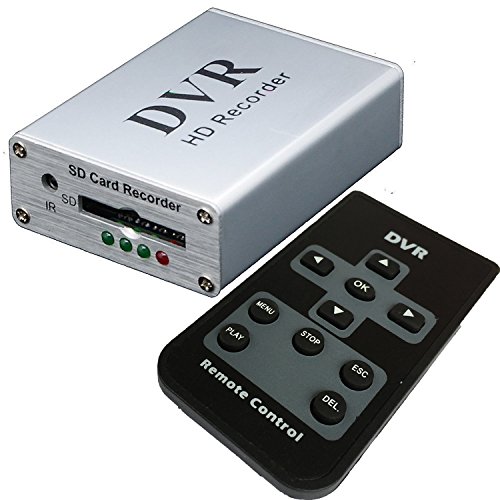
The GRACETOP is best for buyers looking for a small, simple recorder for an FPV or vehicle video setup. The product measures 60 × 45 mm and lists a 704 × 576 viewing resolution for real-time video on a TV. Its described setup involves inserting a microSD card and connecting the recorder to a TV and camera.
The listing specifies support for a 32GB SD card and claims that this capacity can hold seven to eight days of continuous recording. Actual recording time can depend on recording settings and the video source, so buyers should treat that duration as the product’s stated estimate rather than a universal guarantee.
- Best for: Buyers who prioritize a small footprint and basic real-time recording.
- Why it stands out: It lists a compact size and provides a specific 32GB card limit.
- Limitation: Storage support is limited to 32GB according to the product details, and the listed resolution is 704 × 576.
Choose this if your setup needs a small recorder and the card limit is sufficient. Check the camera and TV connections before buying, since the listed setup depends on connecting both devices.
Buying Guide: How to Choose a Mini DVR Recorder
Which video input does your camera or source use?
Start by identifying the signal coming from the camera, camcorder, VCR, or other source. A recorder designed for AV or CVBS connections may not accept every camera format. The products here list different input types: some specify AV connections, while the Portta also lists S-Video and AUX. Compare the device’s output with the recorder’s stated inputs before choosing.
For a one-channel analog camera, consider a compact single-channel DVR. For older tapes or analog playback devices, a converter-style recorder may be more appropriate because it is designed to digitize video and audio inputs. A converter does not replace the source device that plays the tape or disc.
How much SD card storage do you need?
Look for a stated card type and maximum capacity, not just the phrase “SD card support.” The products in this comparison list limits ranging from 32GB to 512GB, and the Portta supports USB storage as well as a TF card. TF and microSD cards refer to the small card format commonly used in compact devices, but check the product’s exact wording and the required card specification.
More storage can provide room for more footage, but recording time also depends on video resolution, frame rate, compression, and whether recording is continuous. Do not assume that a card’s maximum capacity guarantees a particular number of recording days. Check whether the recorder overwrites old files if the card fills; that feature is specifically listed for the POMIACAM model.
Do resolution and frame rate matter for your use?
Resolution and frame rate affect how much detail and motion a recording can capture. The one-channel POMIACAM and DIYSecuritycameraworld models list D1 resolution of 704 × 576. The Segrehy product details focus on FPV features but do not list a recording resolution. The Portta lists recording up to 1080P at 30Hz, while the GRACETOP lists a viewing resolution of 704 × 576.
Do not compare resolution alone without checking the input signal. A recorder’s maximum output specification does not establish that every source will provide video at that resolution. Match the device to the source and the level of detail you need to retain.
Is the recorder for mobile use or a fixed installation?
For FPV or RC use, size, weight, power, and connection layout can be important. The Segrehy lists a built-in battery, compact dimensions, and a stated recording duration. For a fixed camera or monitor arrangement, direct AV input and output may matter more. Vehicle use may involve additional power and mounting requirements; do not assume a general mini DVR is suitable for a vehicle simply because a product description mentions vehicle recording.
What file format and playback options should you check?
File format affects how recordings are stored and used later. The listings include MPEG-4/ASF, AVI, MP4, and MP3 audio, depending on the product. If you plan to edit or archive footage, check that your playback or editing device supports the recorder’s output formats. A preview screen or built-in speaker can help review captured footage on the recorder, but it does not replace checking the recording on the device you plan to use.
Frequently Asked Questions
What does a mini DVR recorder with an SD card do?
It records video from a compatible camera or other video source and saves the footage to a memory card. The supported signal, card type, resolution, and file format vary by model.
Can a mini DVR record from a VCR or camcorder?
Some models are designed for analog video conversion. The Portta lists AV/RCA, S-Video, and AUX inputs for converting analog video and audio. The source device, such as a VCR or camcorder, is still needed to play the original tape.
Are SD, microSD, and TF cards interchangeable?
They are different names or formats used in product listings, so check the recorder’s required card type and size before buying. Do not assume that a full-size SD card and a TF or microSD card fit the same slot without an adapter.
How many hours can a mini DVR record?
Recording time depends on card capacity, resolution, frame rate, compression, and recording mode. Use a product’s stated duration only as a model-specific estimate, and check whether the recorder supports overwriting older footage.
Does every mini DVR support HD recording?
No. Some products list D1 resolution, while others list higher recording resolutions. Check the specific recorder’s stated resolution and verify that it matches the video source and the level of detail you need.