
The best double-DIN in-dash DVD player depends on whether you prioritize disc playback, smartphone integration, or simple audio controls. The Pioneer AVH-521EX is best for a larger touchscreen and DVD features, while the Pioneer AVH-241EX offers a smaller display with DVD and CD playback. The 7-inch touchscreen stereo adds CarPlay and Android Auto. The JVC and BOSS models do not play DVDs, so they are alternatives only if disc playback is not essential.
| Product | Best For | DVD Playback |
|---|---|---|
| Pioneer AVH-521EX | Larger screen and disc entertainment | Yes |
| 7-Inch Touchscreen Car Stereo | DVDs plus CarPlay and Android Auto | Yes |
| Pioneer AVH-241EX | DVD/CD playback in a smaller display | Yes |
| JVC KW-SX88BT | Audio-focused installation without discs | No |
| BOSS Audio Systems BCP62 | CarPlay without DVD playback | No |
Pioneer AVH-521EX: Best Larger DVD Touchscreen

The Pioneer AVH-521EX combines a 6.8-inch resistive touchscreen with DVD and CD playback. Its listed features include Bluetooth for hands-free calls and wireless audio streaming, plus an auxiliary input. USB control supports Android and iPhone devices, and the receiver can send video to optional rear-seat screens.
Best for: Drivers who want a larger display and a mix of disc playback and Bluetooth functions. It is a strong fit for buyers seeking an in-dash DVD player with options for rear-seat video entertainment.
Important limitation: The product information says DVDs can be watched with the parking brake engaged. Confirm the vehicle’s installation requirements and local rules before relying on video playback while parked. Alexa capability requires compatible Weblink features and the Vozsis and Alexa smartphone apps.
7-Inch DVD Stereo: Best for Phone Integration

This double-DIN receiver pairs a 7-inch touchscreen with DVD playback, Apple CarPlay, and Android Auto. The listed features include Bluetooth 5.2, a backup camera, USB and TF card slots, FM radio, and an AUX input. CarPlay and Android Auto provide access to supported phone functions such as maps, music, calls, and messages through the screen or voice controls.
Best for: Buyers who want both DVD playback and smartphone-based navigation and media features. It offers a broader set of listed inputs and functions than a basic disc receiver.
Important limitation: The product information does not identify a brand or provide detailed vehicle-fitment information. Check the stereo’s dimensions, wiring needs, and camera compatibility against your vehicle before buying. Do not assume that every phone feature or app will work in every setup.
Pioneer AVH-241EX: Best Compact DVD Option

The Pioneer AVH-241EX is a double-DIN DVD/CD receiver with a 6.2-inch resistive touchscreen and built-in amplifier. Its listed amplifier output is 14 watts RMS CEA-2006 per channel and 50 watts peak across four channels. Bluetooth supports hands-free calls and wireless audio streaming.
Best for: Drivers who want DVD and CD playback, Bluetooth, and touchscreen controls but prefer the listed 6.2-inch display size over a larger screen. The built-in amplifier and basic disc features make it a straightforward option for in-car entertainment.
Important limitation: The resistive touchscreen differs from other screen technologies in how it registers touch, so buyers who prioritize a larger display or particular touch response should compare the specifications carefully. Alexa use depends on the required apps and compatible Weblink functionality.
JVC KW-SX88BT: Best Audio-Only Alternative
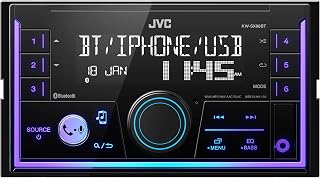
The JVC KW-SX88BT is not a DVD player. It is included as an audio-focused alternative for shoppers who may decide that disc playback is not needed. Its listed features include Bluetooth, AM/FM radio, dual phone connection, a 13-band equalizer, USB and AUX inputs, customizable color illumination, and a shallow chassis.
Best for: Buyers who want a double-DIN Bluetooth receiver with audio adjustment options and who do not need an optical disc drive. The shallow chassis may be relevant when comparing installation options, but vehicle fit should still be checked.
Important limitation: This model does not meet the central requirement for an in-dash DVD player. Choose one of the DVD-equipped Pioneer or 7-inch touchscreen models instead if playing movie discs is essential.
BOSS BCP62: Best CarPlay Alternative

The BOSS Audio Systems BCP62 is explicitly identified as having no DVD playback and no Android support. It is therefore not a match for shoppers who require an in-dash DVD player. It appears here as an alternative for buyers who prioritize CarPlay and are willing to give up disc playback.
Best for: Drivers seeking a CarPlay-focused stereo rather than a DVD receiver. Consider it only if your media needs have changed from playing discs to using a phone-based system.
Important limitation: The product name specifies “No Android or DVD.” Avoid this model if you need Android Auto, DVD movies, or disc-based music playback.
Buying Guide: How to Choose a Double-DIN DVD Player
Do you need a built-in DVD drive?
Start by confirming that the receiver supports DVD playback, not just a touchscreen or smartphone integration. In this selection, the Pioneer AVH-521EX, Pioneer AVH-241EX, and 7-inch touchscreen stereo list DVD playback. The JVC KW-SX88BT and BOSS BCP62 do not. A receiver without a disc drive cannot play DVDs, so check the specifications rather than relying on a product’s “multimedia” description.
Which screen size is right for your dashboard?
The listed DVD models have 6.2-inch, 6.8-inch, and 7-inch screens. A larger screen can provide more display area for menus and supported phone functions, but it does not by itself establish that a receiver will fit a particular dashboard. Compare the receiver’s physical dimensions and your vehicle’s opening before purchase. Also check whether the display style and controls suit your priorities.
Do you want CarPlay or Android Auto?
If smartphone navigation and media access matter, compare the features carefully. The 7-inch model specifically lists Apple CarPlay and Android Auto. The Pioneer models list USB control for Android and iPhone, but their supplied details do not state that they offer CarPlay or Android Auto. Do not treat USB phone control as identical to those projection systems.
Will Bluetooth meet your calling and music needs?
Bluetooth is listed on both Pioneer DVD receivers, the 7-inch DVD stereo, and the JVC audio alternative. Check whether the described functions cover your needs, such as hands-free calls and wireless music streaming. The 7-inch model lists an external microphone, while the other product descriptions do not specify that detail. Confirm included accessories if microphone placement is important.
Are rear-seat screens or backup cameras important?
The Pioneer AVH-521EX description says video can be sent to optional rear-seat screens. The 7-inch stereo lists a backup camera among its features. Those functions serve different purposes: rear-seat video supports passenger entertainment, while a backup camera is intended to provide a view behind the vehicle. Verify what equipment is included and what must be purchased separately.
What should you check before installation?
- Confirm the vehicle has a compatible double-DIN opening and check the stereo’s measurements.
- Review wiring, mounting, and any vehicle-specific installation requirements before ordering.
- Check whether steering-wheel controls, factory amplifiers, or other existing equipment need additional parts; the product details here do not confirm compatibility.
- For video playback, follow the receiver’s instructions and applicable laws. The AVH-521EX description specifies that DVD viewing requires the parking brake to be engaged.
- Compare the inputs you will use, such as USB, AUX, or TF card, rather than choosing by screen size alone.
Frequently Asked Questions
Which listed products play DVDs?
The Pioneer AVH-521EX, Pioneer AVH-241EX, and 7-inch touchscreen stereo list DVD playback. The JVC KW-SX88BT and BOSS BCP62 do not.
Which DVD stereo has the largest listed screen?
The 7-inch touchscreen stereo has the largest listed display among the DVD-capable products in this selection. The Pioneer AVH-521EX has a 6.8-inch screen, and the AVH-241EX has a 6.2-inch screen.
Which model lists both CarPlay and Android Auto?
The 7-inch touchscreen double-DIN stereo lists both Apple CarPlay and Android Auto. The BOSS BCP62 lists CarPlay but explicitly does not support Android or DVD playback.
Can the Pioneer AVH-521EX send video to rear-seat screens?
Its listed features say it can send video to optional rear-seat screens. The description does not say those screens are included.
Is the JVC KW-SX88BT a DVD player?
No. It is an audio receiver with Bluetooth, radio, USB, AUX, dual phone connection, and equalizer features, but the supplied product information does not list DVD playback.