
The best car stereo capacitive touch screen depends on your dashboard, phone, and preferred features. The Pioneer DMH-130BT is a straightforward choice with Bluetooth and a backup-camera input; the KENWOOD DMX709S is better for buyers seeking Apple CarPlay, Android Auto, and HD Radio. For a 7-inch screen with wireless CarPlay and Android Auto, consider the Upgrade double-DIN receiver. The options below also include a budget-oriented feature set and a large-screen single-DIN model. Confirm fitment and wiring requirements for your vehicle before buying.
| Product | Best For | Screen And Key Features |
|---|---|---|
| Pioneer DMH-130BT | Simple Bluetooth upgrades | 6.8-inch capacitive touchscreen, Bluetooth, USB |
| Leadfan 7-inch Double-DIN | Basic multimedia playback | 7-inch touchscreen, mirror link, Bluetooth |
| Upgrade Wireless Double-DIN | Wireless phone integration | 7-inch HD capacitive touchscreen, CarPlay, Android Auto |
| Single-DIN 9-inch CarPlay Stereo | Large-screen single-DIN setups | 9-inch touchscreen, CarPlay, Android Auto |
| KENWOOD DMX709S | Feature-rich connected audio | 6.95-inch capacitive touchscreen, CarPlay, HD Radio |
Pioneer DMH-130BT

The Pioneer DMH-130BT is a double-DIN digital multimedia receiver with a 6.8-inch capacitive touchscreen. Its listed features include Bluetooth, USB, AM/FM radio, FLAC playback, a backup-camera input, and steering-wheel input. The short-chassis design is also part of the product description.
Best for: Drivers who want a familiar receiver format with Bluetooth calling or audio, USB playback, and a camera connection. It is a practical fit for buyers who do not require CarPlay or Android Auto, neither of which is listed in the supplied product details.
Why it was selected: The capacitive screen is explicitly identified, and the feature mix covers common needs without making smartphone projection the central selling point. The stated 50W x 4 output and FLAC support may also matter to buyers comparing audio and file-playback specifications.
Limitation: This model is described as a digital multimedia receiver, not a CarPlay or Android Auto receiver. Confirm vehicle fit, steering-wheel control requirements, and the camera connection setup before purchase.
Leadfan 7-Inch Double-DIN Stereo

The Leadfan receiver is a double-DIN car stereo with a 7-inch touchscreen. Its listed features include a backup camera, mirror link, Bluetooth caller ID, FM radio, MP3 and MP4 playback, USB, auxiliary input, and subwoofer support.
Best for: Buyers looking for a touchscreen multimedia receiver with several playback and connection options. The listed mirror-link feature may suit drivers who want to display supported phone content, while Bluetooth caller ID and the camera feature address everyday driving tasks.
Why it was selected: Its 7-inch display and broad mix of media inputs make it relevant to shoppers comparing touchscreen receivers beyond models focused on phone projection. It also provides a clear alternative for people who prioritize USB, auxiliary, and file playback.
Limitation: The supplied product name does not identify the screen as capacitive and does not list Apple CarPlay or Android Auto. Buyers specifically seeking either feature, or a confirmed capacitive panel, should compare the product details carefully before choosing.
Upgrade Wireless Double-DIN Stereo
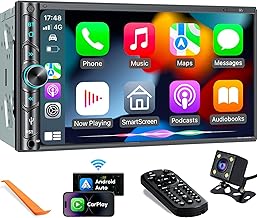
This double-DIN receiver has a 7-inch HD capacitive touchscreen. The product name lists wireless CarPlay, Android Auto, Bluetooth, a backup camera, four-channel RCA, and two subwoofer ports. It is positioned for drivers who want phone integration alongside connections for an expanded audio system.
Best for: Drivers who want wireless CarPlay or Android Auto and prefer a 7-inch capacitive display. The RCA and dual subwoofer connections may also make it worth comparing for a system that uses external audio equipment.
Why it was selected: It combines explicitly stated capacitive touchscreen technology with wireless smartphone features. That makes it a strong comparison point for buyers who want navigation, communication, or supported phone apps available through a compatible projection system.
Limitation: The supplied name does not give installation dimensions, vehicle-specific fitment, or detailed wireless connection requirements. Check the product listing and vehicle setup before assuming that every phone or audio component will work as intended.
Single-DIN 9-Inch CarPlay Stereo

This receiver is described as a single-DIN car radio with a 9-inch touchscreen. Listed features include CarPlay, Android Auto, Bluetooth, mirror link, AM/FM audio, GPS, USB, an equalizer, a backup-camera input, steering-wheel control support, and a microphone.
Best for: Buyers comparing a large display in a single-DIN product format. It may suit a dashboard or installation plan where a single-DIN receiver is preferred but a larger screen is a priority. Its listed phone-integration and camera features add to the range of functions to evaluate.
Why it was selected: The screen size and single-DIN description set it apart from the double-DIN options in this list. It gives shoppers a way to compare a large display and phone features without assuming that every receiver uses the same chassis format.
Limitation: The supplied name calls it a touchscreen but does not specify that the panel is capacitive. Confirm the screen technology, mounting arrangement, and vehicle fitment if those details are essential to your purchase.
KENWOOD DMX709S eXcelon

The KENWOOD DMX709S eXcelon is a double-DIN stereo with a 6.95-inch capacitive touchscreen. Its listed features include Apple CarPlay, Android Auto, Bluetooth, AM/FM HD Radio, MP3 playback, USB, a 13-band equalizer, and SiriusXM support.
Best for: Drivers who want smartphone integration and a range of radio and audio controls in one receiver. CarPlay and Android Auto are important differentiators, while HD Radio and the 13-band EQ may appeal to buyers comparing broadcast and sound-adjustment features.
Why it was selected: The product name clearly identifies the screen as capacitive and includes several connected-audio features. It provides a useful comparison against simpler receivers and models whose listed strengths focus on camera inputs or basic media playback.
Limitation: The supplied details do not specify whether CarPlay or Android Auto operates wirelessly or through a wired connection. Confirm connection method, installation needs, and any SiriusXM equipment requirements in the product information before purchase.
Buying Guide: How to Choose a Capacitive Touch Screen Car Stereo
A capacitive touchscreen is one factor in choosing a receiver, not a guarantee that it will fit your vehicle or include the functions you need. Compare display technology, chassis format, smartphone features, audio connections, and installation requirements separately. Product names can summarize key specifications, but the full listing and vehicle fitment information should settle questions about included hardware and compatibility.
Is the screen confirmed to be capacitive?
Look for the word “capacitive” in the receiver’s product specifications. In this selection, the Pioneer DMH-130BT, Upgrade wireless double-DIN model, and KENWOOD DMX709S explicitly use that term in their supplied names. The Leadfan and single-DIN 9-inch model are described as touchscreen products, but the provided names do not confirm capacitive technology.
If capacitive operation is a requirement, do not treat “touchscreen” alone as proof. Check the full listing for the screen type and use that specification to compare products. Also consider display size and layout: a larger screen may change how the receiver fits the dashboard and how controls are arranged.
Which chassis format fits your dashboard?
Check whether your vehicle requires a single-DIN or double-DIN receiver, and whether the dashboard opening can accommodate the screen assembly. Four products here are described as double-DIN models; the 9-inch option is identified as single-DIN. That product description does not, by itself, guarantee fit in a particular vehicle.
Before buying, verify the vehicle’s year, make, model, factory audio configuration, and installation requirements using reliable fitment information. A receiver may require additional installation parts or wiring, but the supplied product details do not establish which parts are needed for a specific car. Confirm those details rather than assuming they are included.
Do you need CarPlay or Android Auto?
Choose based on the phone features you expect to use. The Upgrade receiver lists wireless CarPlay and Android Auto, while the KENWOOD DMX709S and single-DIN 9-inch model list CarPlay and Android Auto without specifying a wireless connection in the supplied details. Pioneer and Leadfan do not list either feature in their provided names.
Wireless and wired operation are not interchangeable assumptions. Check the receiver’s full specifications for connection method and phone requirements. If projection features are not important, compare the simpler Bluetooth, radio, USB, and media playback options instead of paying attention only to smartphone integration.
What audio and media connections matter?
List the devices and sources you plan to use, then compare the receiver’s stated connections. USB appears in several product names, while the Leadfan also lists an auxiliary input and MP3/MP4 playback. Pioneer lists FLAC playback, and KENWOOD lists MP3 playback, HD Radio, a 13-band EQ, and SiriusXM support.
For an expanded sound system, review preamp and subwoofer connections. The Upgrade receiver specifically lists four-channel RCA and two subwoofer ports, and Leadfan lists subwoofer support. These descriptions are not a substitute for checking output details, component requirements, and whether your planned speakers or amplifiers match the receiver.
Will you use a backup camera or steering-wheel controls?
Several models list a backup-camera input or camera feature, including Pioneer, Leadfan, Upgrade, and the single-DIN 9-inch receiver. Pioneer and the single-DIN model also mention steering-wheel input or support. These features can be useful, but the listing does not establish that a camera or vehicle-specific control adapter is included.
Confirm whether your existing equipment can connect to the receiver and whether extra components are required. Check which camera input the stereo provides and how steering-wheel controls are handled. Do not assume that a feature name alone guarantees compatibility with every factory camera or control system.
How should you compare screen size and daily use?
The options range from 6.8 inches on the Pioneer to 9 inches on the single-DIN model, with the other listed screens measuring 6.95 or 7 inches. Screen size is only one comparison point. Consider dashboard space, visibility, control placement, and whether the receiver’s listed functions match how you use the car.
For a simple Bluetooth-focused upgrade, compare the Pioneer’s listed features. For phone projection, compare the Upgrade and KENWOOD models, while checking wired or wireless operation. For a large screen in a single-DIN product format, examine the 9-inch receiver’s fitment details closely.
Frequently Asked Questions
What does capacitive touchscreen mean in a car stereo?
It identifies a type of touch-sensitive display. For a product comparison, look for the manufacturer or listing to state “capacitive” rather than relying on the broader word “touchscreen.” The supplied names explicitly identify capacitive screens on the Pioneer, Upgrade, and KENWOOD models in this article.
Which option lists wireless CarPlay and Android Auto?
The Upgrade wireless double-DIN stereo explicitly lists wireless CarPlay and Android Auto in its product name. The KENWOOD and single-DIN models also list CarPlay and Android Auto, but the supplied details do not state that those connections are wireless.
Which receiver has the largest listed screen?
The single-DIN car stereo is listed with a 9-inch touchscreen, the largest stated display in this selection. Its product name does not confirm that the screen is capacitive, so verify that specification if it is a requirement.
Do these stereos include a backup camera?
Several product names list a backup-camera feature or input, but that wording does not confirm that a camera is included. Check the complete listing to determine whether the camera itself is supplied or whether the receiver only accepts a compatible camera connection.
Does a double-DIN stereo fit every vehicle with a touchscreen opening?
No. A double-DIN label describes the receiver format, not guaranteed vehicle compatibility. Check fitment for your vehicle and confirm dashboard space, wiring, mounting, and any required installation parts before ordering.
Which model is best for basic Bluetooth and USB use?
The Pioneer DMH-130BT is a relevant choice to compare because its listed features include Bluetooth, USB, AM/FM, and a 6.8-inch capacitive screen. Buyers who need CarPlay or Android Auto should compare models that explicitly list those features instead.