
The best microphone for Skype calls depends on whether you need a private headset, a tabletop mic for group meetings, or a speakerphone that lets you talk without wearing headphones. The TONOR TM20 is best for small-group calls, while the JIAMQISHI headset suits callers who want a boom mic and private listening. The KAYSUDA combines a speaker and microphone, and the TONOR TM310 is a compact, directional desktop option. Compare the key differences below.
| Product | Best for | Format |
|---|---|---|
| TONOR TM20 | Small group calls around a table | Omnidirectional conference mic |
| JIAMQISHI USB Headset | Private calls and background-noise control | Wired headset with boom mic |
| KAYSUDA USB Speaker Phone | Hands-free calls and conference use | Speakerphone with microphone |
| TONOR TM310 | Focused voice pickup at a computer | Clip-on directional mic |
| NUBWO HW02 USB Headset | Long work calls and inline controls | Lightweight wired headset |
TONOR TM20 Conference Microphone

The TONOR TM20 is a USB tabletop microphone designed for online meetings, teaching, and calls on services including Skype. Its 360-degree omnidirectional pickup pattern is intended to capture voices around the room, making it a more practical choice for a small group than a headset microphone designed for one person.
- Best for: Small meetings where several people sit near the computer.
- Why it was selected: Its listed pickup range is up to 5 meters (16.4 feet), and its omnidirectional design captures sound from around the mic.
- Listed features: Noise-reduction technology, echo reduction, and a mute button.
Choose this if participants need to speak without passing a headset around. The product information says it is a microphone, not a speaker, so it will not provide call audio on its own. An omnidirectional mic may also pick up more room sound than a close-positioned headset boom mic.
JIAMQISHI USB Headset With Microphone
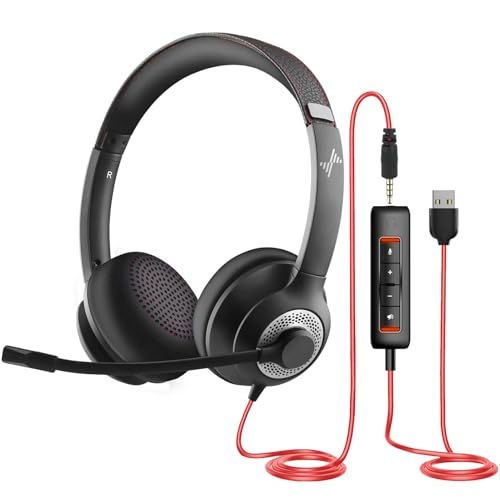
The JIAMQISHI headset is a one-person option for Skype users who want headphones and a microphone in one wired device. Its unidirectional boom mic is designed to focus on the wearer’s voice and reduce unwanted background noise. The microphone can be positioned on either side, according to the product details.
- Best for: Private calls, home offices, and online classes.
- Why it was selected: The boom microphone keeps the pickup point close to the speaker, while the headset provides call audio directly to the wearer.
- Listed features: 270-degree adjustable mic, adjustable headband, memory-foam ear pads, and 40 mm audio drivers.
Choose this if you do not want a tabletop microphone to capture voices from across the room. The listing describes USB and 3.5 mm connections, so check which connection suits your computer before buying. As an on-ear headset, it is not the right format for people who prefer open speakers or need several participants to share one mic.
KAYSUDA USB Speaker Phone

The KAYSUDA USB speakerphone combines a microphone and speaker in one device. It is intended for one-to-one conversations as well as group conference calls, so it can suit callers who want to talk and listen without wearing a headset. Its 360-degree microphone is designed to pick up voices from different directions.
- Best for: Hands-free calls and small conference discussions.
- Why it was selected: It includes both call playback and voice pickup, unlike a standalone USB microphone.
- Listed features: Full-duplex communication, echo cancellation, HD voice, and a 3.5 mm earphone port for private listening.
Choose this if the group needs a shared speakerphone rather than a microphone alone. The 3.5 mm earphone port offers a private-listening option. Because the built-in speaker plays call audio into the room, a headset may be a better fit when you need to keep conversations private or avoid sound from speakers reaching the microphone.
TONOR TM310 Clip-On USB Microphone

The TONOR TM310 is a directional desktop microphone that clips onto a computer or monitor. Its supercardioid pickup pattern is designed to favor sound from the front and reduce pickup from the sides and rear. That makes it a useful alternative to an omnidirectional conference mic when one person speaks from a fixed position.
- Best for: Individual Skype calls at a computer where desk space is limited.
- Why it was selected: The clip-on structure attaches above the computer, and the directional pattern focuses on front-facing speech.
- Listed features: Mute button, LED indicator, 200 cm (78-inch) cable, USB-C cable, and USB-A adapter.
The product information lists plug-and-play use with Windows and macOS, and says it is not recommended for smartphones. Choose this if you want a mic positioned near the monitor rather than a headset. Avoid it if multiple people need to speak from different sides of a table, since its directional design is aimed at front sound capture.
NUBWO HW02 USB Headset
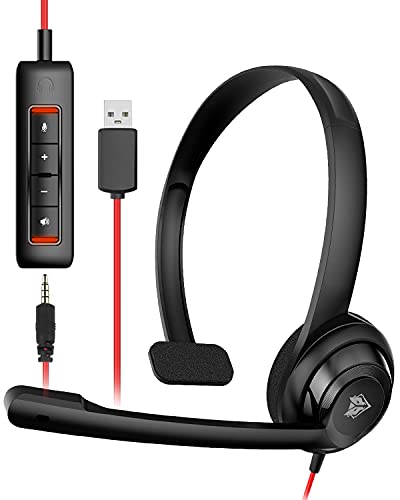
The NUBWO HW02 is a lightweight wired headset with an adjustable boom microphone for Skype and other calls. It is designed for individual use, with the mic close to the speaker and inline controls for adjusting volume and muting. The listed weight is 60 grams, which may appeal to people who wear a headset during long meetings.
- Best for: Frequent calls, webinars, and users who want convenient mute and volume controls.
- Why it was selected: Its adjustable boom mic and headset format suit private, one-person calls.
- Listed features: Noise-cancelling microphone, digital signal sound card in the control box, and 3.5 mm and USB connection options.
Choose this if a lightweight headset and inline controls matter more than shared room pickup. The listing describes the headset as on-ear, so it may not suit listeners who prefer over-ear headphones. Confirm the connection you plan to use before ordering, since the listed options include both USB and 3.5 mm.
Buying Guide: How To Choose A Microphone For Skype Calls
Should you choose a headset, desktop mic, or speakerphone?
Choose a headset when one person is taking a call and needs private audio. A boom microphone sits close to the speaker, which can help keep their voice prominent compared with a mic placed farther away. A desktop microphone is more suitable when you do not want to wear headphones. A speakerphone is an all-in-one option when callers need both a shared microphone and speaker.
For group calls, compare the pickup pattern. An omnidirectional microphone is designed to capture voices around it, as with the TONOR TM20 and KAYSUDA. A directional microphone focuses more on sound from a particular direction. The TM310’s listed supercardioid pattern favors the front, making it better suited to a single speaker facing the mic than to a group gathered around it.
How much room pickup do you need?
Consider where each participant will sit and how far the mic will be from the speakers. The TM20 lists a pickup range of up to 5 meters, while the KAYSUDA is described as a 360-degree microphone for conference use. Those listed features make them relevant to group calls, but room layout and background sound still matter. For a single caller in a noisy space, a headset with a close boom mic may be a better match.
Do you need noise reduction or echo control?
Noise reduction and echo control are not the same feature. A microphone described as noise-cancelling or noise-reducing is intended to limit unwanted background sound. Echo cancellation is especially relevant to speakerphone use, where the device’s speaker and microphone operate in the same room. The JIAMQISHI and NUBWO list noise-cancelling microphone features; the KAYSUDA lists echo cancellation. These descriptions do not guarantee that every room or call will sound identical.
Which connection and controls should you check?
Confirm the connection before choosing a model. The listed products include USB, USB-C with an adapter, and 3.5 mm options. The TONOR TM310 listing specifies a USB-C cable and USB-A adapter, while the JIAMQISHI and NUBWO listings mention USB and 3.5 mm connections. Check your computer’s available ports and the product’s complete connection details.
Think about how often you mute. The TM20 and TM310 list mute buttons, and the NUBWO HW02 lists inline volume and mute controls. An indicator light is listed for the TM310 and another NUBWO HW02 version in the supplied product information; check the exact model’s details if a visible mute status matters to your setup.
What should you consider for comfort and call privacy?
For long individual calls, headset weight, ear-pad material, and adjustment can affect comfort. The JIAMQISHI lists an adjustable headband and memory-foam ear pads. The NUBWO HW02 lists a lightweight 60-gram design. For a private conversation, a headset avoids relying on an open speakerphone; the KAYSUDA also lists an earphone port for private listening.
For shared calls, make sure the microphone can be placed where participants can speak toward or around it. A tabletop mic can reduce the need to pass a headset between people, but a room microphone is not as personalized as a boom mic positioned near one caller’s mouth. Match the device to the number of speakers and the room rather than choosing by format alone.
Frequently Asked Questions
Can I use a USB microphone for Skype calls?
Yes. The listed TONOR USB microphones are designed for online meetings and mention Skype use. Connect the device to your computer, then select the microphone as the input device in the computer or call application’s audio settings.
Which type of microphone is best for one person?
A headset with a boom microphone is a practical choice for one person because the mic stays close to the speaker. The JIAMQISHI and NUBWO HW02 are headset options among these selections.
Which option is better for a group Skype call?
A conference microphone or speakerphone is better suited to multiple people sharing a call. The TONOR TM20 is a microphone only, while the KAYSUDA combines a microphone and speaker.
Does a USB conference microphone include a speaker?
Not necessarily. The TONOR TM20 listing explicitly says it is not a speaker. The KAYSUDA USB speakerphone is the option in this selection that lists both speaker and microphone functions.
Is an omnidirectional mic always the best choice?
No. An omnidirectional mic is useful when voices come from different directions, but it may also capture more room sound. For a single caller, a directional desktop mic or a headset boom may be a better fit.
What should I do if Skype does not use my microphone?
Check that the microphone is connected and selected as the input device in the computer’s sound settings and in the call application. Also check the device’s mute control and the application’s microphone permission settings.