
The best S/PDIF USB audio interface depends on whether you need optical digital output, digital input and output, or multichannel analog connections. The Cubilux adapter is best for a simple USB-A-to-optical output, while the ESI U24 XL is better for two-way S/PDIF connectivity. StarTech and the 5.1 USB sound card offer broader computer-audio features. The MAONO P1 is included as a recording-focused alternative, but its listed features do not specify S/PDIF.
| Product | Best For | Digital Connection Notes |
|---|---|---|
| Cubilux USB A to TOSLINK Adapter | Simple optical output | USB-A to TOSLINK transmitter |
| ESI U24 XL | Digital input and output | Optical and coaxial S/PDIF I/O |
| StarTech ICUSBAUDIO7D | Multichannel computer audio | SPDIF output and optical input passthrough |
| 5.1 USB Audio Sound Card | Basic USB audio playback and recording | Product name specifies SPDIF; listed details are limited |
| MAONO P1 | Podcasting and recording | Listed features do not specify S/PDIF |
Cubilux USB A to TOSLINK Adapter

Best for: People who need to send digital audio from a USB-A computer or listed gaming console to an optical S/PDIF sound system, DAC, amplifier, or speaker.
This unidirectional adapter converts USB-A audio to TOSLINK optical output. The product description identifies it as a transmitter, so it is intended to send audio from the connected USB device to an optical audio component, not to bring optical audio into the computer. It is described as plug and play, with no driver or external power required, and supports Windows and Mac OS computers with a USB-A port.
- Supports listed audio formats up to 192 kHz/24-bit.
- Designed for USB-A laptops, computers, and the listed PlayStation consoles.
- Connects to optical-equipped soundbars, home audio systems, DACs, and amplifiers.
Choose this if your main requirement is a compact USB-to-optical output path. The stated limitation is direction: it is not an optical input adapter, and the product description says it is not for TVs or other devices. Check the source device and USB port before choosing it.
ESI U24 XL USB Audio Interface

Best for: Users who need S/PDIF input and output as well as two-channel analog connections.
The ESI U24 XL stands out for its stated optical and coaxial S/PDIF digital input and output. That two-way digital connectivity makes it a better fit than a transmitter-only adapter when a setup must both send and receive digital audio. It also provides two analog input channels and two analog output channels through 1/4-inch TRS connectors. One output connector can be used as a headphone output.
- Two analog inputs and two analog outputs.
- Optical TOSLINK and coaxial RCA S/PDIF input and output.
- 24-bit USB audio interface for PC and Mac, according to the product name.
Choose this if you want a more versatile interface with both digital directions and analog I/O. The supplied feature information does not specify sample rates, included software, or detailed operating-system requirements, so verify those requirements for your setup before buying.
StarTech 7.1 USB Audio Adapter
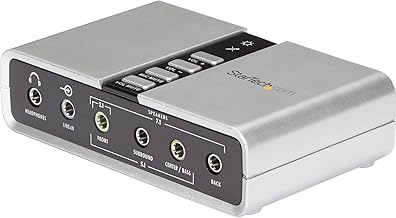
Best for: Desktop or laptop users who want multiple analog audio connections alongside digital audio features.
This bus-powered adapter adds up to 7.1-channel audio through a USB port and supports 7.1-, 5.1-, and two-channel output using 3.5 mm jacks. Its connections include a headphone port, line input, and stereo microphone inputs. The listing describes analog and digital output, plus optical SPDIF input passthrough for two-channel audio at 48 kHz.
- Supports 44.1 kHz and 48 kHz for analog playback and recording.
- SPDIF digital output supports 48 kHz playback.
- Includes a 1-meter USB cable and is bus-powered.
Choose this if analog surround connections and basic digital audio matter more than high-rate S/PDIF output. A key limitation is that the stated SPDIF output supports 48 kHz playback only, while optical input passthrough is listed for two-channel audio at 48 kHz. It is not the strongest match if you need higher-rate S/PDIF or broad digital input capabilities.
5.1 USB Audio Sound Card With SPDIF

Best for: Buyers seeking a basic USB sound card whose product name identifies SPDIF and whose listed requirements are modest.
The product is described as a 5.1 USB sound card and external audio adapter for a PC or laptop. Its stated details include USB Audio Device Class 1.0 and 1.1 compliance, USB 2.0 full-speed compliance, plug-and-play use, and hot swapping. It supports 44 kHz and 48 kHz sampling rates for playback and recording.
- Listed for PC and laptop use.
- Supports 5.1 audio, according to the product name.
- Supports playback and recording at 44 kHz or 48 kHz.
Choose this if you want a straightforward USB audio device and do not need detailed high-resolution format claims. The available features do not explain the SPDIF connector type, whether the digital port is input or output, or its specific channel behavior. Confirm those details with the seller or product documentation if your setup depends on them.
MAONO P1 USB Audio Interface

Best for: Podcasters, streamers, and musicians who prioritize microphone recording and mobile workflow over S/PDIF connections.
The MAONO P1 is a recording-oriented interface with dual USB ports for connecting a computer and a phone or iPad simultaneously, according to the product description. Listed features include up to 70 dB of gain, 24-bit/192 kHz recording, auto gain, loopback, ASIO support, independent mute controls, and routing software. Its stated device support includes Mac, PC, iPhone, Android, and cameras.
- Designed for solo podcasting, streaming, and mobile music recording.
- Includes independent mute controls and headphone and monitor mute controls.
- Offers a Stream Mode that sends the voice equally to both channels.
Choose this if microphone control and creator-focused recording tools are more important than digital S/PDIF connections. The listed features do not specify an S/PDIF input or output, so it should not be treated as a direct substitute for an S/PDIF USB interface. Avoid it if optical or coaxial digital I/O is essential.
Buying Guide: How To Choose An S/PDIF USB Audio Interface
Do You Need S/PDIF Input, Output, Or Both?
Start by identifying the direction of the audio signal. An S/PDIF output sends digital audio from the computer to a receiver, DAC, soundbar, or other digital audio device. An S/PDIF input sends audio from an external digital source into the computer. If you need both functions, look for a product that explicitly states S/PDIF input and output, such as the ESI U24 XL. A transmitter-only adapter, such as the Cubilux, is not a two-way interface.
Should You Choose Optical Or Coaxial S/PDIF?
Optical S/PDIF uses a TOSLINK connection, while coaxial S/PDIF uses an RCA-style connector. Check the available port on both the USB interface and the audio component you want to connect. The ESI U24 XL lists optical and coaxial digital I/O. The Cubilux uses optical TOSLINK output. The StarTech adapter lists SPDIF features, but its supplied details do not fully describe the connector setup for every function.
What Sample Rate And Channel Support Do You Need?
Match the interface’s published format support to the source, software, and destination device. A higher maximum sample rate is not useful if the connected components do not support it. The Cubilux lists support up to 192 kHz/24-bit, while StarTech specifies 48 kHz for SPDIF output and two-channel optical input passthrough. The 5.1 USB sound card lists 44 kHz and 48 kHz playback and recording, but does not provide further SPDIF format details.
Are You Connecting A Computer, Console, Or Mobile Device?
Confirm that the adapter is intended for the source device and that the connection type matches. The Cubilux description specifies USB-A computers and laptops, and identifies certain gaming consoles as supported sources. StarTech is described as a USB adapter for desktop and laptop computers. The MAONO P1 lists broader creator-device connectivity, but its features do not specify S/PDIF. Do not assume that a USB audio adapter designed for computers will work with a TV or another device unless that use is stated.
Do You Need Recording Inputs Or Only Digital Playback?
A simple USB-to-TOSLINK transmitter can suit a playback-only setup. For recording, check whether the interface has the required digital input, analog inputs, or microphone connections. The ESI U24 XL lists S/PDIF input and output plus two analog inputs. StarTech offers line-in and stereo microphone inputs, as well as optical input passthrough. The MAONO P1 focuses on microphone recording and streaming, rather than specified S/PDIF I/O.
What Details Should You Verify Before Buying?
Product listings do not always describe every port or operating requirement. Before choosing, verify the exact connector type, signal direction, supported sample rates, channel count, and intended source device. For products with limited specifications, check whether the digital port is an input or an output. Also make sure the interface’s USB connector can connect to your computer or other source. These checks help avoid buying a transmitter when you need an input, or a recording interface when you need digital output.
Frequently Asked Questions
What Does An S/PDIF USB Audio Interface Do?
It connects a USB-equipped source, such as a computer, to digital audio equipment through an S/PDIF connection. Depending on the model, it may transmit audio, receive audio, or support both directions.
Is TOSLINK The Same As S/PDIF?
TOSLINK is an optical connection commonly used to carry S/PDIF digital audio. S/PDIF can also use a coaxial connection, so check whether your interface and destination use optical or coaxial ports.
Can A USB-To-TOSLINK Adapter Record Optical Audio?
Not if it is an output-only transmitter. The Cubilux product is described as unidirectional USB-to-TOSLINK output. For recording digital audio from an optical source, choose an interface that explicitly lists optical S/PDIF input.
Which Listed Product Has Both S/PDIF Input And Output?
The ESI U24 XL lists S/PDIF digital input and output through both optical TOSLINK and coaxial RCA connectors. Check its other stated requirements against your audio setup before choosing it.
Does The MAONO P1 Have S/PDIF?
The supplied MAONO P1 feature information does not specify an S/PDIF input or output. It is described as a recording and streaming interface with microphone-focused controls, so confirm its connections before considering it for a digital S/PDIF system.