
The best car WiFi display box depends on whether you want wireless phone projection, built-in streaming apps, or screen mirroring. The AUTOSKY AI Box Lite Flex is best for shoppers seeking selectable streaming apps, while the Ottocast P3 Pro offers a broader set of listed features, including HDMI output and split-screen. For a simpler mirroring-focused option, consider the DLNA adapter. Check your vehicle’s connection requirements before buying: several products are designed for vehicles with factory-wired CarPlay, and the AUTOSKY listing specifies a touchscreen.
| Product | Best suited for | Notable listed feature |
|---|---|---|
| AI Box CarPlay, 3-in-1 | Factory-wired CarPlay users wanting streaming and wireless conversion | 4GB RAM, 32GB ROM, and 5.8GHz WiFi |
| AI Box Wireless CarPlay Adapter | Users looking for apps and screen mirroring | Play Store and screen mirroring |
| AUTOSKY AI Box Lite Flex | Touchscreen-equipped vehicles and streaming-app selection | Selectable streaming apps |
| Ottocast P3 Pro OttoAibox | Buyers seeking a feature-rich smart car box | HDMI out and split-screen |
| Car WiFi Display Box Mirror Link Adapter | Buyers focused on DLNA-supported mirroring | DLNA support |
AI Box CarPlay 3-in-1
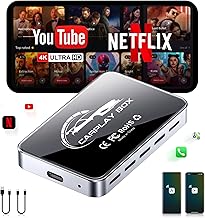
This 3-in-1 AI box is aimed at drivers who want to convert a compatible factory-wired CarPlay setup to wireless use and access streaming features through the box. The listing names Netflix and YouTube, along with 5.8GHz WiFi, 4GB of RAM, and 32GB of storage.
Best for: Drivers whose vehicles already have factory-wired CarPlay and who want a combination of wireless conversion and built-in entertainment options. It is selected because the listing describes both functions in one device, rather than focusing only on mirroring.
- Listed as supporting wireless CarPlay and Android Auto in OEM wired-car systems.
- Includes 4GB RAM and 32GB ROM, according to the product name.
- Names Netflix and YouTube as built-in streaming options.
Limitation: The product description specifies OEM wired-car requirements. Confirm that your vehicle has the required factory-wired CarPlay connection; the listing does not establish compatibility with every vehicle or every phone.
AI Box Wireless CarPlay Adapter

This adapter combines wireless CarPlay positioning with an app-oriented feature set. Its listing names YouTube and TikTok, a built-in Play Store, screen mirroring, and plug-and-play setup. It is described for OEM factory-wired CarPlay vehicles.
Best for: A buyer who wants to explore apps and screen mirroring in addition to wireless CarPlay. It is a relevant choice when the priority is the combination of the Play Store and mirroring, rather than a specific memory configuration or HDMI output.
- The product name identifies a built-in Play Store.
- YouTube and TikTok are named as supported entertainment apps.
- Screen mirroring and plug-and-play operation are listed.
Limitation: The listing specifies factory-wired CarPlay vehicles, so it should not be assumed to work with vehicles that lack that system. Verify the seller’s current compatibility information and app requirements before purchase.
AUTOSKY AI Box Lite Flex

The AUTOSKY AI Box Lite Flex is described as a wireless CarPlay and Android Auto adapter with selectable streaming apps. Its product name lists Netflix, Hulu, Disney+, Prime Video, and more, and describes the device as plug and play.
Best for: Buyers who want a choice of streaming services and have a vehicle that meets the stated touchscreen requirement. The named services make this option especially relevant for people comparing app selection rather than looking only for basic phone projection.
- Wireless CarPlay and Android Auto are listed.
- Streaming choices named in the listing include Netflix, Hulu, Disney+, and Prime Video.
- The product description says a touchscreen is required.
Limitation: A touchscreen is explicitly required, so this is not the right choice if your intended vehicle setup does not meet that condition. Streaming availability and account requirements may depend on the services and configuration; confirm details before ordering.
Ottocast P3 Pro OttoAibox

The Ottocast P3 Pro is presented as a smart AI car box with wireless CarPlay and Android Auto. Its product name also lists an Android 13 system, voice assistant, HDMI output, 5G WiFi, Bluetooth 6, cloud SIM, and split-screen.
Best for: Buyers comparing a wider range of connectivity and interface features in one car box. HDMI output and split-screen distinguish it in this selection, while the named wireless phone-projection functions make it relevant to shoppers seeking more than a basic mirroring adapter.
- Wireless CarPlay and Android Auto are listed.
- HDMI output and split-screen are named features.
- The listing identifies Android 13, 5G WiFi, Bluetooth 6, and cloud SIM.
Limitation: A longer feature list does not confirm fit with a particular vehicle. Check the manufacturer’s compatibility details and the requirements for features such as HDMI output and cloud SIM before choosing it.
Car WiFi Display Box Mirror Link Adapter

This compactly described option focuses on wireless display mirroring. Its name lists Mirror Link and DLNA support, as well as ultra-low latency. The available product information does not name streaming apps, memory capacity, or wireless CarPlay and Android Auto conversion.
Best for: Buyers whose main goal is a DLNA-supported mirroring adapter and who do not need the broader app and phone-projection features listed for the AI boxes above. It is included because it directly matches the car WiFi display and mirror-link search intent.
- Mirror Link and DLNA support are identified in the product name.
- The listing also describes ultra-low latency.
- It is positioned as a display adapter rather than a feature-rich AI box.
Limitation: The supplied product information is brief. It does not establish which phones, head units, apps, or connection methods are supported, so confirm those details before purchase.
Buying Guide: How To Choose A Car WiFi Display Box
Does your vehicle need factory-wired CarPlay?
Start with the car’s existing infotainment system. Several products in this selection specify factory-wired CarPlay as a requirement or intended setup. A wireless adapter generally cannot be assumed to add compatibility to a vehicle that lacks the necessary factory system. Check the product’s vehicle list and connection requirements against your exact model year and trim.
Separate phone projection from screen mirroring when comparing options. Wireless CarPlay or Android Auto is designed around phone-projection functions, while Mirror Link or DLNA points toward sharing or casting screen content. The product names do not establish that every app or phone can use every mode.
Do you want apps, wireless projection, or mirroring?
Choose according to the feature you will actually use. The 3-in-1 AI Box names Netflix and YouTube and also describes wireless conversion. The second AI Box emphasizes the Play Store and screen mirroring. The AUTOSKY model highlights a selection of streaming services but states that a touchscreen is required. The DLNA adapter is the most narrowly described mirroring option.
If wireless CarPlay or Android Auto is the priority, confirm that the product supports the relevant function for your vehicle. If streaming is the priority, check which apps are named, whether separate accounts or subscriptions are needed, and whether the seller explains how the apps operate. Do not infer that an app listing guarantees access in every region or setup.
What connection and display requirements matter?
Check the connection type, screen requirements, and any stated installation conditions before ordering. The AUTOSKY listing explicitly says a touchscreen is required. Other listings refer to OEM factory-wired CarPlay vehicles. For the Ottocast model, verify how HDMI output is intended to be used and whether it fits your desired display arrangement.
Also review the included cables and setup instructions on the current listing. The product names alone do not specify cable length, power requirements, or the exact steps for pairing a phone. These details can affect whether a device is practical in your particular cabin.
How should you compare memory, WiFi, and extra features?
Compare only specifications that matter to your use. The 3-in-1 unit lists 4GB RAM, 32GB ROM, and 5.8GHz WiFi. The Ottocast P3 Pro names 5G WiFi, Bluetooth 6, Android 13, split-screen, and cloud SIM. Those specifications may help distinguish the listed configurations, but they do not by themselves prove faster performance or compatibility.
Extra features can also add setup considerations. Before selecting cloud SIM or HDMI functionality, check whether additional service, accessories, or a compatible external display are needed. The available product descriptions do not provide enough detail to assume those requirements are included.
What should you verify before buying?
- Confirm the vehicle’s model year, trim, and factory infotainment features against the product’s compatibility information.
- Check whether the device requires factory-wired CarPlay, Android Auto, a touchscreen, or another specified connection.
- Decide whether your priority is wireless projection, app access, or screen mirroring.
- Review phone operating-system requirements and the supported mirroring method.
- Check app availability, account needs, and any service requirements for streaming or cloud features.
- Read the current setup instructions and package contents instead of assuming cables or accessories are included.
For vehicle use, set up and select entertainment before driving. Follow local laws and the device instructions, and do not watch video while driving.
Frequently Asked Questions
What is a car WiFi display box?
It is a device intended to connect with a vehicle display or infotainment system using a wireless or wired connection. Depending on the model, it may support phone projection, screen mirroring, or streaming apps. Check the specific product description because these functions are not universal.
Will a car WiFi display box work in any car?
No. Some products specify factory-wired CarPlay vehicles, and one listing requires a touchscreen. Confirm the exact vehicle and head-unit requirements before purchasing.
Do all car display boxes support wireless CarPlay and Android Auto?
No. The product descriptions differ. Some explicitly name wireless CarPlay and Android Auto, while the DLNA adapter listing focuses on mirroring and does not identify those functions. Check the individual feature list.
Can these devices play Netflix or YouTube?
Some listings name streaming apps. The 3-in-1 AI Box names Netflix and YouTube, the second AI Box names YouTube and TikTok, and AUTOSKY lists several services, including Netflix and Hulu. App access can depend on the device setup and service requirements.
Is DLNA the same as wireless CarPlay?
No. DLNA is a media-sharing standard named for the mirror-link adapter, while wireless CarPlay is a phone-projection feature. A device that lists one should not be assumed to support the other.
Can passengers watch video while the car is moving?
Use video features only when it is legal and safe. Drivers should not watch video while driving, and users should follow local laws, vehicle instructions, and the device manufacturer’s guidance.