
An audio in-to-out converter can connect a digital audio source to analog speakers or an amplifier when their connections do not match. The five options below are digital-to-analog converters, often called DACs: they accept optical or coaxial digital audio and output analog RCA or 3.5mm audio. Choose the Hdiwousp model for both optical and coaxial inputs, or an optical-to-RCA model such as the AUTOUTLET or PROZOR options for a simpler connection. Check your source’s audio format and output ports before buying.
| Product | Input-to-output type | Best suited for |
|---|---|---|
| PROZOR Aluminum Alloy DAC | Optical to RCA and 3.5mm | Buyers seeking analog outputs from an optical source |
| PROZOR DAC With 7-Foot Cable | Optical to RCA | Setups needing a longer included cable and amplified RCA output |
| AUTOUTLET 192kHz DAC Cable | Optical to RCA | Direct connection to a stereo amplifier |
| Hdiwousp Optical/Coaxial DAC | Optical or coaxial to RCA and 3.5mm | Buyers who need input flexibility |
| PROZOR Optical DAC | Optical to RCA and 3.5mm | Buyers comparing a straightforward optical converter |
PROZOR Aluminum Alloy Digital-to-Analog DAC

This PROZOR converter is an option for a setup that needs to turn a digital optical audio signal into analog sound. Its product name identifies optical input and RCA left/right plus 3.5mm output, making it relevant when a source has a Toslink connection and the receiving device needs an analog connection.
Best for: Buyers looking for an optical-to-analog converter with both RCA and 3.5mm output options. It was selected because those output types can serve different analog connection needs without changing the converter category.
Check before buying: The supplied product details do not specify supported sample rates, included accessories, or setup instructions for this listing. Confirm the exact ports and included items on the product page. Like the other optical DACs here, this is a one-way digital-to-analog device, not an analog-to-digital converter.
PROZOR Optical-to-RCA DAC With 7-Foot Cable
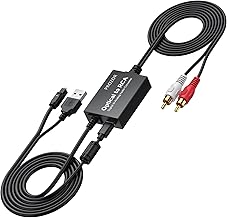
This PROZOR model converts SPDIF optical digital audio to analog left/right RCA output. The listing specifies a 7-foot (2.1-meter) cable, a built-in audio amplifier chip, and support for 32, 44.1, 48, 96, and 192 kHz sampling rates with a 24-bit incoming SPDIF stream.
Best for: Buyers who need an optical-to-RCA connection and want the listed cable length included. Its amplifier chipset and dual-channel operational amplifier are described as addressing low RCA output volume, which may matter when connecting to an analog input.
Important setup note: The product information says to set the TV’s digital audio output to PCM and adjust TV volume in settings. It also warns that optical output is not supported by the receiving device only if that device lacks the matching input; verify the actual connection direction and ports. This converter is not reversible.
AUTOUTLET Optical-to-RCA 192kHz DAC

The AUTOUTLET is an optical-to-RCA DAC cable designed to send analog left/right audio to a stereo amplifier. Its listed features include a built-in professional audio amplifier chip, a dual-channel operational amplifier, 24-bit/192 kHz processing, and support for optical sampling rates of 32, 44.1, 48, 96, and 192 kHz.
Best for: Buyers who want a direct optical-to-RCA connection for equipment with a stereo analog input. It was selected because the listing clearly describes both the conversion direction and its intended amplifier connection.
Check before buying: The product name describes a 7-foot cable, but confirm the cable arrangement and connectors match your installation. The listed maximum sampling rate does not mean every source sends audio at that rate. Make sure the source output format is supported by the converter; the supplied features do not state that it accepts every digital surround format.
Hdiwousp Optical And Coaxial DAC
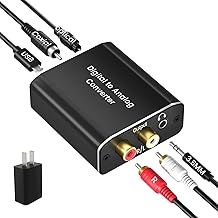
Unlike the optical-only options, this Hdiwousp converter accepts either coaxial or Toslink optical digital input and provides analog RCA left/right and 3.5mm outputs. The listing identifies PCM/LPCM signal support, sampling rates of 32, 44.1, 48, 96, and 192 kHz, and 24-bit S/PDIF input. An optical cable and power adapter are listed as included.
Best for: Buyers whose source may use optical or coaxial output, or who want a choice between analog RCA and 3.5mm output. It was selected for its broader stated input and output options.
Important limitation: The listing explicitly says the converter is not reversible. It converts digital PCM/LPCM to analog; it does not convert an analog input into a digital output. Set the source to PCM or LPCM as instructed, and check that the source has a matching digital output port.
PROZOR Optical DAC With RCA And 3.5mm

This PROZOR model is named as a 192 kHz digital-to-analog converter with optical input and analog RCA left/right and 3.5mm output. The listing also names devices such as PS3, HD DVD, PS4, an amplifier, Apple TV, and home cinema as intended use examples.
Best for: Buyers searching for a basic optical-to-analog converter with both RCA and 3.5mm connections. It was selected because its stated connection types address common situations where a digital optical source needs analog output.
Check before buying: The supplied product information does not provide detailed setup directions, power requirements, or a supported-format list beyond the 192 kHz designation in the product name. Confirm those details on the product page and check whether your source can output a compatible audio signal. Do not choose it for analog-to-digital conversion.
Buying Guide: How To Choose An Audio Converter
What direction does the signal need to travel?
Start by identifying the source and the receiving device. These five products are digital-to-analog converters: a digital optical or coaxial signal goes in, and analog audio comes out. This is the right direction when, for example, a source with digital audio output needs to feed a receiving device with analog RCA or 3.5mm input.
Direction matters because a converter is not automatically bidirectional. If your source has analog RCA output and your receiver needs digital optical input, you need an analog-to-digital converter instead. Check the labels on the ports and the product description before ordering.
Which input port does your source have?
Optical audio commonly uses a Toslink connection. Coaxial digital audio uses a different physical connection, even though both carry digital sound. The Hdiwousp listing specifies both optical and coaxial inputs. The other products in this comparison are described as optical converters, so select one only if the source has a compatible optical output.
Also check whether the source’s digital output is enabled. A converter cannot receive a signal through a port that is absent, inactive, or configured for a different output type.
Which analog output do you need?
RCA left/right output is intended for a stereo analog connection with separate left and right channels. A 3.5mm jack is a smaller analog connection. Choose a converter whose output matches the receiving device’s input, or confirm that a suitable cable is available. A product with more output types can offer flexibility, but unused connections do not improve compatibility by themselves.
Does the source support PCM or LPCM?
Check the source’s digital audio format setting. The Hdiwousp listing specifically instructs users to select PCM/LPCM, and the PROZOR 7-foot model says to set a TV’s audio output to PCM. If a converter supports only a specified format, a source outputting another format may not work as expected. Consult the product details and source settings rather than assuming that a stated sampling rate means all formats are supported.
How much do sampling rate and bit depth matter?
A sampling-rate specification describes supported digital audio input rates, not the quality of every source or recording. The PROZOR and AUTOUTLET listings state support up to 192 kHz and 24-bit input, while Hdiwousp lists several supported rates through 192 kHz. Match the converter’s stated support to the source output. A higher maximum is not a substitute for checking the input type and audio format.
Should you prioritize cable length or amplification?
If the converter must sit farther from the source or receiver, compare the listed cable length. The PROZOR and AUTOUTLET products identify a 7-foot (2.1-meter) cable. For a concern about low RCA output level, the PROZOR 7-foot model and AUTOUTLET listing describe built-in amplifier circuitry. These features are product-specific; do not assume every DAC in this list includes the same cable or amplification.
Frequently Asked Questions
What does an audio in-to-out converter do?
It changes a signal from one connection or signal format into another. The products here convert digital optical or coaxial audio into analog RCA or 3.5mm output. They are not analog-to-digital converters.
Can I use an optical-to-RCA converter with a TV?
Yes, if the TV has a compatible optical digital audio output and the converter supports the TV’s audio format. Some product instructions specify setting the TV output to PCM. Confirm the TV’s port and settings before purchase.
Will a 192 kHz converter work with a lower-rate source?
The listed products specify support for several lower sampling rates as well as 192 kHz, but support differs by model. Check the individual product’s stated rates and the source’s output settings.
Can I connect a coaxial source to any product in this list?
No. The Hdiwousp listing specifies coaxial and optical inputs. The other products are described as optical converters. Match the source’s port to the converter’s stated input.
Why is there no sound after connecting a DAC?
Check that the digital cable is connected to the source output, that the converter’s analog output goes to an input on the receiving device, and that the source’s audio format is supported. For models that specify PCM or LPCM, select that setting on the source.