
The best headset microphone splitter adapter depends on which way you need to split the connection. For a phone-style headset with one 3.5mm plug going into a computer with separate headphone and microphone jacks, choose a female-to-two-male PC adapter such as the ENVEL or B01MQZ2023 cable. For connecting a headset with separate plugs to a device with one combo jack, consider the KINGTOP. The two-headphone splitter is a different type, intended to connect two listening devices to one source.
| Product | Best suited for | Connection direction |
|---|---|---|
| Headphone Splitter For Computer | Single-plug headset to PC | One female to two male |
| ENVEL Headset Splitter Cable | Single-plug headset to PC | One female to two male |
| KINGTOP Headphone Mic Splitter | Two headset plugs to a combo jack | One male to two female |
| 3.5mm TRRS Splitter, 2-Pack | Sharing an audio source | One source to two headphone jacks |
| Headset Headphone Splitter Adapter Cable | Gaming headset to PC audio and mic ports | One female to two male |
Headphone Splitter For Computer

This adapter is designed to connect a headset with one 3.5mm four-conductor plug to a computer that has separate headphone and microphone connections. Its female jack accepts the headset plug, while its two male plugs connect to the PC’s separate audio and microphone ports.
Best for: People whose computer has two separate 3.5mm jacks but whose headset has a single combined audio-and-microphone plug. It was selected because the product name clearly identifies that female-to-two-male PC connection.
- Choose this if you need to separate a headset’s audio and microphone signals for a computer.
- Check that the headset plug and computer ports match the adapter’s 3.5mm configuration before buying.
Limitation: This is not the right direction for combining separate headphone and microphone plugs into one combo headset jack. It also does not provide a USB connection.
ENVEL Headset Splitter Cable

The ENVEL cable is a PC headset adapter with a 3.5mm female connection and two 3.5mm male plugs. The product description specifies that it separates a headset’s headphone and microphone connections for a computer. This is the same general connection direction as the B01MQZ2023 adapter.
Best for: Buyers who need a clearly described female-to-two-male adapter for a single-plug headset and a computer with distinct headphone and microphone ports. It was selected for its explicit PC and audio/microphone splitter description.
- Choose this if your headset has one combined 3.5mm plug and your computer has separate audio and mic jacks.
- Compare the plug layout with your computer’s port labels, especially if the device has a single combo jack instead.
Limitation: The listed product information does not specify cable length or additional features. It should not be treated as a two-listener headphone splitter.
KINGTOP Headphone Mic Splitter

The KINGTOP adapter is described as a 3.5mm TRRS cable with one male plug and two female connections. That layout is the reverse of the common PC splitter that takes one headset plug and separates it into two computer plugs. The product name identifies it for headset audio and microphone use and mentions laptops, PS4, Xbox One, and Android devices.
Best for: Buyers who need a one-male-to-two-female adapter for a setup involving a headset’s separate headphone and microphone plugs and a single 3.5mm connection. It was selected because its connector direction fills a different need from the PC-oriented splitters above.
- Choose this only after confirming which plug goes into the source and which plugs accept your headset connections.
- Check the device’s port type and the headset’s connector arrangement before relying on the listed platform names.
Limitation: The product name alone does not fully explain the intended wiring of each female jack. Confirm the port layout in the product listing if your setup depends on separate microphone and headphone signals.
3.5mm TRRS Splitter, 2-Pack
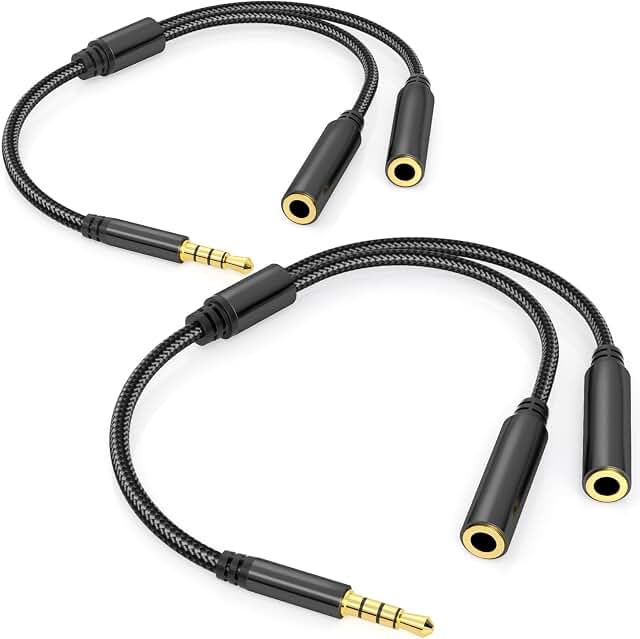
This two-pack is described as a 1-foot, 1-in-2-out 3.5mm splitter with two female connections. Its product name presents it as a way to connect two headphones to one source and says it supports audio and microphone. It is therefore a different category from an adapter that separates a headset’s combined plug into PC headphone and microphone plugs.
Best for: People looking for two splitter cables to share a 3.5mm source between two listening connections. It was selected because it offers a two-piece option and explicitly describes a two-output headphone use.
- Choose this if your priority is connecting two 3.5mm devices to one source rather than splitting a headset into separate PC ports.
- The listing identifies each cable as 1 foot long, which may be limiting if the devices need to sit farther apart.
Limitation: The product name does not establish that microphone input will work in every two-headset setup. Verify the intended audio and mic behavior for your source and connected devices.
Headset Headphone Splitter For PC

This cable is described as a PC 3.5mm microphone-and-audio Y-splitter for gaming headsets. The product name lists Astro A10, A40, Turtle Beach, HyperX Cloud, SteelSeries, and Razer headsets. Those names indicate the product’s stated use, but buyers should still check that their particular headset has the matching single-plug connection.
Best for: Gaming-headset owners who need a 3.5mm adapter to connect a combined headset plug to separate PC microphone and headphone ports. It was selected for its explicit PC gaming headset focus and named headset families.
- Choose this if your PC has separate audio and mic jacks and your headset uses one combined plug.
- Check the connector layout rather than relying on a brand name alone.
Limitation: This is a wired 3.5mm adapter, not a USB sound card or wireless accessory. It will not create separate PC ports on a device that lacks them.
Buying Guide: How To Choose A Headset Microphone Splitter
What connection direction do you need?
Start by counting the plugs on the headset and the ports on the device. A common PC headset splitter has one female jack for a headset’s single combined plug and two male plugs for a computer’s separate headphone and microphone ports. A reverse adapter has one male plug and two female connections. These layouts are not interchangeable just because both products are called splitters.
Read the product name and inspect the connector diagram or photographs before ordering. If the adapter’s input and output directions do not match your devices, it may not route microphone and headphone signals as intended.
Does your headset have one plug or two?
A headset with one 3.5mm plug usually combines headphone audio and microphone signals in one connector. A PC with separate audio-out and mic-in ports may need a female-to-two-male splitter. A headset with separate headphone and microphone plugs may instead require a reverse adapter to connect to a device with one combined jack.
Do not confuse a headset splitter with a headphone-sharing splitter. The two-headphone type is meant to connect more than one listening device to a source. Its purpose and wiring differ from splitting one headset’s audio and microphone signals for separate computer ports.
What do TRRS and 3.5mm mean?
“3.5mm” describes the plug size. TRRS refers to a connector with four contact sections, commonly used to carry headphone audio and microphone signals together. A 3.5mm plug can have different contact arrangements, so matching physical size alone does not guarantee that an adapter will route both audio and mic functions correctly.
Check the headset and device descriptions for terms such as combo jack, headset jack, microphone input, and headphone output. If the listing does not explain the wiring clearly, look for a connector diagram before choosing.
How can you avoid buying the wrong type?
- Identify whether the headset has one combined plug or separate headphone and microphone plugs.
- Count the device’s available 3.5mm ports and note whether they are separate or combined.
- Match the adapter’s male and female ends to the actual plugs and ports.
- Decide whether you need mic support or only want to share headphone audio.
- Check cable length if the splitter must reach between devices placed apart.
For a desktop with separate audio and mic ports, look first at the three female-to-two-male PC splitter options in this list. For a one-port device and a headset with separate plugs, investigate the reverse-style adapter. For two listeners using one source, choose a product specifically described as a two-headphone splitter.
Frequently Asked Questions
Will a headset splitter make a microphone work on a computer?
It can connect a combined headset plug to separate computer headphone and microphone ports when the adapter has the correct female-to-two-male layout. The computer must also have the appropriate ports, and the headset and adapter wiring must match.
Can I use a PC headset splitter with a phone?
Not necessarily. A PC splitter is generally intended to connect a single-plug headset to separate computer audio and microphone ports. A phone with one combo jack may need a different adapter arrangement, depending on the headset plugs and device connection.
Is a two-headphone splitter the same as a mic splitter?
No. A two-headphone splitter connects multiple listening devices to one audio source. A headset microphone splitter routes a headset’s combined audio and microphone connection to separate ports, or combines separate headset plugs for a combo jack.
Why does the splitter have one female jack and two male plugs?
That layout commonly accepts a headset’s single combined 3.5mm plug and separates it into headphone and microphone plugs for a computer with two distinct ports. Check the adapter’s stated use and port labels before connecting it.
Will any 3.5mm splitter support microphone audio?
No. Some 3.5mm splitters are designed only for headphone audio. Look for explicit headset, microphone, or TRRS support and verify that the connector direction matches your setup.