
The best mic and audio combo jack adapter depends on the ports on your device and headset. For a headset with one 3.5 mm plug and a computer with separate headphone and microphone jacks, choose a female-to-two-male adapter such as the UGREEN or D & K Exclusives cable. For a headset with two plugs and a device with one combo jack, choose a male-to-two-female adapter such as the StarTech.com or MillSO. The IIISOGNO cable serves a different purpose: it connects two headsets to one audio jack.
| Product | Best For | Connection Direction |
|---|---|---|
| UGREEN Headphone Splitter | Durability features and PC use | One headset plug to separate PC audio and mic jacks |
| D & K Exclusives Headphone Splitter | Compact headset-to-PC connection | One headset plug to separate PC audio and mic jacks |
| StarTech.com Headset Adapter | Using a two-plug headset with a combo jack | One combo jack to separate headphone and mic plugs |
| MillSO Headphone Mic Splitter | Gaming headsets with two plugs | One combo jack to separate headphone and mic plugs |
| IIISOGNO 3.5mm TRRS Splitter | Sharing audio and mic with two headsets | One device jack to two headset jacks |
UGREEN Headphone Splitter

Best for: Connecting a headset with one 3.5 mm TRRS plug to a PC or laptop that has separate headphone and microphone jacks. This is the correct direction when the computer has two ports and the headset has one.
The adapter has one female 3.5 mm headset connection and two male plugs for the computer’s separate ports. UGREEN lists use with VOIP, online gaming, classes, and meetings. Its listed construction includes 24K gold-plated connectors, an aluminum alloy casing, oxygen-free copper wire, and a nylon-braided jacket.
Why it was selected: The connector layout and stated use directly match a common headset-to-computer connection problem. It also provides specific construction details for shoppers comparing cable materials.
Check before buying: UGREEN specifies a CTIA-compliant TRRS headset cable for microphone output. The listing warns that OMTP or other wiring standards may cause the microphone to fail. This adapter is not intended to turn a computer’s single combo jack into separate ports.
D & K Exclusives Headset Adapter

Best for: Buyers who need to connect a single-plug headset to a computer with separate headphone and microphone sockets. Its two male connectors are intended for the computer’s headphone and mic ports.
This cable provides one female 3.5 mm headset connection and two male 3.5 mm connections. The listed features describe use with VOIP and chat applications, including Skype and other voice programs. It has gold-plated connectors and oxygen-free copper, and its compact design is intended to fit in a laptop bag.
Why it was selected: Its stated function closely matches the search for an adapter that separates microphone and audio signals for a PC. It is also a straightforward option for travelers who want a small cable in their bag.
Check before buying: This is a one-headset-to-two-computer-ports adapter, not a two-plug headset adapter for a device with one combo jack. Confirm that your headset has one combined plug and your computer has separate audio and microphone ports.
StarTech.com Headset Adapter

Best for: Using a headset with separate headphone and microphone plugs on a device that has one 3.5 mm combo jack. This is the reverse connection direction from a PC splitter with two male plugs.
The StarTech.com adapter has one 3.5 mm male TRRS connector and two 3.5 mm female TRS connectors. Plug the adapter’s male end into the device’s combo port, then connect the headset’s headphone and microphone plugs to the matching female sockets. The listing describes it as a compact travel option for keeping older audio accessories in use with newer devices.
Why it was selected: Its connector arrangement is clearly specified and addresses the opposite port configuration from the UGREEN and D & K options. It is a useful comparison for shoppers whose headset has two separate plugs.
Check before buying: StarTech.com explicitly says this is not an audio splitter for two headphones. Avoid it if your goal is to connect two headsets or share sound with another listener.
MillSO Headphone Mic Splitter

Best for: A two-plug gaming headset used with a device that has a single 3.5 mm TRRS combo port, provided the headset uses separate standard headphone and microphone plugs.
MillSO lists one 3.5 mm TRRS male plug and two 3.5 mm TRS female sockets. The sockets are identified by color: green for headphones and pink for the microphone. The product description mentions use with devices such as PCs, notebooks, tablets, and game consoles, and outlines options for connecting a TRS microphone with headphones or speakers.
Why it was selected: The color-coded sockets and stated gaming-headset use make the connection layout easy to identify. It is a direct alternative to the StarTech.com adapter for a two-plug headset and a combo-jack device.
Check before buying: MillSO says the adapter does not work with three-pole TRS condenser microphones or four-pole TRRS external microphones. Check the plug type of any microphone you plan to use.
IIISOGNO Dual-Headset TRRS Splitter
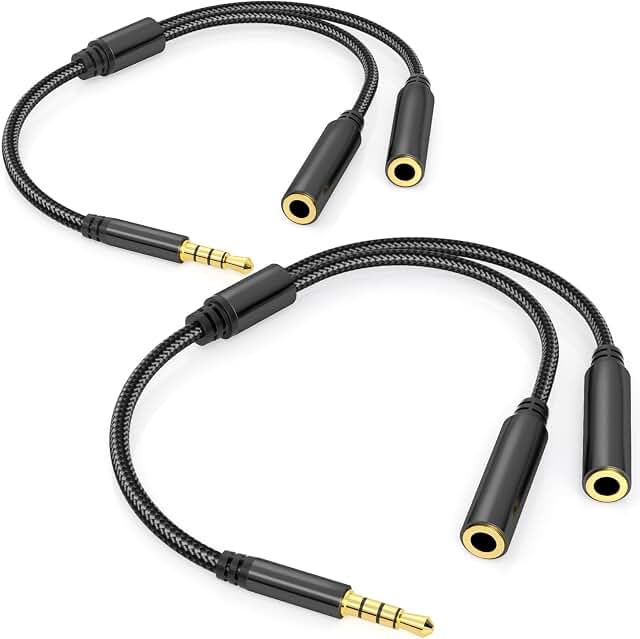
Best for: Sharing a device’s audio with two TRRS headsets when both listeners need sound and microphone support. Unlike a conventional headset-to-PC adapter, this cable is designed to connect two headsets to one device jack.
The listing describes one 3.5 mm connection splitting to two female headset connections and says both headsets can support audio and microphone use. It lists phones, tablets, laptops, computers, and game consoles among compatible device categories. The plug is gold-plated, and the cable is described as one foot long and sold in a two-pack.
Why it was selected: It covers a different but related buyer need: sharing a combo-jack connection between two headsets. Including it helps distinguish a dual-headset sharing cable from adapters that separate mic and headphone ports.
Check before buying: The listing says TRS headphones or speakers work for sound only. Microphone use requires a TRRS headset with a built-in mic. Choose another adapter if your goal is to connect one headset with a single plug to a computer’s separate audio and mic ports.
Buying Guide: How To Choose A Mic And Audio Combo Jack Adapter
Which ports are on your device and headset?
Start by counting the plugs and ports on both devices. A headset with one 3.5 mm plug usually combines microphone and headphone signals in a TRRS connection. A computer with separate headphone and microphone ports needs a female headset socket connected to two male plugs. UGREEN and D & K Exclusives are examples of this arrangement.
A headset with two plugs usually has a separate headphone plug and microphone plug. To connect that headset to a device with one combo jack, choose an adapter with one male TRRS plug for the device and two female sockets for the headset. StarTech.com and MillSO list this configuration.
Do you need to split ports or share a headset connection?
“Splitter” can refer to different cable types. A headset-to-PC adapter separates a combined headset connection into distinct microphone and headphone plugs. A combo-jack adapter can do the reverse, allowing a two-plug headset to connect to one combined port. A dual-headset splitter shares one device connection with two headsets.
These designs are not interchangeable. Read the connector description and compare it with the ports you have before ordering. A cable with two male plugs will not serve the same purpose as one with two female sockets, even if both are described as audio splitters.
What do TRS and TRRS mean?
TRS and TRRS describe the contact sections on a 3.5 mm plug. A TRRS headset plug carries audio and microphone signals through one plug. TRS plugs are commonly used for separate audio or microphone connections. The product listings identify the intended plug types, so check those details rather than relying only on the phrase “3.5 mm adapter.”
Wiring standards can matter for microphone operation. UGREEN specifically calls for a CTIA-compliant TRRS cable and warns that OMTP or other standards may cause mic failure. If a headset’s microphone does not work, verify its wiring standard and confirm that the adapter’s configuration matches it.
Are the connectors color-coded?
Color-coded sockets can help when connecting a two-plug headset. MillSO identifies its green socket for headphones and pink socket for a microphone. If an adapter is not color-coded, use its product instructions or connector labels to match the headset plugs to the right sockets. Do not assume that two similar-looking sockets perform the same function.
What if the microphone is not working?
First, check that the headset microphone plug is connected to the microphone socket and that the adapter matches the device’s port layout. Then verify the plug type and wiring standard. A TRS audio-only headset will not provide microphone input through an adapter that requires a TRRS headset with a built-in mic. For adapters with stated CTIA requirements, check that the headset follows that standard.
Should you choose a compact cable or a more reinforced design?
For occasional travel, a compact adapter that fits in a laptop bag may be enough. D & K Exclusives and StarTech.com both describe portable designs. If cable construction is an important comparison point, UGREEN lists an aluminum alloy casing, gold-plated plugs, oxygen-free copper wire, and a braided jacket. These are listed construction features; they do not replace checking that the connector configuration is correct.
Also consider the cable’s intended use. If you need voice chat, online classes, or meetings, make sure the adapter supports the microphone path, not just headphone audio. If you only need to share sound between two listeners, a dual-headset model is a different category from a mic-and-headphone port adapter.
Frequently Asked Questions
What adapter do I need for one headset plug and two PC ports?
Choose a female-to-two-male headset adapter. It accepts the headset’s single 3.5 mm plug and connects to the computer’s separate headphone and microphone ports. Confirm any stated TRRS wiring requirements before buying.
What adapter connects a two-plug headset to one combo jack?
Choose an adapter with one 3.5 mm male TRRS plug and two 3.5 mm female sockets. The male plug goes into the device’s combo port, while the headset’s headphone and microphone plugs connect to the separate sockets.
Can any 3.5 mm splitter carry microphone audio?
No. Some splitters carry sound only, while others support microphone and headphone signals. Check the product’s connector types and stated function. The IIISOGNO listing, for example, requires a TRRS headset with a built-in microphone for mic use.
Will a headset adapter work with every gaming headset?
Not necessarily. Headsets can use different plug arrangements and wiring standards. Compare the headset’s plugs with the adapter’s TRS or TRRS configuration, and review any product-specific compatibility notes before choosing.
Is a headset adapter the same as a two-headphone splitter?
No. A headset adapter may separate microphone and headphone signals or combine two headset plugs for a combo port. A two-headphone splitter is intended to connect two listening devices. Check the connection direction and microphone support to identify the right type.