
The Logitech ClearChat Style is the clearest match for shoppers who specifically want a behind-the-head USB headset, while the other picks below are USB or USB-compatible alternatives with different wearing styles. Choose the Logitech for its stated behind-the-head design, the NUBWO for a lightweight on-ear option, or the MANHATTAN and Cyber Acoustics models for simple mono USB calling. Check each product’s listed connection and fit before buying.
| Headset | Best for | Design or connection noted |
|---|---|---|
| Logitech ClearChat Style | Behind-the-head fit | Behind-the-head design |
| NUBWO HW02 | Lightweight calls and general computer use | USB and 3.5mm; on-ear |
| MANHATTAN 179867 | Basic single-ear USB calling | USB-A; mono |
| Wantek USB Computer Headset | Flexible wired connections | USB and 3.5mm |
| Cyber Acoustics AC-840 | Mono USB voice calls | USB; mono |
Logitech ClearChat Style Behind-The-Head Headset

Best for: Buyers whose priority is a behind-the-head wearing style rather than a conventional over-head band. The listed features specifically identify this Logitech model as a behind-the-head PC headset and describe it as comfortable.
The fit style is its main reason for selection: it is the only product in this list whose supplied product details explicitly call out a behind-the-head design. Its black finish with a blue color plate is also specified. Shoppers who want a headset that does not use a standard band over the crown can consider it first.
Limitation: The available product details do not specify its connector type, microphone controls, weight, or compatibility range. Confirm the connection and device requirements before choosing it for a USB-only setup.
NUBWO HW02 Lightweight Wired Headset
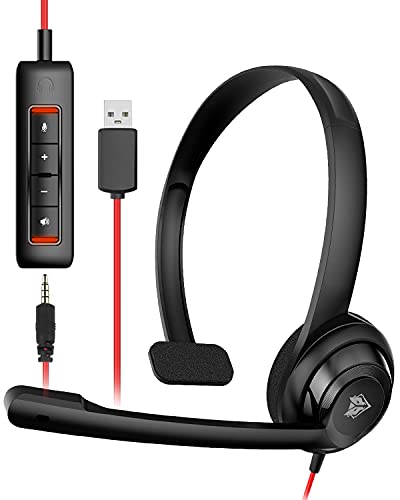
Best for: People who want a lightweight on-ear headset for calls, online learning, or multimedia use and do not require a behind-the-head frame. The listed weight is 60 grams, and the product includes an adjustable boom microphone.
The HW02 is described as having both USB and 3.5mm connection options, plus an inline USB control with volume and mute functions. Its control box includes a digital signal sound card, which the product details associate with clear, natural audio. The adjustable microphone is listed for calls on platforms such as Teams, Skype, and Zoom.
Why it was selected: It offers multiple connection options and a low listed weight, making it a practical comparison for buyers considering alternatives to a behind-the-head design.
Limitation: This is an on-ear headset, not a behind-the-head model. Check which connection option suits your computer and intended setup.
MANHATTAN 179867 Mono USB Headset
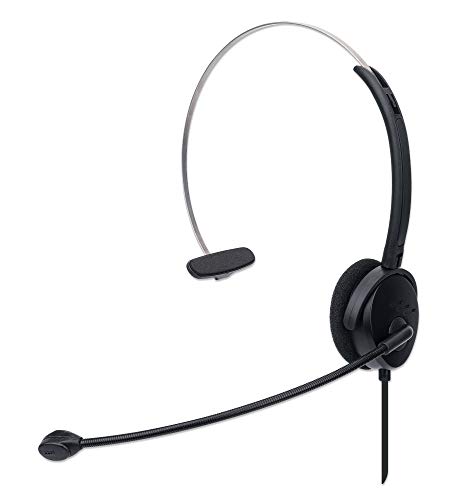
Best for: Callers who prefer a single-sided headset that leaves one ear uncovered. The MANHATTAN model has a USB-A connection, an adjustable headband, and a soft on-ear cushion, according to its listed features.
Its flexible boom microphone can be moved toward the mouth, while the inline control provides volume adjustment. The single-speaker format may suit people who want to hear nearby surroundings while listening to a call. The product also lists a five-foot cable, a useful detail for planning desk placement.
Why it was selected: It is a straightforward USB mono alternative for computer calls, with a flexible mic and adjustable fit details provided.
Limitation: It is not described as a behind-the-head headset, and its mono, single-speaker design is less suited to buyers seeking stereo sound through both ears.
Wantek USB And 3.5mm Computer Headset

Best for: Buyers who want a conventional headset with both USB and 3.5mm connection options. Wantek lists compatibility with a range of device categories, including computers, laptops, smartphones, tablets, and gaming consoles; verify the intended device connection before purchase.
The product features a padded adjustable headband, memory-foam cushions, and rotatable ear cups. Its boom microphone rotates up to 330 degrees and can be moved out of the way when not in use. Wantek also describes the mic as unidirectional and noise-cancelling, with sound processing intended to reduce unwanted noise during calls.
Why it was selected: It provides multiple wired connection choices and detailed adjustment features for shoppers comparing USB headsets with more conventional designs.
Limitation: The listed features do not identify a behind-the-head frame. Its larger padded headband may not suit shoppers specifically avoiding a conventional over-head style.
Cyber Acoustics AC-840 Mono USB Headset
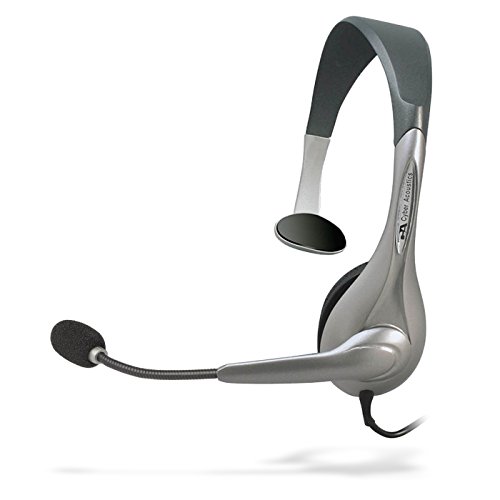
Best for: People who want a mono USB headset focused on voice calls and convenient inline controls. Its listed features include a unidirectional noise-cancelling microphone, inline volume and mute controls, and a USB plug-and-play connection.
The product is described as suitable for standard USB ports and intended for Windows PCs, Macs, and Chromebooks. A mono design can be a useful choice for callers who prefer one-ear listening. The noise-cancelling microphone is presented as a way to support speech capture in less-than-ideal environments.
Why it was selected: It combines a specified USB connection with dedicated microphone mute and volume controls, making it an easy-to-compare option for voice-focused computer use.
Limitation: The product is mono rather than stereo and is not identified as a behind-the-head design. The listed information does not give a cable length or detailed fit measurements.
Buying Guide: How To Choose A USB Behind-The-Head Headset
Is the headset truly behind the head?
Start with the fit, because “USB headset” and “behind-the-head headset” describe different features. USB refers to a connection; behind-the-head describes how the headset is worn. In this selection, the Logitech ClearChat Style is the only product whose supplied details explicitly state that it has a behind-the-head design. The other models are alternatives, not confirmed behind-the-head options.
If avoiding a band over the crown is essential, do not assume that a lightweight or compact headset has a behind-the-head frame. Look for that exact fit description in the product details, and check product images and specifications before ordering.
Which connection should you choose?
For a USB-only setup, the MANHATTAN and Cyber Acoustics products specify USB connections. The NUBWO and Wantek list both USB and 3.5mm options. The Logitech information supplied here does not state its connector type, so verify that detail if USB is mandatory.
USB-A is specified for the MANHATTAN model. If your computer has a different port, confirm whether you need an adapter rather than assuming one is included. A 3.5mm connector may suit devices with a compatible audio jack, but connector arrangement and supported functions can vary by device.
Do you need mono or stereo audio?
Mono headsets use one speaker, which can leave the other ear available for nearby sounds. The MANHATTAN and Cyber Acoustics products are explicitly described as mono or single-sided. For listening through two earcups, compare models whose product information confirms stereo audio; do not infer stereo performance from a product title alone.
How important are microphone controls?
For frequent calls, check whether the headset has a movable boom and accessible mute or volume controls. NUBWO lists an adjustable boom and inline volume and mute control. MANHATTAN specifies a flexible microphone and inline volume control. Cyber Acoustics lists inline volume and microphone mute, while Wantek describes a rotating boom microphone.
Noise-cancelling microphone descriptions may be useful when you take calls around background noise, but they do not mean that the headset blocks sound from reaching your ears. Consider the microphone’s stated direction and positioning instructions, and place it as described by the manufacturer.
What fit details matter for long calls?
Compare the wearing style, ear cushions, adjustability, and any stated weight. NUBWO lists a 60-gram weight. MANHATTAN notes an adjustable headband and soft on-ear cushion, while Wantek lists a padded headband and memory-foam cushions. The Logitech details simply describe the product as comfortable without providing measurements.
Fit is personal, so buyers who wear a headset for long sessions should pay attention to return terms and product sizing before purchase. If a headset feels uncomfortable, do not assume that extended wear will resolve the issue.
Which option is better for calls versus general listening?
For voice-focused calls, mono USB models such as MANHATTAN and Cyber Acoustics provide a simple format with listed microphone controls. NUBWO includes features for calls as well as multimedia listening. Wantek lists stereo audio features and multiple connection types. Choose according to your call routine, listening preference, and device ports rather than relying on broad claims such as “all-purpose.”
Frequently Asked Questions
Which product here is specifically behind-the-head?
The Logitech ClearChat Style is the only product in this list whose supplied features explicitly identify a behind-the-head design. Its connector type is not provided in the listed details, so verify it if you need USB.
Are all five headsets USB models?
Not all have equally clear connection details. MANHATTAN and Cyber Acoustics specify USB, while NUBWO and Wantek list USB along with 3.5mm. The Logitech listing details provided here do not state its connector type.
Which options have a mono design?
MANHATTAN is listed as single-speaker and mono, and Cyber Acoustics is listed as mono. The other product details do not identify those models as mono.
Which headset lists both USB and 3.5mm connections?
NUBWO HW02 and Wantek list USB and 3.5mm connection options. Confirm the appropriate connection for your particular device before buying.
What is a good choice for inline mute controls?
NUBWO lists an inline USB control with volume and mute functions, and Cyber Acoustics lists inline volume and microphone mute controls. Wantek describes rotating its boom mic upward to mute or move it out of the way.