
The right professional radio broadcast equipment depends on whether you need a microphone, a multi-person podcast setup, or an FM transmitter. The FIFINE K688CT is best for a host who wants a USB/XLR dynamic microphone; the Movo video bundle suits a two-person show needing cameras and microphones; and the listed 7W/1W transmitter is the option specifically intended for FM transmission. These products serve different roles, so compare the equipment type and included components before choosing.
| Product | Best suited for | Listed equipment |
|---|---|---|
| FIFINE AmpliTank K688CT | Single-host voice recording | USB/XLR dynamic microphone kit |
| Movo Video Podcast Bundle | Two-person video podcasts | USB audio interface, two microphones, two cameras, two boom arms |
| 7W/1W FM Transmitter | FM audio transmission | Selectable power modes and 3.5 mm audio cable |
| Movo 2-Person USB Bundle | Two-person USB podcasting | Two condenser microphones and USB hub |
| TENLAMP G10 Creator Bundle | Creator or streaming setup | Audio mixer bundle with microphone |
FIFINE AmpliTank K688CT Microphone Kit

The FIFINE AmpliTank K688CT is a USB/XLR dynamic vocal microphone kit, making it the most directly focused option here for a single host recording spoken audio. The listing identifies it for podcasting and describes it as a voice-over and streaming microphone. Its USB/XLR connection options give buyers two connection types to consider when planning a setup.
- Best for: A solo host who wants a dynamic microphone for podcasting, streaming, or voice-over work.
- Why it stands out: It is a microphone kit rather than a large multi-camera bundle, so it is a targeted choice when the main need is capturing one speaker.
- Limitation: The supplied product details do not specify what accessories are included or describe the microphone’s controls. Check the listing for those specifics before purchase.
Choose this if you need a microphone and want to compare USB and XLR workflows. Avoid assuming that it includes a mixer, boom arm, or other studio components based on the product name alone.
Movo Video Podcast Equipment Bundle

This Movo bundle is aimed at a two-person video podcast rather than an audio-only radio booth. Its listed components include a USB audio interface, two XLR dynamic microphones, two 4K cameras, and two boom arms. That combination makes it the broadest production package in this selection for buyers who need both voices and video in one bundle.
- Best for: Two hosts who want to produce a video podcast and need listed audio and camera equipment.
- Why it was selected: It includes two microphones and two cameras, so its contents align with a two-person recording format.
- Limitation: The supplied details do not identify software, cables, lighting, or computer requirements. Confirm the full contents and connection needs before planning a complete studio.
Choose this over a single-microphone kit if the production includes two speakers and video. It is not the right match if you only need an FM transmitter or a simple microphone for one presenter.
7W/1W Long-Range FM Transmitter
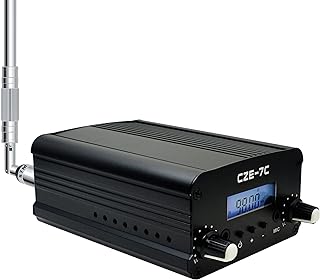
This is the only item in the selection explicitly designed to transmit an FM signal. The listing specifies two power modes, 1W and 7W, a 3.5 mm audio cable, and an LCD. It also describes a BH1415 FM stereo transmitter chip, a PLL modulation system, audio pre-emphasis, a limiter, and a low-pass filter circuit.
- Best for: Buyers seeking FM transmission equipment for an event or other use described in the listing.
- Why it was selected: Unlike the podcast bundles, it directly addresses over-the-air FM transmission rather than microphone capture or video production.
- Limitation: The product details do not establish that its power or use is authorized in every location or situation. Check applicable FCC rules and local requirements before transmitting.
The listing states that the transmitter is FCC certified and gives FCC ID 2ASVO05B7CT200. Treat this as a specific product listing claim, not a substitute for checking current regulatory requirements. Choose this if FM transmission is the central need; do not choose it as a replacement for a microphone or audio interface.
Movo 2-Person USB Podcast Bundle

The Movo 2-Person USB Podcast Bundle is a straightforward option for two speakers recording through a USB-oriented setup. The listed components are two condenser microphones and a USB hub. The product name emphasizes a two-person podcast use, making it a more focused alternative to the larger Movo video bundle.
- Best for: Two people who need a podcast microphone bundle and expect to use a USB hub in their setup.
- Why it was selected: It provides two microphones in a bundle, a useful starting point when both host and guest need separate microphones.
- Limitation: The supplied details do not specify whether the bundle includes an audio interface, stands, cables, or recording software. Verify the itemized contents before buying.
Choose this if two microphones are more important than cameras or XLR dynamic microphones. For a video production package, the other Movo bundle lists two cameras and boom arms; for single-host recording, a one-microphone option may be more appropriate.
TENLAMP G10 Creator Audio Mixer Bundle

The TENLAMP G10 is described as a creator audio mixer bundle with a microphone for streaming. Its listed name makes it relevant to a host who wants a combined mixer-and-microphone product rather than a standalone microphone. The available product information does not provide technical details about inputs, outputs, controls, or included accessories.
- Best for: A creator or streamer looking for a bundle identified as an audio mixer with a microphone.
- Why it was selected: It covers the mixer-and-microphone category, which differs from the standalone-microphone and FM-transmitter products in this roundup.
- Limitation: The supplied product details do not confirm its number of channels, connection types, or compatibility with particular devices. Check those specifications against your setup.
Choose this if you want to evaluate a creator-focused mixer bundle. For a conventional radio studio, first confirm that its connections and controls match your microphones, monitoring equipment, and recording or broadcast workflow.
Buying Guide: How To Choose Radio Broadcast Equipment
“Professional radio broadcast equipment” can refer to several different jobs: capturing a host’s voice, mixing several audio sources, recording a podcast, producing video, or transmitting audio over FM. These products are not interchangeable. Start by defining the task you need to accomplish, then select equipment that explicitly performs it.
Do you need a microphone, mixer, or transmitter?
A microphone captures a speaker’s voice. A mixer or audio interface manages audio connections and routing, depending on its design. An FM transmitter sends audio over a radio signal. A podcast bundle may combine some recording components, while a video bundle may add cameras. Identify the missing part of your system before purchasing a bundle.
- For one presenter: Consider a single microphone such as the FIFINE USB/XLR dynamic mic kit.
- For two-person audio: Compare the Movo bundle with two condenser microphones against other two-microphone options.
- For video podcasts: The Movo video bundle lists two cameras, two microphones, an interface, and two boom arms.
- For FM transmission: Consider only equipment designed to transmit FM, and check relevant operating requirements.
How many people will speak at once?
Count the simultaneous speakers, not just the number of people who may appear on a show. A two-host program generally needs a microphone for each active speaker and a way to connect those microphones to the recording or broadcast system. The Movo bundles list two microphones, while the FIFINE kit is described as a single microphone.
Before buying, confirm that the included equipment supports the number of separate microphone connections you need. The product names alone do not establish the number of available interface inputs or the ability to record separate tracks.
Should you choose USB, XLR, or both?
Connection type affects how equipment fits into a studio. The FIFINE product is identified as USB/XLR, while the Movo video bundle lists an audio interface and XLR dynamic microphones. The Movo two-person bundle is presented as USB-oriented and includes a USB hub. Match the connection method to the computer, interface, or mixer you plan to use.
Do not assume that every USB hub functions as an audio interface, or that every XLR microphone can connect directly to a computer. Read the included-component list and verify the connection path before ordering.
What matters for a video podcast?
For video, check whether the package includes cameras as well as audio gear. The Movo video bundle lists two 4K cameras, but the provided details do not explain camera connections, recording software, lighting, or mounting arrangements beyond two boom arms. Plan for any additional production requirements separately.
If you only intend to make audio, cameras may not be useful to your workflow. A simpler microphone package can be a better match when visual recording is not part of the project.
What should you check before FM transmission?
FM transmission equipment is different from studio recording equipment. The listed transmitter has 1W and 7W modes, an LCD, a 3.5 mm audio cable, and circuitry described for FM stereo transmission. Confirm that the product’s input matches your audio source and review the applicable regulatory requirements for your location and intended use.
A listing’s certification statement should not be treated as blanket authorization for every frequency, power setting, location, or application. Verify current rules before operating a transmitter. A microphone or podcast mixer alone does not transmit an FM signal.
How can you avoid buying an incomplete bundle?
Product titles can highlight the main components without listing every cable, stand, software package, or accessory. Check the complete itemized contents and determine what you already own. The supplied information for several products does not state whether cables, stands, headphones, or recording software are included.
- Write down the devices you need to connect, including microphones, computers, cameras, and audio sources.
- Check the number and type of connections required for each device.
- Confirm that the product includes the components needed for your intended setup.
- Identify missing accessories before planning a complete studio around a bundle.
Frequently Asked Questions
What equipment do I need to start a radio-style podcast?
At minimum, you need a microphone and a compatible way to capture its audio. A two-person show needs equipment for both speakers. Add a mixer or audio interface when your workflow requires one, and confirm that the selected products connect correctly.
Is a podcast microphone the same as an FM transmitter?
No. A microphone captures sound; an FM transmitter sends audio over an FM signal. They perform different tasks and are not substitutes for each other.
Which product in this selection is intended for FM transmission?
The 7W/1W Long-Range FM Transmitter is the product explicitly identified as an FM transmitter. Its listing specifies two power modes and a 3.5 mm audio cable. Check applicable operating rules before use.
Which listed option is suited to a two-person video podcast?
The Movo Video Podcast Equipment Bundle lists two XLR dynamic microphones, two 4K cameras, two boom arms, and a USB audio interface. Confirm its complete contents and connection needs before purchasing.
Can I assume a bundle includes everything needed for broadcasting?
No. Product names and short feature descriptions may not identify every cable, software item, stand, or accessory. Review the full listing and compare it with the equipment already available in your studio.