
For a coaxial digital audio output connected to an optical input, choose a converter that explicitly supports coaxial-to-Toslink conversion. The PROZOR 192K Bi-Directional Optical Converter and the Bi-Directional Coax Digital Audio Adapter are the two listed products designed for that direction. The other three products convert digital audio to analog RCA or 3.5 mm audio; they are not substitutes for a coax-to-optical converter.
| Product | Best For | Signal Direction |
|---|---|---|
| PROZOR 192K Bi-Directional Optical Converter | Flexible use in either direction | Coaxial to optical and optical to coaxial |
| Bi-Directional Coax Digital Audio Adapter | Basic format conversion | Coaxial to optical and optical to coaxial |
| PROZOR 192K DAC | Connecting digital audio to analog equipment | Optical to RCA or 3.5 mm |
| Hdiwousp 192 kHz DAC | Digital coaxial or optical to stereo analog | Coaxial or optical to RCA or 3.5 mm |
| 192KHz DAC with Coaxial Cable | Optical digital audio to analog stereo | Optical to RCA or 3.5 mm |
PROZOR 192K Bi-Directional Optical Converter

Best for: Buyers who need to convert coaxial digital audio to optical Toslink and may also want optical-to-coaxial conversion. The product name specifies both signal directions, making it a direct match for a coaxial output feeding an optical input.
It is listed as supporting 192 kHz and DTS/Dolby-AC3, and the product name describes it as a bi-directional digital splitter. An optical cable is included, which may be useful when connecting the converter to an optical input. Select this model when the ability to reverse the conversion direction is useful, rather than buying a one-direction-only adapter.
Limitation: Bi-directional capability does not mean the converter changes digital audio into analog. Check that the source outputs a compatible digital audio signal and that the receiving device accepts optical input.
Bi-Directional Coax Digital Audio Adapter

Best for: Buyers looking for a straightforward coax-to-optical converter that also supports the reverse direction. Its listed name explicitly identifies coax-to-optical and optical-to-coaxial conversion, so it addresses the required connection type.
Choose this adapter if you need to change the connector format between a coaxial digital output and an optical digital input, or if you want a converter that can be used in either direction. The listing information provided does not specify a maximum sample rate, included cable, or supported audio formats, so compare those requirements with your equipment before choosing it over the PROZOR model.
Limitation: The supplied product details do not identify a sample-rate limit or audio-format support. Avoid assuming it supports a particular high-resolution rate or surround format without checking the current product information.
PROZOR 192KHz Digital-to-Analog DAC

Best for: Connecting optical digital audio to analog RCA stereo or a 3.5 mm audio connection. The listing describes a 192 kHz DAC, optical Toslink input, RCA left/right outputs, and a 3.5 mm jack adapter. It also names devices such as PS3, PS4, HD DVD, Apple TV, and home cinema equipment as examples of use.
This is included for comparison because it may look like a general-purpose optical audio adapter. However, its stated purpose is digital-to-analog conversion. It does not provide the coaxial-to-optical conversion required when a source has coaxial digital output and the destination has optical digital input.
Limitation: Do not choose this product for coaxial-to-optical conversion. It is for sending digital optical audio to analog audio outputs.
Hdiwousp 192 kHz Digital-to-Analog DAC
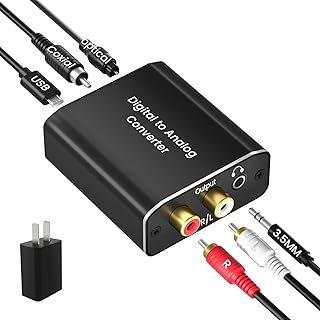
Best for: Buyers whose actual goal is to get analog stereo audio from a coaxial or optical digital source. The product name specifies digital coaxial and optical inputs, analog 3.5 mm and RCA left/right outputs, a 192 kHz DAC, an aluminum enclosure, and an optical cable.
This is a more flexible option for a different audio task: it accepts either of the named digital input types and produces analog output. It may be relevant when connecting a digital source to analog speakers or an amplifier input, but it does not convert coaxial digital audio into optical digital audio.
Limitation: Its outputs are analog, not Toslink. Avoid it if your receiving device has an optical input and needs a digital optical signal.
192KHz Optical-to-Analog DAC

Best for: Buyers who need to convert optical digital audio to analog RCA or 3.5 mm audio. The listing name identifies a 192 kHz DAC, an optical-to-RCA adapter, a 3.5 mm adapter, and a coaxial cable.
This product is relevant as a comparison because “coaxial cable” in a product description can be mistaken for coaxial digital input. The listed function, however, is optical digital to analog output. The name does not describe coaxial digital input converted to optical digital output.
Limitation: Its listed conversion direction and output types do not match coax-out-to-optical-in. Choose a true digital format converter instead.
Buying Guide: How to Choose a Coax-to-Optical Converter
Does the converter support the direction you need?
Start by identifying the source and destination. A coaxial digital output sends a signal through a coaxial connection. An optical input receives a signal through a Toslink connection. For this setup, the converter must accept coaxial digital input and provide optical digital output. A product that converts optical audio to analog RCA will not perform that task, even if its title mentions optical audio or a coaxial cable.
Do you need a one-way or bi-directional device?
A one-way converter is sufficient when the connection will always run from coaxial output to optical input. A bi-directional model supports both coax-to-optical and optical-to-coax conversion, which can be useful if you expect to change the setup. The two listed products described as bi-directional are the direct matches. Confirm the selected direction in the device documentation before connecting the equipment.
Which audio formats and sample rates should you check?
Compare the source’s audio output settings with the converter’s supported formats and sample rates. The PROZOR converter’s supplied product name specifies 192 kHz and DTS/Dolby-AC3 support. The other bi-directional adapter’s supplied details do not state a maximum rate or format support. Do not assume an unlisted model supports a particular rate or surround format.
For troubleshooting, check whether the source is set to output a compatible digital signal. Some equipment offers multiple audio output modes. If the converter does not pass the selected format, changing the source’s digital audio setting may be necessary; check the manuals for both devices.
Are you converting digital audio or creating analog output?
Digital-to-digital conversion changes the connection format while keeping the signal digital. Coax-to-optical conversion is in this category. A DAC, or digital-to-analog converter, changes a digital input into analog output such as RCA left/right or 3.5 mm. Choose a DAC only when the destination expects analog audio. It is not an alternative to a coax-to-optical converter.
What should you verify before ordering?
- Source port: Confirm that the source has a coaxial digital audio output, not a different type of coaxial connection.
- Destination port: Confirm that the receiving device has an optical Toslink digital input.
- Signal direction: Look for explicit coaxial-to-optical support. Bi-directional wording should name both directions.
- Audio format: Compare the source’s output format with the converter’s stated support.
- Cables: Check which cable types are included. The PROZOR bi-directional product name specifies an optical cable; the other listings should be checked for their included accessories.
- Power and setup: Review the current product instructions for power requirements and connection order, since the supplied product details do not fully describe setup.
How do you diagnose a silent connection?
First verify that the source is using its coaxial digital output and that the receiving device is set to its optical input. Check that the converter is connected in the correct direction and that all plugs are seated. Then review the source’s digital audio output format and compare it with the converter’s stated support. If the device is a DAC with analog outputs, it cannot pass digital optical audio to another device.
Frequently Asked Questions
Can a coaxial digital output connect directly to an optical input?
No. Coaxial digital and optical Toslink use different connection formats. A coax-to-optical converter is needed between a coaxial digital output and an optical digital input.
Is a coax-to-optical converter the same as a DAC?
No. A coax-to-optical converter changes a digital connection format. A DAC converts digital audio into analog output, such as RCA stereo or 3.5 mm audio.
Which listed product directly supports coaxial output to optical input?
The PROZOR 192K Bi-Directional Optical Converter and the Bi-Directional Coax Digital Audio Adapter are both described as supporting coax-to-optical conversion.
Does bi-directional mean both directions work at once?
Not necessarily. The term indicates support for conversion in either direction, but the supplied product details do not establish simultaneous conversion. Follow the device instructions for the intended connection.
Can a digital-to-analog converter connect coaxial output to optical input?
No. The listed DAC products provide analog outputs, such as RCA or 3.5 mm. They do not provide the digital optical output needed for an optical input.
What should I check if there is no sound?
Confirm the source output, destination input, converter direction, cable connections, and supported audio format. Also verify that the converter is a coax-to-optical digital converter rather than an optical-to-analog DAC.