
The best WiFi adapter for a receiver depends on its ports: a receiver with Ethernet usually needs a WiFi-to-Ethernet bridge, while a desktop PC with USB can use a USB WiFi adapter. The BrosTrend AX1500 is best for a wired device when you want a WiFi 6 bridge and Gigabit Ethernet port; the AC1200 bridge is another option for Ethernet devices. For PCs, the TP-Link Archer TX30U Plus offers WiFi 6 and two antennas, while the Tenda U11 and UGREEN AX900 are simpler dual-band USB choices.
| Product | Best For | Connection Type |
|---|---|---|
| BrosTrend AX1500 WiFi 6 Bridge | Wired receivers and other Ethernet devices | WiFi to Ethernet |
| BrosTrend AC1200 Bridge | Wired devices needing a WiFi connection | WiFi to Ethernet |
| TP-Link Archer TX30U Plus | Windows 11 or 10 PCs needing WiFi 6 | USB |
| Tenda U11 AX900 | PCs needing a dual-band WiFi 6 adapter | USB |
| UGREEN AX900 | Windows 10 or 11 PCs needing built-in drivers | USB |
BrosTrend AX1500 WiFi 6 Ethernet Bridge

Best for: A receiver, television, game console, or other device that connects to a network through an Ethernet port. This product acts as a wireless bridge: it connects to a WiFi router and provides a wired network connection through its Gigabit Ethernet port.
The AX1500 is the strongest match in this group for a wired receiver because its product details specifically describe connecting wired devices to WiFi 6. It supports dual-band WiFi and lists speeds up to 1 Gbps for the connected device. The Gigabit LAN port is intended to make use of higher available bandwidth than a Fast Ethernet port.
Choose this if your receiver has Ethernet but does not have built-in WiFi, and you want a bridge rather than a USB network adapter. The listed compatible device types include computers, printers, TVs, Blu-ray players, game consoles, and DVRs.
Limitation: This is not a USB adapter for adding WiFi directly to a computer. The receiver needs an Ethernet connection for the bridge to serve it, and actual speeds depend on the WiFi connection and network conditions.
BrosTrend AC1200 WiFi To Ethernet Adapter
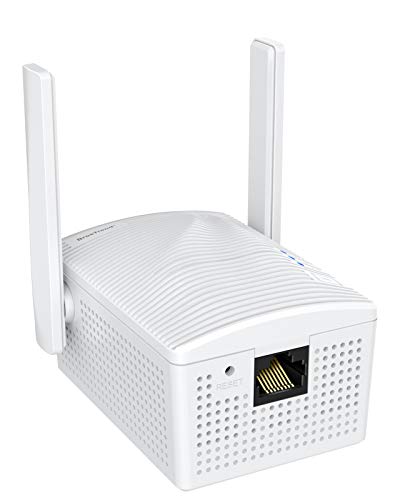
Best for: Ethernet-enabled receivers and home electronics that need to join a WiFi network. Like the AX1500, this model is a WiFi-to-Ethernet bridge, not a USB dongle. The listed setup uses an electrical outlet and does not require driver installation or updates.
The adapter supports dual-band 802.11ac WiFi, with listed maximum rates of 867 Mbps on 5 GHz and 300 Mbps on 2.4 GHz. Its product information names smart TVs, game consoles, Blu-ray players, network printers, Raspberry Pi devices, Ethernet switches, and computers among the supported device categories.
Better for a buyer looking for a straightforward bridge for an older wired device who does not specifically need the WiFi 6 features described for the AX1500. It can also suit a receiver placed where running Ethernet cable back to the router is inconvenient.
Limitation: It uses the 802.11ac standard rather than WiFi 6, and the listed WiFi speed is not a guarantee of the speed a receiver will achieve. Confirm that the receiver has an Ethernet port before choosing this type of adapter.
TP-Link Archer TX30U Plus WiFi 6 Adapter

Best for: A Windows 11 or Windows 10 desktop or laptop that needs a USB WiFi upgrade. This is a PC adapter, not a bridge for a receiver with only an Ethernet port. Its dual-band WiFi 6 connection lists up to 1201 Mbps on 5 GHz and 574 Mbps on 2.4 GHz.
The Archer TX30U Plus has two high-gain dual-band antennas and beamforming technology, according to the product details. Those features are intended to improve signal reception and connection coverage. The 5 GHz band is presented for activities such as streaming and gaming, while 2.4 GHz is described for longer-range browsing and everyday use.
Choose this if the device you want to connect is a compatible Windows PC with a USB port and you prefer an adapter with external antennas. It is the most suitable listed USB choice for buyers prioritizing WiFi 6 and antenna-based reception.
Limitation: The listed operating systems are Windows 11 and Windows 10 only. Performance can vary with distance, obstacles, and other conditions, so an adapter cannot guarantee a particular speed throughout a home.
Tenda U11 AX900 USB WiFi Adapter

Best for: A Windows PC that needs dual-band WiFi 6 through USB, including a desktop whose existing wireless connection is unavailable or outdated. Tenda lists support for Windows 11, Windows 10, and Windows 7.
The U11 is rated up to AX900, with listed maximum rates of 600 Mbps on 5 GHz and 286 Mbps on 2.4 GHz. The product information says a WiFi 6 router is required to reach the combined AX900 speed rating. It also describes a receive-and-transmit function that can let a connected computer share its internet connection with other devices.
Better for buyers who want a compact dual-band USB WiFi 6 option and need the product’s stated Windows 7 support. It is an alternative to a wireless bridge when the target device is a PC with USB, rather than an Ethernet-only receiver.
Limitation: The combined AX900 rating depends on using a WiFi 6 router, and the listed compatibility is for Windows systems. It is not described as a WiFi-to-Ethernet bridge for a receiver.
UGREEN AX900 USB WiFi 6 Adapter

Best for: A Windows 10 or Windows 11 PC owner who wants a dual-band USB adapter with a built-in driver. UGREEN states that the adapter supports Windows 10 and 11 on x86/x64 CPU architectures and offers CD-free installation.
The adapter lists WiFi 6 speeds of up to 600 Mbps on 5 GHz and 286 Mbps on 2.4 GHz. As with the Tenda AX900, UGREEN says a WiFi 6 router is needed to reach the combined AX900 rate. The two frequency bands give users an option to prioritize a faster 5 GHz connection or use 2.4 GHz for a different range and network environment.
Choose this if the target is a Windows 10 or 11 computer and avoiding a separate driver download or installation disc is important. It is a direct PC networking adapter, not a wireless bridge for a receiver that accepts only Ethernet.
Limitation: The listed product support excludes macOS, Linux, Windows 8, Windows 8.1, Windows 7, and XP. Check the computer’s operating system and processor architecture before buying.
Buying Guide: How To Choose A WiFi Adapter For A Receiver
Does the receiver have Ethernet or USB?
Start by checking the receiver’s available network ports. A receiver with an Ethernet port can often use a WiFi-to-Ethernet bridge, such as either BrosTrend product listed above. The bridge joins the wireless network and passes the connection to the receiver over Ethernet.
A USB WiFi adapter is intended for a computer with a supported USB connection and operating system. Do not assume that a USB WiFi dongle will work with a stereo receiver, TV receiver, or other appliance just because it fits the port. The receiver’s documentation must support that type of adapter and its drivers.
When should you choose a WiFi-to-Ethernet bridge?
Choose a bridge when the receiver has Ethernet but lacks built-in WiFi. This setup can also be useful for other wired equipment named in the product details, such as a printer, game console, or smart TV. The BrosTrend AX1500 is the WiFi 6 option with a Gigabit Ethernet port; the AC1200 is a WiFi 5 bridge with an outlet-powered setup and no driver installation described.
Before choosing, confirm that the receiver can obtain a network connection through Ethernet. A bridge does not add WiFi capability through an unsupported USB port, and it does not replace the receiver’s audio or video connections.
Which WiFi band should you use?
These adapters offer 2.4 GHz and 5 GHz connectivity. A 5 GHz connection may be preferable when the device is near the router and needs higher listed throughput. A 2.4 GHz connection may be worth trying when range or obstacles are a concern, though interference and the layout of the home affect results. The best band depends on the router, distance, and surrounding networks.
Do advertised maximum speeds match real-world speeds?
No listed maximum should be treated as a guaranteed internet speed. The ratings describe product capabilities under particular conditions. Router capability, broadband service, distance, walls, interference, and the connected device can all limit performance. For the AX900 USB adapters, the product details specifically say a WiFi 6 router is needed to reach the combined AX900 rating.
Should you choose WiFi 6 or 802.11ac?
WiFi 6 is the newer standard represented by the Tenda, UGREEN, TP-Link, and BrosTrend AX1500 products. It may be a sensible match when the router also supports WiFi 6. The BrosTrend AC1200 bridge uses 802.11ac and can be a practical fit for a wired device when that standard and its listed dual-band rates meet the buyer’s needs.
What operating-system details matter for USB adapters?
Check compatibility before ordering a USB adapter. The UGREEN AX900 lists Windows 10 and 11 only and excludes macOS, Linux, and earlier Windows versions. The Tenda U11 lists Windows 7, 10, and 11. The TP-Link Archer TX30U Plus lists Windows 10 and 11. These products should not be treated as interchangeable across operating systems.
Frequently Asked Questions
What is the best WiFi adapter for a receiver with an Ethernet port?
A WiFi-to-Ethernet bridge is the appropriate type to consider. The BrosTrend AX1500 is the WiFi 6 choice in this list, while the BrosTrend AC1200 is an 802.11ac option. Confirm that the receiver supports a wired network connection through Ethernet.
Can I use a USB WiFi adapter on any receiver?
No. A USB port does not guarantee that a receiver supports USB WiFi adapters. The receiver must support the adapter type and any required drivers. Check the receiver manufacturer’s documentation before choosing a USB dongle.
Do WiFi adapters work without a WiFi router?
The listed products need a wireless network to provide internet access to a connected device. The Tenda product also describes sharing a computer’s existing internet connection, but that is different from connecting a receiver to a router-free internet service.
Is a WiFi bridge the same as a USB WiFi dongle?
No. A WiFi bridge connects to a wireless network and provides Ethernet to a wired device. A USB WiFi dongle connects a compatible computer directly to WiFi through USB.
Which option is suitable for Windows 7?
The Tenda U11 lists Windows 7 support. The UGREEN and TP-Link products list Windows 10 and 11, while the provided BrosTrend bridge details do not specify a Windows requirement because the bridge connects to wired devices over Ethernet.